by Felicien | May 16, 2017 | Free Reports
If you have a free server room, here’s what you can do with it!
Many small to mid-sized companies are running across a problem these days: They are moving their systems to the cloud and related cloud services and finding that they don’t really need a server room anymore. On one hand, that’s good news, because it really helps on save electricity and heating bills! But on the other hand, there’s now a room in the office that you own/lease that’s about to stand empty. This space deserves a purpose – and we’ve got a few good ideas.
Perishable Storage
Obviously, a server room cannot be used for full refrigeration, but it does come with significant amounts of temperature control, and that make it an ideal spot to store any semi-perishable supplies that your business may use or need, including foods and plants. If you’ve been wanting a pantry-like space at work, or find the idea intriguing, it may be time to look into potential redesigns for your server room!
Game Space for Relaxation
There are several different ways you could go with a game room. First, you could include table games like pool, mini-basketball or foosball for adults to relax with. The insulation common in most server rooms helps to soundproof the room and keep the noise away from the rest of the office. Or you could choose a quiet collection of board games and ample space to set them up for a more cerebral type of gaming. Finally, if your office must sometimes entertain children, then you may want to consider actually entertaining with a quiet room and their choice of kids’ games while their parents work in the business. Any of these options can be a success!
A Grow Room
Obviously, you shouldn’t be growing anything illegal in your server room, but it’s an excellent spot for legal grow operations if you are involved in the produce market, supplying ingredients, or anything else that encourages the growth of plants under strict conditions. The temperature controls, combined with the right grow lights, make the room an ideal spot for indoor gardening.
Yoga or Relaxation Room
The soundproofing also makes your server room a nice place to get away from the noise and just relax. If you are trying to encourage yoga and relaxation as part of your wellness initiative, think about converting the space into a yoga room or a similar type of room for employees to get away from it all. On a related note, it could also make an excellent nursing room for working mothers if this is high on your wellness priority list!
Rentable Storage Space
If your server room is large enough and has a convenient location, consider renting it out for storage or another similar service for nearby companies. If an organization is looking for extra space in a building like yours, this could be exactly what they want. Make sure you work out the details of the rental offer carefully before diving into this one.
Product Testing
Do you need a safe environment to conduct quality control and product tests? Your server room could be exactly the sort of space you need. It’s sheltered enough to allow for more tactile experiments, but still in a controlled space that allows for careful measurements if necessary.
Private Meeting Room
This is an easy one. Qualities like soundproofing and temperature control are also ideal for a private meeting place. Most server rooms at mid-sized businesses are too small for a full board room style meeting, but consider a meeting place that smaller teams can use throughout the day as necessary. A small server room can also serve as an excellent spot for small client meetings and signings where privacy is very important. A busy company can almost always use extra meeting room space, so why not take advantage of the new real estate?
Karaoke Booth
Okay, this one is just for fun, but you’d be surprised at just how often it’s suggested as a use for this space. Clearly, employees just want to have some fun, and while this is something that you may only be able to see a big company like Google or Facebook doing, it’s still in the realm of possibility for you, too! The point is to consider more fun, off-the-wall options that can give employees a break or encourage their creativity.
by Felicien | May 16, 2017 | Education, General
Outlook’s new feature allows you to hold onto deleted emails longer than ever. By setting a later purge date, you can hold onto important communications without cluttering your email folders.
Most people have likely suffered the heartache of deleting an important email. You search and search again through your inbox and the communication is nowhere to be found. Although some providers archive emails automatically instead of deleting them forever, the emails are eventually purged from the server. With Outlook’s new feature you can hold onto emails longer and not worry about those emails disappearing for good a short month later.
Why Save Deleted Emails?
For each opened email, you have to make a clutch decision: archive or delete the communication? In some cases, like if you receive any spam, deleting the offending email is a no brainer. However, emails from contacts are often different. For instance, if a colleague sends a link to a website you need, you may decide to delete the email after finding the URL. However, a couple months down the road you may wish to bring up the email. If the email has yet to be purged, this saves you the headache of having to get in touch with your coworker to ask for him or her to resend the information. Another case for not prematurely deleting emails is to retrieve contact information. If you accidentally delete an email without copying contact details, you may have a hard time tracking down the sender to get back in touch.
Office 365 Presets
In most cases, deleted Outlook emails are automatically set to purge from the system after 30 days. For onsite Outlook inboxes run on an Exchange server, an administrator is responsible for setting the length of time for emails to stay in the Deleted folder. This timeframe is managed through the system’s Messaging Records Management feature. The default setting is for emails older than 30 days to get moved to a recoverable subfolder. The subfolder holds onto the emails for 15 days before completely removing them from the system. Onsite Exchange users were able to change this default setting in the past, but Office 365 administrators were stuck with losing emails permanently after 30 days. Luckily, the retention policy is now changed for Office 365 and administrators have the option for allowing the purge to take place a maximum of 24,855 days in the future. The date used by the system is the timestamp of the email or the last time the message was edited.
Don’t worry about any of these settings getting rid of your archived items. Once you save an email to a particular folder, the email can only be manually deleted from the server. Keep in mind there is a setting to delete expired items in Outlook within your Office settings. For instance, emails in your inbox have a default aging period of six months while outbox emails age after three months.
If you don’t have any system recovery options in place, prematurely purging Outlook emails can be disastrous. Make adjustments to your purge settings to have a holding place for emails you’re unsure if you should permanently delete or not.
by Felicien | May 15, 2017 | ebooks, Education, Free Reports, General
At nearly $1 Trillion in earnings a year, the cybercrime business is now at record proportions. Hackers make big money from stolen data. Please, don’t let it it be your data.
In case you missed the news last week a massive ransomware attack called WannaCry shut down work at 16 hospitals across the United Kingdom and is still spreading accross the USA.
Download our free Ebook to learn more about the 5 biggest cybersecurity risks you must be aware of TODAY!
<!-- Note :<!-- [et_pb_line_break_holder] --> - You can modify the font style and form style to suit your website. <!-- [et_pb_line_break_holder] --> - Code lines with comments “Do not remove this code” are required for the form to work properly, make sure that you do not remove these lines of code. <!-- [et_pb_line_break_holder] --> - The Mandatory check script can modified as to suit your business needs. <!-- [et_pb_line_break_holder] --> - It is important that you test the modified form before going live.--><!-- [et_pb_line_break_holder] --><div id='crmWebToEntityForm' style='width:600px;margin:auto;'><!-- [et_pb_line_break_holder] --> <META HTTP-EQUIV ='content-type' CONTENT='text/html;charset=UTF-8'><!-- [et_pb_line_break_holder] --> <form action='https://crm.zoho.com/crm/WebToLeadForm' name=WebToLeads2287140000000445009 method='POST' onSubmit='javascript:document.charset="UTF-8"; return checkMandatory()' accept-charset='UTF-8'><!-- [et_pb_line_break_holder] --><!-- [et_pb_line_break_holder] --> <!-- Do not remove this code. --><!-- [et_pb_line_break_holder] --> <input type='text' style='display:none;' name='xnQsjsdp' value='fb8a45dfc98d91120a8fd5e90cf97ce092cbc5eb10ed77b22d91f6c7ad49baf6'/><!-- [et_pb_line_break_holder] --> <input type='hidden' name='zc_gad' id='zc_gad' value=''/><!-- [et_pb_line_break_holder] --> <input type='text' style='display:none;' name='xmIwtLD' value='e145708d49be7419b4da42b3289786a5c33dc6856f931ab958d49885cc7e7eb9'/><!-- [et_pb_line_break_holder] --> <input type='text' style='display:none;' name='actionType' value='TGVhZHM='/><!-- [et_pb_line_break_holder] --><!-- [et_pb_line_break_holder] --> <input type='text' style='display:none;' name='returnURL' value='https://s3-us-west-2.amazonaws.com/content-delivery-ap/ebooks/ebook_Cybersecurity_cns.pdf' /> <!-- [et_pb_line_break_holder] --> <!-- Do not remove this code. --><!-- [et_pb_line_break_holder] --> <style><!-- [et_pb_line_break_holder] --> tr , td { <!-- [et_pb_line_break_holder] --> padding:6px;<!-- [et_pb_line_break_holder] --> border-spacing:0px;<!-- [et_pb_line_break_holder] --> border-width:0px;<!-- [et_pb_line_break_holder] --> }<!-- [et_pb_line_break_holder] --> </style><!-- [et_pb_line_break_holder] --> <table style='width:600px;background-color:white;color:black'><!-- [et_pb_line_break_holder] --><!-- [et_pb_line_break_holder] --> <tr><td colspan='2' style='text-align:left;color:black;font-family:Arial;font-size:14px;'><strong>Leave us some basic information to claim your free eBook</strong></td></tr><!-- [et_pb_line_break_holder] --><!-- [et_pb_line_break_holder] --> <tr><td style='nowrap:nowrap;text-align:left;font-size:12px;font-family:Arial;width:200px;'>First Name<span style='color:red;'>*</span></td><td style='width:250px;' ><input type='text' style='width:250px;' maxlength='40' name='First Name' /></td></tr><!-- [et_pb_line_break_holder] --><!-- [et_pb_line_break_holder] --> <tr><td style='nowrap:nowrap;text-align:left;font-size:12px;font-family:Arial;width:200px;'>Last Name<span style='color:red;'>*</span></td><td style='width:250px;' ><input type='text' style='width:250px;' maxlength='80' name='Last Name' /></td></tr><!-- [et_pb_line_break_holder] --><!-- [et_pb_line_break_holder] --> <tr><td style='nowrap:nowrap;text-align:left;font-size:12px;font-family:Arial;width:200px;'>Company<span style='color:red;'>*</span></td><td style='width:250px;' ><input type='text' style='width:250px;' maxlength='100' name='Company' /></td></tr><!-- [et_pb_line_break_holder] --><!-- [et_pb_line_break_holder] --> <tr><td style='nowrap:nowrap;text-align:left;font-size:12px;font-family:Arial;width:200px;'>Email<span style='color:red;'>*</span></td><td style='width:250px;' ><input type='text' style='width:250px;' maxlength='100' name='Email' /></td></tr><!-- [et_pb_line_break_holder] --><!-- [et_pb_line_break_holder] --> <tr style='display:none;' ><td style='nowrap:nowrap;text-align:left;font-size:12px;font-family:Arial;width:50%'>Description </td><td> <textarea name='Description' maxlength='1000' style='width:250px;'>5 biggest cyber security </textarea></tr><!-- [et_pb_line_break_holder] --><!-- [et_pb_line_break_holder] --> <tr><td colspan='2' style='text-align:center; padding-top:15px;'><!-- [et_pb_line_break_holder] --> <input style='font-size:12px;color:#131307' type='submit' value='Download' /><!-- [et_pb_line_break_holder] --> <input type='reset' style='font-size:12px;color:#131307' value='Reset' /><!-- [et_pb_line_break_holder] --> </td><!-- [et_pb_line_break_holder] --> </tr><!-- [et_pb_line_break_holder] --> </table><!-- [et_pb_line_break_holder] --> <script><!-- [et_pb_line_break_holder] --> var mndFileds=new Array('Company','First Name','Last Name','Email');<!-- [et_pb_line_break_holder] --> var fldLangVal=new Array('Company','First Name','Last Name','Email');<!-- [et_pb_line_break_holder] --> var name='';<!-- [et_pb_line_break_holder] --> var email='';<!-- [et_pb_line_break_holder] --><!-- [et_pb_line_break_holder] --> function checkMandatory() {<!-- [et_pb_line_break_holder] --> for(i=0;i<mndFileds.length;i++) {<!-- [et_pb_line_break_holder] --> var fieldObj=document.forms['WebToLeads2287140000000445009'][mndFileds[i]];<!-- [et_pb_line_break_holder] --> if(fieldObj) {<!-- [et_pb_line_break_holder] --> if (((fieldObj.value).replace(/^\s+|\s+$/g, '')).length==0) {<!-- [et_pb_line_break_holder] --> if(fieldObj.type =='file')<!-- [et_pb_line_break_holder] --> { <!-- [et_pb_line_break_holder] --> alert('Please select a file to upload.'); <!-- [et_pb_line_break_holder] --> fieldObj.focus(); <!-- [et_pb_line_break_holder] --> return false;<!-- [et_pb_line_break_holder] --> } <!-- [et_pb_line_break_holder] --> alert(fldLangVal[i] +' cannot be empty.'); <!-- [et_pb_line_break_holder] --> fieldObj.focus();<!-- [et_pb_line_break_holder] --> return false;<!-- [et_pb_line_break_holder] --> } else if(fieldObj.nodeName=='SELECT') {<!-- [et_pb_line_break_holder] --> if(fieldObj.options[fieldObj.selectedIndex].value=='-None-') {<!-- [et_pb_line_break_holder] --> alert(fldLangVal[i] +' cannot be none.'); <!-- [et_pb_line_break_holder] --> fieldObj.focus();<!-- [et_pb_line_break_holder] --> return false;<!-- [et_pb_line_break_holder] --> }<!-- [et_pb_line_break_holder] --> } else if(fieldObj.type =='checkbox'){<!-- [et_pb_line_break_holder] --> if(fieldObj.checked == false){<!-- [et_pb_line_break_holder] --> alert('Please accept '+fldLangVal[i]);<!-- [et_pb_line_break_holder] --> fieldObj.focus();<!-- [et_pb_line_break_holder] --> return false;<!-- [et_pb_line_break_holder] --> } <!-- [et_pb_line_break_holder] --> } <!-- [et_pb_line_break_holder] --> try {<!-- [et_pb_line_break_holder] --> if(fieldObj.name == 'Last Name') {<!-- [et_pb_line_break_holder] --> name = fieldObj.value;<!-- [et_pb_line_break_holder] --> }<!-- [et_pb_line_break_holder] --> } catch (e) {}<!-- [et_pb_line_break_holder] --> }<!-- [et_pb_line_break_holder] --> }<!-- [et_pb_line_break_holder] --> }<!-- [et_pb_line_break_holder] --> <!-- [et_pb_line_break_holder] --></script><!-- [et_pb_line_break_holder] --> </form><!-- [et_pb_line_break_holder] --></div>
by Felicien | May 13, 2017 | Press-Release
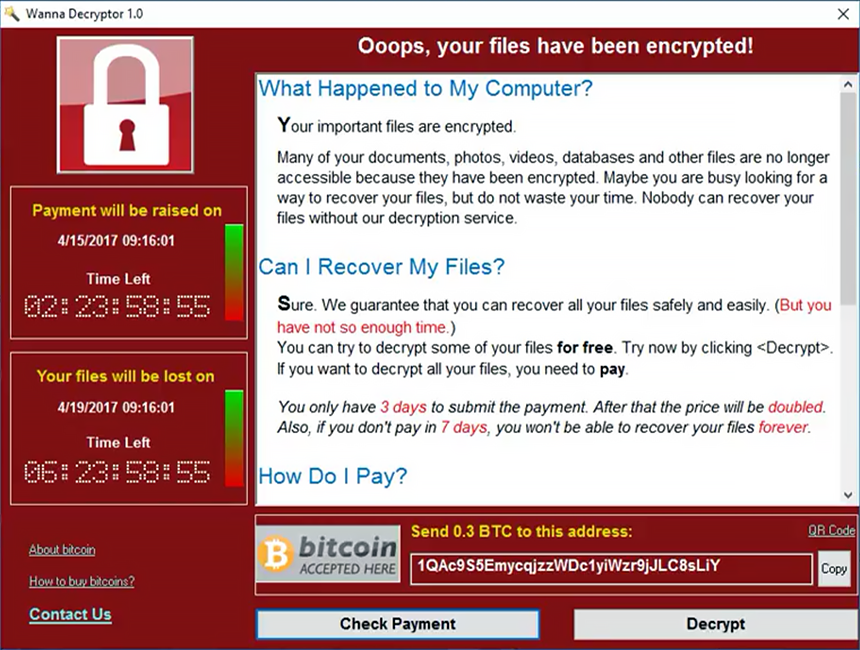
On May 12, 2017 a new strain of the Ransom.CryptXXX (WannaCry) strain of ransomware began spreading widely impacting a large number of organizations, particularly in Europe. This virus specifically targets Microsoft Windows computers.
A hacking tool known as Eternal Blue, developed by US CIA has been enhanced by the hackers to super-charge an existing form of ransomware known as WannaCry, three senior cyber security analysts said.
Wcry is demanding a ransom of $300 to $600 in Bitcoin to be paid by May 15, or, in the event that deadline is missed, a higher fee by May 19. The messages left on the screen say files will remain encrypted. It’s not yet clear if there are flaws in the encryption scheme that might allow the victims to restore the files without paying the ransom.
If you have yet to install the Microsoft fix—MS17-010— you should do so immediately. You should also be extremely suspicious of all e-mails you receive, particularly those that ask the recipient to open attached documents or click on Web links.
If you are an existing client of ours on our Managed Services Platform, you would have already received the fix through your weekly patching cycle, If not please check with your IT and or Security provider to ensure you are covered
Read Reuters Article : http://www.reuters.com/article/us-britain-security-hospitals-idUSKBN18820S

by Felicien | May 10, 2017 | Education, General, Wisdom Wednesday
Let your customers schedule and manage appointments online with Microsoft Bookings.
If your business involves scheduling appointments with customers, you need to give the Microsoft Bookings service a serious look. This online service, which is part of Office 365, simplifies the process of setting and managing appointments with customers. It’s ideal for businesses such as medical offices, law firms, consultants, advisors, auto shops, hair salons, or anyone who provides services on an appointment basis. Customers can set appointments themselves or you can do it for them.
Bookings has 3 primary components:
- An online bookings page where your customers can schedule appointments with specific staff members. This page can be used as a stand-alone page or embedded in your website and works on desktop and mobile devices.
- An online backend where you can view and manage appointments, set a staff list and schedules, specify your services and pricing, record customer preferences, and customize how the service works.
- A mobile app you can use to view and manage bookings and access customer information from anywhere you can get an internet connection.
With Bookings, you can efficiently:
- Bring in Business 24/7 – You get a customizable public web page your customers can use to book appointments around the clock.
- Put an End to Phone Tag – Customers can view available times online and book the slot that’s most convenient for them. Customers who prefer to call can do so, and you can enter their information manually. Either way, confirmations are sent immediately and automatically.
- Reduce No-Shows – Send automated appointment reminders to customers, on the schedule you define, with date, time, and directions. You can set the system up to remind staff members automatically too.
- Offer Self-service Rescheduling and Cancellations – It’s easy for customers to change or cancel an appointment. All they have to do is click the link contained in the appointment confirmation email. You can control how much advance notice is required for cancellations.
- Manage Bookings on the Go – With the mobile app, you can add or view appointments and access or change staff and scheduling info when you’re away from the office. You can also view customer information and call or text customers directly from your mobile device.
How it Works
Bookings appointments can be made two different ways: customers can schedule an appointment themselves using the online booking page or staff can manually enter appointments. To make an appointment, the customer first selects the service they want. Then, based on the availability schedule you created, they can choose a day and time and enter their contact information to book the appointment.
As soon as the appointment is submitted, the customer is sent an email confirmation notice. The notice contains details of the appointment and a link for directions. It also includes a link the customer can use to change or cancel the appointment.
At the same time, the date is automatically added to your calendar or your staff’s calendar. Bookings work with Outlook calendar and Google calendar. Your customers won’t see your linked business calendars; they’ll only see the Bookings calendar you publish online.
The configuration is highly customizable and easy to configure. To set it up, you simply:
- Enter your business information.
- Set your scheduling policies, such as length of appointments, acceptable cancellation times, and automatic notifications.
- Define your service offerings, including service name, description, location, and pricing. You can also add internal notes about the service.
- Create your staff list.
- Set employee working hours.
- Schedule business closures for vacations or other reasons.
- Publish your booking page.
Bookings is available to Microsoft customers who have an Office 365 Business Premium subscription. The Microsoft Bookings mobile app is available in the Itunes and Google Play app stores.
For more information on Microsoft Bookings or help getting started, contact Computer Network Systems today at 1.866.205.8123 or support.staff@compnetsys.com