
by Felicien | May 21, 2019 | Education
The role of the CMO has been evolving at a rapid pace in recent years due to the constant addition of new marketing technologies or martech. You only have to compare the tech budgets of marketing departments today to those five years ago to see a drastic increase in spending.
Companies know that they need to embrace and leverage the right martech to remain competitive, and they are willing to invest substantial sums to do so. That leaves companies and key decision makers with a challenging question: What kind of role should the CMO play in tech decisions? The answer depends on the industry vertical, but there is an overall trend that is worth paying attention to. With each passing year, CMOs are becoming more and more involved in tech decisions.
How Involved Should CMOs Be in Tech Decisions?
To understand the answer to this question, we need to look at a few different factors. These include:
The Changing Role of CMOs
The traditional CMO role was already filled with important decisions. Chief Marketing Officers have always been responsible for things like brand management, communications, campaigns and advertising. But today, with the rise of data-driven decisions—which offer more predictability and accuracy than opinions ever could—the role of the CMO has had to evolve to encompass more and more tech.
Consider the options for understanding the customer experience available to marketing teams today:
Artificial Intelligence (AI)
Big Data
Marketing Automation
Internet of Things (IoT)
And more…
Incorporating these tools into the company’s marketing mission requires a whole new skillset that includes customer service, data analysis, user experience (UX) and more. Of course, not all CMOs need to be experts in any one of these particular areas, but they do need to know how to manage and organize professionals who do understand these areas to fully realize the potential of their marketing efforts.
The Importance of Company Objectives
If you have recently found yourself feeling overwhelmed with the number of tech tools available, you have some idea of what it feels like to be a CMO in today’s tech-heavy environment. A visit to your favorite app store will give you the opportunity to pick from sometimes thousands of apps to accomplish the same goal, whatever that goal may be. And while the martech options available to CMOs are perhaps less numerous, they are also being pushed by sales people on a daily basis—so CMOs are being constantly bombarded with new “solutions” that are touted as the newest answer to common problems. Even more confusing, there are plenty of martech offerings that are more like solutions looking for problems than the other way around.
One of the key ways that CMOs can avoid overwhelm when it comes to martech is to always keep company objectives at the forefront of their minds. The company objectives can vary by organization, but most marketing organizations are focused on things like Market Presence, Revenue Growth and Efficiency. These goals can be more easily achieved using the right martech, but not all tech tools are going to offer significant benefit in the seeking of such goals.
Company objectives offer a guiding light in the complex world of martech. CMOs, above all others in the marketing organization, need to remain aware of company objectives and ensure that the tech budget is utilized as efficiently as possible—on technologies that will achieve measurable progress towards the achievement of the goals of the company.
CMOs Can Use Data to Drive Tech Decisions—Especially if They Ask Questions
One of the best ways CMOs can target the tech that is right for their organization is to utilize data in the decision making process. And that does not mean the CMO needs to be an expert in data analysis, either. They just need a team that can help them understand the data that they are looking at. Subjective decisions are not necessary—at least not in most cases—with the use of the right data.
The secret to utilizing data is to ask questions, as many questions as necessary to gain an understanding of what you are looking at. Over time, a CMO can come to understand quite complex concepts as he or she repeatedly comes into contact with them. But as with any new information, the fastest way to gain an understanding is to ask questions. It can be difficult at first for someone in a position of authority to admit that they do not know something right off the bat, but eventually asking questions becomes easy.
While it may not be apparent initially, employees will feel respect for the leader that is willing to admit a lack of understanding and ask for help. After all, the employee gains a sense of value when they can help higher-ups and the company as a whole with their knowledge.
CMOs Should Be an Integral Part of Tech Decisions
Ultimately, CMOs should strive to be an integral part of tech decisions in the company. They should work with their team, as well as with other key decision makers like the CIO and CTO, to guide the company in the right direction.
by Felicien | May 21, 2019 | Education
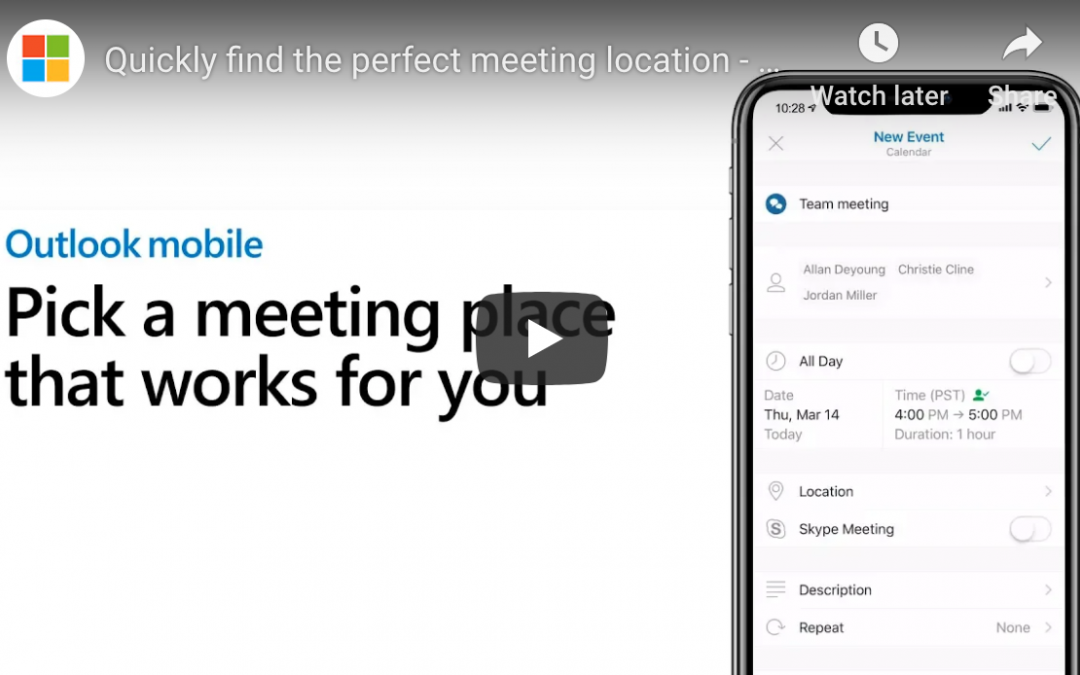
Microsoft’s Office suite makes it easy to schedule meetings, reserving the right room and inviting all the right people. Many people think they can only use these powerful features from their office computer, because Exchange calendar integration in iOS doesn’t support these features. In reality, mobile users can still access these powerful scheduling features using Outlook Mobile. Here’s how.
Step 1: Create a New Event
Open your Outlook Mobile and create a new event. To do this, tap on the calendar tab along the bottom of the app. Next, press the big plus sign in the lower right corner. (As always, locations can change over time and depending on device. You’re likely to find a calendar page and a plus sign somewhere, though—use them.)
Step 2: Name Event, Add Attendees, and Set Date and Time
Choose a name for your meeting in the first field, and add all the people you want to attend the meeting in the second one. For the latter, just start typing names. Outlook Mobile will pull up relevant contact information. Click on the contacts you want to include.
Note: Depending on your configuration settings, Outlook Mobile may offer you multiple options for some contacts. If you have a personal and a work version of a contact, for example, be sure you choose the right one. Do the same if you have a single contact with multiple email addresses associated.
Before moving to step 3, check that the date and time information is set correctly. You can change this later, but setting it up now allows the magic below to work properly.
Step 3: Click Location
Next, tap the “location” field a little bit lower on the screen. This is where the magic happens. Outlook Mobile will intelligently suggest connected meeting rooms that you use frequently and that are free for your selected time. It will also suggest places nearby, which is useful if you’re calling an off-site meeting. Outlook Mobile learns from you, too: the more you use it, the smarter its suggestions become.
If you don’t see a suitable location listed, you can search for a better one. This can be an on-site meeting room or any mappable location.
If you and your meeting attendees have “Time to Leave” enabled in settings, Outlook Mobile will even notify you a few minutes before you need to leave your current location to get to the meeting on time. One-touch directions are available directly in the calendar event, too.
Wrap Up
This is just one of many powerful yet overlooked features in Outlook Mobile. To learn more or for help with other IT questions, contact us today.

by Felicien | May 20, 2019 | Education
Cyber attackers are highly motivated to obtain or corrupt your company’s data. But whether their motivation is to steal your funds outright, hold your data for ransom, practice espionage, or simply disrupt your business, most hackers cannot access your network without an “in.”
In other words, they require a login, personal access codes, or network access through malware to initialize their breach. Unfortunately, a recent report released by Verizon has concluded that 93% of the time, a cyber attacker’s “in” comes to them in the form of a social engineering attack on your employees.
The only way to prevent such breaches in your security is with proper cybersecurity training.
What is a social engineering attack?
Social engineering attacks are frankly less high-tech than traditional cyber attacks by highly knowledgeable tech criminals. In other words, they don’t require the extensive knowledge and tools needed to directly hack a highly protected computer system out of nowhere.
Social engineering attacks are more like street scams — only they’re usually done online or sometimes, over the phone. These scams use human psychology to fool individuals into willingly giving up sensitive information. In the case of your business, the targets are your employees.
There are several types of these attacks, including “phishing” and “pretexting,” which are quite similar and often go hand-in-hand. Phishing emails, however, remain the most common type of social engineering scam.
What are phishing emails?
In short, a phishing scam might be an email sent to the employees of your company that looks legitimate. It might (appear to) be from the employee’s bank, for example. It might request that your employee “click here” and login to (what looks like) the bank website so that the bank can “update your information” or “confirm your identity.”
A phishing email might also promise something to the recipient: “Here’s your free 50% off coupon! Click here!” or use a so-called emergency to illicit fear: “Someone has hacked your account. Click here to get it back.”
If your employee does indeed click on the malicious link of a phishing email, they will likely be taken to a blank or uninteresting page. In the meantime, however, the link click will have initiated the installation of malware onto the employee’s computer. This malware then enables the hacker to obtain sensitive information or disrupt or damage your company’s data.
How can company’s prevent phishing scams?
The reputational implications of any type of security breach — even one that doesn’t actually corrupt or steal your data or funds — can be enormous. Of course, it goes without saying that if you are caught in the crosshairs of a data ransom or cyber theft, the financial implications will be equally devastating.
As we’ve learned from the Verizon report, most security breaches are linked with phishing. Therefore, cybersecurity training for your employees is the best preventive solution you have for stopping security breaches before they start.
Employee training is not expensive, yet it is highly effective. Your employees should learn the following throughout their ongoing training:
How to identify a range of phishing and pretexting scams
How to proceed should they find an email, phone call, or social request suspicious
Your company’s strict policies and procedures for communication (for example, “We would never send emails requesting personal information from our employees as this would only be done in person.”)
Notice of increased risks for phishing scams around the holidays
Notice of the most recent and common scams currently trending
Cybersecurity training should be frequent and come at regular intervals throughout the year as attack strategies often come randomly in spurts and habitually change tactics.
While cybersecurity training is your best line of defense when it comes to phishing and security breaches, it’s also important to hire a reputable IT managed service provider (MSP) to handle your network and security. Your MSP should have experience and broad skill in protecting their clients from network breaches. Contact qualified MSPs in your area today to learn more about protecting your business from cyber attacks.

by Felicien | May 20, 2019 | Education
Moving from hardware solutions to software solutions isn’t a new concept for technology professionals, but network infrastructure has traditionally been a hardware-focused world even as applications move to the cloud. With the introduction of SD-WAN, or Software-Defined Wide Area Networks, IT professionals find themselves needing to retool their understanding of flexible networks and security. The MPLS (Multiprotocol Label Switching) has been in use for decades and is an extremely reliable — yet pricey — option for connectivity. Today’s SD-WAN provides the modern organization with the flexibility, scalability, security and efficiency needed to stay competitive in a fast-changing world.
The Basics of SD-WAN
At its most basic, you can think of SD-WAN as a way to tie together a variety of disparate networks as it is equally efficient with internal as well as external internet and even cloud-based applications. Instead of a more rigid WAN network, SD-WAN allows you to configure your network quickly from a centralized location, reducing the potential of human error that can bring your network to its knees and productivity to a screeching halt. Since all variables are driven by software that you configure, this structure can be quickly scaled and new remote locations added without requiring an intense investment in time and physical hardware or redesign.
How Do You Manage a Software-Defined Network?
A key value that you gain when you shift to an SD-WAN is the ability to make shifts locally as well as globally from a centralized dashboard. This makes changes swifter, but also helps protect your network by ensuring that universal security standards are applied at all locations equally. Using an SD-WAN configuration gives you the added benefit of consolidated troubleshooting and error reporting so you can quickly identify any trouble spots or network hotspots and shift resources as needed to add speed and efficiency to your network — something that users are sure to appreciate, even if they never realize it is happening.
What Are the Business Benefits of SD-WAN?
Upgrading your network from a more restrictive model to SD-WAN has a variety of benefits for your organization. While some of these gains are realized upfront, others will continue to add value to your organization over time.
The cost of connectivity using an SD-WAN is less expensive than traditional MPLS, an especially important point when you consider the bandwidth-heavy applications that business users require.
While there is a high level of expertise required for upfront configuration of a software-defined network, ongoing changes are less intensive and can potentially save you consulting fees in the future.
Your business users will appreciate that network availability is high because there is no need to take the network down to make configuration changes or upgrades.
Your technology team is able to define networking rules in the language of business — SLAs, security restraints, apps and users — making the network easier to understand and maintain in the future.
With Gartner noting that nearly 25% of businesses will utilize SD-WAN in 2019, there is a growing body of knowledge within the IT community that makes it easier to find resources to support your network infrastructure. The SD-WAN market is expected to grow to $1.3 billion by 2020.
Cloud-based applications continue to emerge in all sectors of business, and it can be challenging to protect these applications without a consolidated hub of security rules. SD-WAN allows everything from SaaS to traditional connections to be covered under the same business rules.
Branches and remote workers will appreciate having access to the same high quality of connection that they enjoy at the office, instead of having to deal with restrictive security procedures and application latency.
Instead of relying on the hardware to make decisions about connections speed and connections as with MPLS, SD-WAN makes agile decisions about the best way to connect users and the data or applications that they need to access.
What Type of Business Benefits from SD-WAN?
While there are many benefits of SD-WAN, there is one downside that can be a deal-breaker for certain organizations. Software-Defined WAN does provide extremely reliable uptime, but there can be more packet loss than you would see with a hardware-based network. In this case, you may want to consider a hybrid infrastructure that lets you gain the benefits of SD-WAN for the majority of your applications yet maintains any heavy applications that simply cannot abide packet loss on a more traditional MPLS. The majority of organizations are looking for ways to reduce their cost of connectivity and have very heavy use of their internet or intranet connections — making SD-WAN ideal. Businesses that are growing quickly or expanding into new regions are also likely to see gains from making the switch.
Many organizations are seeing that shifting to an SD-WAN model may help them future-proof their business by creating a flexible, scalable and secure model that can grow with their business. From the reduced cost of connections to the high availability environment, it’s clear that the conversation around SD-WAN will not be going away in technology groups around the world.
by Felicien | May 20, 2019 | Education
Small businesses technology and business leaders may feel as though their data is safe, but nothing could be further from the truth. According to SmallBizTrends.com, nearly 43% of phishing campaigns are targeted specifically at small businesses, a dramatic increase from 18% in 2011. Unfortunately, a 2017 report from Keeper Security also shows that the greatest cybersecurity threat to small businesses is their employees, with more than 54% of data breaches caused by employee or contractor negligence. Protecting the data within your organization is crucial, and the costs that are associated with a data breach continue to rise. Small businesses are increasingly focused on ways to mitigate the risk associated with data storage and use and that often starts with having a comprehensive backup and data recovery process in place. Here are some suggestions from industry leaders on how to protect your critical small business data from a cyber attack or other loss of access.
Importance of Immediate Data Access
Your business data is arguably your most important digital asset and one that is accessed hundreds or even thousands of times each day. Your employees utilize business data from a variety of systems to look up customer orders, create POs and track shipments while consumers are online placing orders and tracking status. Until you truly experience a major loss of data access, you may not realize the crippling effect that it would have on your organization’s operations.
Dangers of Data Loss
The first hit that you would feel with the loss of access to your data is in the productivity of your teams. Workflows grind to a halt as employees scramble to figure out how to perform their daily activities without access to the information that they take for granted. In many businesses, the data stored within your CRM or other data repository is driving your website, meaning ordering comes to a crashing halt should the secure connection to your data falter. Technology teams scramble to figure out where the problem lies, putting all other IT needs on the back burner for the foreseeable future. Plus, your team may need to call in consultants to help identify a breach and begin remediation as quickly as possible. If your team identifies that a breach has occurred, you may have to report to customers and stakeholders that sensitive data has been accessed by unauthorized parties. This can devolve into trust issues with your business, negative publicity and ongoing loss of revenue even while you’re attempting to return to operational readiness.
Data Consolidation Makes Protection Easier
Business data structures often grow organically, with additional databases and information structures added over time. While this may make sense as you’re bolting systems together, eventually it can become an unruly tangle of disparate systems that makes security and data integrity more challenging for your teams. A regular review of business systems with an eye towards data consolidation is a project well worth considering as your timeline permits. It’s often helpful to work with a trusted technology partner to ensure that you are considering all the options that are available for the security of your data both in transit and at rest.
Protecting Business-Critical Data
There are a variety of protections that you can put in place to maintain both access to your data as well as its integrity. Creating a robust backup and disaster recovery process allows your team to define the best case scenario for data backups — local only, short-term local with a regional cloud-based backup or cloud only. There are dozens of different ways you can configure your backup process, but what’s important is that it meets the needs of your business both now and in the future. When you have a documented backup and disaster recovery process in place and test it on a regular basis, you have added peace of mind that your small business data is protected and quickly accessible in the event of a cyberattack or natural disaster.
Assessing and Managing Cybersecurity Risks
As your business matures, it’s imperative that you create a review schedule to assess and manage your cybersecurity risks. This includes everything from monitoring employee activity logs to protecting passwords to educating staff members and contractors against tapping, clicking or interacting with suspicious website content or email attachments. Data encryption, email and web filters and the regular application of patches to your servers and applications can also help reduce the risk of a cyberattack on your small business. Sometimes, the challenge is as simple as assuring that you have redundancies on your power supply so you don’t run the risk of losing servers during a power surge. Other remediation issues can be much more intensive, but putting together a full list of options helps you understand and ultimately reduce the risk to your organization.
Your data is being bombarded with threats on all sides, and it’s up to your technology team to help protect your organization. Creating a robust backup and disaster recovery plan with a trusted technology partner can help you walk through an audit of all pertinent systems and quickly identify problems that can be resolved quickly and define a strategy for ongoing review and support. Without access to your data and business information systems, you can quickly find that your organization is grinding to a slow and painful halt.
