by Felicien | May 17, 2019 | Education
Microsoft Teams is a relatively new addition to Microsoft’s Office suite. Teams is a powerful collaboration tool. It’s kind of like Microsoft’s high-powered answer to Slack. Create teams for whatever purposes make sense in your business. Communicate and collaborate within those teams to get stuff done. The killer feature in Microsoft Teams is the ability to collaboratively use nearly any other component of the Office suite directly inside the Teams application.
Team Meetings
Whether your team is a mix of on-site and virtual or completely virtual, you still likely need to hold meetings from time to time. Microsoft Teams includes a Meetings function, allowing those that aren’t present to join in on an in-person meeting. All you need is a device running Teams in the conference room. If you’re the host, all you need to do is create the meeting in your Outlook Calendar like you normally do.
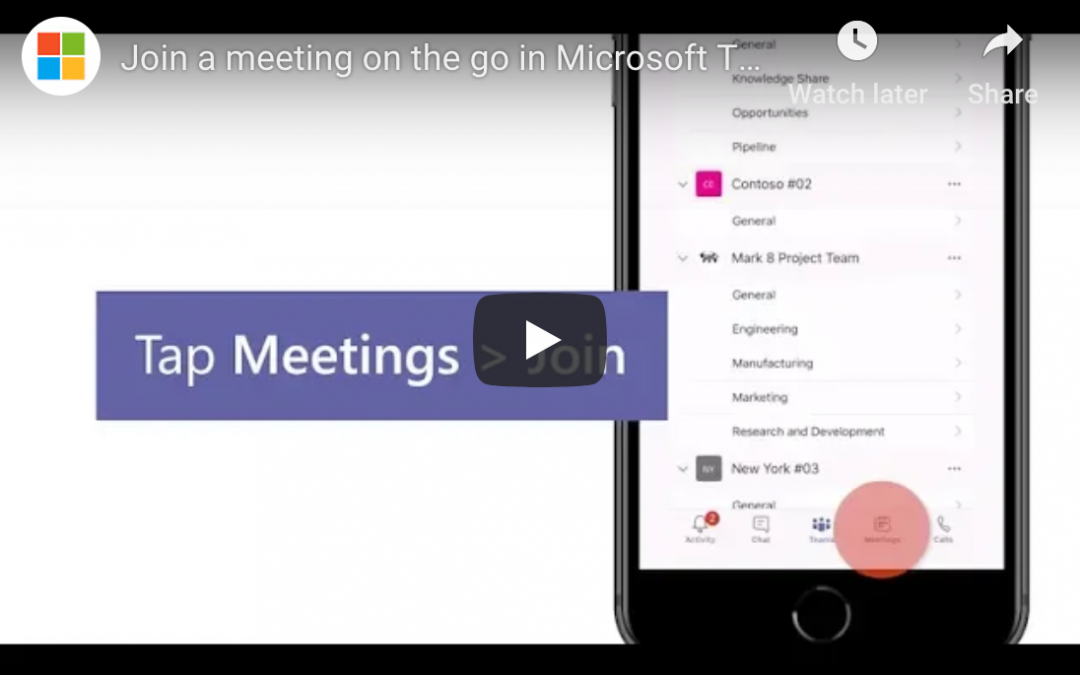
How to Join a Microsoft Teams Meeting on the Go
If you’re the one that needs to join the meeting from a distance, here’s what to do. Open your Teams app and click or tap on the Meetings tab. If your organization is using Outlook for its calendar functions, this tab will populate with the meetings you’ve been invited to. Look for the one you’re trying to join, and click the big “Join” button. This will launch a call, and you’ll see avatars or photos for the others who are joining the meeting.
Controlling Your Presence During the Meeting
Tap anywhere (or, on a computer, move your mouse) to bring up meeting controls. You can mute or unmute your device’s microphone, toggle video on or off, and adjust volume. In the upper right corner (on mobile) you may see a button for adding additional people to the meeting (if you have the rights). You’ll also see a button to view any chats associated with your Team or the meeting itself.
You or others can share files into the Teams meeting. Once displayed on your screen, you can pinch to zoom in. When you’re done viewing the file, close it out and return to your main meeting window (whether that’s a video or just an audio interface with avatars).
If You Don’t See the Join Button
If you don’t see a “Join” button, then you’re dealing with one of two problems. If you sometimes see them and sometimes don’t, then your meeting organizer likely isn’t creating the meeting properly. The organizer might need to experiment with creating the meeting within Teams rather than from Outlook.
If you never see the button, then your IT group likely has not implemented the Meetings function within Teams. Contact IT with a request to enable this feature.
Wrapping Up
You now know how to join a Teams meeting on the go, but there’s a lot more to Teams than that. For help navigating Teams or the rest of the Office suite, contact us today. We’re here to help!
by Felicien | May 17, 2019 | Education
Do Not Disturb on Android can do more than you might expect. Here’s how to enable and customize Do Not Disturb on your Android device.
Today’s quick tech blog explains how to enable Do Not Disturb on Android devices. We’ll also give a basic explanation of how to customize this feature, making it even more powerful. Note that terminology and locations vary on Android devices. If you don’t see exactly what I describe, look for something similar.
What Is Do Not Disturb on Android?
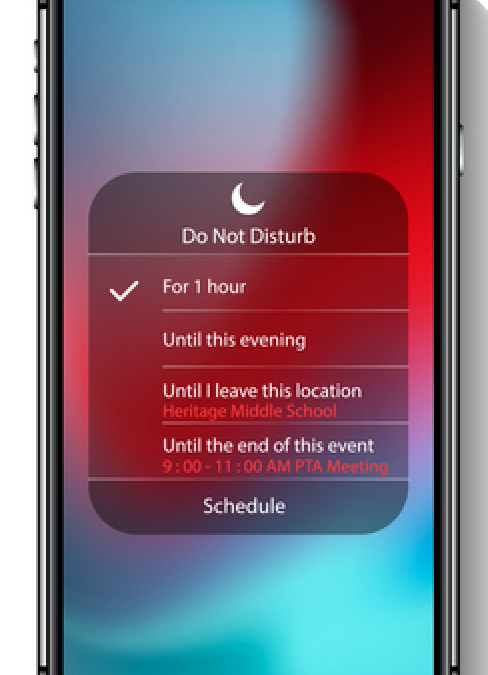
Do Not Disturb on Android does what you’d expect based on its name: when enabled in its default mode, it silences all notifications. It’s a good choice while you’re sleeping (or want to be), while you’re presenting at work or displaying content from your device, or while driving.
Default mode has its usefulness, of course, but sometimes it’s a little too…nuclear. You might want to cut down on the notification madness, but you still want to be alerted if your significant other (or boss, or VIP client) calls. This includes calls, texts, news alerts, and any other app notifications. Good news: Do Not Disturb can be customized, making it a powerful feature for tailoring which people and which apps are allowed to reach you. We’ll get to that, but first, here’s how to enable Do Not Disturb.
Enabling Do Not Disturb on Android
To enable Do Not Disturb, open your settings. Navigate to the Notifications menu. In most Android versions, you’ll see an option for “Do not disturb.” You can toggle this on right from this menu, or you can click on the widget for further options. “Turn on as scheduled” (or some variation of that) is a useful way to automatically toggle off notifications from, say, 11pm until 7am.
A few things to note about the default mode: first, toggling on Do Not Disturb essentially disables Android’s notifications system. You won’t receive any from anywhere. If it’s critical that someone be able to contact you anytime, day or night, you need to customize your Do Not Disturb (see below).
Second, you can always manually disable your scheduled Do Not Disturb. This is useful if you’re out late and still want to be notified about incoming calls or texts. Just come back to the main Notifications page and toggle it off. It will remain off until the next scheduled window.
Customizing Do Not Disturb on Android
Most people can’t get away with default Do Not Disturb. If you want to allow certain people or apps access to you even during Do Not Disturb sessions, go back to the notifications menu in settings and click the widget for Do Not Disturb. Click “Allow exceptions” and start customizing. There are tons of options here. You can enable notification from specific contacts or from repeat callers. You can choose to allow event/task alerts (think work calendar notifications), too.
From there, options vary depending on your phone’s manufacturer and the version of Android that you’re using. Use the principles described with whatever options your phone gives you.

by Felicien | May 17, 2019 | Education
If you’re running a small to medium business (SMB), you’ve probably come across the term “managed IT” or “managed IT service.” What is managed IT, and what can it do for your small to medium business? Today we’ll answer these questions and more. Read on to learn about managed IT and how it helps your business win.
What Is Managed IT?
Managed IT is a specific type of managed service. To explain managed IT, we first need to talk about managed services in general. Managed services are those services that a business outsources completely to another more specialized organization. These exist all over the business world for a wide variety of reasons. Usually, a company invests in managed services in areas that aren’t core competencies. Managed services are a way for companies to focus on their core business, outsourcing peripheral functions to other more specialized businesses.
Some businesses enlist the help of managed services firms to handle their HR needs, while others may outsource elements of their customer service. One of the most common examples of managed services, though, is managed IT.
Managed IT, then, is the intentional outsourcing of a company’s IT needs to another firm that specializes in IT support. The company using managed IT services pays the managed service provider (MSP) to meet their technology needs, reducing or even eliminating the need for in-house IT support.
What’s the Alternative to Managed IT?
The main alternative to managed IT services is to develop a robust in-house IT department. When they reach the end of their abilities, you’ll call in pricey contractors who usually can’t guarantee that quick of turnaround time. (Brutal honesty: they can’t, because they’re prioritizing their managed IT clients over you!) This is sometimes described as the “break-fix” model. Do what you can in-house, and then when something breaks that your team can’t fix, you call in the big guns.
The break-fix model worked when businesses weren’t so dependent on their IT infrastructure, but it doesn’t work well today. Think of a piece of crucial tech in your office. Maybe that’s your online sales platform, or it’s a server or database of some kind. If that one thing suddenly stopped working, how long could you survive waiting for a specialist to show up and start fixing it? You don’t want to wait until a specialist has an opening to come fix it. You need dedicated support.
Why Use Managed IT?
We’ve already alluded to a few benefits to using managed IT, like dedicated support. Here are a few more reasons you should use managed IT to win.
Massively Expand IT Capability
If you’re running an SMB, you have real, concrete limits to the number of IT professionals you can afford to hire in-house. A 50-employee company can’t have a 25-person IT department and stay in business for long. Take a long, hard look at your current IT capability. Can your staff really do everything? Chances are you have a few folks that are specialized in a few areas. Additionally, they’re all adequate in basic IT functions.
When you bring in a managed IT service, you’re hiring a company that specializes in just one thing: managed IT. If they’re a 50-employee company, well over 25 of those people are IT specialists. They bring a wide variety of specializations to the table, too.
You massively expand your company’s IT capability by bringing on a dedicated support team. A managed IT service can typically do far more than you can currently do yourself.
Allow Existing IT Staff to Specialize
Bringing on a managed IT service may allow you to reduce your own IT staff, but another option is to let them specialize. Right now, they’re probably overworked, running from problem to problem. They solve problems outside their expertise, but they do so inefficiently. Bringing on a managed IT firm to handle most functions allows your IT staff to focus and specialize on proprietary or value-added IT processes specific to your company.
Focus on Your Core Business
If you currently run all your IT in house, how much of your time as a leader is spent dealing with your IT team? Every hour you spend on IT is an hour you aren’t spending growing and improving your core business. Offloading 80, 90, or even 100% of your IT needs to a managed service provider frees you up to focus on what you do best.
How Can We Help?
If you’re ready to see what managed IT can do for you, we’re here to answer your questions. Contact us today to start winning with managed IT.

by Felicien | May 17, 2019 | Education
Big Plans For The May 2-4 Weekend?
This year, Victoria Day falls on Monday, May 20th.
Why do we call it the May 24 weekend?
Whether you’re taking the time to kick back and relax, spend time with friends, or plan to get the jump on the workweek ahead, our team hopes you have an awesome long weekend!
And of course, just because Monday is a holiday, that doesn’t mean you’ll have to make do without us. You’ll be able to reach us if any technical issues arise.

by Felicien | May 16, 2019 | Education
A healthy, growing business is almost always a good thing. Still, expansion brings with it certain responsibilities on your part.
If your business is growing quite quickly, it’s important to understand that large changes or adjustments may need to be made. This could mean hiring more employees, starting to provide employee health insurance, advertising more and spending more on marketing services, or obtaining more physical office space.
One area that you certainly won’t want to ignore as your business expands is your company’s information technology provider.
Many businesses who start small assume they can keep their IT provider as they grow. However, it’s important to realize that some providers aren’t equipped to handle larger businesses — those who often necessitate sprawling networks and extensive security needs.
To determine whether your company will soon require new IT services, consider the following questions about your current IT provider.
How familiar are they with your specific industry?
Often, when you’re just starting out, you’ll hire an IT provider who handles information technology services for a broad range of industries. Without a doubt, working with these types of providers will help your growing business by cutting costs. At the same time, you’ll still have your IT taken care of.
But as your business grows, you’ll want an IT provider with unique expertise in your industry. Niche IT providers who specialize in IT for hospitals, transportation services, or optometry offices, for example, are much more likely to provide you with better-quality service and improved security.
They are knowledgeable about and regularly brush-up on industry standards. They keep up with new and cutting edge technologies in your industry. And most of all, they are constantly aware of common security threats (and solutions) to businesses like yours.
Do they service other companies of similar size?
Take a look at who else your IT company serves. Are there any clients who match your company’s size? If so, do you believe those companies would also necessitate the same amount of attention and security as your company?
Even if your current provider services a company comparable to your size, if that company is a greeting card business and you own a chain of dental offices, you may have more to think about than just size. Namely, you’d have personal medical information within your network and a unique and crucial need to avoid breaches, scams, and possible liability catastrophes.
How often do you require troubleshooting services?
Are you already in near-constant communication with your IT provider for recurrent outages, network errors, slow-downs, and other problems?
Certainly, troubleshooting is one of the reasons you have an IT provider in the first place. However, the best providers should be able to set-up a network that requires infrequent service.
Moreover, preventable errors that happen once should not happen again. The downtime that results from problems in your network will inevitably hinder your business’s success. Moreover, as a company that’s growing, things will only get worse if you do not improve your service now.
How have they handled network problems to date?
When you have needed to make a service request in the past, what’s been your current provider’s track record?
Consider how easy they are to get in touch with. Are you able to speak with your own account manager or at least a representative who’s knowledgeable about your business?
How fast is your request handled? If it’s an emergency, such as a security breach or a system failure, how fast do they respond? If it’s a routine question or small system error, how fast do they respond?
Larger businesses need IT providers who know their business and are at-the-ready when a problem occurs. In fact, you should have a direct line to call when problems arise — one that answers to a live person.
Furthermore, as a growing business, you’ll want to anticipate that future problems will inevitably be more calamitous, especially when left unhandled for even a day or two. As your business expands, your IT provider must be immediately responsive, fully capable of handling any problem, and prompt in their service calls.
Have they presented a plan for accommodating your company’s growth?
First of all, have they taken notice of your company’s growth? A quality IT company will come to you first, noting that your company has been expanding and ideally, presenting a plan for your extended IT needs.
However, even if it’s you who needs to take the knowledge of your company’s expansion to your IT company, you’ll want to look for signs that they have a plan in mind to accommodate your anticipated needs.
They may, for example, suggest that you move from an as-needed payment plan to a monthly or yearly management plan. Many of the best IT providers who handle a range of company sizes will have at least these two options for their clients. When moving to a managed plan, you’ll be able to request assistance whenever necessary, paying a flat rate for their on-call care.
Find an IT Company Who Will Help Your Business Flourish
If, by evaluating the questions above, you’ve determined that it may be time to hire a new IT company, this certainly doesn’t mean that your current provider is entirely insufficient. It simply means that you’ve outgrown them, which in turn means that it’s time to move on to a more capable provider.
Taking the time to assess and realize your business’s extent of growth and possible outgrowth of an IT provider is an important step in your business’s expansion. Hiring an IT provider with adequate resources and capabilities to handle your expansion will ensure you’re fully prepared when it comes to your information technology — a foundational element that is, today, an invaluable component to businesses of all kinds.
