
by Felicien | May 23, 2019 | Education
For far too long, CEOs have seen information technology as a sunken cost that needs to be absorbed and reluctantly accepted. New platforms, upgrades, platform conversions, hardware, software and other technologies are a financial pain point that needs to be endured.
However, for success today, company leaders need to take a completely different approach. Information technology should be viewed as essential for companies wanting to achieve their strategic goals. The premise that technology teams should just “keep the lights on,” upgrade the software and support the other business units is an outdated approach.
Who Is Responsible for Changing the CEO Mindset?
Some companies may have a CEO who profoundly understands the nuanced approach to technology that is imperative to achieve digital transformation. However, such leadership is rare today despite the growing reliance on disruptive technologies such as artificial intelligence, machine learning data analytics, automation and the Internet of Things.
That’s why the chief information officer’s role is increasingly critical. The CIO needs to be included in high-level strategic conversations to help shape the needs (for financial resources, technologies, systems and people), opportunities and desired outcomes. It’s also incumbent on the CIO to play an important role in educating, influencing and empowering the CEO.
According to a recent CIO.com article, CIOs need to help CEOs and other senior leaders in the following ways:
Having a keen understanding of new technologies, innovation trends and strategic opportunities
Working with leadership in tandem with vendors to co-create innovative solutions
Educating C-suite executives and board members about disruptive industry trends and possibilities
Introducing collaborative tools and self-service portals to reduce human capital costs.
Building innovation hubs that benefit the business
Championing digital business strategies at the industrial and organizational levels
Promoting a lean approach a la a start-up for fostering new products, services and ideas
What Work Should the CIOs Focus On To Change a CEO’s Mindset about Technology?
One of the most important tasks the CIO should focus on is understanding customers. Learning more about their needs, challenges, interactions and preferences will inform the CIO’s insights shared with the CEO. The CIO has to spend more time with customer-facing units, such as sales and marketing, learning about their needs and how the most effective salespeople and campaigns are built.
The key is getting out of the office. Yes, a CIO, especially of a small company, may be pulled into the weeds more often than they want, but time needs to be made for this outreach,
Why is it so important? The next time the CIO is in a strategy meeting or 1:1 with the CEO, they can provide insights on what directly impacts customers, backed up by data and IT knowledge.
CIOs should champion teams focused on innovation, development of new products and services and leveraging collected data.
CEOs are paying attention too.
“The proliferation of digital technology has given IT the ability to directly impact an organization’s bottom line,” said GE Digital CEO Bill Ruh.
“Smart CEOs now see IT not as a cost center but as a differentiator, a source of innovation, and an enabler of revenue growth and market differentiation,” notes a recent article. “As CEOs increasingly turn their attention to digital innovation as a top priority, they are counting on CIOs to drive it.”
What Are CEOs Asking of their CIOs?
“CEOs need CIOs to be more than service-oriented order takers. They expect IT leaders to work with business leaders to co-develop technology-related capabilities that will enable the business to innovate and grow,” notes Gartner in its 2019 CEO survey. A look at key data from that report shows just how much CEOs are starting to recognize the importance of IT. Consider:
A third of CEOs ranked IT-related priorities in their top 3
49 percent of CEOs believe the business and technology sides of the business are equally responsible for the performance and quality of digital products and services
47 percent of CEOs saw technology enablement as one of the top two ways to improve productivity
A Korn Ferry survey of corporate technology offices illustrates the shift of roles and how CEOs value CIOs differently today. Among the findings:
83 percent say their role is perceived as more strategic than it was 4 years ago
81 percent say they have more exposure and play a more significant role with customers, products and services
55 percent believe the CEO and board see the lead technology officer’s role as a revenue generator and not a cost center
The data are clear about the changing role. In a 2017 Harvey Nash/KPMG CIO survey, 62 percent of CIOs said they are a part of the executive team, compared to 38 percent in 2005. The likelihood that a CIO reports to the CEO rather than the CFO or someone else is increasing 10 percent annually.
CEOs today have an incredible opportunity to use ever-evolving technologies to change business models, introduce new products and services and deliver what customers crave. How? By understanding these technologies, elevating the CIO’s role and seeing IT as a revenue-generating part of the business.

by Felicien | May 22, 2019 | Education
Ensuring that you have a high-speed, highly reliable digital connection to the world is crucial for today’s technology leaders. Business professionals are now accustomed to near-instant access to the information and platforms that they need and are increasingly unwilling to accept less than perfection when it comes to infrastructure. Unfortunately, infrastructure can be extremely expensive to rework and often needs to be modified over time or as funds allow. When you make an upfront investment in technology such as SD-WAN (Software-Driven WAN) you can make significant gains in terms of deployment time as well as the appreciation of your business peers. These benefits will help describe why SD-WAN is increasingly the choice of organizations of all sizes who need to quickly, securely and reliably connect to the internet — and each other.
SD-WAN is Scalable and Flexible
Traditional networking infrastructure is considered extremely stable, but that stability could also be considered a downside when it is time to move or scale your organization. The high upfront cost of implementing MPLS (Multiprotocol Label Switching) networking is primarily due to the hardware that is involved in creating an efficient flow of information between two or more locations. Data forwarding decisions with MPLS are made according to more rigid rules that drive packet-forwarding technology. Sure, MPLS is quite reliable with exceptionally low packet loss, but that efficiency is balanced with a relatively high bandwidth cost — a big problem considering today’s multimedia content, massive downloads and telecommunications needs.
By contrast, SD-WAN offers the potential of dramatically decreasing your ongoing operating costs in terms of bandwidth while also blurring the hard edges of your networking to allow for more flexible applications. Software-driven networking allows you to quickly and easily add new links without expensive changes to your hardware. Lower-priority traffic can be assigned to broadband internet to reduce the load on any legacy (and more expensive!) MPLS connections.
SD-WAN Offers Cloud-Level Security
Connecting remote offices securely with a fast connection has been difficult in the past, but SD-WAN is challenging that paradigm. Since the connections are cloud-based, this protocol easily supports SaaS applications — which are in increasing use in business today. Temporary work locations are more easily configured with added security that would have been quite challenging with aging, hardwired technology. Providing this type of unified communications platform provides for increased efficiency across the organization while providing employees with the geographic flexibility that they need to be successful. Users demand access to applications that network administrators would prefer to keep within their walled gardens, especially with the recent rise in cybercrime. Security spending is expected to top $113 billion by 2020, showing the ongoing commitment of technology teams to creating a secure and accessible infrastructure for the modern organization. SD-WAN has security baked right in, providing end-to-end encryption that requires all endpoints and devices to be fully authenticated before they are able to access the secure network.
SD-WAN Improves Branch Uptime
Network infrastructure has traditionally been more structured and mechanical, often requiring expert technicians to schedule downtime for the organization in order to make necessary updates. That means that unscheduled downtime is much more prevalent than with a software-based solution for packet routing. Human error is easily the top cause due to manual configuration errors according to a study from Avaya, often resulting in revenue loss and even the loss of jobs. SD-WAN implementations are considered less brittle due to the availability of zero-touch provisioning that reduces the costly manual touchpoints. The reduction in moving parts and touchpoints not only saves expensive technician time for reconfiguration but reduces the possibility of outages and the need for break-fix solutions.
SD-WAN Improves Network Automation
Technology leaders are always on the search for better-faster-cheaper: the trifecta that always seems to be out of reach. However, SD-WAN provides a much more attractive layer for network automation than the more rigid structures of the past. Creating an overlay allows IT network administrators to enhance productivity by automating tasks such as monitoring for the optimal connection for each portion of network traffic. Any changes to the network configuration can be centralized and easily distributed — adding to the overall performance of the system. This allows the network to be adaptable in the utilization of expensive resources. Through overlay networking, you’re able to create a discrete, virtualized trust overlay network by creating a virtual tunnel between two points that runs through the network. Each point in the network is tagged, allowing two trusted points to recognize each other and create that virtual connection that speeds data along the path without the need to physically create a connection.
With technology spending on security on the rise and the added need for high-speed connectivity, SD-WAN seems to step into the void left by high-end physical networks by providing a more flexible, scalable — and affordable — connection option for businesses today.

by Felicien | May 22, 2019 | Education
If your organization is large enough to have a CFO, it surely has some kind of backup and business continuity plan in place. Do you understand how this system works? More importantly, is the system your business has in place actually sufficient to protect you in the event of a disaster? These are questions every business needs to ask, and you as the CFO need to be a part of that conversation. To get prepared, here are a few of the top questions CFOs have regarding backup and business continuity, answered.
Aren’t Backups Enough?
The short answer is no. The longer answer gets into the wide range of backup formats. On-site backups are a part of the solution, but they don’t protect against natural disasters or physical site breaches. Off-site backups have their limitations, too. The farther away the site, the more logistically challenging data transfer and physical storage can become. On the other hand, if the off-site backup is just down the street, it may be just as vulnerable to the natural disaster that hit your business.
Is the Cloud the Answer?
Cloud backups are a great new innovation in the industry, but they alone won’t save your business, either. Restoring from a cloud backup takes serious bandwidth, and bandwidth could be an issue following a catastrophe. Consider that not all business disasters are natural. If your business suffers a crippling cyber attack, cloud backups may complicate the restoration process.
What is Backup and Disaster Recovery?
Backup and disaster recovery, sometimes shortened to just backup disaster recovery or BDR, is the term for a comprehensive system that includes both data backup and a disaster recovery plan. These two components are designed to work in tandem, allowing a business to remain operational through or quickly restart operations following a disaster. Having a strong BDR plan is the real solution for backups and business continuity.
Backups in BDR
The backup component of your BDR plan should be multifaceted. Most companies benefit from having at least two forms of backup: on- or off-site as well as cloud backup. With backups, redundancy is a desirable feature, not a place to cut costs. Storage drives (whether at your location or in some server farm far away) can fail without warning.
Disaster Recovery in BDR
The disaster recovery component is just as crucial as the backup component. This is security planning, in a nutshell. If your physical office building gets wiped out by a natural disaster, you need more than your data. You need replacement computers, servers, and networks to use that data on, not to mention a place to do that work. Your disaster recovery plan finds the solution to these problems. Develop a recovery time objective, a measurement of the amount of time you’ll need to resume operations. From there, build out a plan for sourcing equipment and facilities.
Your disaster recovery plan is closely tied to your business continuity plan, which outlines how essential functions will keep running or be restored.
What Does a BDR System Accomplish for the Business?
Implementing an effective BDR system has many advantages for your business, including faster recovery time, lower risk, and lower costs.
Faster Recovery
Your business’s recovery time will be much shorter if you have both a detailed plan for what to do in the event of a disaster and a complete, usable backup of all critical systems. There’s no real way to put an exact figure on it, but working a plan is always going to turn out better than winging it, especially when in disaster mode.
Lower Risk
Every step you take toward a well-planned BDR system lowers your business risk. Having an on-site backup is safer than having none. Having on-site paired with off-site is safer still. Adding cloud backup to the mix does the same. Similarly, the more thorough your disaster recovery plan, the lower your risk.
It may sound overly simple, but “be prepared” is a pretty great motto. No business can completely mitigate all risk, but implementing a BDR system lowers your business’s risk profile greatly.
Lower Costs
Companies implementing BDR systems often contract with managed services firms to create and/or execute those systems. It’s worth taking a look at what’s available. You may find that your costs with a managed service provider are lower than the costs of building a BDR in-house.
Even if you determine monetary costs aren’t lower, there’s also an opportunity cost to consider. How confident are you in your in-house plan (or the team that built it)? Is that team made up of dedicated experts, or is everyone involved working just a bit outside their expertise? There is a real opportunity cost to not getting this right. Contracting with a quality MSP reduces the risk of missed opportunities due to an overly long outage or recovery.
Conclusion
If you haven’t yet implemented a BDR system, it’s time to do so. If you need help developing or implementing a BDR at your firm, contact us to get started.
by Felicien | May 22, 2019 | Education
Microsoft Teams is an amazingly powerful collaboration tool that’s available as a part of the Microsoft Office suite.
At its core, it’s kind of like Slack on steroids, but that core functionality is just the tip of the iceberg. Because it’s integrated with the rest of Microsoft Office, it has so many powerful features.
One feature area in Microsoft Teams is the ability to host and join virtual meetings. Users can join or host meetings from desktop or mobile. Mobile users can share files with the group, and we covered that in a previous post. Desktop users can share screens with other users, and with a surprising degree of control. Here’s how to take advantage of this feature.
Step 1: Create a Meeting
The Share Screens feature works from within the Meetings function, so the first step is to create or join a meeting. Locate the tabs bar (usually on the left side), where you’ll see icons like Activity, Chat, Teams, Meetings, and Files. Select Meetings, and then create a meeting (or join a meeting that someone else is hosting). The Meetings tab is tied into your Outlook calendar, allowing you to see potential conflicts.
Quick note: Teams features can be enabled or disabled at the enterprise level. If you don’t see a Meetings tab at all, your IT department hasn’t enabled it yet. Contact IT and plead your case for enabling this awesome feature.
Step 2: Click the Share Button
Once the meeting is in progress, you’ll see a series of buttons in the bottom middle of your screen. If you don’t see them, move your mouse to that location to make them show up. You’ll see buttons for video (if enabled), microphone (for muting yourself), ending the call, and more. The one you want looks like a rectangle with an upward arrow. This button, aptly named the Share button, represents screen sharing. Click it to continue.
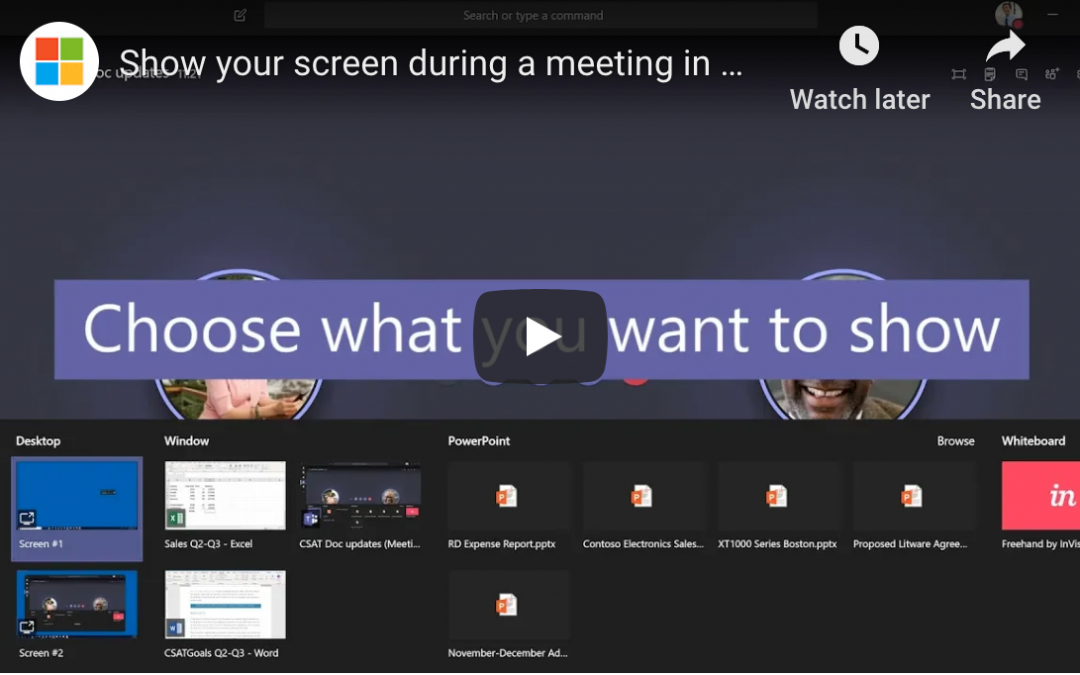
Step 3: Choose What to Share
Screen sharing isn’t exactly new technology, but the implementation here is particularly well done. When you click the Share button, Teams doesn’t immediately share your entire screen. Instead, you have options. “Desktop” allows you to share one of your desktops. “Window” lets you choose a single window or app to share. “PowerPoint” shares the presentation you choose. There are even more options available under “Browse”.
Conclusion
This level of granular control makes screen sharing in Teams a killer feature, and there’s so much more that Teams can do for you. Team-based chat, productivity tools, and real-time collaboration on nearly any Office file are a few more ways it can help. If you’re ready to keep exploring, contact us to keep learning.

by Felicien | May 21, 2019 | Education
It’s always been important for the C-suite to understand the cost benefits and value associated with technology projects, but today’s complex infrastructure needs are requiring greater levels of input from financial executives, in particular. Technology spends are increasing dramatically, and there’s a need to balance the shorter-term benefits of specific tactics with the long-term strategies that will help move the organization forward. The days of technology teams making do with the funding that they are allowed are over, as technology becomes more tightly intertwined with business strategy. It is crucial that the big dollars invested in technology and innovation are tied to true business value in a way that can be communicated throughout the organization — making the CFO an integral part of the decision-making when it comes to determining the IT spend.
Funding Sustainable Growth
Technology is advancing at an unbelievable rate, with new software applications and methods of reaching customers coming at breakneck speed. Making several poor decisions around technology can create a miasma of problems that can take years to resolve, but that risk is mitigated when financial leaders work closely with technology teams to ensure that there are adequate measures and milestones in place. CFOs must ensure that the organization has the funds available to budget for items that are critical for continued business operations that support corporate strategy and sustainable growth initiatives. This has to be balanced with the additional risk that can be assumed by waiting for “something better” (an application, a way of controlling data or reduced legislation) to come along. According to Gartner, worldwide IT spending is set to reach $3.8 trillion this year, with ongoing increases in spending attributed to IoT, shifting on-premise computing to the cloud, software applications and maintenance fees. With this shift comes a fundamental change in the way technology dollars are budgeted: from capital expenditures to a SaaS model that is billed as an operating expense.
Aligning Technology Spend with Strategic Initiatives
Starting with the strategic initiatives of the business and slotting in technology where needed may be the way CIOs and CTOs are familiar with budgeting, but the new paradigm requires additional work. The risk potential of having business systems vulnerable to a cyberattack is an ongoing concern and one that can require a significant amount of spending in any given year. Data silos are being broken down and consolidated as older legacy systems reach their sunset years. This tension between supporting an often-aging infrastructure and providing a stable base for the future creates a need for creative budgeting throughout the organization. Having the CFO work with technology executives can help bring greater visibility to the IT needs of the organization and how they align with specific strategic initiatives.
Constantly Examining Technology ROI
Part of the budgeting process involves being intentional about determining business ROI for the various technology initiatives and being unafraid to boldly cut or fund projects based on the changing needs of the business. New threats occur on a regular basis — as well as new opportunities to seize dominance in a particular market. Having the flexibility to pivot and create revenue may require a continual review of the various projects as well as a fundamentally different approach to what have traditionally been multi-year IT projects. Vigorously defending projects that no longer provide business ROI can put a major drain on limited organizational resources, especially in light of changing features and functionality for even the most stable business platforms.
Now more than ever, CFOs must have a solid understanding of the business value that IT projects plan to deliver and a solid review of milestones. This shared responsibility with CIOs and CTOs creates not only a greater accord in financial decisions but also a deeper understanding of the value that various projects have for the entire business.
