
by Felicien | Oct 16, 2018 | Education
From the invention of the assembly line to cloud computing for the Discrete, Repetitive, and Process Manufacturing industries, updating to the latest technology is never in question. What does get closer scrutiny, is deciding to invest in Microsoft technologies. That’s what Rolls Royce did, and now they use Microsoft technology platforms, to fundamentally transform, how it uses data to serve their customers better.
5 Microsoft Technologies Offered to Discrete, Repetitive, and Process Manufacturers
Every CEO or business owner knows reducing overhead, and expenses on server maintenance, technology management, and upgrading code benefits the company both short-term and long. It’s the same viewpoint manufacturers have always had for their operations.
The five areas of interest to Manufacturers is Microsoft’s Azure technologies in these areas:
IoT
Machine Learning
Large-Scale Computing
Hybrid Clouds
Blockchain
Internet of Things (IoT)
The Internet of things (IoT) is the network of physical devices, vehicles, home appliances, and other items embedded with electronics, software, sensors, actuators, and connectivity which enables these things to connect, collect and exchange data.
When managing hundreds of thousands of devices, around the globe, while large quantities of data get streamed, and then; processing and storing that same data in real-time, is a job only the cloud was explicitly designed to pull off. That’s why Azure got designed. It will deliver both Platforms-as-a-Service (PaaS) and Software-as-a-Service (SaaS), making it easy for all types of Manufacturers to choose Microsoft Azure.
From the Platform as a Service level, you will find five Azure platform services:
Azure IoT Hub – you can directly and securely connect and consume data from IoT assets
Azure IoT Hub Device Provisioning Service – you can provision millions of devices in a secure and scalable manner
IoT Edge – you can run advanced analytics, machine learning, and artificial intelligence at the device level
Azure Stream Analytics – integrates with Azure IoT Hub to enable real-time analytics on data from IoT devices and applications.
Azure IoT Suite – provides a set of preconfigured IoT solutions for workloads such as Remote Monitoring, Predictive Maintenance, and Connected Factory.
From the Software-as-a-Service level, you have Microsoft’s IoT Central. It is a fully managed IoT SaaS solution. IoT Central makes it easy to connect, manage and monitor the Internet of Things assets at scale, allowing it to create deep insights from the IoT data to take necessary and informed action.
Machine Learning and Artificial Intelligence (AI)
Microsoft continually improves old tools. They also build new ones to simplify the process of integrating these technologies with your business. These are significant areas of investment for both Microsoft and Manufacturers, limited only by your imagination.
Azure Machine Learning Services – are integrated, end-to-end, advanced analytics and data science solution that permits data scientists to develop experiments, prepare data, and deploy models at cloud scale.
Azure Machine Learning Studio – is a drag-and-drop collaborative tool you use to build, test, and deploy predictive analytics solutions on your data
Azure Bot Service – is an integrated environment that is purpose-built for bot development, permitting you to build, connect, deploy, manage and test intelligent bots.
Cognitive Services – are intelligent algorithms to see, hear, speak, understand, and interpret user needs through natural methods of communication.
Large-scale Computing
Large-scale computing is a building block when working with large datasets, especially for computationally-intensive engineering workloads. Manufacturers use rendering, and simulation technologies such as Azure Batch, to run massive parallel and HPC batch jobs.
Also used is Microsoft HPC Pack, Linux RDMA cluster to run Message Passing Interface (MPI) applications, and high-performance VMs lets you dynamically extend to Azure, when you need additional capacity, and deploy an on-premises Windows compute cluster.
Hybrid Clouds
Hybrid Clouds have become popular choices for manufacturers, just not ready to make a full commitment to the cloud. Lack of engagement might be something as simple as, keeping some company data and systems in-house.
That’s when Microsoft got the idea to create, Microsoft Azure Stack, for common scenarios like this. The Azure Stack is a hybrid cloud platform. The platform lets you deliver Azure services from your organization’s data center.
In Manufacturing, there are two daily routines, that have made hybrid cloud deployments particularly attractive to manufacturers:
Edge and Disconnected Environments – Often IoT implementations include devices that are intermittently connected, or not connected at all to the Internet.
Security and Compliance Requirements – Highly secure devices often are unable to connect directly to the internet and must use a local service. That is more common in the manufacture of goods for the military and defense sectors.
Blockchain Technologies
Bitcoin, a form of Cryptocurrency, relies heavily on the blockchain technology. However, Blockchain-as-a-technology (BaaT) became a much broader application to use. Easy-to-deploy templates from Microsoft that run on Azure for the most popular ledgers, including their Azure Blockchain Service.
Blockchain gained more attention with Manufacturers, as they began using tools like these in the cloud. It has the potential to address several essential manufacturing scenarios including
Asset Management
Counterfeit Prevention
Digital Thread Traceability
Supply Chain Management
IoT Tracking and Identification
The deep integration of all these services is Azure’s fundamental value proposition. It might be from Microsoft or Open Source, with on-premises systems, rich operational analytics, strong SLAs, and compliance certifications, you can still trust they have the right answers for your manufacturing company.
If you are still wavering, about investing your manufacturing firm in Microsoft technologies, who better to look to, then a technology giant that’s been transforming businesses and manufacturers, around the globe, for nearly half a century.
Did you find this article informative? If you liked this one, check out our other content we think you’ll find interesting.

by Felicien | Oct 16, 2018 | Education
Good news for people wanting a new Microsoft Surface Pro 6 2-in-1. It is all grown up. No longer just for schools, video-games, and weekend play, the new Surface Pro is ready for prime-time. It has a sleek new look and a thicker, black non-slip coating on the exterior. This makes it much more professional-looking than previous versions. In fact, that is one of the main selling-points—its classy, elegant appearance.
Tablets are generally seen as more convenient than a laptop or a clunky, antiquated desktop. However, they also have a screen size that’s easier to view. This makes them portable, but more useful than a smartphone screen would be. Plus, with the addition of a keypad along with the touchscreen, this is a multifunctional device.
Additionally, it is as useful as it is attractive. At a whopping 67-percent faster speed, the eighth-generation Intel quad-core i5 processor handles work and play with equal capability. One of the things customers requested was a more professional-looking workstation, with faster processing using multiple cores and Microsoft Pro 6 definitely provides that.
What Are Its Primary Features?
One of the primary selling points is the more professional appearance. The muted colors that the Pro 5 were available in, included blue, red, and silver. The black-colored cover that has only been provided in the Pro 6 is considered much more appropriate for the work environment than the brighter options previously offered.
A second feature that makes the upgrade beneficial is the advanced speed. Although the Surface Pro was already considered fast, the newest iteration is significantly more so. It can be purchased with either 8GB or 16GB of memory and comes with 128GB, 256GB, 512GB, or 1TB SSD.
What Makes It Better Than Previous Versions?
The superior speed of use and professional appearance are its main selling points. Truly, it depends on what one is buying the tablet for. If it is for a child’s homework or video game playing, then the Pro 5 might be a better choice. The Pro 6 has less desirable graphics for gaming, while the Pro 5 has the most superior graphics capabilities of the two, and includes a faster and more capable CPU. If one is buying the tablet for business purposes, the Pro 6 is likely the preferred option, as it has superior speed without all the glitz.
How Are the Surface Pro 5 and Surface Pro 6 Similar?
Both Pro 5 and Pro 6 are available with the following attributes, and some would argue that they are nearly identical. They have a 12.3-inch display, which is more than enough for most users and is the same size as many laptop computers. Both are available with 4GB, 8GB, or 16GB of RAM. They each have a battery-life of around 13 hours.
Some of their notable features include the following:
Headphone Jack
MicroSDXC Card Reader
Mini-DisplayPort
Surface Connect Port
USB-A 3.0 Port
Multi-touch PixelSense
One of the main things that previous versions have that this one does not is the truly impressive graphics. The Surface Pro 5 is sold with an Intel® HD Graphics 620.
What Are Other Options?
One of the primary aspects that other devices have is their port options. For example, many laptop options have Thunderbolt connectors, which allow them to handle larger files much more quickly than older machines. If you’re planning on using a two-in-one for heavy audio or video usage, you may want to consider your options thoroughly. Without Thunderbolt or USB-C, simple tasks like transfers or opening files can take quite a long time. Much of the time spent doing a project can be waiting for files to transfer, render, load, etc.
Neither the Surface Pro 5 or the 6 comes equipped with a USB-C or Thunderbolt 3 connector. This wasn’t considered a major issue with previous devices. However, since recent editions of modern 2-in-ones have them now, it is a bit surprising.
Some of the competitors in the field include the following:
Dell XPS 13 2-in-1
Eve V
HP EliteBook x360 G2
HP Envy x2 (Qualcomm)
HP Spectre x360
Lenovo Miix 720
Lenovo Yoga 920
Surface Book 2 (13 inch)
Although there are lots of options, Microsoft has been around since 1975. As a long-time contender, it has more than proven its abilities and staying power.
In Conclusion
When one doesn’t want to sit at a desk all day, perhaps a tablet is the best option. It allows for mobility, versatility, and flexibility. With a Microsoft Surface Pro 6 you can make the best of work and play. Although the graphics are not as great as they were with the Surface Pro 5, they are decent. Both are light enough to take into the office or on vacation. With a one-year warranty and a first-class support system, you cannot go wrong. Microsoft just keeps getting better and better.

by Felicien | Oct 16, 2018 | Education
Steve Jobs Day Sheds Light On Apple Founder’s Legacy
In today’s modern world, the name “Apple” has become synonymous with technology. It’s no wonder then that Steve Jobs, the company’s late co-founder, has become such an influential figure in American history. His contributions are well documented in motion pictures, books and an authorized biography.
October 16 is known as Steve Jobs Day, which was declared in 2011 by the Governor of California. The day brings forth the opportunity to reflect on the life of the famed innovator and how his contributions have helped advance the human race. From iPhones to iPads and every single app in between, one could argue that humanity would not be as technologically savvy without the work of Steve Jobs.
In August of this year, Apple achieved what no other company in history has done. It became the first publicly traded U.S. company to reach $1 trillion. Not only is this historic in terms of branding, but it brings to light the incredible ingenuity the company has displayed throughout the years. Along with his partner Steve Wozniak, Jobs’ innovations have helped solidify an incredible legacy likely to stand the test of time.
The Early Years
Jobs grew up in the San Francisco bay area in the 1960s. By the age of 10, he had developed a fascination with electronics, likely due largely in part to time spent with his father building crafts. This hobby paved the way for Jobs’ establishment of Apple in 1976, along with his co-founder Steve Wozniak.
Jobs sat at the helm of Apple’s operations until 1985, when he broke ties with the company and established NeXT computers. Apple later purchased NeXT and paved the way for Jobs’ return to the company in 1997.
Apple Computers
While Jobs can’t be credited for inventing the first computer, his founding of Apple paved the way for its widespread use. The computers that came before Apple was expensive and typically used only for business purposes. The introduction of the Apple II, the brainchild of Jobs and Steve Wozniak, changed this concept forever. Marketed as the world’s first mass-market personal computer, the Apple II meant users could now access the technology from the privacy of their own homes.
More than two decades later, in 1998, Apple released the iMac, an all-in-one computer. One of Apple’s lesser-known inventions is the iBook, which was introduced in 1999. The laptop came equipped with Wi-Fi technology and a few upgrades to its design. People today may remember it for its tangerine and blueberry color options and clamshell design.
The Apple iPad, introduced in 2010, has made the Internet even further accessible. This tablet computer was built more for entertainment than previous devices, making it a staple in many households, utilized by children and adults alike. The product was deemed so successful that Apple sold more than 15 million of these devices in its first year.
The iPhone
Of all Apple’s products, none is as influential in the tech world as the iPhone. Apple’s introduction of the iPhone marked a paradigm shift for the traditional mobile phone. Apple’s version, like the majority of its most revolutionary products, boasted a sleek, simple design that helped further uncomplicate technology for the masses.
Introduced in 2007, the phone has undergone a radical series of redesigns over the years, each year presenting more opportunities for productivity than the last. Prior to the invention of the iPhone, mobile phones’ primary purpose was to access chatting and emailing. Today’s version is utilized for web-surfing, Facetiming, social media and the utilization of an endless stream of apps available for download at users’ fingertips. Frequent updates and new designs ensure Apple users are getting the best product possible, which has helped the brand amass its own population of loyal followers.
The iPod
One of Apple’s most significant inventions to date remains the iPod. While mp3 players had been on the market for several years, Apple’s version was seen by many as far superior, and so it began to dominate the market. Able to store thousands of songs, the iPod grew in success with the help of other products, such as Apple iTunes, which was released in 2001. The new technology allowed users to organize their digital library on both their personal computer and through their devices. The iTunes Music Store went live in 2003.
Not all of Jobs’ best inventions were technological. The innovator is also credited with inventing the world’s first glass staircase. The design, which was awarded a patent in 2002, has been used across some of Apple’s flagship stores and has since been adopted, in some sense, by both commercial and residential properties the world over.
Steve Jobs Day is a day designated for honoring the Jobs legacy, but his impact is seen daily, in the hands of millions. While Apple, as a company, has certainly carried on without him, Jobs is one innovator unlikely to ever be forgotten.

by Felicien | Oct 15, 2018 | Education
If you could draw insights from your data within five minutes flat, would that get your attention? Microsoft’s Power BI is an online service, with a connection to other Software-as-a-Service (SaaS) applications, that lets you analyze, visualize and transform data quickly and easily. Through the use of Power BI dashboards, interactive reports, and rich visualizations, your company will make sound decisions in less time, and with no effort.
What Are Microsoft’s Power BI Ease-of-use Features?
We believe tearing down skill level barriers is one of the most vital benefits you can get from Microsoft’s Power BI and makes sense for every business owner. At its core, Power BI is designed to be a tool for everyone.
That’s why Microsoft not only filled it with the best data analytical features available; but also made Power BI incredibly easy to use. That way, everyone at your business or organization will benefit from intelligent, data-driven analysis—regardless of their skill level.
Build intuitive charts and graphs in minutes
Plug in your data, select your graphics and start showing off. With Power BI, you won’t have to rely on hard-to-schedule graphic designers to make your data beautiful ever again. After connecting your data sources to Power BI, you can immediately start using the drag-and-drop menu to build stunning visualizations. Choose from the standard bar or column charts, as well as treemaps, pie charts, and even more specialized graphs such as waterfalls and gauges. You can also build custom graphics using the library of visualizations the Power BI community is continually putting online. Keep refining by removing individual elements, isolating key categories, adjusting axes, and more.
After you’ve transformed your data, you can then take your most useful charts and graphics and quickly combine them all into a custom dashboard with just a few clicks. Create several panels for managing different aspects of your organization, or use only one so you can glean insights at a glance. You can even share these dashboards with other team members, driving efficiency and high-level decision-making throughout your organization.
Explore your data using natural language
Finding the answers you want is as easy as asking a question. One of the most exciting features of Power BI is its ability to interpret queries and questions phrased in natural language. To start exploring through your data, ask a simple question, such as “What were the sales numbers for last quarter?” Power BI will then automatically select the corresponding data and choose the appropriate visualizations to depict it. If you’d like to dive in further, keep refining your question, until you’ve found what you need—or what you were looking for all along.
When finished, you can operationalize that custom data by including it in your dashboard or by sharing it with the rest of your organization. In this way, Power BI helps remove any potential barriers to data exploration and promotes a culture aligned with data analytics. Everyone will finally be able to uncover exactly the information they need.
Access data analytics wherever you are
The Power BI mobile app puts everything you need in your palm. Today’s workers aren’t just sitting in their office all day. They’re always on the go, so it’s essential they continually have access to the data analytics they need. The Power BI mobile app does more than connect with the rest of your Power BI data, so you can check it while you’re away. It offers full integration to help you focus on only the information you need.
For example, once you create a custom dashboard within Power BI, it will automatically appear in your Power BI mobile app, where you can scroll through to view it through the easy-to-use interface. You can take it another step further; tell the mobile app to notify you if any data points you’re tracking exceed a certain threshold. That way, it saves you the trouble of constantly monitoring your phone while you’re out of the office.
The Power BI mobile app also makes it easy to annotate live data and share it through text, email, or through the app itself—giving you further control over your data wherever you go.
Seamlessly connect all of your data
You get native integration with hundreds of data sources, apps, and services. Before you can begin sharing and collaborating with your data, you first have to make sure that everyone can access it in one place. Power BI makes this easy by automatically connecting to hundreds of different data sources, as well as many more apps and services that your organization may already use. That includes native integrations with SQL Server, Azure, SAP Hana, Office 365, Microsoft Dynamics, Adobe Analytics, Salesforce, and much more. New combinations are continually being developed as well, helping to extend further, Power BI’s reach.
With this level of flexibility, you can finally create a convenient way for your entire organization to view all its data under one umbrella. For example, after connecting your CRM system and website analytics software to Power BI, you could create a graph directly comparing website visitors with your sales. Dive further, and you could even correlate the average time a visitor spends on your website before making a purchase.
Once you open up this capability to your entire organization, the possibilities of new and valuable insights are endless. Which you’ll agree, Microsoft’s Power BI does make sense for your business.
Did you find this article informative? If you liked this one, check out our other content we think you’ll find interesting.
by Felicien | Oct 15, 2018 | Education
New Calendar, Mail, and mobile Outlook features help you get things done, was the title of the April 30th, 2018 blog from Microsoft’s Outlook team, about the newest features. Since then, Outlook has received more modern additions, from mobile management to enterprise information protection all designed for user simplicity. So, let’s step inside and see what new changes Microsoft Outlook has.
What’s New Inside Outlook Calendar?
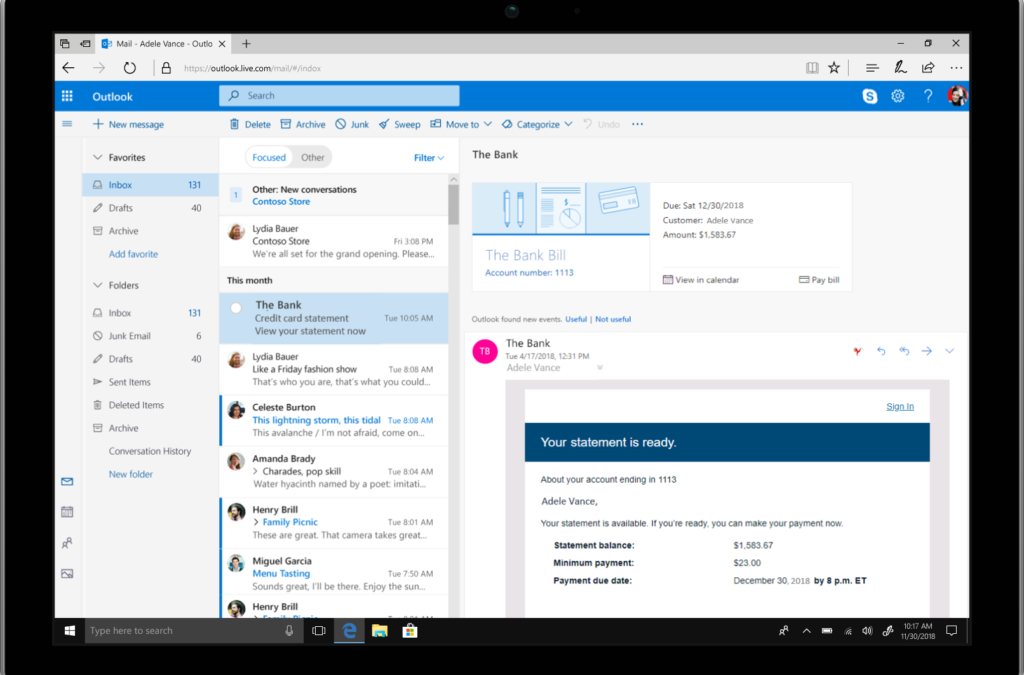
With the familiarity of Outlook and making it easier to get things done, and customizable, so you stay in control, it couldn’t be any simpler than Bill Pay Reminders. That’s correct, inside Calendar you can automatically track these events.
At the top of your email, you’ll get a summary card (See Fig 1.), just like you do when your package delivery information or any travel reservations is presented in Outlook at the top in your Email Today.
Fig 1. Summary Card inside Microsoft Outlook
Outlook will identify the bills you receive in your email. At the top, it will show you a summary, and automatically add a calendar event on the due date. Two days before the due date, you’ll receive an email reminder so you won’t forget to pay your bills on time.
Suggested meeting rooms and event locations—Adding a meeting or event location just got faster and easier inside Outlook. Similar to a virtual assistant Outlook will offer suggestions for your meeting location. Just start typing in the location field. Based on Bing, Outlook suggests options and then autocompletes your meeting location with the information you’ll need.
Outlook’s rich location feature adds the full address for public locations into your calendar event. Based on your current location, your destination address, and traffic updates a notification is sent when it is time to leave.
Also reserving a meeting room, from your mobile device continues getting more accessible and faster as Outlook learns your preferences. Let’s say you must find a conference room. Outlook will show you what your organization’s room availability is so that you can choose what option is best for your meeting, and it’s all done with just a tap.
Meeting RSVP tracking and forwarding—The key to time management is keeping track of events you’ve plan to attend, or organized. However, managing who is participating is more useful to you also. Inside Outlook, you can now see all tracked meeting responses and RSVPs. (See Fig 2.)
Fig 2. Person’s Name, who are attending, and their responses are shown for easy tracking.
But let’s say you have to plan a meeting, and you are required to keep complete control of the attendees on the list. Inside Outlook, you have a new option to prevent or allow your calendar invitation from being forwarded without your knowledge. Under Response Options, click New Meeting and then check or uncheck Allow Forwarding. (See Fig 3.)
Fig 3. The Response Options’ drop-down menu shows where to check or uncheck.
Fig 4. Below recipient’s photo is a message alerting them, they cannot forward this invitation.
Multiple time zones—Managing events, inside Outlook, across various times zones, is no longer complicated. Go ahead and define the start and end times, across all time zones, for your meetings and appointments. Set up that travel event from the departing time zone to when you arrive at your final destination, in another time zone. (See Fig 5.)
Fig 5. On the main calendar grid, you can display multiple time zones in Outlook.
Simplified Ribbon— is adaptable and easily customizable. That single row of commands you rely on can be quickly and easily personalized. You can either pin the controls or remove them from the ribbon anytime. Should you want to go back to the classic, full-ribbon, just click back anytime. (See Fig 6.)
Simplified Ribbon is adaptive
Adjusts icon labels
Moves commands out of the way
Scales up or down to fit different window sizes
Accessible through new ellipses and menu drop down experiences.
Fig 6. Ribbon shows customized commands.
“Coming Soon”— in Outlook for Windows, the Outlook team introduced a new feature called “Coming soon.” Coming Soon is about making it easier for all users, to discover and learn more about significant updates. With this feature, you just turn it on or off. When it’s on, you can see upcoming visuals that are coming to Outlook. Your overall core experience is now cleaner, simpler and more modern. (See Fig 7.)
The updated Outlook for Windows experience is more straightforward and more customizable. You will work faster and get back to the things that matter most, your free time and user experience. Outlook helps you connect, organize and get things done.
[1] New Calendar, Mail, and mobile Outlook features help you get things done
[2] Your favorite email app, Outlook mobile, adds new enterprise information protection and mobile management capabilities
Did you find this article informative? If you liked this one, check out our other content we think you’ll find interesting.

by Felicien | Oct 12, 2018 | Education
If you have a child, and they have a mobile phone, their chances of identity theft are at a remarkably higher risk of being stolen, than most adults. But thanks to the new United States federal law, the Economic Growth, Regulatory Relief, and Consumer Protection Act, and according to a WYTV interview with David Stanley, Cyber Express manager, your loved one’s identity, just got a lot harder to steal.
(WYTV) Keeping Kids Safe: Protecting your kids from identity theft
Children are favorite targets for data thieves, and it’s a crime that can go undetected for years. As parents, we often, unknowingly help hackers snatch our kid’s information all from a simple post.
But, a new law is allowing parents to check and freeze their kids’ credit with the three major agencies for free. And it’s all thanks to a new federal law called The Economic Growth, Regulatory Relief, and Consumer Protection Act, which began September 21, 2018.
If you haven’t thought about checking your children’s credit lately, WYTV reporter Lindsey Watson talked to cyber experts about why you may want to reconsider.
It’s an alarming statistic according to Experian. One in four kid’s identities gets stolen before they become an adult. But what makes children such easy targets for data thieves? Parents are often helping hackers snatch their information all with a simple post on social media.
“They’re trying to gain as much information about the person, you know birth dates, name, date, and then they can kinda go back and figure it all out, and put it all together. It’s kinda what they do right now, they SOCIAL hack you,” said David Stanley, Cyber Express manager.
Stanley refers to it as Social Hacking. “It boils down to if you put out your kid’s name, how old he is, or her,” Stanley said. While Stanley says they haven’t seen a child’s identity stolen yet, it’s something parents need to be aware of before it’s too late.
“We can go forward with you, hand-and-hand and figure it out together. Hopefully, your son or daughter isn’t a victim, and if they are let’s figure it out, make sure that everything is fine, get everybody on an even keel and start over,” he said.
7 Cyber Express Child Identification Protection Checklist
In our very connected world, our children do not comprehend that there are individuals out there ready to take advantage of their innocence. Along with the above interview, we’ve put together a quick and easy checklist, that gives you seven more ways you can protect your children’s identity when they can’t.
Always remain cautious about what you disclose – More and more doctor’s offices, store rewards clubs, and schools are having us fill out electronic forms for our children. But it’s becoming too easy to accidentally give out our kid’s information, such as social security numbers, which if stolen, could take years to repair their credit.
Monitor what the school gives to third-party vendors – Whether you realize it or not, schools do release children’s information to their vendors. Five pieces of information commonly published are photos, home addresses, phone numbers, email addresses, and dates of birth. Contact your child’s school to learn if they have an opt-out process.
Be on the lookout for what your child gives away – With social media, online forums, and gaming groups, our children are too eager to say just about anything, to stay connected or keep up with the latest online trends. Unfortunately, identity thieves know just the right words to say, getting your loved one to share personal information.
Monitor your child’s finances monthly – Does your child have a bank account? College savings account? Or a trust fund? Once a month you get these account’s statements. Review them for any unusual activity, plus check with each financial institute, handling their accounts, and sign-up for mobile alerts.
Watch for warning signs you would not expect – Should you receive a pre-approved credit card offer, with your underaged child’s name on the envelope, that’s typically not a computer glitch. If you are getting bills or collection notices addressed to your child, that’s not a coincidence. Should you get, in the mail, notice from the IRS your little one owes back taxes, their ID got stolen.
Investigate to know if your children have a credit history you’re not aware of – Quite often, after some digging, an unsuspecting parent discovers, their child does indeed have a credit history. What is hard to believe is how that happened; when their minor child has never worked.
Credit History examination steps to take are easy:
Call the three major credit reporting agencies and ask for a manual search of files or records associated with 1) your child’s social security number only and 2) your child’s name and social security number tied together.
You’ll be asked to provide copies of their social security number and birth certificate.
Consider having a credit freeze placed on your child’s account.
Numbers or email to get in touch: Equifax: 800-525-6285 / Experian: 888-397-3742 / TransUnion: childidtheft@transunion.com
