
by Felicien | Mar 21, 2019 | Education
There’s a new scam targeting highly-trafficked Instagram accounts, and anyone with several thousand followers on their account — including businesses and clients — are fair game to the fraudsters. The scheme masquerades as a false claim of copyright infringement, according to Kaspersky Labs, who first noticed the new way influential and popular users are being cajoled into giving up their credentials to attackers.
How can you tell if your company or a client is in the crosshairs? The first sign of attack comes in the form of an official-looking email, seemingly from the team at Instagram.
“Your account will be permanently deleted for copyright infringement,” the email threatens. Tripwire reports in a recent article that the scam then requires action in the next 24-48 hours that involves “addressing the claim” and “verifying credentials.” This is where the user is required to type in the account’s password, which hands over the keys to the social media account to the attackers. It doesn’t end there, though — Tripwire warns that an “email verification” is required in addition to the credentials verification, where the user is asked to choose their email provider and give up the username and password for that login as well.
Kaspersky warns the false emails from Instagram are extremely similar to actual Instagram addresses. They include “mail@theinstagram.team” or “info@theinstagram.team.” Protecting your business or your clients from giving up the information in the first place is paramount — once the information is handed over, scammers can then demand ransom to return the account, spread malicious content across the page, and of course, change the information required to assert control over the account, like passwords and security questions. Tripwire encourages managers of popular Instagram accounts to enable two-factor authentication to make it significantly more difficult for attackers to gain access to the account. Kaspersky advises staying up-to-date on best practices, like avoiding suspicious links and only logging into Instagram through the official app.

by Felicien | Mar 21, 2019 | Education
After literally changing the world through technology, what does a retired billionaire Microsoft co-founder do for an encore? If his name is Bill Gates, he changes the world yet again. This time, Gates is exploring advanced cutting-edge technology to find healthcare solutions for the world’s most pressing issues. Serving as guest curator for the annual “10 Breakthrough Technologies” list published by MIT Technology Review, Gates revealed his top picks for 2019 – five of which happen to be healthcare technologies.
In introducing the list, Gates explains his choices and expresses optimism for how we can invent the future. “We’re still far from a world where everyone everywhere lives to old age in perfect health, and it’s going to take a lot of innovation to get us there,” he writes. “For now, though, the innovations driving change are a mix of things that extend life and things that make it better. My picks reflect both. Each one gives me a different reason to be optimistic for the future, and I hope they inspire you, too.”
Here are the top five healthcare technologies for 2019, as curated by philanthropist Bill Gates on his quest to change the world through innovative solutions.
1. Customized Cancer Vaccines
Things are getting personal in the world of cancer care and treatment. In a collaboration between German startup BioNTech and the biotech behemoth Genentech, researchers are conducting clinical trials with technology that customizes cancer vaccines for each individual. The approach attacks only cancerous cells rather than healthy ones using mRNA-based therapies, taking into account the patient’s genetic profile and specifics of the personal diagnosis.
2. Predicting and Preventing Premature Birth
Considering the millions of mothers giving birth to premature babies every year, Stanford University bioengineer Stephen Quake decided to do something about it. He has developed a genetic blood test that can identify which women are likely to deliver a premature baby, thereby increasing the likelihood of effective care and prevention. The test works by detecting fluctuations in specific genes related to premature births. Quake states that quick and easy test costs only about $10.
3. Ingestible Gut Probe for Easy Disease Screening
Harvard Medical School professor Guillermo Tearney, MD, PhD, who is also a pathologist at Massachusetts General Hospital, has created a swallowable gut probe that can capture images and screen for diseases such as environmental enteric dysfunction. The condition inhibits the absorption of nutrients, which adversely affects children in developing countries who are susceptible to malnourishment. According to the MIT Technology Review, the device has the potential to replace endoscopes and anesthesia, which can be cost-prohibitive for many people.
4. Wearable ECG Device for Everyday Use
Wearable devices such as the Series 4 Apple Watch are receiving advanced ECG technology that aims to equal heart monitoring done in a traditional physician’s office. The goal is to detect arrhythmia sooner and thereby reduce the potential for a heart attack.
5. Voice-enabled AI Assistants in Health Care
Artificial intelligence systems with voice-enabled technology, such as Alexa from Amazon and Siri by Apple, are being configured for HIPAA-compliant use in clinical patient care. Hospitals and clinics will be able to utilize the devices for things such as post-surgery care, checking blood pressure and increasing efficiency.

by Felicien | Mar 21, 2019 | Education
With today’s businesses moving a large portion of their information technology operations to the cloud, having holistic IT services management is more important than ever before. Making this shift provides organizations with an unprecedented level of flexibility, and cloud solutions are generally more affordable. However, you may find that you’re introducing a greater level of complexity as you bring on additional integrations and cloud-based solutions. Having a trusted IT services management partner allows you to focus on the core growth of your business while shifting the bulk of responsibility for IT operations to your services management team. See how making this move helps local businesses thrive.
What is ITSM?
Information Technology Services Management (ITSM) goes by a variety of different titles. You may hear this referred to as managed services, IT outsourcing, IT consulting and more — but it all boils down to finding a partner with the technical expertise to support your organization’s IT operations. Internal IT teams often retain responsibility for setting strategy and oversight, while the more tedious daily processes and larger integrations are moved offsite to your partner’s teams. This allows you access to a broader team of professionals with expertise in a variety of different platforms, infrastructure setups and methodologies.
How Does ITSM Help My Local Business?
As businesses grow, their technical challenges become increasingly complex and are often more than one or two IT professionals can handle internally. Working with an IT services management organization allows you to reduce inefficiencies in your business and reduce the workload on key technical staff. You’ll find enhanced operational efficiency and reduced operating costs, along with a vastly improved customer experience for your internal users and customers. With an external review of your software implementations, you are likely to enjoy enhanced access control and governance of your crucial business systems. Your IT services management professionals are also able to help bring consistency to your process and automate them whenever possible. You’ll find that your teams are able to collaborate more fluidly — both internally and with your customers or vendors.
What Types of Services Does an ITSM Offer?
The wide scope of the landscape — where there are thousands of solutions for each IT project — simply requires knowledge that is too broad for a single, small team. ITSM helps your local business by helping weed through some less-than-ideal solutions to find exactly the options that are right for your business.
This could include providing a range of platforms and services:
Cloud-based storage
Backup and disaster recovery procedures
Antivirus and anti-malware solutions
Office 365 and productivity software licensing and implementation
Active monitoring of your network for data breaches
Remediation and resolution management
Help Desk support
Software Integrations
Universal control dashboards
Threat assessments and staff training
WiFi and endpoint management
These are only a few of the solutions that a full-service ITSM partner can provide for your organization.
Will an ITSM Team Understand My Business?
Sure, it might take your technology professionals a bit to get up to speed on your specific core competencies and the challenges that your organization offers, but these individuals are accustomed to working with a variety of organizations and will quickly learn what makes your business unique. Plus, they’re able to leverage all of their knowledge of past engagements to help see what works, what doesn’t — and how to make the most out of the teams that are available. Your IT services management team will look across the organization at people, processes and technology in order to help visualize your work and understand where changes can be made to wasteful processes.
If your organization is embarking on a digital transformation project — or even if you’re simply trying to get your technology team out of the weeds with daily help desk requests — ITSM offers some true benefits for your business. You can increase the agility and responsiveness of your business while ensuring that daily business processes are interrupted as little as possible. See how ITSM concepts can help provide the cement that you need between your business and technology teams to lead your organization into the future.
by Felicien | Mar 21, 2019 | Education
Endless airline terminals. Overpriced airport food. Overly-close seating on packed planes. What’s there to love about business travel? Sure, there are some road warriors who appreciate never having to clean a room or make a bed as they spend all their time in hotels, but for most people, business travel is simply something to be endured. Even 10 years ago, it would have been challenging to have the kind of high-speed access and seamless experience that you need for video conferencing, but today’s a different story. See how you can save time and money by utilizing some of these next-gen video calling apps.
Business Happens Everywhere
Workers want to be able to be productive anytime, anywhere — and that could include while watching their child’s baseball game, stepping out of a client meeting for a few minutes or even from home on the weekends. This is especially true of small business owners who are never truly off duty. Fortunately, video conferencing software and apps have come a long way from the fuzzy, slow-moving images and poor sound quality of the past to provide crystal-clear images and sound with no noticeable lag. If you haven’t tried it lately, video calling apps are now quite seamless to use and work equally well from your desktop, laptop, tablet or mobile phone.
Benefits of Video Calling
Let’s face it: travel is expensive, and the cost is not always justified for the value that you provide. There are certainly times when business travel will still be required, but many negotiations and conversations can happen equally well over a high-speed video call. Phone calls without video are not enough to provide you with the nuanced information that you receive when you’re able to see someone directly in front of you, and video calling fits that bill nicely. Business is increasingly global in nature, making video calls one of the few cost-effective ways to work with teams that are scattered throughout the region — or the world. Until the last few years, it was a bit more difficult to ensure that both individuals or teams had access to the right software and hardware to make video calling truly viable. With the majority of laptops being shipped with high-resolution video conferencing hardware already installed and the prevalence of smartphones, that is no longer the case.
Top Video Calling Apps
While certainly not an exhaustive list, here are a few of the top video conferencing apps that are used in business today:
Skype — consistently one of the top-rated apps by technology professionals and users
Zoom — free video calling that allows you to instantly share information from your phone
Cisco WebEx — businesses professionals love it, and there are extensive shared workplaces available in the platform
GoToMeeting — quickly and easily collaborate with partners and clients in real time
Slack— cross between a chat platform and video conferencing, built specifically for team communication
No matter what your video calling needs are, there’s probably a platform on the market today that will fulfill your needs — and cost far less than relying on expensive business travel.
by Felicien | Mar 21, 2019 | Education
In an ideal world, you’d never have any technical issues, and you’d never have to call Microsoft technical support. Everything should work perfectly, without bugs, slowdowns, crashes, or corruptions. Of course, technical issues are inevitable, and when you experience difficulties, you call technical support to get the problem resolved as quickly as possible. The only thing worse than experiencing the frustration of Microsoft technical issues is when you call and go through the whole rigamarole of what is wrong only to hear, “Your product is not supported.”
What does it mean if a Microsoft Windows product is not supported?
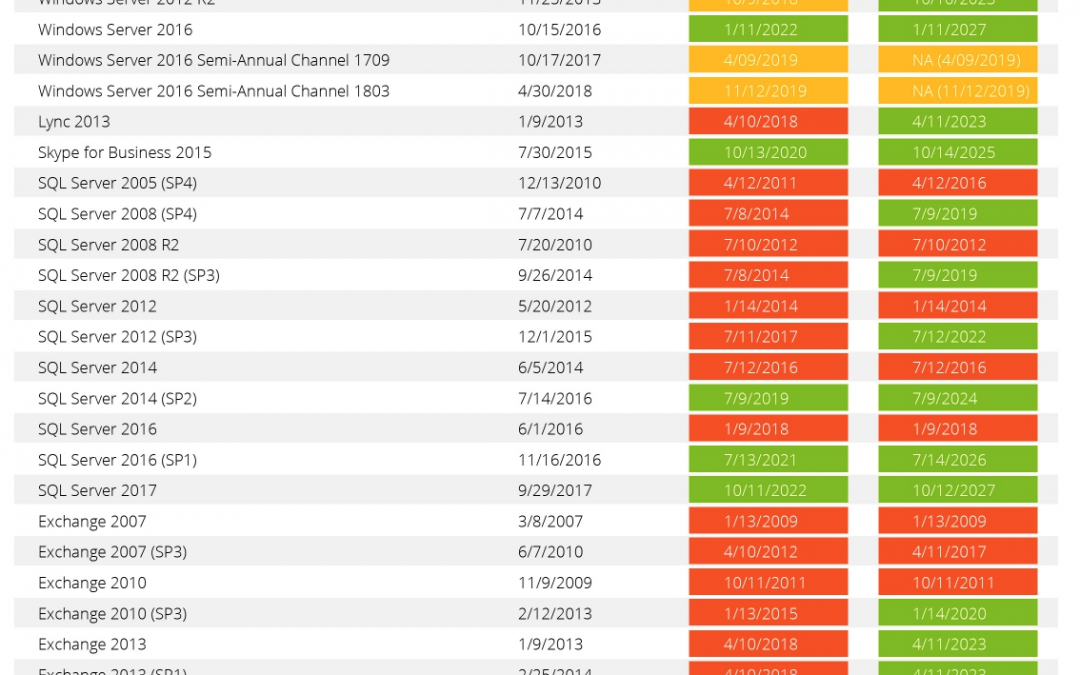
In the most general terms, “not supported” means that Windows is no longer eligible for the downloadable bug fixes, security patches, and other updates from the Windows Update service. It means that the product has exceeded the standard lifecycle support services. Each Microsoft product and service pack will fall into different support schedules, but you can also track the overall support lifecycle as well, so that you can plan for the inevitable end of a product for personal and professional use.
If Windows is not supported, is it still functional? Can you use it?
When Microsoft no longer supports a version of Windows, and your install is no longer protected from known security risks, compatibility issues, and other bugs, you can still use the operating system. In most cases, you will still be able to start and run your version of Windows Vista, XP, 7, 8.1, etc.; but you will experience increasing instances of software incompatibility and likely security risks. You may also experience error messages or other support issues related to your hardware and software. The compatibility issues can be frustrating, but you will likely still be able to use the product. For those individuals and companies who love the “old” product, and don’t want to change, they don’t really have to, at least not yet.
Why would you use Windows when it is no longer supported?
There are a number of reasons why you might need to use a version of Windows that is no longer supported. For example, your hardware may not support a new version of Windows, or your software may not be compatible. Another reason to stay with a deprecated version is because you just prefer it, because you don’t want to upgrade, or even due to security restrictions from your company. Some companies still use Windows 7 for security reasons, or because there are rumors (often well-founded) of issues with the new release. There’s always a trade-off when you decide to use a deprecated or unsupported product. You probably won’t be able to install or access new programs, websites, or other more current functionality; but you also may not need all those bells and whistles. If you prefer the old system, and you don’t want to change, then nobody can force you to upgrade. You have options to keep your system and programs in the exact same, stable state you’ve always enjoyed.
What is the timeline for service packs and the Microsoft lifecycle?
When a new Windows (OS) service pack is released, the previous service pack is on a 2-year cease-of-support updates countdown. While that timeline would seem to give you a general sense of how long you have before your product is no longer supported, there are caveats. Microsoft sometimes extends the length of time for support services, or just allows the support timeframe to inexplicably continue. It can be welcome news for the general Windows user, but it’s not something that is promised or assured. So, the consensus is that you should take support when and if you can, but expect that it could end.
How do you make sure Microsoft will be supported?
With the Modern Lifecycle Policy, you can pay for Software Assurance (SA), a subscription that offers additional licensing and professional services. For professionals and business owners, SA offers peace of mind that they will receive support services even when the standard product is no longer supported. Some companies also rely on the additional licensing rights and professional services, including:
Dedicated support services
Training or online certifications
Access to Microsoft partners
For companies who need help with additional training or services, the SA solution can more than pay for itself. The alternative (or additional) scenario is to hire or use existing IT infrastructure to support your Microsoft support or training needs. Even with your paid support services (for SA), Microsoft can still end all support for a product with a 12-month notification of support cessation.

by Felicien | Mar 20, 2019 | Education
Life is extremely busy with people scheduling every moment of their day while still looking back and wondering where their month has gone. It’s all too easy to find yourself reviewing a 6-month plan only to find that you are seriously off-course. Focusing one day at a time can cause you to be short-sighted when it comes to achieving your long-term goals. A quick review of your monthly calendar helps ensure that you’re well on the way to meeting business — and personal — objectives.
Leverage Project Management Strategies
Most project managers realize the importance of scheduling regular project reviews where you focus not on the daily tasks, but on the distance, you have moved from the overall project perspective. You can leverage this same methodology when it comes to tackling your calendar! Looking at your calendar on a daily or even weekly basis gives you an idea of what you have to get through, but it doesn’t provide you with a holistic view of your month and your year. Breaking deliverables and goals down into monthly chunks lets you see results more quickly and provides ongoing motivation to stay the path.
Using the Right Tools for the Job
Keeping your calendar updated with all of your various home, family, personal and work obligations can be a chore, especially when you’re splitting childcare or after-school activity duties with your spouse, parents or friends. Outlook and your Google Calendar may be great for scheduling work items, but is your work calendar getting bogged down with non-work related tasks? This can make it extremely difficult for others to schedule meetings with you and to maintain visibility for crucial work projects and tasks.
Thinking Strategically
Do you have a 1-year, 5-year and 10-year plan? Breaking these plans down into bi-annual and quarterly chunks allows you to more accurately track where you are according to your plan. This also keeps you from getting to the end of a busy year and wondering what happened to all of your time! Bringing this type of strategic thinking into your calendar on a monthly basis assures that you’re setting aside a time that is just for you. Even if you only spend 15 minutes reviewing the next month on a Sunday afternoon, you will find that it was time well spent.
Don’t let yourself get tied down to the daily hassles of life that can keep you from meeting your long-term goals and objectives. You can even use your calendar to help schedule time for your monthly calendar review! Your future self thanks you.
