
by Felicien | May 22, 2019 | Education
If your organization is large enough to have a CFO, it surely has some kind of backup and business continuity plan in place. Do you understand how this system works? More importantly, is the system your business has in place actually sufficient to protect you in the event of a disaster? These are questions every business needs to ask, and you as the CFO need to be a part of that conversation. To get prepared, here are a few of the top questions CFOs have regarding backup and business continuity, answered.
Aren’t Backups Enough?
The short answer is no. The longer answer gets into the wide range of backup formats. On-site backups are a part of the solution, but they don’t protect against natural disasters or physical site breaches. Off-site backups have their limitations, too. The farther away the site, the more logistically challenging data transfer and physical storage can become. On the other hand, if the off-site backup is just down the street, it may be just as vulnerable to the natural disaster that hit your business.
Is the Cloud the Answer?
Cloud backups are a great new innovation in the industry, but they alone won’t save your business, either. Restoring from a cloud backup takes serious bandwidth, and bandwidth could be an issue following a catastrophe. Consider that not all business disasters are natural. If your business suffers a crippling cyber attack, cloud backups may complicate the restoration process.
What is Backup and Disaster Recovery?
Backup and disaster recovery, sometimes shortened to just backup disaster recovery or BDR, is the term for a comprehensive system that includes both data backup and a disaster recovery plan. These two components are designed to work in tandem, allowing a business to remain operational through or quickly restart operations following a disaster. Having a strong BDR plan is the real solution for backups and business continuity.
Backups in BDR
The backup component of your BDR plan should be multifaceted. Most companies benefit from having at least two forms of backup: on- or off-site as well as cloud backup. With backups, redundancy is a desirable feature, not a place to cut costs. Storage drives (whether at your location or in some server farm far away) can fail without warning.
Disaster Recovery in BDR
The disaster recovery component is just as crucial as the backup component. This is security planning, in a nutshell. If your physical office building gets wiped out by a natural disaster, you need more than your data. You need replacement computers, servers, and networks to use that data on, not to mention a place to do that work. Your disaster recovery plan finds the solution to these problems. Develop a recovery time objective, a measurement of the amount of time you’ll need to resume operations. From there, build out a plan for sourcing equipment and facilities.
Your disaster recovery plan is closely tied to your business continuity plan, which outlines how essential functions will keep running or be restored.
What Does a BDR System Accomplish for the Business?
Implementing an effective BDR system has many advantages for your business, including faster recovery time, lower risk, and lower costs.
Faster Recovery
Your business’s recovery time will be much shorter if you have both a detailed plan for what to do in the event of a disaster and a complete, usable backup of all critical systems. There’s no real way to put an exact figure on it, but working a plan is always going to turn out better than winging it, especially when in disaster mode.
Lower Risk
Every step you take toward a well-planned BDR system lowers your business risk. Having an on-site backup is safer than having none. Having on-site paired with off-site is safer still. Adding cloud backup to the mix does the same. Similarly, the more thorough your disaster recovery plan, the lower your risk.
It may sound overly simple, but “be prepared” is a pretty great motto. No business can completely mitigate all risk, but implementing a BDR system lowers your business’s risk profile greatly.
Lower Costs
Companies implementing BDR systems often contract with managed services firms to create and/or execute those systems. It’s worth taking a look at what’s available. You may find that your costs with a managed service provider are lower than the costs of building a BDR in-house.
Even if you determine monetary costs aren’t lower, there’s also an opportunity cost to consider. How confident are you in your in-house plan (or the team that built it)? Is that team made up of dedicated experts, or is everyone involved working just a bit outside their expertise? There is a real opportunity cost to not getting this right. Contracting with a quality MSP reduces the risk of missed opportunities due to an overly long outage or recovery.
Conclusion
If you haven’t yet implemented a BDR system, it’s time to do so. If you need help developing or implementing a BDR at your firm, contact us to get started.
by Felicien | May 22, 2019 | Education
Microsoft Teams is an amazingly powerful collaboration tool that’s available as a part of the Microsoft Office suite.
At its core, it’s kind of like Slack on steroids, but that core functionality is just the tip of the iceberg. Because it’s integrated with the rest of Microsoft Office, it has so many powerful features.
One feature area in Microsoft Teams is the ability to host and join virtual meetings. Users can join or host meetings from desktop or mobile. Mobile users can share files with the group, and we covered that in a previous post. Desktop users can share screens with other users, and with a surprising degree of control. Here’s how to take advantage of this feature.
Step 1: Create a Meeting
The Share Screens feature works from within the Meetings function, so the first step is to create or join a meeting. Locate the tabs bar (usually on the left side), where you’ll see icons like Activity, Chat, Teams, Meetings, and Files. Select Meetings, and then create a meeting (or join a meeting that someone else is hosting). The Meetings tab is tied into your Outlook calendar, allowing you to see potential conflicts.
Quick note: Teams features can be enabled or disabled at the enterprise level. If you don’t see a Meetings tab at all, your IT department hasn’t enabled it yet. Contact IT and plead your case for enabling this awesome feature.
Step 2: Click the Share Button
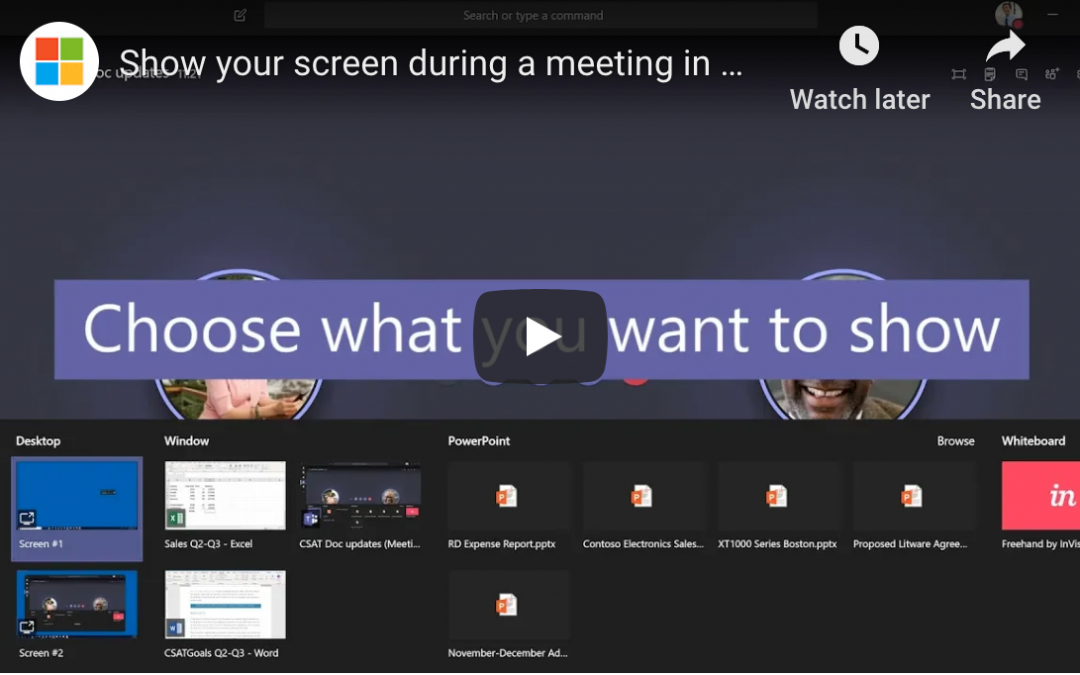
Once the meeting is in progress, you’ll see a series of buttons in the bottom middle of your screen. If you don’t see them, move your mouse to that location to make them show up. You’ll see buttons for video (if enabled), microphone (for muting yourself), ending the call, and more. The one you want looks like a rectangle with an upward arrow. This button, aptly named the Share button, represents screen sharing. Click it to continue.
Step 3: Choose What to Share
Screen sharing isn’t exactly new technology, but the implementation here is particularly well done. When you click the Share button, Teams doesn’t immediately share your entire screen. Instead, you have options. “Desktop” allows you to share one of your desktops. “Window” lets you choose a single window or app to share. “PowerPoint” shares the presentation you choose. There are even more options available under “Browse”.
Conclusion
This level of granular control makes screen sharing in Teams a killer feature, and there’s so much more that Teams can do for you. Team-based chat, productivity tools, and real-time collaboration on nearly any Office file are a few more ways it can help. If you’re ready to keep exploring, contact us to keep learning.

by Felicien | May 21, 2019 | Education
It’s always been important for the C-suite to understand the cost benefits and value associated with technology projects, but today’s complex infrastructure needs are requiring greater levels of input from financial executives, in particular. Technology spends are increasing dramatically, and there’s a need to balance the shorter-term benefits of specific tactics with the long-term strategies that will help move the organization forward. The days of technology teams making do with the funding that they are allowed are over, as technology becomes more tightly intertwined with business strategy. It is crucial that the big dollars invested in technology and innovation are tied to true business value in a way that can be communicated throughout the organization — making the CFO an integral part of the decision-making when it comes to determining the IT spend.
Funding Sustainable Growth
Technology is advancing at an unbelievable rate, with new software applications and methods of reaching customers coming at breakneck speed. Making several poor decisions around technology can create a miasma of problems that can take years to resolve, but that risk is mitigated when financial leaders work closely with technology teams to ensure that there are adequate measures and milestones in place. CFOs must ensure that the organization has the funds available to budget for items that are critical for continued business operations that support corporate strategy and sustainable growth initiatives. This has to be balanced with the additional risk that can be assumed by waiting for “something better” (an application, a way of controlling data or reduced legislation) to come along. According to Gartner, worldwide IT spending is set to reach $3.8 trillion this year, with ongoing increases in spending attributed to IoT, shifting on-premise computing to the cloud, software applications and maintenance fees. With this shift comes a fundamental change in the way technology dollars are budgeted: from capital expenditures to a SaaS model that is billed as an operating expense.
Aligning Technology Spend with Strategic Initiatives
Starting with the strategic initiatives of the business and slotting in technology where needed may be the way CIOs and CTOs are familiar with budgeting, but the new paradigm requires additional work. The risk potential of having business systems vulnerable to a cyberattack is an ongoing concern and one that can require a significant amount of spending in any given year. Data silos are being broken down and consolidated as older legacy systems reach their sunset years. This tension between supporting an often-aging infrastructure and providing a stable base for the future creates a need for creative budgeting throughout the organization. Having the CFO work with technology executives can help bring greater visibility to the IT needs of the organization and how they align with specific strategic initiatives.
Constantly Examining Technology ROI
Part of the budgeting process involves being intentional about determining business ROI for the various technology initiatives and being unafraid to boldly cut or fund projects based on the changing needs of the business. New threats occur on a regular basis — as well as new opportunities to seize dominance in a particular market. Having the flexibility to pivot and create revenue may require a continual review of the various projects as well as a fundamentally different approach to what have traditionally been multi-year IT projects. Vigorously defending projects that no longer provide business ROI can put a major drain on limited organizational resources, especially in light of changing features and functionality for even the most stable business platforms.
Now more than ever, CFOs must have a solid understanding of the business value that IT projects plan to deliver and a solid review of milestones. This shared responsibility with CIOs and CTOs creates not only a greater accord in financial decisions but also a deeper understanding of the value that various projects have for the entire business.

by Felicien | May 21, 2019 | Education
The role of the CMO has been evolving at a rapid pace in recent years due to the constant addition of new marketing technologies or martech. You only have to compare the tech budgets of marketing departments today to those five years ago to see a drastic increase in spending.
Companies know that they need to embrace and leverage the right martech to remain competitive, and they are willing to invest substantial sums to do so. That leaves companies and key decision makers with a challenging question: What kind of role should the CMO play in tech decisions? The answer depends on the industry vertical, but there is an overall trend that is worth paying attention to. With each passing year, CMOs are becoming more and more involved in tech decisions.
How Involved Should CMOs Be in Tech Decisions?
To understand the answer to this question, we need to look at a few different factors. These include:
The Changing Role of CMOs
The traditional CMO role was already filled with important decisions. Chief Marketing Officers have always been responsible for things like brand management, communications, campaigns and advertising. But today, with the rise of data-driven decisions—which offer more predictability and accuracy than opinions ever could—the role of the CMO has had to evolve to encompass more and more tech.
Consider the options for understanding the customer experience available to marketing teams today:
Artificial Intelligence (AI)
Big Data
Marketing Automation
Internet of Things (IoT)
And more…
Incorporating these tools into the company’s marketing mission requires a whole new skillset that includes customer service, data analysis, user experience (UX) and more. Of course, not all CMOs need to be experts in any one of these particular areas, but they do need to know how to manage and organize professionals who do understand these areas to fully realize the potential of their marketing efforts.
The Importance of Company Objectives
If you have recently found yourself feeling overwhelmed with the number of tech tools available, you have some idea of what it feels like to be a CMO in today’s tech-heavy environment. A visit to your favorite app store will give you the opportunity to pick from sometimes thousands of apps to accomplish the same goal, whatever that goal may be. And while the martech options available to CMOs are perhaps less numerous, they are also being pushed by sales people on a daily basis—so CMOs are being constantly bombarded with new “solutions” that are touted as the newest answer to common problems. Even more confusing, there are plenty of martech offerings that are more like solutions looking for problems than the other way around.
One of the key ways that CMOs can avoid overwhelm when it comes to martech is to always keep company objectives at the forefront of their minds. The company objectives can vary by organization, but most marketing organizations are focused on things like Market Presence, Revenue Growth and Efficiency. These goals can be more easily achieved using the right martech, but not all tech tools are going to offer significant benefit in the seeking of such goals.
Company objectives offer a guiding light in the complex world of martech. CMOs, above all others in the marketing organization, need to remain aware of company objectives and ensure that the tech budget is utilized as efficiently as possible—on technologies that will achieve measurable progress towards the achievement of the goals of the company.
CMOs Can Use Data to Drive Tech Decisions—Especially if They Ask Questions
One of the best ways CMOs can target the tech that is right for their organization is to utilize data in the decision making process. And that does not mean the CMO needs to be an expert in data analysis, either. They just need a team that can help them understand the data that they are looking at. Subjective decisions are not necessary—at least not in most cases—with the use of the right data.
The secret to utilizing data is to ask questions, as many questions as necessary to gain an understanding of what you are looking at. Over time, a CMO can come to understand quite complex concepts as he or she repeatedly comes into contact with them. But as with any new information, the fastest way to gain an understanding is to ask questions. It can be difficult at first for someone in a position of authority to admit that they do not know something right off the bat, but eventually asking questions becomes easy.
While it may not be apparent initially, employees will feel respect for the leader that is willing to admit a lack of understanding and ask for help. After all, the employee gains a sense of value when they can help higher-ups and the company as a whole with their knowledge.
CMOs Should Be an Integral Part of Tech Decisions
Ultimately, CMOs should strive to be an integral part of tech decisions in the company. They should work with their team, as well as with other key decision makers like the CIO and CTO, to guide the company in the right direction.
by Felicien | May 21, 2019 | Education
Microsoft’s Office suite makes it easy to schedule meetings, reserving the right room and inviting all the right people. Many people think they can only use these powerful features from their office computer, because Exchange calendar integration in iOS doesn’t support these features. In reality, mobile users can still access these powerful scheduling features using Outlook Mobile. Here’s how.
Step 1: Create a New Event
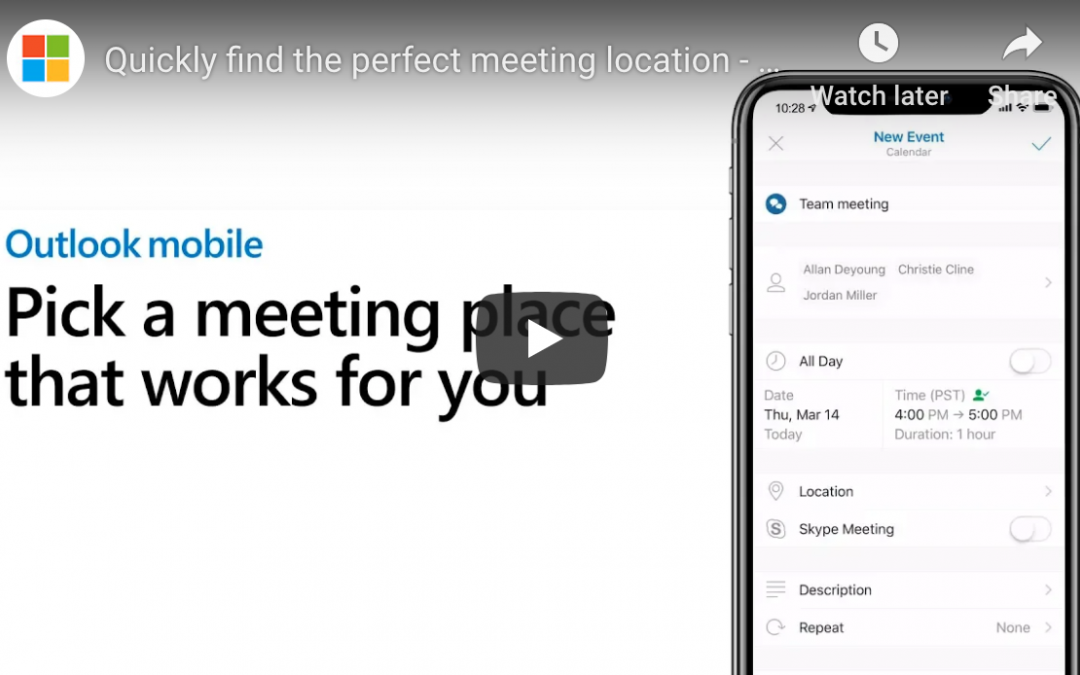
Open your Outlook Mobile and create a new event. To do this, tap on the calendar tab along the bottom of the app. Next, press the big plus sign in the lower right corner. (As always, locations can change over time and depending on device. You’re likely to find a calendar page and a plus sign somewhere, though—use them.)
Step 2: Name Event, Add Attendees, and Set Date and Time
Choose a name for your meeting in the first field, and add all the people you want to attend the meeting in the second one. For the latter, just start typing names. Outlook Mobile will pull up relevant contact information. Click on the contacts you want to include.
Note: Depending on your configuration settings, Outlook Mobile may offer you multiple options for some contacts. If you have a personal and a work version of a contact, for example, be sure you choose the right one. Do the same if you have a single contact with multiple email addresses associated.
Before moving to step 3, check that the date and time information is set correctly. You can change this later, but setting it up now allows the magic below to work properly.
Step 3: Click Location
Next, tap the “location” field a little bit lower on the screen. This is where the magic happens. Outlook Mobile will intelligently suggest connected meeting rooms that you use frequently and that are free for your selected time. It will also suggest places nearby, which is useful if you’re calling an off-site meeting. Outlook Mobile learns from you, too: the more you use it, the smarter its suggestions become.
If you don’t see a suitable location listed, you can search for a better one. This can be an on-site meeting room or any mappable location.
If you and your meeting attendees have “Time to Leave” enabled in settings, Outlook Mobile will even notify you a few minutes before you need to leave your current location to get to the meeting on time. One-touch directions are available directly in the calendar event, too.
Wrap Up
This is just one of many powerful yet overlooked features in Outlook Mobile. To learn more or for help with other IT questions, contact us today.

by Felicien | May 20, 2019 | Education
Cyber attackers are highly motivated to obtain or corrupt your company’s data. But whether their motivation is to steal your funds outright, hold your data for ransom, practice espionage, or simply disrupt your business, most hackers cannot access your network without an “in.”
In other words, they require a login, personal access codes, or network access through malware to initialize their breach. Unfortunately, a recent report released by Verizon has concluded that 93% of the time, a cyber attacker’s “in” comes to them in the form of a social engineering attack on your employees.
The only way to prevent such breaches in your security is with proper cybersecurity training.
What is a social engineering attack?
Social engineering attacks are frankly less high-tech than traditional cyber attacks by highly knowledgeable tech criminals. In other words, they don’t require the extensive knowledge and tools needed to directly hack a highly protected computer system out of nowhere.
Social engineering attacks are more like street scams — only they’re usually done online or sometimes, over the phone. These scams use human psychology to fool individuals into willingly giving up sensitive information. In the case of your business, the targets are your employees.
There are several types of these attacks, including “phishing” and “pretexting,” which are quite similar and often go hand-in-hand. Phishing emails, however, remain the most common type of social engineering scam.
What are phishing emails?
In short, a phishing scam might be an email sent to the employees of your company that looks legitimate. It might (appear to) be from the employee’s bank, for example. It might request that your employee “click here” and login to (what looks like) the bank website so that the bank can “update your information” or “confirm your identity.”
A phishing email might also promise something to the recipient: “Here’s your free 50% off coupon! Click here!” or use a so-called emergency to illicit fear: “Someone has hacked your account. Click here to get it back.”
If your employee does indeed click on the malicious link of a phishing email, they will likely be taken to a blank or uninteresting page. In the meantime, however, the link click will have initiated the installation of malware onto the employee’s computer. This malware then enables the hacker to obtain sensitive information or disrupt or damage your company’s data.
How can company’s prevent phishing scams?
The reputational implications of any type of security breach — even one that doesn’t actually corrupt or steal your data or funds — can be enormous. Of course, it goes without saying that if you are caught in the crosshairs of a data ransom or cyber theft, the financial implications will be equally devastating.
As we’ve learned from the Verizon report, most security breaches are linked with phishing. Therefore, cybersecurity training for your employees is the best preventive solution you have for stopping security breaches before they start.
Employee training is not expensive, yet it is highly effective. Your employees should learn the following throughout their ongoing training:
How to identify a range of phishing and pretexting scams
How to proceed should they find an email, phone call, or social request suspicious
Your company’s strict policies and procedures for communication (for example, “We would never send emails requesting personal information from our employees as this would only be done in person.”)
Notice of increased risks for phishing scams around the holidays
Notice of the most recent and common scams currently trending
Cybersecurity training should be frequent and come at regular intervals throughout the year as attack strategies often come randomly in spurts and habitually change tactics.
While cybersecurity training is your best line of defense when it comes to phishing and security breaches, it’s also important to hire a reputable IT managed service provider (MSP) to handle your network and security. Your MSP should have experience and broad skill in protecting their clients from network breaches. Contact qualified MSPs in your area today to learn more about protecting your business from cyber attacks.
