
by Felicien | Jul 23, 2019 | Education
Cloud Storage vs. On-Site Data Housing: Factors for Healthcare Organizations to Consider
Internet technology has opened the way for data storage to be far less cumbersome for modern healthcare organizations. After all, handling all the incoming data in a modern practice is not all that easy. Many organizations have jumped on board and went after a cloud-hosting solution, but is it really necessary if you have room for on-site data storage in your facility? Here are a few factors to consider before making the final decision on cloud storage versus on-site data housing for your healthcare organization.
Compliance is a core concern for many healthcare organizations with cloud-hosted data storage.
Cloud-hosted data is great; it is convenient and does not require investments in expensive hardware. However, in a field where strict adherence to privacy regulations is a top concern, off-site data storage can be something that’s a bit off-putting for some healthcare companies. You lose a certain level of control over the data when it is stored off-site with a cloud-hosting provider. The digital records are not on-site at the facility, so you have to have full trust in the host for the sensitive data, and sometimes that sense of trust is hard to foster to provide you with full confidence.
Of course, on-site data housing comes with its own compliance concerns as well. Proper security measures have to be in place for the data itself, the systems you used to house that data, and the physical location of the data center. The primary difference here is that if you choose to go with an on-site data storage solution, you will know what levels of protection you have specifically because you had a hand in implementing those safeguards. With cloud-hosted data storage for healthcare, you are at the mercy of the provider.
Setting up your own data center can be a lot of work and money.
One of the pitfalls of keeping data on-site is the fact that it can involve a lot of effort and quite an investment. There are several factors to consider before this kind of implement takes place. You will have to look at:
What type of computing hardware your organization is going to need.
If your organization has the electrical infrastructure to offer full reliability and avoid problems with outages.
How you will implement a cooling system to keep the data center cool due to high levels of heat generation in the space.
What type of security you will also implement to keep the physical location secure from outsiders.
If you are capable of utilizing the right operating systems and software to coincide with the on-site data servers.
The bottom line is, you have to consider if building your own on-site data storage in healthcare is worth it or if it would be best to go with the more modern solution. There can be numerous costs involved and a great deal of planning. Some organizations are more equipped to handle these changes than others. For the most part, small and midsize operations simply won’t have the time or funding in most situations.
Don’t forget that hybrid data hosting is also an option.
If you’re not equipped financially to handle a full investment in an on-site data storage system but prefer to keep some legacy applications private in your own data storage systems, you do have the option to go hybrid. According to Forbes, this setup is quickly becoming one of the most popular in healthcare. In general terms, a hybrid model allows you some on-site data storage and some off-site cloud-hosted storage as well. These models are being used quite frequently in smaller operations because they make good sense, allow the operator that sense of control they want, and are financially appealing.
There’s really no one-size-fits-all data storage solution for all healthcare organizations. The important thing to do is to consider all of the pros and cons of each setup and take into consideration the resources and space you have available before settling on a particular data storage solution.

by Felicien | Jul 22, 2019 | Education
Phishing is one of the most commonly-used cyberattacks in Australia. Statistics from the Office of the Australian Information Commissioner show that phishing accounts for 39 percent of all breaches reported. Therefore, it’s important to be aware of how to protect yourself at home and at work from phishing.
How does phishing work?
The victim receives an email that is simple in format and generally personalised and potentially from a known sender. It may look like an official email from a known organisation or company, and it invites the victim to click on an embedded link. Wording varies, but it may say, “click to learn more” or “click to see the image.” After clicking, the victim is redirected to a webpage and asked to enter their user name and password or for other personal information. Once the personal information is filled in the attacker then sends emails to everyone in the victim’s address book and the cycle repeats.
It’s a spam email issue?
It is and it isn’t. While having spam email issued from your own email account is annoying and a problem, the larger issue is that the victim has given the attacker their user name and password. With an email and password, the attacker can easily hack into anything the victim uses that email and password for. Most people repeat email and password data for multiple accounts. In the world of cloud storage, this can be several accounts including email, CRM, file storage, banking, and proprietary applications.
Will changing the password mitigate further damage?
Changing your password is a start. Depending on what each account holds, it may be appropriate to cancel or disable the account and set up a new one. However, an aggressive attacker can get into a lot of personal and/or sensitive information from the original login information. Changing just one email password may not be enough. You may need to change all of your work and personal passwords.
How can I know if changing the password has solved the problem?
Look for history of logging in and out of accounts. Once you change the password, there should be incidents of logging failure (from the attacker). However, there is some lag time, because your login information may access more than one sub-account or cloud account synchronised to the main account.
Once the password is changed, am I clear?
No. Depending on what has been accessed, the breach may fall under the Privacy Act and Data Breach Notification. If you’re at work, discuss your breach with the IT department immediately, so they can take the appropriate action. Within an organisation, it’s possible that you aren’t the only person affected, and other people may have fallen for the same trap. Everyone who received the same email should delete it completely without clicking on it. Communicate with anyone who is involved and determine whether this needs to be reported to the Commissioner.
All accounts are secure and communications sent. What next?
Once the fire has been put out, there still may be lingering security issues to strengthen or counter. These can be talking to IT to double-check everything, blocking email addresses, or improving the filters. Then you’ll have to investigate the compromise to see if it is an “eligible data breach” according to the NDB scheme.
You will have to ask some hard questions such as what information has been sent and received via email, stored in the cloud, or accessible via their login. Ask if that data were to be made public knowledge, what would the consequences be? Is there any kind of financial or personally identifiable information (PII) available? Will anyone come to harm (physical, financial, reputational, or emotional) as a result? In Australia, you have 30 days to conduct an investigation to determine whether it is an eligible data breach. If you’re certified for the European Union (EU) General Data Protection Regulation (GDPR), you have 72 hours to decide. Check with your legal department for further instructions.
Anything else?
For better results in the future, it’s helpful to repeat training with all employees yearly on how to identify phishing and what to do in the case of a cyberattack.

by Felicien | Jul 22, 2019 | Education
Nearly every company must now rely on technology on a daily basis. For most companies, the role of technology will only grow in the future, making it even more important for all companies to have the tech support they need at all times. Depending on the situation, companies may hire employees to handle IT in-house, or they may outsource IT to a third-party provider.
The information below will help you determine whether it is time for your business to consider IT outsourcing.
Benefits of Outsourcing IT
Before you can decide whether outsourcing is right for you, you must first understand the reasons you might choose this path. Below are some of the potential benefits of outsourcing IT:
Fewer headaches – When you outsource IT, you no longer have to worry about maintenance, upgrades, repairs or any other technological problems.
Fewer expenses – Outsourcing IT is cost-effective, as you won’t have to pay for full-time employees to handle IT.
Scalability – Outsourced IT services can be scaled up or down to meet your needs as your company evolves.
No interruptions – When IT is outsourced, you won’t need to deal with downtime or other workflow interruptions related to IT issues.
Better use of in-house resources – Many businesses delegate IT responsibilities to existing employees when they can’t afford to hire full time IT personnel. With outsourcing, you will no longer need to split your employees’ focus in this way.
Downsides of Outsourcing
Although outsourcing IT offers several benefits, there are downsides as well. For example, you won’t have as much control over your operations as you would have if you kept IT in-house. In addition, if your provider is in a different time zone or has a heavy workload, communication can be problematic. Finally, if your business is small, outsourcing may be too expensive.
Should You Outsource?
Deciding whether to outsource IT to a third-party provider can be a challenge for any company, and there are many factors to consider. If you aren’t sure whether outsourcing IT is right for your company, simply compare your options and weigh the pros and cons. Remember to evaluate the potential for cost savings, as well as the impact on your day-to-day operations. It’s also a good idea to learn about the services available to you so you will know what you should expect if you choose to outsource.
If you decide to proceed with outsourcing, it is important to consider multiple providers before making a selection. Choosing the right IT provider can make all the difference in the success of your company. Remember that the cost of outsourced services is not the most important factor. Making sure that you are receiving reliable, high-quality services is essential. Interview each of the providers you are considering and ask them about the services they provide, the fees they charge and the customer support they offer. You should also read reviews from past customers to find out how others have felt about the services they received from the provider in question.
by Felicien | Jul 22, 2019 | Education
As the business world continues to evolve, digital transformation becomes even more important for every company, regardless of the industry. However, successfully moving into the digital arena and remaining on top requires companies to make the right choices when it comes to their money and their time.
Below are some tips to help your company achieve ongoing digital success.
1. Create a designated budget for digital projects.
In order to become a digital success, monetary investment is always required. Carve out a section of your budget that will be dedicated to digital projects only. In general, your digital expenses should represent at least five percent of your annual expenses. However, depending on your situation, you may decide to scale this amount up or down.
2. Involve your employees.
Investing money in digital projects alone is not enough to guarantee your success. You must also involve your employees in these endeavors. Every employee on your staff should be aware of your goals with regard to digital projects, and some of your employees should be working exclusively in roles related to digital.
3. Stay on top of emerging technologies.
The digital world is always changing, with new technologies on the horizon every day. To be successful digitally, your company needs to be aware of the new technologies as they emerge so you can incorporate them into your operations when appropriate.
4. Consider digital when looking for new talent.
Bringing your current employees onboard with your digital projects can be helpful, but it isn’t enough to ensure lasting success in this arena. As digital continues to become more widespread, hiring employees who are comfortable with technology becomes even more important for every company. When looking for new talent to add to your team, make digital skills a priority.
5. Make use of data.
To improve customer experiences digitally, your company needs to invest in and utilize data. Data allows you to customize every customer’s interactions with your company so he or she can have the highest level of satisfaction possible. Data also allows you to gain valuable insights about every aspect of your business’ operations so you can identify strengths and weaknesses.
6. Seek professional assistance.
Bringing digital to your company successfully can be a challenge, especially if you aren’t an expert in this field and/or if you have many other responsibilities. If you aren’t sure how to incorporate digital into your daily operations, consider hiring a consultant or even a full-time digital team to help you make the most of your investments and your efforts.
These are just a few of the strategies you can use to make your company a digital success. Keep in mind that success rarely comes overnight, so ongoing effort will likely be required before you will see the results you desire.
by Felicien | Jul 22, 2019 | Education
Apple’s mobile iOS operation system is one of the most popular platforms in the world. With more than 1.3 billion devices running iOS worldwide, Apple has clearly done an excellent job of providing a world-class experience for its users.
Watch the video below or click here to watch on YouTube.
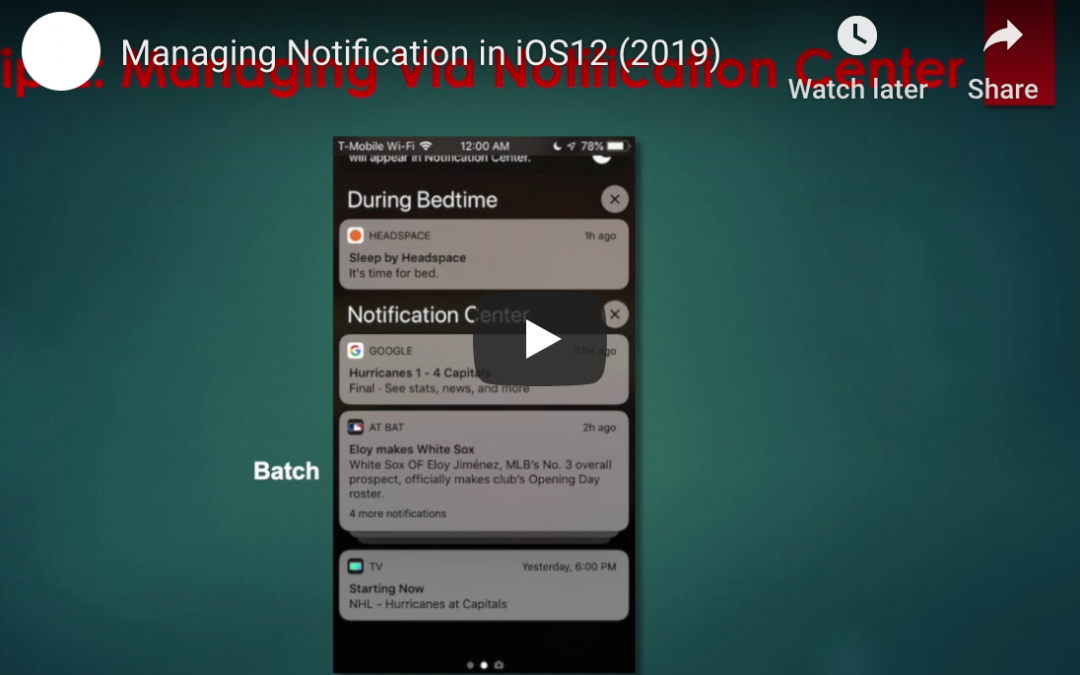
One area of the operating system that has undergone significant development in recent updates is in notification management. With more apps — and corresponding notifications — than ever before, it is important for mobile operating systems like iOS to provide ways for users to manage these notifications in a simple and streamlined way.
Here are some of the ways Apple is helping users manage their notifications in iOS 12:
Notification Grouping
One great innovation in iOS 12 is the ability to have notifications from individual apps “grouped”. This means that, instead of having a long list of every notification from an app, you will see the most recent notification for each app, with previous unanswered notifications stacked behind them. This makes it easier to see notifications from multiple apps, without the notifications from one app taking up all the space on your screen.
Grouped notifications can be expanded by tapping on the top notification, so you’ll still have access to all notifications when you’re ready to view them.
Deliver Quietly
Another new feature is the ability to have notifications delivered “quietly”. The “Deliver Quietly” function can be activated from the notification screen. When this setting is turned on, notifications will not cause a vibration or notification tone, but will still be visible when looking directly at your device. In essence, “Deliver Quietly” is very similar to the “Do Not Disturb” function — except that it can be app-specific.
App-specific notification settings
In addition to the “Deliver Quietly” feature, iOS 12 also gives users the ability to change other notification settings for individual apps. In addition to the ability to “Deliver Quietly” and turn notifications off completely, users can choose where notifications appear (notification screen, lock screen, banner at the top of the screen). In addition, individual apps can have sounds and badges turned on or off. Even notification grouping can be turned on or off for individual apps.
For the privacy-conscious, iOS 12 also gives users the ability to turn notification previews on or off for individual apps. This means you can still keep non-sensitive apps showing previews while protecting potentially sensitive data by turning off notification previews.
Quick notification setting changes
Perhaps the most convenient notification feature in iOS is the ability to quickly make app-specific notification changes. Instead of going through multiple menus in the “Settings” app, users can simply click on the ellipsis (three dots) that show up in the top-right of notifications. From here, users can make all the changes discussed in this article.
While there are more notifications than ever before, Apple is making them more manageable in iOS 12.

by Felicien | Jul 21, 2019 | Education
Microsoft Defender ATP Security for Macs
Microsoft Defender ATP (Advanced Threat Protection) is a program that detects ongoing attacks on corporate networks, blocks any that are malicious, and then provides response recommendations to improve security. Microsoft has made good on a pledge made in March 2019 by announcing that its sophisticated endpoint security service is available for Mac users.
Microsoft Defender ATP for Mac has been moved to what the company calls “general availability” as of June 28 according to Helen Allas, the principal program manager for the enterprise security team. In a July 8 post to a company blog, Allas reported that “with Microsoft Defender ATP for Mac general availability, all Microsoft Defender ATP customers now have an opportunity to start benefiting from integrated experiences across their Windows and macOS clients in Microsoft Defender Security Center.” The core components of Microsoft Defender ATP, which includes the latest “Threat & Vulnerability Management,” serve Macs as well as PCs.
The Microsoft Defender ATP for Mac supports the three latest released versions of macOS: Mojave, High Sierra, and Sierra. Customers can use Microsoft Intune and Jamf to deploy and manage Microsoft Defender ATP for Mac. Just like with Microsoft Office applications on macOS, Microsoft Auto Update is used to manage Microsoft Defender ATP for Mac updates.
There’s still more implementation to come
With this announcement came the news that this update doesn’t allow for complete integration of Microsoft Defender ATP for Macs quite yet. There are also some quirks that haven’t been ironed out for Mac users. In the “Known Issues” section of the online documentation, Microsoft has written “full Microsoft Defender ATP integration is not available yet.” And there is no date listed for when the entire program will be available for integration for Mac users.
Defense against malicious attacks
Microsoft Defender ATP is a very useful tool as it detects ongoing cyberattacks on corporate networks, blocks whatever it recognises as malicious, and then follows up to investigate and discover information about the attack and/or security breach, after which it provides response recommendations and cyberattack remediation.
How to add Microsoft Defender ATP
This defense service is a component within the highest-level Windows ten licenses, including those provided by a subscription service such as Windows 10 Enterprise E5 or Microsoft 365 E5. In fact, Microsoft claims that ATP is the differentiator between these high-level services and lower-tier bundles. You can also add ATP as an add-on service to Microsoft 365 E3 for an extra $12 per month.
If you want to add Macs to the Windows PCs already reporting and covered by Microsoft Defender ATP, users are required to license Microsoft 365 E5, Windows 10 Enterprise E5 or Windows 10 Education E5 (Microsoft 365 E5 includes Windows 10 Enterprise E5). Any Macs using Defender ATP are required to be running one of three of the newest edictions of macOS – 2018 Mojave, 2017 High Sierra, or 2016 Sierra. Once September’s release of 2019 Catalina, it’s likely that Microsoft will drop the oldest, 2016 Sierra, because Apple will no longer support that OS with regular security updates.
You can find instructions from Microsoft published on how to deploy Microsoft Defender ATP to Macs. On those instructions, users are warned that they will need “beginner-level experience in macOS and BASH scripting” as well as admin privileges to the device or devices in case there are issues and you need to use a fallback of manual deployment to install. Admins can deploy the security service to Macs using any of these platforms: Microsooft Intune, JAMF, or other MDM (mobile device management) platforms.
Instructions on how to configure Defender ATP for Mac are posted here.
Customers can register for a free trial of Defender ATP online.
