
by Felicien | Dec 13, 2017 | Education
Understanding how business owners can take advantage of the Section 179 tax break on new telecom systems
In an increasingly competitive market, business professionals across all industries are always looking for ways to cut overhead costs and taking advantage of tax deductions is a huge part of that. Recently, conversations about the Section 179 tax deduction have been dominating the American business environment.
Many business owners are wondering what’s covered under the equipment deduction mandate and what’s not. Specifically, we’ve been getting lots of questions from clients about whether or not business telecommunications systems are eligible for deduction under the Section 179.
The short answer is, yes! Business telecommunication systems are considered deductible equipment under the Section 179 mandate. But since we’ve been getting so many questions about the deduction, let’s review the key things business owners should know about taking advantage of Section 179.
Breaking Down the Tax Code: Why was Section 179 Created?
Section 179 is an IRS tax code specifically designed to help business owners cut overhead costs. Specifically, the code allows for increased savings for business owners come tax season. Section 179 allows business owners to deduct the full amount of business equipment purchases within a calendar year.
The IRS Section 179 deduction was enacted to help small businesses take a depreciation deduction for certain assets in one year, rather than depreciating them over a longer period of time (typically over a 5 to 6 years).
Why You Should Care: Understanding the Strategic Benefits of Section 179 for Business Owners
The benefits of Section 179 for SMBs are twofold. First, and most obviously, the tax break allows business owners to save valuable dollars at tax time. This alone is great for a company’s bottom line. It allows business owners to make an outright deduction, equal to the full purchase price of a qualifying piece of equipment. This helps businesses reduce taxable income, and ultimately alleviate business tax burdens.
Second, it offers a great incentive for business owners to finance or invest in a wide variety of business equipment and resources. With the ability to deduct the full purchase price, businesses are able to more strategically implement company equipment and resources to address needs.
Defining Business Equipment: What Equipment Qualifies and What Doesn’t under Section 179
Before business owners hop on the Section 179 bandwagon, it’s critical to have a baseline knowledge of what’s deductible and what’s not. The last thing any business owner wants is to make a huge investment only to find out it’s not deductible under Section 179.
Let’s look at what business equipment is deductible and what’s not covered:
QUALIFIES:
Servers
Networking Equipment / Switches
Phone & Telecommunications Systems
Routers & Firewalls
Computers
Laptops
Monitors
Wireless Internet
Copiers
Printers
Scanners
Storage Devices
Battery Backups
Non-customized, off-the-shelf software
DOESN’T QUALIFY:
Real Estate
Permanent Structures / Buildings
International Property
Gifted or inherited equipment
Used equipment
Is Your Business Telecom System Covered Under 179?
As has been seen, yes business telecommunications systems are covered equipment under Section 179. Basically, qualified equipment is any tangible, depreciable, personal property which is acquired for use in the active conduct of a trade or business. This means, if your business has been thinking about finally upgrading your telecommunications system, Section 179 offers huge incentive to pull the trigger.
Any material, long-term property that is used more than 50% of the time for business purposes can qualify for this incentive, regardless of whether the property is bought or leased. However, the IRS must deem the property as fit for the incentive by confirming that the property will last more than one year.
When it comes to telecommunications, such qualifying properties include:
Business phone systems
Unified Communications systems
Voice solutions
So, long story short, telecom system purchases can be deducted under Section 179, so long as the solutions you’ve purchased are investments for the long term. Really, it’s all about making it easier for business owners to invest in reliable, long-lasting equipment to enrich business operations. Investing in a new, permanent telecom system to optimize business communication, is definitely deductible under Section 179.
What Are the Limitations?
As amazing as Section 179 is, it does have some key limitations. Businesses cannot utilize this tax incentive if their deductions are greater than their net taxable business income for the year in question. This sounds like a lot of financial jargon but determining if your eligible isn’t that difficult. To find the magic number, simply use the following equation:
Business income – Business deductions = net taxable business income
Do not factor in the deduction for 50% of self-employment tax or any net operating losses.
If the above equation shows that you have a net loss for the year, you are not eligible for the Section 179 tax deduction.
Doing the Math: How Section 179 Saves Taxable Income for Business Owners
In order to get a better idea of how the savings actually work, it’s helpful to compare the traditional cost relief system (MACRS) with the new deduction parameters under Section 179.
Here’s how the traditional Modified Accelerated Cost Recovery System (MACRS) works:
Say a business with a gross income of $100,000, buys out a $1 phone system valued at $20,000.
The MACRS method of depreciation only allows you to deduct 20% in the first year ($100,000 x 20% = $20,000 in depreciation).
This reduces a company’s taxable income to $80,000.
However, under the Section 179 Depreciation:
Say a business has a gross income of $100,000, and you buy out a $1 phone system valued at $100,000.
The Section 179 Deduction depreciation method allows businesses to depreciate the full amount in one year ($100,000).
This reduces a company’s taxable income to $0.
This is simply a hypothetical example. However, there are a variety of tools online to help business owners calculate their deduction potential. To get an estimate, check out this Section 179 tax deduction calculator online.
The Clock is Ticking: The 2017 Tax Year is Almost Up!
Depending on the equipment purchases your company has made this year or has planned, there are huge benefits to be taken advantage of with Section 179. Getting to know the code is the first step. Also, it’s important to remember that for Section 179 deductions in 2017, equipment must be purchased and in place by midnight on December 31st, 2017.
However, even if you don’t make the deadline this year, Section 179 should be in the back of your mind as you plan for next year’s equipment purchases and upgrades. If you’ve been considering replacing your current business phone system and upgrading to a unified communications system, now is the time. You can deduct the entire cost of that new system under Section 179. A brand-new telecom system that’s entirely tax deductible? In an increasingly busy and competitive business market, that’s a no-brainer.
For business who may have been considering a new telecom system this year, you have LESS THAN A MONTH to take advantage of equipment deductions in the upcoming tax season. Don’t waste time if you want to reap the benefits of the upcoming tax season.

by Felicien | Dec 13, 2017 | Education
How Microsoft Teams is changing the game and giving Slack a run for its money
News recently broke that Microsoft Teams is officially available to anyone with an Office 365 subscription. The application has been in testing since November, but it’s now fully launched as part of the Office 365 suite. This is great news for professionals because Teams is about to make communication among business teams in Office 365 much easier.
Many tech experts agree that this latest application from Microsoft will change the game for digital communication giants like Slack. While the initial version of Teams is dynamic and fully integrated, we thought it would be beneficial to explore the key differences and capabilities between Teams and Slack to see if Microsoft has really outdone the widely-used, web-based chat solution.
The Team Chat Showdown: Slack vs. Teams
THE BASICS
Slack is the well-liked and long-standing web-based take on old-fashioned digital communication channels that use Internet Relay Chat (IRC) models. This allows for a long ‘relay’ of messages that can be persistently stored and accessed. This provides a constant flow of conversation between team members that can be re-examined or picked up from the most recent point at any time. The framework is line-oriented and text heavy but seeks to mimic the office water-cooler as a place for team members to chat in a conversational style.
Teams mimic Slack’s style but proudly includes a Microsoft twist. Microsoft Teams is a dynamic group messaging application organized around the use of chatrooms. Additionally, unlike Slack, Teams is not a standalone solution – it is fully integrated with all Office 365 applications, which optimizes the consolidation of data and functionality. Full integration means there’s no additional account sign ups or onboarding process. Only one login, using existing Office 365 credentials is required.
BUSINESS INTELLIGENCE & INTEGRATION
Furthermore, Teams relies on built-in business intelligence tools to help users better utilize and understand existing groups or teams. This makes it easier than ever to streamline the company communication platform and ensure relevant team members stay connected. This optimization is maximized even further because Teams is also integrated with Skype for Business. This means turning a Teams text conversation into a face-to-face meeting is only a click away, from within the same browser.
Like Slack, Teams can be integrated with a variety of third-party services to offer things like embedded images and videos within chat windows. Teams have even gone further than Slack in the creative department by adding a feature that allows users to choose an image and overlay text on it. Finally, thanks to Office 365 integration, file sharing capabilities are much more streamlined in Teams as opposed to Slack.
MESSAGE PRIVACY & LAYOUT
Teams are more private as it utilizes private group chat options instead of a ‘live-stream’ IRC channel like Slack. This means team members can have more private conversation streams that function more like personal messages as opposed to status updates.
Microsoft also changed the game when it comes to message view and organization. Slack has since copied the feature, but Teams was the first to orient toward threaded messaging. This allows users to cluster replies beneath specific messages. As mentioned, Slack has now included this feature, but many users agree that the threading option just doesn’t suit the Slack, line-by-line, IRC model. The bottom line is, many Slack users chose the solution for this ‘free-for-all’ approach to team communication.
It’s here where Teams parts ways most significantly from Slack. Some critics believe the Teams infrastructure is a little heavy and clunky. Threaded messages take up a lot of space, meaning users don’t have the option of seeing a variety of messages on screen at once. While threaded messaging may work for some companies, most organizations investing in an instant communications platform are looking for something more instantaneous and chat-style.
PRICING & USAGE OPTIONS
The final way that Microsoft is distancing itself from the Slack approach, is through tiered pricing models. As it stands, Teams has no free tier and no standalone pricing. Instead, Teams comes included with Office 365 Business Essentials, Business Premium as well as all three Enterprise plans (E1, E3 & E5). This means Teams is offered at no additional cost – Office 365 users pay their regular monthly subscription and have full access to the Teams app. Slack, on the other hand, a free version and a variety of basic, per-user subscription models for their stand-alone chat solution.
The Final Verdict: Microsoft Introduces a Top Contender on Their First Try
When it comes down to it, Microsoft built Teams in about 21 months and it’s already a polished and well-equipped solution. In fact, for a version 1 product, Teams is downright remarkable. So, for Office 365 business users who have been making use of Slack for communication, Teams offers a compelling alternative. Google is on the scene too, pushing Hangouts as an additional communication solution – specifically targeted at G Suite subscribers.
However, when it comes down to it, neither Slack or Hangouts offers the same integration, centralization, and customization potential that Teams offers. While Microsoft may want to rethink the visual infrastructure of Teams to reflect a more appealing and consistent flow of conversation, their solution is already changing the game when it comes to business communication. They may also be wise to consider a free, standalone subscription option to get users hooked on the features and capabilities built-in to Teams. A standalone version could also serve as an effective tool for external collaboration and cross-organizational connection.
Is teamwork in your office delayed or made difficult because of poor communication tools? Wondering about the best solutions for more instant and streamlined chat potential among team members? Reach out to our team of technology professionals any time for guidance.
by Felicien | Dec 12, 2017 | Education
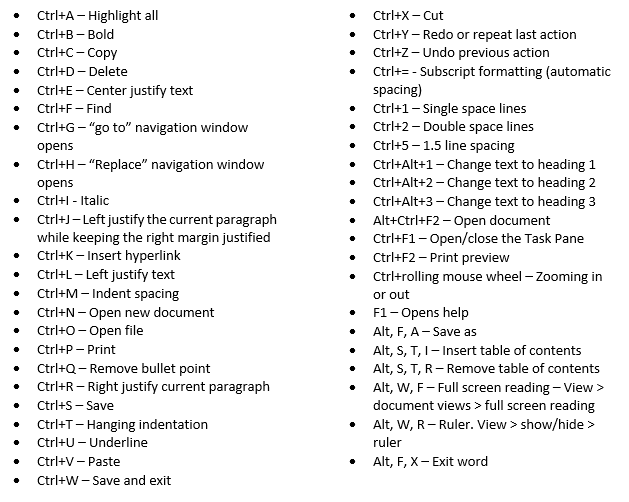
Microsoft Word is a valuable software that most people use daily. However, even if you are a word pro, there may be some things you don’t know about shortcuts. Shortcuts are simple keystroke actions that make doing certain tasks much easier and quicker than doing them with the mouse. Utilizing shortcuts can help content creators and writers speed up their process and reach deadlines faster. Any moment spent switching between keyboard and mouse is a moment wasted. Here are some of the easiest shortcuts that are easy to learn, and you can implement in your creative process immediately.
Many people who use these shortcuts are self-taught and simply pick up on everything themselves. However, you can also take a typing 101 course to learn how to implement the most common shortcuts seamlessly into your routine. There are online typing classes that will help you learn how to use not only shortcuts but also proper typing form and technique. Also, many public libraries and community colleges offer typing classes for no or low cost to the public. In some cases taking a typing class is required or offered at new jobs or in school. Take advantage of these courses when available, especially if they fill a requirement on a transcript. They are also advantageous to have on your resume or CV.
Those who don’t use shortcuts may not for a variety of reasons. Maybe they aren’t aware of them or don’t know how to use them properly. Or perhaps they are aware of them but haven’t taken the time to practice implementing them when typing. Learning these shortcuts does take some time at first, but the payoff, in the end, makes it worth it. In a professional setting you would be ahead of deadlines, have time to create more content, typing emails and memos would take seconds instead of half an hour.
In a personal setting, using shortcuts would improve the quality of your typing and again save time that you could spend doing other errands and tasks. Sending important emails, making flyers, and creating to-do lists becomes much simpler and quicker when using shortcuts.
Shortcuts were invented to make the user experience of writing within Microsoft Word quicker, more streamlined, and a more effective use of the user’s time in both a professional and personal setting. They fulfill that goal when users make a conscious effort to implement shortcuts. They can be tricky to get the hang of at first. Muscle memory dictates that when you want to highlight, copy, and paste you reach for the mouse. It can take quite a while to retrain your brain so it’s immediate response is not to reach for the mouse. However, once using these shortcuts becomes a habit, you will notice your type speed increase and any typing tasks take up less time in your day. To become a more productive individual it is important to take advantage of these kinds of shortcuts. By spending less time typing you can focus more on the meaning behind the words, and the message of the writing as a whole.

by Felicien | Dec 12, 2017 | Education
Exploring the ongoing impacts and remedies for the KRACK Wi-Fi vulnerability
It’s been nearly two months since the KRACK Wi-Fi bug was broadcast to the world. The news hit headlines across the globe in October of this year when tech researchers discovered the wide-spread vulnerability that impacted IoT devices of all kinds.
Two months down the road, we’ve decided to check in and ensure that businesses have replaced or patched affected systems and devices. So often, we forget about dangerous vulnerabilities once the headlines fade. But since the KRACK vulnerability was so widespread and impacted internet connections through a variety of IoT devices, it’s critical that businesses stay on their toes and ensure no holes remain.
The Basics: Recapping the KRACK Wi-Fi Vulnerability
As noted, in October 2017, a widespread Wi-Fi flaw was discovered and was dubbed KRACK or Key Reinstallation Attack. KRACK has been described as a security flaw in the WPA2 protocol, which could allow criminals to break the encryption between a router and a given device. Once encryption is broken, criminals are able to intercept and interfere with network traffic.
Security vulnerabilities like KRACK can be hard to wrap your head around so here’s a quick breakdown of how KRACK happens:
Hackers find WPA2-PSK networks that they want to infiltrate and wait for a user to connect. In a modern business world, users connect to Wi-Fi hotspots everywhere – maybe in the office, but often in remote locations like a public park, coffee shop or their parked vehicle.
As the device works to legitimize the Wi-Fi connection, hackers can quickly interfere and decrypt any traffic being exchanged over Wi-Fi. This means hackers have the power to cause a lot of trouble without being on the network itself. Without an actual connection to the network, hackers take advantage of this vulnerability to intercept, modify or forge data as well as install malicious malware.
What makes KRACK especially scary is the fact that the security flaw isn’t contained to a specific software program, rather it targets WPA2 Wi-Fi – a widely used protocol that countless business and individuals rely on daily.
Basically, because the vulnerability affects Wi-Fi encryption, it sent the entire tech industry scrambling. The reason is, the so-called KRACK attack affects nearly every wireless device to some extent, leaving them vulnerable to hijacked internet connections. That’s a pretty massive scope – especially in the age of the Internet of Things.
Long Road Ahead: Why Experts Believe Devices Will Be Vulnerable to KRACK for Years
To be honest the full extent of the KRACK fallout remains to be seen. While all the major platforms like iOS, MacOS, and Windows have already been patched, there are millions of routers and other IoT devices that will likely never see a fix. This means the risk factor could linger for years.
This kind of wide-reaching, long-lasting attack exposes just how challenging it is to protect IoT networks – and how much work the industry has to do in terms of expanding security protocols. While your office computer, iPhone, and laptop may be patched, IoT devices are hiding everywhere. Have you patched your router? What about your security cameras? Even automated thermostats and garage doors could be impacted. With so many devices made vulnerable, the challenge to contain the threat efficiently is very difficult.
The reason containment is so hard is because some IoT devices just don’t get the regular software updates they need to correct security issues. Thermostats and security cameras are rarely in mind when a business schedules software updates. In fact, because KRACK is very complex and requires an industry-wide, coordinated effort to fix, many security experts recommend buying new equipment once options with built-in patches are on the market.
It’s not that manufacturers aren’t trying. Netgear – a leading provider of routers – released numerous patches for its router models the very day that KRACK went public. The problem is that manufacturers like Netgear produce thousands of different product models – all of which need to be independently tested for KRACK impact. This is a huge job and one that makes it difficult to say the problem is totally taken care of.
Double Check: Even if You Think Your Patched, Give Every Device a Second Thought
While it may seem like an insurmountable problem, there is one key thing that business owners can do to ensure they’ve done all they can. Whatever advice you may have heard for dealing with KRACK, only one solution has a tangible benefit: get your devices patched. If you’re not sure whether a certain device is patched or not, take a look at this running list of companies that have released patches.
If you have an iPhone, Mac, or Android device, and haven’t patched it yet – patch it right now! If you have a variety of IoT devices in your office, create an inventory and research the patching options for each. If there are certain devices with no available fix, it might be worth considering a replacement.
However, before you go throwing out devices, it’s a good idea to reach out to a team of IT professionals. Consulting with a team of experts can help you determine which devices are fixable and which need to be axed to maintain security. Since KRACK made headlines, we’ve been working alongside concerned clients to make sure every last business device is patched. However, we can only help those who reach out with concerns about potentially vulnerable devices.
Has your IT provider helped you patch or replace impacted devices so you’re no longer vulnerable? If you think there are unpatched, vulnerable IoT devices lurking in your office don’t hesitate to give our team of experts a call. As long as you have a rough idea of the devices that might be vulnerable, our team of professionals can work with you to mediate any lingering risk.

by Felicien | Dec 12, 2017 | Education
Cybercrime causes over $1 trillion in damages every year. Understanding the statistic is the first step to avoid becoming one. There are so many scams out there today designed to dupe you and trick you into making yourself vulnerable and giving up your information. It is more important than ever to be cautious on the internet as cybercrime increases at an exponential rate. Cybercriminals have become more creative and conniving in the ways that they gain access to your information.
Types of Scams
Currently, there has been a scam occurring where cybercriminals deposit malware onto your computer, then the criminal pretends to be tech support from a reputable company such as Microsoft and attempts to “help” you fix your computer. Of course, when they are “helping” you they are also mining your sensitive data or stealing your personal information. This is extremely dangerous because you are talking directly with the criminal either via instant messaging or over the phone. They can gain more information from talking directly to you than they can be mining your computer.
Another extremely common scam is email phishing. This involves criminals sending out emails it tries to trick you into giving them your information such as your Facebook login, phone number, or address. These could look like free promotional from companies, like coupons or raffle gifts as well. Always be wary of emails from unknown companies that you haven’t heard of or didn’t specifically request emails from. Also, if you see that an email is part of a chain that is a sure sign that it is a scam.
A scam to beware of especially during the holidays is the eCard scam. This is when you will receive an email offering a free eCard service. Usually, it will say something along the lines of “send your first ecard for free! Click this link”. Never click the link unless you specifically requested an eCard service and are expecting it.
During the summer months the number of travel scams increases. These scams often involve some type of last-minute free travel to an exotic destination that has a time limit on the offer. These kinds of offers appeal to a person’s sense of adventure, however, these are very rarely real offers and just a quick way for scammers to get your information.
After natural disasters, scammers will take advantage of people who seek to help victims and will set up fake websites to accept donations, or send emails asking for monetary donations.
Another common scam is the “overpayment” type. This scam occurs when a scammer finds an ad for something you have posted trying to sell such as a car or computer. They pretend to be a buyer and offer you a larger sum of money than what you are asking for. They do this supposedly to cover costs of extra shipping fees for international shipping. They will often send you a fraudulent cashier’s check or money order and then have you send a check for the difference with the goods they purchased from you. A similar case can occur when you post your resume online. You may get a job offer from an overseas company. In this case, they will ask for your banking information to “pay” you. Then, of course, you will never get paid but will probably experience identity theft, or money stolen from your account.
As a rule of thumb, beware of any messages, pop-ups, or emails that either request money from you or are offering to send you money. Scammers get very creative in the ways they will try to trick you into giving up your information. Sometimes they will claim to be a lawyer representing a deceased family member who has given you an inheritance. Another common play is they will pretend to be a representative of a government agency requesting urgent payments. A less common play is the criminal will send threatening messages until you pay them a sum of money, this is called “the hitman” scam. Other common plays are the “lottery” scam and the “credit card or loan” scam which are offering you money in exchange for your information. The two common themes of all these scams are that they always come off as urgent, insistent, or pushy. Furthermore, they always are either urgently requesting money to solve an issue or offering you money in exchange for some type of information.
What Can You Do to Protect Yourself?
There are certain precautions that you can take to protect yourself from these types of scams. Here are some of the basic guidelines you should know.
Use common sense. If your computer stops working properly right after visiting a website or clicking on a pop-up, you can be certain it’s a virus. Especially if you notice the difference and then a “tech support representative” contacts you right after. Or if an email offer seems a little too good to be true, it probably is.
Don’t ever click on pop-ups or links in sketchy emails
Be wary of tech support that initiations contact. Generally, tech support won’t contact you first. You must call them with the problem first, and they may call you back or get back to you via email, but that’s about all.
Uninstall and delete any remote managing tools or applications you have may download. If you close the criminal’s doorway into your device they can do no more harm.
Install a legitimate antivirus software and update your computer as soon as possible.
Change your passwords
Contact your bank or credit card provider to make sure there was no unusual activity on your account.
If your computer still isn’t working right contact your real tech support to see if they can solve the issues.
If the problems persist then consider restoring it to factory settings and restoring from backups.
If you follow these guidelines this will greatly reduce your risk of exposure to criminals. It is especially important to keep a level head and use logic and reasoning today when surfing the internet. Many scammers will appeal to your emotions using anger, fear, love, or sympathy to take advantage of you. Stay one step ahead and be vigilant about guarding your information.

by Felicien | Dec 12, 2017 | Education
We like tech, it’s what we do. As the holiday shopping season kicks into overdrive, we are bringing you 12 of the most requested, most wanted tech gifts for 2017. Check back each business day between now and December 19th for another must-have tech item and why you should check it out.
You’ve purchased the new Xbox One X or a PS4 Pro, and now you can’t wait to get gaming. Or maybe the console purchase was for a spouse and/or child. Sure, your run-of-the-mill HDMI capable TV that adorns your living room will connect. But you didn’t get all that new and great 4K power just to force it onto a standard high definition television, did you?
Of course not. You have 4K now, so that demands a great 4K experience. The folks over at Samsung hear you and have just the screen in mind. The Samsung Q7F is the perfect TV for your 4K movies or games. It’s great for media consumption, with four HDMI ports and three USB ports. These can be used individually, or you can connect all your devices to the Samsung One Connect Box, which acts as a hub for HDMI connections and feeds into the TV via a single cable. Super convenient when you have multiple systems.
Recommended by the folks over at Xbox, this premium screen will run you minimum $3,000 for the 55” model and as high as $6,000 for the 75” version. Available at most retailers, the best deals are usually hiding on the store’s website.
Happy Holidays and good luck on the tech hunt from all of us here at {company}!
