
by Felicien | Mar 23, 2018 | Education
The recent surge in cyber theft and hacking has everyone worried. With each new cyber breach, consumers realize just how vulnerable we all are. After the Equifax hack of September 2017, state legislatures began proposing new laws that would tighten data security.
For those working with an MSP, the burden often falls on them to increase security so that breaches simply don’t take place. Though this concept is good in theory, MSP’s sometimes struggle to find the right balance between convenience and stronger security for cyberspace.
New Proposed Legislation
The American Bankers Association believes that during 2018, at least half of all states will develop tougher data breach laws for the financial services industry. One of these bills receiving more attention originates in New York, the home of many prominent financial institutions. Experts believe the new bills being developed for New York could become a model for other financial providers. These bills could even affect federal laws.
The new legislation will be designed to stop the onslaught of huge, expensive data breaches, such as JP Morgan Chase, Sony Pictures, and Equifax. Many believe this type of legislation is way overdue.
The bill being developed by legislatures in New York is called the “Stop Hacks and Improve Data Security Act” (SHIELD Act). It will require that any organization that handles financial or sensitive information produce clear examples of their safeguards. It would also require all banks, credit reporting agencies, brokerages and insurance providers to develop better security measures. In addition, the new laws will apply to anyone who deals with the personal financial information of consumers.
The bill will contain phrases like “clear examples of safeguards” that force organizations to provide proof of their security measures. Many experts believe these “safeguards” might include all administrative, technical and physical security measures taken by any company that deals with the private information of New Yorkers.
Though MSPs are already gearing up to offer higher levels of data security to their customers, the problem of data security falls back on each financial services company. Consumers are outraged when corporations the size of JP Morgan Chase and Equifax don’t take data security seriously enough. This outrage can spawn expensive lawsuits.
Keys to Success
Though MSPs will begin offering more robust data security plans, it’s important to remember that the burden falls back on each business. In this day and age, you simply can’t rely on a third-party vendor; the stakes are too high. Your company could be sued by anyone who loses their personal and banking info to hackers. For this reason, most businesses have a small team of IT pros on premises that communicate regularly with their MSP.
Your own IT department should be fully engaged with your MSP. They should understand exactly what security measures have been put in place and how this system is protecting your data. They should be involved in program upgrades. They can also work inside your business to organize monthly security briefings for employees.
Consider Hiring Security Experts
Though most MSP’s offer a comprehensive group of security services to help protect your data from intrusion, many top banking, and financial institutions are going one step further. They are hiring security experts whose only job is to ensure that all data is safe and secure from hackers. Companies that specialize in providing data security plans follow a strict regimen of protocols. They conduct regular security risk assessments. Their team will come out to your company on a regular basis to train employees. And this is so important to your overall security plan working.
Risky employee behavior is responsible for over half the data breaches. Every day in companies all over the world, employees make mistakes that could spell disaster. They commonly share passwords, ignore prompts to install patches, click on suspicious links in emails, and use weak passwords. Employees need better training in order to know and remember to utilize all company data breach policies.
Are You Doing Enough to Stop Hackers?
Though many MSP’s are fully up to date on the policies and procedures for greater cybersecurity protection, it’s important to decide for yourself whether their security measures are strong enough. If your company handles the financial information or healthcare information of others, basic data security programs may not be enough.
Ransomware attacks are on the rise. Cyber thieves break into your system and hold your data hostage until you pay the ransom. Many company owners are not sure whether their data is safe from these attacks. The days when anti-virus programs and firewalls were adequate to protect data are over. Your company will require the highest level of protection in order to remain safe. Remember that cybercriminals never rest. They’re always on the lookout for new ways to steal names, addresses, and banking information.
The Revolution in Technology
Today’s cloud technology allows everyone to take their work with them wherever they go. In addition, consumers can access that information on a laptop, phone, or iPad. Though all these new advancements in technology are fun and convenient, they do present a unique challenge for security experts. Regular security risk assessments can determine whether your employees are leaving important data right out in the open for criminals to find.
HIPAA guidelines require that a normal SRA include a basic inventory of where and how sensitive data is being used. These assessments are available for financial institutions as well. They are a great way to get the big picture about how sensitive data is transmitted, stored and accessed, whether using email, text messages or mobile devices. Most security experts believe that a comprehensive Security Risk Assessment is a great place to start.
Better Documentation
Lastly, good solid documentation of all security policies is required. All employees should know and understand the security policies and procedures used by their employer. Each software upgrade should be documented. Any events that might affect your organization’s data security should be documented as well. Any time an employee is terminated, your company should have a very specific procedure that it follows to avoid an angry employee from stealing data.
Changing the Way We Do Business
The new cybersecurity laws may change the way we all do business each day. Though some of these laws will be cumbersome and inconvenient, the alternative is much worse. It’s important to remember that the new cybersecurity legislation is meant to protect us from hackers and data loss. Consumers want to go back to feeling safe again when they do business online. And that’s the goal of these new laws.
Whether you decide to select security experts who have the skills and tools to address all types of data breaches or continue on with your MSP, the game has to change in order to stop hacking and cyber crimes. Each employee should feel personally responsible for doing their best to protect data. Your MSP and IT department must work together to build the strongest fortress possible for your sensitive information.

by Felicien | Mar 23, 2018 | Education
Are you certain that your healthcare workers understand the risks to your PHI and other confidential information? A clinic in Baltimore thought theirs did, but they were proven wrong when they discovered their patient records were up for sale on the Dark Web.
In 2016, a Baltimore substance abuse treatment facility was hacked. Their patient records ended up on the Dark Web, according to DataBreaches.net. Information such as dates of admission, what patients were taking methadone, and what their dosing requirements were, along with the names of doctors and counselors were exposed to cybercriminals.
The prominent Washington University School of Medicine learned about a phishing incident on January 24, 2017, when an employee responded to a phishing attack on December 2, 2016. The Office of Civil Rights (OCR) said that 80,270 individuals might have been affected.
“This phishing scam allowed some of Washington University School of Medicine’s patient data to potentially be accessed, the school reported on its website. The accessed employee email accounts may have included names, birth dates, medical record numbers, diagnosis and treatment information, other clinical information, and Social Security numbers in some cases.”
Texas-based Urology Austin, PLLC revealed that they experienced a ransomware attack on January 22, 2017. Within minutes of the attack, they shut down their computer network. However, OCR reported that 279,663 individuals’ private data might have been affected.
They immediately took steps to restore the affected data and their operations. A Urology Austin representative told local news that they didn’t pay the ransom and that they were able to restore the patient information from a backup.
The odds that a data breach can happen to your healthcare organization have greatly increased.
Why? Because healthcare workers generally lack cybersecurity awareness. The following are some alarming statistics:
24% of healthcare workers lack awareness about phishing emails as compared to 8% in non-healthcare sectors
Only 18% of healthcare employees were able to recognize phishing emails. Physicians were 3 times worse at it.
88% of healthcare workers opened phishing emails.
50% of doctors were in the “risk” category, making them likely to commit a serious data breach.
Healthcare employees exhibited less knowledge about cybersecurity than the larger population.
24% of physicians couldn’t identify the common signs of malware.
30% of healthcare workers took risks that put the safety of patient records at risk.
23% failed to recognize forms of malware.
18% chose the wrong actions when they were given scenarios to respond to. Many thought it was okay to share patient data via their personal email accounts or over insecure cloud platforms.
The high costs of a lack of cybersecurity awareness
The Identity Theft Resource Center revealed that there were 1,091 breaches in 2016 that affected 15 million records from hospitals, dental clinics, senior care facilities, and others. This is a 40 percent increase from the previous year. As a result, the Dark Web is flooded with “fullz” (full packages of personally identifiable information) as well as patient insurance information.
Healthcare hacking and IT incidents accounted for the majority of large-scale incidents in 2017.
According to the 2017 Cost of a Data Breach Study: Global Overview, healthcare data breach costs are the highest for the seventh straight year. Data breaches from healthcare organizations cost $380 per record. This is greater than 2.5 times the global average in other industries.
The Answer
It’s obvious from this data that healthcare entities are not properly educated and prepared to defend themselves against sophisticated hacking attempts today. From these statistics, you can see that these organizations are at risk of HIPAA noncompliance.
Your first layer of defense is your employees. They require professional security awareness training that includes both privacy awareness and demonstrations on how to recognize phishing attempts and what to do if they receive one.
It’s only through ongoing security awareness training that you can keep your healthcare employees apprised of the latest sophisticated threats, how to mitigate them and what to do protect your organization from severe, negative consequences.
Beyond ensuring that your PHI and other confidential data is secure and protected at all times, you must provide security awareness training that’s conducted by a professional who understands PHI and what healthcare employees need to know.
According to the US Department of Health and Human Services, employee cybersecurity awareness training should meet the following four objectives:
Develop and demonstrate foundational-level knowledge of cybersecurity.
Employ best practices to protect privacy and safeguard Controlled Unclassified Information (CUI).
Recognize cyber threats to information systems.
Identify and report potential cybersecurity and privacy incidents promptly.
Don’t Become Another Statistic.
5 More Tips to Keep in Mind:
Regular and Recurring Security Training Is Essential.
Hackers are constantly developing new, sophisticated methods to trick your employees into clicking on malicious links and downloading dangerous software. For this reason, it’s critical that your employees stay up to date on the very latest security threats and how to avoid them. Additionally, refresher training will keep them on their toes and save you a lot of worries.
KISS (Keep It Simple and Secure)
If the security measures you teach are complicated and difficult to follow, your employees won’t remember them. Instruction should be clear and concise with ways for employees to easily remember your policies and rules. This is another reason why it’s always best to defer to IT professionals to train your staff.
Your Employees Need to Know How to Respond to Security Incidents.
Along with teaching your staff how to avoid security incidents, they should be aware of how to appropriately respond to them. What should they do if they come across a malicious attachment or link? What should they do if they accidentally click on one? Make sure they know what to do and who to contact.
Teach Your Employees about Cybersecurity for Their Personal Use.
It’s also important to teach your healthcare staff about network security for their personal purposes, such as when purchasing items online or what to do if they receive phishing emails on their personal accounts. They should also know how to protect their personal information on your organization’s network.
Make Sure Security Support is Easily Accessible.
Ensure your staff knows where to go if they have security questions or concerns. Your IT Managed Services Provider (MSP) will have a 24/7 Help Desk for support and assistance with these concerns or anything regarding technology. Plus, if an employee does come across a ransomware attempt, your MSP can intervene remotely to remove any malware and ensure your PHI and confidential data remains secure.

by Felicien | Mar 22, 2018 | Education
Bring your healthcare practice into the future with cloud computing technology.
As the demand for better healthcare rises in the U.S., more healthcare organizations are utilizing cloud computing. There’s been an increase in demand for healthcare services due to aging populations and the growing prevalence of chronic diseases. Healthcare providers are experiencing cost pressures from the need to do more along with expectations for better outcomes that deliver increased value. This demand has driven healthcare providers to depend on cloud computing because it provides a cost-effective, on-demand resource for them to access the information they need to make important decisions.
Healthcare providers have quickly realized the potential benefits of cloud computing to automate management and provide for:
Security and Disaster Protection,
Real-time business intelligence,
IoT augmented patient care,
Big data analytics,
Cognitive assistance,
Economies of scale, and
Flexible payment models.
Cloud computing plays an important role for both providers and patients.
It has replaced traditional healthcare operations with digital alternatives that help to lower costs and allow for data integration and analysis, resulting in higher efficiency and effectiveness. Cloud services provide computing solutions at a lower cost than buying or licensing them and facilitates the information sharing and collaboration physicians and patients rely on today.
With cloud computing, IT resources can be accessed on demand and paid for as an operating expense. Healthcare organizations are benefitting from:
Software as a Service (SaaS) solutions,
Infrastructure as a Service (IaaS) virtualized computing resources, and
Platform as a Service (PaaS) that allows them to develop, run, and manage applications without the complexity of constructing and maintaining an infrastructure in-house.
With SaaS specifically designed for the healthcare industry, barriers to entry have disappeared. Cloud Solution Providers (CSPs) deliver higher levels of service for applications, along with disaster recovery for a lower cost when compared to using on-premises solutions. They also provide improved responsiveness with decreased administrative overhead.
Cloud solutions offer scalability and the ability to adjust as demand for healthcare services increase or decrease – and they provide web access to data without the need to store information on computer devices.
Cloud services allow clinicians to search vast amounts of data to produce the best treatment plans. Patients can also access these services to learn about their medical issues and collaborate with their doctors.
Regarding patient privacy and HIPAA regulations, cloud services use data centers that are typically more secure than in-house solutions. They protect against threats with both physical and technical methods and are maintained by expert IT staff. Additionally, they employ sophisticated security controls and data encryption. CSPs now offer HIPAA-enabled offerings in accordance with the HITECH Act.
With traditional IT, the healthcare organization is responsible for security. With cloud services, the responsibility is shared between the cloud provider and the healthcare organization.
There’s no need to hire IT employees because cloud services come with all the needed IT skills required. The costs for these experts is spread across many customers.
Many CSPs offer services with an upfront financial commitment for a multi-year term, or on a subscription basis. This flexibility enables organizations to optimize financial treatment of cloud services to meet their unique needs.
Cloud-based healthcare IT systems allow for broad interoperability and integration of other systems and applications like EHR/EMR solutions. They offer the ability to share information easily and securely.
Cloud services provide secure remote access to applications and data, and they support access from mobile devices via the Internet. They offer access to a much larger ecosystem of information and a wide range of services.
Cloud security is a priority for CSPs. Security systems and tools are integrated with the cloud-based services they provide. They come with controls for access and authentication, firewalls, encryption services, monitoring and intrusion detection. Plus, CSPs offer government-certified services through initiatives like FedRAMP, FISMA, and FIPS.
Backup as a Service (BaaS): Healthcare organizations outsource their backup and recovery services to an online data backup cloud service provider. This allows for complete data backup sets that are always available and useable.
Disaster Recovery as a Service (DRaaS) is available via the cloud in the face of IT failure or data loss. With DRaaS, healthcare organizations don’t have to invest in or maintain their own disaster recovery environments. The DRaaS provider can implement the plan and ensure timely availability of IT systems with minimal loss of data.
Sophisticated analytic capabilities can be used with business intelligence solutions to improve both patient-specific assessment and management. Intelligent business process management suites (iBPMSs) and case management frameworks (CMFs) provide healthcare staff the capabilities they need to mitigate medical mistakes and minimize patient adverse events (PAEs).
Cloud services facilitate personal health maintenance, improve diagnoses, obtain better case outcomes, and optimize healthcare delivery. Hospitals and healthcare practices are increasingly relying on cloud-based practice management, medical records and medical image archiving solutions. They offer cost-effective benefits and the ability to offload tasks from hospital IT departments so that they can support other operational and clinical support systems.
Cloud services allow healthcare organizations to take advantage of storage services at a fraction of the cost of housing them internally. This results in reduced capital expenses and reduced staffing needs as well.
Cloud computing promotes patient compliance. Patients are now sharing vital information with their providers to help them when making decisions and dealing with differential diagnoses. The increase in cloud computing has led to the replacement of health IT systems with new capabilities that allow patients to play a greater role in their healthcare. Cloud computing is at the center of this change – it supports the collaboration and information sharing that consumers demand today.
Patients are using the cloud to take a more active role in maintaining their health via their computers, smartphones and wearable devices that track their activity, exercise, diets and vital signs. Cloud computing also helps patients find the best, most appropriate health services in their area.
Cloud computing provides the connectivity channels required for telemedicine and eliminates the need to install complex technologies.
It allows for a connected model where healthcare can seamlessly be delivered from multiple providers. Furthermore, it offers the opportunity for patients to communicate and collaborate with medical staff and be part of the management of their care.
Cloud computing leverages emerging technologies to enable care outside of the physical hospital or doctor’s office, through the use of wearable devices that connect to cloud-based smart healthcare systems. The Internet of Things (IoT) devices provide near-real-time data and convey vital signs from anywhere in the world. It allows providers to monitor a patient’s health while giving them the flexibility to live their life.
Mobile computer applications, the IoT and wearable devices that are supported by cloud applications are becoming more commonplace. This has helped to change the doctor-patient culture from a “fix-it” mentality to one that is prevention-based. Cloud systems also make it easy for patients and providers to benefit from registration to support of IoT communication protocols and the management of IoT device data.
Due to the benefits it provides, adoption of cloud computing solutions in healthcare is anticipated to accelerate in the coming years. It’s important to identify which applications and services should be migrated to the cloud. Migration isn’t always easy and should be managed by an IT professional that is experienced in cloud migration services. Furthermore, to fully benefit from cloud computing, healthcare organizations should develop a strategy that complements its business goals. Cloud solutions for healthcare organizations will continue to provide new and improved patient care capabilities as more advances are accomplished.
by Felicien | Mar 22, 2018 | Education
With the 2016 version of Excel, Microsoft has really upped the game for people who aren’t great with numbers. You can now easily use one-click access that can be customized to provide the functionality you need.
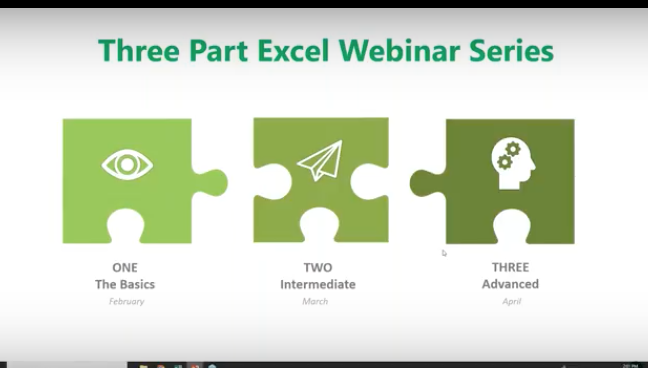
This is the first of a three-part series about using Microsoft Excel 2016 to help you identify trends, construct helpful charts, and organize information to maximize the value of your data.
You can use Excel Worksheets and Workbooks in conjunction with programs like Microsoft Access and PowerPoint. Excel 2016 possesses many capabilities that aren’t readily apparent. That’s why we’re providing this three-part series for you.
What is Excel and how is it organized?
Excel is an electronic spreadsheet program that’s used to store, organize and manipulate data. You enter data into Workbooks that are made up of individual Worksheets. In the Worksheets, you enter data into cells that are organized into rows and columns. Excel data can consist of text, numbers, dates, times and formulas.
Why would you want to use Excel?
If you or your employees work with financial data, it’s a great tool to use for:
Basic mathematical operations like adding, dividing, and multiplying.
Finding values like profits or losses.
Calculations like averages, percentages and number counts.
Performing calculations in Excel is only the tip of the iceberg. There’s much more you can do like creating charts and graphical layouts to make it easier to recognize trends and more easily analyze data.
Navigation
What’s great about Excel is that it has the same set up as other Microsoft products you’re familiar with. You have tabs across the top, where each tab has a corresponding ribbon with many functionalities to choose from.
The Quick Access Toolbar
The Quick Access Toolbar is a drop-down menu where you’ll find functions that you commonly use like Print and Save. You can also customize the Quick Access menu with other functions you use on a regular basis.
The Formula Bar
This is located underneath the ribbon next to the Name Box that shows you where your cursor is located on your Worksheet. The Formula Bar is important because it’s what calculates the math for you. Excel does the calculation and displays the answer in the cell you choose. The Formula Bar also shows you the contents of the particular cell you’re in.
Adding Data
There are three ways you can add data to your Excel Worksheet. You can:
Type in the data,
Copy and Paste data, or
Import data from other sources.
This is great if you have a large amount of data. For example, if you have customer lists in a database, you can even pull this into Excel.
You can enter data into only one cell, into several cells at the same time, or even on more than one Worksheet at once. And, as mentioned, the data can be numbers text, formulas, dates, or times.
On your Worksheet, simply click a cell and type in the information that you want to enter. Then hit ENTER or TAB. If you typed in a date, Excel will recognize this and format it the way you’ve specified in your default settings.
Formulas
Excel computes the correct answer when you enter a formula into a cell. Once you’ve done this, it recalculates whenever you change any of the values. The way Excel knows that you’re entering a formula is by starting with an equal sign. Then you follow the equal sign with a SUM or AVERAGE.
For example, C2: =A2+B2 means that the number in C2 is what occurs when you add the numbers in A2 and B2.
You can type this in manually, but now Excel has great functionalities to help you do this. The simple way is to put your cursor in cell C2, hit = and type in A2+B2. The numbers in A2 and B2 will be added, and the SUM will be entered in cell C2.
Note: You always want to calculate using the actual cells rather than typing in numbers like 1 + 2, etc. The reason for this is so you can go back at any time and change the values in cells and the formula will calculate with the new numbers.
Let’s say you want to add a bunch of numbers together in your Worksheet. You can type = sum (a1:a5) in the cell where you want the answer to appear. Or you can do this and drag your mouse across the cells you want to add. Type =sum ( and drag your mouse across the cells and hit ENTER. The sum will appear in the cell without you having to typing in all the numbers! When you put your cursor on the cell, you will see the actual formula you just created.
There are many ways to do the same thing in Excel. It’s like this across all Microsoft products. You can go to the Ribbon at the top to “Auto Sum” to do the same calculation. Select a cell next to the numbers you want to add, click AutoSum on the Home tab and press Enter. Do what works best for you.
Once you create a formula, you can copy and paste it into another cell. You can also copy and paste formulas into different Worksheets as well. This can save you a lot of time.
Formatting Worksheets
With Excel 2016, you can format your Worksheets much more easily than you could before. You can use document themes throughout the Worksheets in your Workbook to present a professional and consistent appearance. You can also apply predesigned formats as well.
Let’s say you have a Worksheet with many rows that are hard to read. You can go in and create fill colors and more to differentiate the rows, columns, and headers to make reading much easier.
You have options to create borders around cells, rows or columns from the drop-down menu. You can also shade cells with a solid background. Don’t forget that you can change the style and types of fonts. Right-click the text, and a drop-down menu will appear where you can make these and other selections easily.
Creating Charts
If the data isn’t complex, you can easily read it, but if you have a lot of data, creating a chart will help you better analyze it. You can select specific cells, rows, and columns for your chart. One way to do this is to highlight the data and go to the top ribbon to select the type of chart you want to create.
With Excel 2016, you have a “recommended charts” option. Excel will help you choose the chart that best suits your data.
You can then go in and further customize your chart in the “Chart Tools”. You can change the color scheme, 3D effects, shading and more. If you change the data in the cells in your Worksheet, your chart will reflect the changes.
Some of the new charts in 2016 include:
Waterfall
Tree Map
Box and Whiskers
Sunburst
Creating Tables
You may be used to creating tables in Word or PowerPoint. Some people think the format in Excel is already in a table, but it’s not; at least until you tell it to do so. If you want to do this, select your data, go to “Insert” and select “Table.”
Similar to other Microsoft products, tabs will appear to help you format your table.
Viewing Worksheets
When dealing with lots of information, it can get unruly trying to work around various rows and columns. This is where Viewing Worksheets can be helpful. You can freeze a portion of your worksheet with “Freeze Panes” to more easily view it.
You also have the ability to “split” the data to view different parts of your Worksheet. You can compare two Worksheets in the same Workbook or even in different Workbooks by viewing them side by side.
Saving and Printing
If you have Worksheets that are so large they won’t fit on one page, go to “Save As” and decide on the name, where it gets saved, and go to “Print” where you can save the file to a pdf that you can send.
You can select options for printing the entire sheet, part of it, resizing it, and more to suit your needs. Going to “Page Setup” will allow you to shrink the entire Worksheet down to a size that’s more manageable for printing.
Sharing & Security
In Excel 2016 you can share Workbooks and Worksheets with others and password-protect them. The people you send them to need to know your password to open them, whether you send them via email, share them on your network, or via the cloud. From within Excel, you can designate who can access your Worksheets and Workbooks, and also whether they can edit them or not. There are a variety of parameters you can set within a Worksheet.
For example, if you want to hide employees’ salaries, you can hide this section when you share it. Or, you can let people see your data but lock it down, so they can’t change it. You can also protect your Worksheets and Workbooks to keep them secure from non-authorized users.
The Quick Analysis Tool
When highlighting data, click on the Quick Analysis button to create a chart, highlight specific cells, and much more. It doesn’t give you the functionality you’ll find in the Ribbon, but you can get things done quickly and easily with this tool.
3D Power Maps
This is another new tool in Excel 2016 that lets you look at information in ways you might not have seen in the two-dimensional format. This helps you strategically create your data on a 3D map. You need latitude and longitude data to do this. You can also import your own maps into 3D Power Maps.
PivotTables
PivotTables help you analyze your Worksheet data. You can summarize, analyze, explore and present your data in just a few clicks. They are very flexible and can be adjusted to your unique needs. Note: Your data should be organized without blank rows or columns for this to work properly.
The good news is that Excel 2016 will also help you pick the best format for your PivotTables!
PivotCharts
PivotCharts are another great way to add visualizations to your data. You will first need a PivotTable to create a chart. Now, your PivotTable will behave like a PivotChart. When you change the information in your PivotTable, the PivotChart will also reflect this change. The PivotTable is connected to the PivotChart.
That’s it for now! For more information on using Excel 2016 like a Pro, feel free to contact the Microsoft Experts at {company}! {phone} {email}

by Felicien | Mar 22, 2018 | Education
With a great looking, professional website, your business can compete in today’s complex marketplace. Since your website is the first thing consumers see, it has to make a great first impression. Otherwise, you may find your traffic declining and conversions down. A company website should also reflect your values, experience and industry knowledge.
Often times, business owners try to cut corners and design their own website. While this can be a good solution if you’re low on cash, it can also result in a poorly built site. Some business owners have good, keen insights on how their website should be laid out, the right colors to use and other design elements. But often, this is not true. You may be a pro at what you do, but designing a website requires specific skills you may not have. Before you let your cousin’s roommate design your website, or tackle it yourself, check out these 9 web design mistakes that business owners consistently make.
Number One: User-Friendly Design
A great deal of research has gone into the topic of how to create a user-friendly website. User experience (UX) is one of the key elements of a great website. UX focuses on making sure each visitor has the best possible experience on your site. Was the site easy to navigate? Was the information there credible? Did visitors find the content valuable? It’s a complicated process to get each one of these exactly right.
Number Two: Is It Mobile Friendly?
Most web designers will claim to give you a website that is mobile friendly but don’t take their word for it. This is something that every web designer says to potential customers. Instead, check out a few of their past designs and make sure. Each year, the number of people shopping on their smartphone grows and that is slated to continue on into the near future. A poorly executed mobile site could cost you in the end.
Number Three: Professionally Written Content
This is another area where business owners often try to cut corners. Why not let your spouse, brother or one of the kids write your content? Because poorly written content shouts out to the public that you aren’t taking your business seriously. An experienced copywriter knows how to word your content so that it’s easy and fun to read and contains your important keywords.
Number Four: Web Design Layout
There are so many choices when it comes to how your site should be designed. You have unlimited choices about where to place images, content, taglines and other elements. Some people have great instincts about this stuff, while others struggle. A professional web designer should have enough experience to research your business, industry, and competition and give you exactly what will work best for your specific business. Even small changes can make a big difference.
Number Five: Optimized Content
Optimizing your content so that your site comes up on the first page of search engines is every business owner’s dream. But this dream is a process that takes place every day. When you initially place content on the site, it should be professionally written and contain your keywords. Any future content you add should also be optimized. It’s important to review your content every two years to ensure that it’s still relevant and still contains the right keywords.
Number Six: Use of Colors
This is where many individuals fall short. It may seem like a great idea to do the whole site in black and orange but do a bit of research first. The colors you use should be easy on the eyes, they should be enticing, they should not provoke any negative moods. Experiment by checking out a dozen websites in your industry. As you visit the sites, write down one word that you thought of when you first viewed the site.
For instance, one dating site uses pink and blue. While these colors are associated with boys and girls, your target audience is NOT boys and girls; it’s men and women. Adults might find the use of a girly pink color offensive. There are certain shades of pink and blue that might work, but always bear in mind the impact that colors have on shoppers. There’s an entire industry built around what colors to use, whether you have a brick and mortar store or a website. It’s worth your time to learn about this topic.
Number Seven: Too Much Clutter
Some people just don’t get the concept of “too much information.” A messy website with boxes here and there, multiple images and content that rattles on can be a big turnoff for consumers. It’s like an information overload occurs when viewing some websites. You get that feeling of being overwhelmed, so you click away as soon as possible. Once this happens to a visitor, there’s very little likelihood that they’ll ever visit your site again. We often only get one chance to impress.
Number Eight: No Clear Direction
Too often, website visitors land on a page, look around for a few moments and still have no idea what the business is all about. Your value proposition, your mission statement … these things should all be upfront and easy to understand. There’s no excuse for even one person visiting your site, then leaving without knowing who you are and what you do. Sometimes we all enjoy working on riddles and puzzles, but don’t make your potential customers do that or they’ll go someplace else to shop.
Number Nine: Pages Load Too Slowly
Usually, with today’s technology, this is not as much of a problem as it was a few years ago. Typically, if a page loads too slowly, you have too many images, charts, diagrams and other elements that slow down page-loading times. One site that features emeralds from all over the world suffers from slow page-loading. Why? Each page of the site has a dozen photos, uses formatting like bolding and colored text and includes internal and external hyperlinks. While you can do this occasionally on a page, you cannot get away with doing it on every page of your site.
Tips for Success
Look around before you buy. Check out several web designers before a signing a contract. Make sure that some revisions are included in the price. Though you won’t find anyone who will do unlimited revisions, you might be able to negotiate this. Ask for references and check those out. A site should be visually appealing but it should also offer an incredible user experience.
It’s important to find a good web designer that you trust and then allow them to do their job. If you second-guess all their design choices, you may not get the best end result. Be cautious about working with companies in places like Lithuania, Poland and India. Some of these business owners are hard-working individuals who will do a great job. But there’s often a cultural and language barrier that can cripple your efforts to get exactly the website you want.

by Felicien | Mar 22, 2018 | Education
Are you an expert at using Microsoft products? Microsoft wants to hear from you — and wants to make your feedback part of an update — but first, they need to know what you think. How can they find out?
How often do you use a Microsoft product? Are you a daily Microsoft Word user? Is your primary email client Microsoft Outlook? What about SharePoint? The list goes on (Teams, Flow, you get the idea). And those are just the software products! Maybe you have a Surface Book, too? Or a Surface Book 2?!
One of the great things about Microsoft is they love user feedback. Software updates are often based entirely on suggestions from users on what features they’d like to see, what improvements can be made, and how to make daily use easier for users in general. The main goal is to increase efficiency with the Microsoft product while increasing productivity at the end user perspective. This is a win-win-(win). That last “win” was in parentheses because it’s silent – Microsoft sees increased dependence and therefore long-term customer loyalty, which translates into an ongoing revenue stream. That’s understandable.
What’s often less clear is how Microsoft tries to collect user feedback. No, they don’t really call users at home. Well, actually, they might – but in this case, the most effective way to communicate a suggested feature is through the Microsoft Excel Community, a forum of over 16,000 members in which to communicate about all things Microsoft Excel. If you’re in search of a feature, this is the place to peruse. Formula got you flummoxed? Need help with a pesky pivot table? Is a macro making you crazy? You’re most likely to find your answers here. The best part is that this community has super users, and we don’t mean users who wear capes. One such super user has over 400 posts, and these users can be found under “Experts” – a clear indicator they know what they’re talking about in Microsoft Excel!
There is also an active Blog, where Microsoft posts content about Excel. Content ranges from posts aimed at beginners, like how to use general features for newbies, to content focusing on new features released to satisfy the needs of super users (“experts”). These Blog posts are great for deeper insights and step-by-step instructional processes, but the forums are the better space for finding tips and suggestions for specific needs.
Microsoft loves to hear from users about what’s working and what can be improved and encourages engagement through a custom portal on their Community page. Roughly halfway down this page, on the right-hand side, users will see a vivid green box — the green will be instantly recognizable as “Excel” green — with “Submit your ideas”. Clicking on this will open a dialogue menu for users to submit as a digital version of a suggestion box.
Trust us when we say, Microsoft listens. This is their way around getting you on the phone for a personal interview. Recent updates have been made that actually result from feedback in this manner. Users can submit ideas, and other users can “vote up” suggestions. The recent features that have been added to Microsoft Excel have gotten anywhere between 200 to over 1,000 votes from users supporting the suggestion. This is one of the most effective ways to communicate directly with Microsoft – because they’re watching this forum closely.
Stalker Level: Microsoft
Based on user feedback, Microsoft recently updated Excel to include features expanding the use of foreign languages. Before the update, users would attempt to import a CSV file that included text strips that did not contain traditional Latin characters, like Arabic. Users would then get an error message that this information would be lost in the text encoding process upon opening the file. Users affected by situations like this need no longer worry as CSV UTF-8 file formatting is now permitted.
This error dialogue used to pop up all the time in situations like this, no matter how many times a user followed the same process. Excel now allows you to select “Don’t Show Again” to disable this warning for the same user. But even if a user only accidentally clicks the “Don’t Show Again” option, this can be toggled on again. Microsoft is trying to allow users to cater their Excel experience to their custom preferences, and it’s starting to show.
Another feature that came into existence through user feedback via the Community is the improved pivot table experience. Users can now alter pivot table settings and then establish these as the default settings for pivot tables at the user level. No more re-formatting pivot tables with each file! Users can even create a pivot table in a new worksheet and import the settings from the existing table data, to save time. Microsoft realized how big of a time saver this would be, and jumped at the opportunity to satisfy a huge community user base with this update.
A cool feature Microsoft just released for Excel Online is an improved search experience. Remember when you would open the “Find” dialogue box, enter your search parameter, and then Excel would show you the next location? And then to find the next location, you had to repeat the process? Well – good news! The search window no longer disappears with each search query. BONUS: users can search within the pivot experience, as well! These filters work on Excel Online just like in the desktop version.
When Microsoft makes an update to any of their products, the goal is to improve efficiency and productivity, as already stated. That’s why they began including the Quick Access icons in the toolbar at the top of the application window several versions of Microsoft Office ago.
Did you know the Quick Access toolbar is customizable? Users can change the icons that live in this section, at the very top of the document window. This is where your magical “undo” button is, by default. If you select the drop-down arrow just to the right of the last icon, there is a short list of actions you can include, and an option for “More” under these. Imagine the possibilities!
Microsoft also likes to share lesser-known features with users to make sure they are getting the most out of their Microsoft products. One of their recently-highlighted features was the Document Location Information, where users can toggle on the ability to see the full address for the location of a file, should the user need to access the file, perhaps for sharing.
One cool workaround for file sharing is that you can click on the icon next to the file name at the very top of the window on the desktop version and use a drag-and-drop feature this way to attach a file to an email or to cloud storage platforms.
Visit the Community to check out all the top features that are packed into Microsoft Excel to see how to simplify your day-to-day tasks, automate reporting processes, and improve overall efficiency. And remember – if you think of something else, tell Microsoft. You never know, the next Microsoft Excel feature that gets announced may be your suggestion!
