
by Felicien | Aug 24, 2020 | Education
When the going gets tough in business, it’s those who can adapt through drastic changes thrive. You may have made some strategic decisions through a triage of measures that helped you to leverage the resources you have to climb up the success ladder.
There comes a time when you need to upgrade your technology to climb further up the ladder. In such cases, hiring a capable IT director or CIO could be your best option. But, as we know, finding, let alone paying someone to play such a critical role can be costly and tricky.
Does this mean you should forgo such a strategic goal? Well, you could hire an IT consultant to guide your In-house team to the next step. And, the good news such a consultant doesn’t even need to come on board on a full-time basis.
It sounds challenging, but you can do it more effectively if you take the time to make the following considerations:
Is It the Right Time To Bring an IT Consultant On-Board?
IDC’s latest report projects a 25 % rise in annually ICT spending over the next 5-10 years in various industries. Most of this spending will go into updates to traditional systems, and most businesses will be augmenting the latest advances in technology.
So, you’ll need an IT consultant to give your company such changes. It’s not a straight forward process, and what works for a particular enterprise may not be as effective for yours.
Here are a few questions to ensure you settle on the right candidate:
Is Their Experience Relevant to Your Industry?
Your potential candidate should have experience in dealing with corporations that function on the same scale as yours. It’s also wise to choose one whose industrial exposure is relevant to your field of business.
Let’s presume you’re a county-wide chain of mom and pop diners. An IT consultant that usually deals with fortune 500 banking institutions wouldn’t be a good fit for your company. Please take your time to vet their credentials to avoid any unforeseen disappointments.
Do They Have a Portfolio to Back Their Claims?
You can look at your candidate’s portfolio to get an impression of what they can deliver. If you’re pleased with what you see, take the time to ask them what methods they used to attain such impressive outcomes in previous engagements. This is the best way to find out if they can walk their talk.
Is Your Preferred Consultant a Team Player?
A good IT consultant should have the ability to articulate their ideas as clearly and precisely as possible. It also helps if they know their way around complex business processes and are passionate about the value they add when collaborating with others. They should also have confidence in their tech and business insights.
Can They Quantify Their Results?
Your preferred IT consultant needs to have the tools to measure and keep track of their results. This can help you gauge the efficacy of your new tech initiatives. This could include installing new applications, performing upgrades to systems, and data networks. It would also help if you can agree on the observable metrics for monitoring such results.
Summation
Hiring a competent IT consultant is more cost-effective and expedient than bring a full-time expert on-board. They can train the rest of your in-house IT staff and provide supervision to ensure everything goes without a hitch.
A great place to start from the recommendations of people that have taken such a step before. Take your time to look at their portfolio, reviews, and term sheets. This will ensure you get the right IT consultant for your company.

by Felicien | Aug 17, 2020 | Education
In many cases, you might want to combine multiple PDF files to create a single document. Disseminating information is often easier when you share one file instead of many. If you have Adobe PDF Pro, it’s easy enough to combine more than one document. You can also make several documents out of one large document. This is often common when you need to upload a file, but it’s too large.
Combining Two or More PDF Files
STEP 1: Open Adobe PDF Pro.
STEP 2: Open the first document you want to combine.
STEP 3: Click “Document,” then “Insert Pages.”
STEP 4: Choose “From File.” The dialog box will open. Choose the file you want to append to the first file by double-clicking it. A new dialog box will open. You can also choose “From Clipboard” if you copied something and need to paste it into the current file.
STEP 5: Choose the location from the drop-down box. Your choices are “Before” and “After.”
STEP 6: Choose “First,” “Last,” or “Page.” If you choose “Page,” you will need to enter a page number. Thus, you can insert a new file at the very beginning by choosing “Before” and “First.” you can insert a file at the very end of the first document by choosing “After” and “Last.” Or, you can insert a file in the middle of a document by choosing ‘before’ or ‘after’ and entering a page number.
STEP 7: Scroll through the document to ensure the second file is where you expected it to be.
STEP 8: Save the file with a new filename.
Removing Pages
STEP 1: Open the PDF document you need to break down.
STEP 2: Click “Document,” then “Extract Pages.” A dialog box will open.
STEP 3: Enter the pages you want to extract. For example, if you want to extract pages 2 and 3, you would enter ‘2’ in the first box and ‘3’ in the second.
STEP 4: Choose one of the boxes: “Delete Pages After Extracting” or “Extract Pages as Separate Files.” If you choose to delete the pages, the system will remove the pages from the document and then delete them. If you choose to extract pages as separate files, the system will open the pages in a new PDF document.
STEP 5: Choose “Yes” or “No” when the “Are You Sure?” dialog box pops up.
STEP 6: Save the newly edited document. If you chose to save the extracted pages as another document, be sure you save that document.
Additional Functions
You can also replace pages, delete pages, and split a file. One of the most useful functions is to split the file. Often, when you need to upload a PDF that is too big, instead of guessing how many pages make a certain file size, you can tell Adobe PDF Pro what size to split the file into. This is extremely helpful for law offices who upload PDF files to the clerk – county and federal clerks often put a file size restriction on files and pleadings often exceed that file size, especially when you have several attachments.
STEP 1: Open the file you want to split.
STEP 2: Choose “Document,” then “Split Document.”
STEP 3: If you know the number of pages you want in each file, choose the radio button for ‘Max Pages’ and enter the number in the box. If you want to divide the file into several files that are a specific file size, choose the ‘File Size’ radio button and enter the file size in megabytes in the box. You also have a third choice to split the file by top-level bookmarks.
STEP 4: Click “OK.” Adobe will split the file. A new dialog box will pop up telling you how many documents the system created. Click “OK.” You can find your files in the folder where the original document is located. They will have the same file name and ‘Part X’ appended to the file name.
Adobe Pro makes it easy to create files from files and to manipulate the files if you need to break them down, or if you need to add another file in the middle of your original file.

by Felicien | Aug 9, 2020 | Education
IT Managed Services vs. IT Outsourcing: What’s the Difference?
While there are some similarities between IT outsourcing and partnering with an IT managed service, there are also important differences that could spell the difference between a highly successful business and one struggling to move ahead and reach core goals. Read on to discover which IT management model is the best option for your business.
What are the Advantages of IT Outsourcing?
Outsourcing means trusting a third-party service provider to handle one or more IT jobs with minimal supervision on your end. The most commonly outsourced tasks are software application, software application maintenance, and running a data center. These specialized jobs often require skills that are in short supply, leaving a business with no choice but to find a company or individual in another city, state, or even country that can provide needed technical services.
Gaining access to specialized expertise is one of the biggest advantages of IT outsourcing. However, it’s not the only one. Many companies have found that it’s far cheaper to outsource certain IT functions than it is to hire full-time experts to hire these tasks in-house. The average annual salary for an IT technician in the United States is well over $74,500, and this sum does not include expected benefits such as help with repaying student loans, relocation assistance, professional development assistance, and parental leave. Given this fact, it’s not surprising that many companies turn to outsourced IT services and even overseas IT professionals to get expert help at a reasonable cost.
Two other important advantages of working with an outsourced IT service is flexible and scalable service options. You can avail yourself of IT expertise in a particular field when you need it, without having to hire a full-time employee for a set period of time. If you need additional help at certain times of the year, your outsourced IT company can bring in extra technicians to help you out for a limited time period.
What are the Disadvantages of IT Outsourcing?
At the same time, outsourcing some or all your IT services has its downsides. One big problem with many IT outsourcing companies is that they don’t conduct preventative maintenance or regularly assess your IT set-up to improve your services. Rather, they are simply on call in case something breaks down or goes wrong. Relying on a company with a “break it/fix it” service model will limit downtime and keep your IT department running reasonably well but won’t help you use technology to its full potential or empower you to get ahead of the competition. Furthermore, outsourcing IT services to a company located in a distant city, state, or even country can be problematic if misunderstandings arise and/or you need in-person assistance.
What are the Advantages of Partnering with an IT Managed Service Provider?
IT managed services are outsourcing companies that partner with you to provide a range of IT tools and services, including cybersecurity services, business continuity planning, IT consulting, cloud storage and support, software development, IT training for employees, and IT monitoring and support. IT managed services can either handle all your IT needs or partner with your in-house IT technician or department to offer specialized services as needed.
IT managed services, unlike outsourced IT services, specializing in providing proactive IT assistance to improve your overall IT set-up. IT managed service providers routinely monitor your whole network to ensure that there are no cybersecurity vulnerabilities or potential problems that could lead to data breaches or downtime. They offer advice on IT upgrades to help you save time and money, improve customer services and overall operations, and get to know new technologies that could help you take your business to the next level. What’s more, many IT managed services specialize in certain industries, making it possible for you to get IT support from someone who is familiar with your business needs and industry requirements.
IT managed service providers offer scalable, flexible services to suit your needs and budget. In fact, many of these companies offer complimentary IT system assessments to help you better understand your IT set-up and how to improve it to meet your current and future needs. IT managed services are essentially an extension of your business. You don’t have to put the IT technicians on your payroll but you can count on them to provide both virtual and in-house support. They work 24 hours a day, seven days a week, 365 days a year. They’re there for you no matter what.
What are the Disadvantages of Partnering with an IT Managed Service Provider?
Sadly, some IT managed service providers offer sub-par service or are simply unable to keep up with the demands of your growing business. In such instances, it can be difficult to switch over to a new IT managed service as your current service will have full access and control over your IT set-up. It’s important to select an IT managed service with care and caution to ensure it’s the best fit for your business now and in the future.
It’s also worth noting that IT managed services may not be able to provide specialized forms of assistance that can only be obtained by outsourcing or hiring an in-house technician. Thankfully, IT managed service providers offer the flexibility you need to partner with any expert who can help you grow your business. Your IT managed service can even work directly with your outsourced IT company, freeing you to focus on business growth rather than IT development, repair, and maintenance.
Do you need a specific, specialized IT job done for your business? If so, IT outsourcing could be your best bet. However, if your goal is to keep your IT department running smoothly and securely at all times, partnering with an IT managed service is the way to go. Getting professional outside help and support for your IT set-up will not only enable you to focus on other important aspects of your business but also provide you with expert advice and support to improve operations and use technology to reach your business goals faster than would have otherwise been possible.
by Felicien | Aug 2, 2020 | Education
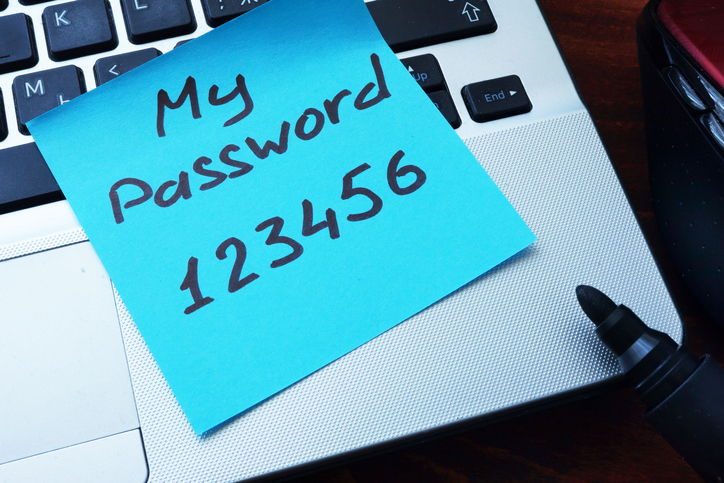
Using 123456 as Your Password?
Is your company’s cybersecurity repeatedly swept under the rug? While reinforcing passwords and setting up firewalls can seem daunting, you may not realize the severe risk of neglecting these and other routine security practices. Unfortunately, as the Internet evolves to meet our needs and desires, the same can be said of malicious hackers and programs. Ill-intentioned parties are constantly becoming more adept at accessing private information and what is meant to remain secure data.
Despite this growing threat, many of today’s Internet users and company employees have not reacted accordingly to increasingly well-equipped hackers. In fact, a 2019 Forbes article cites that ‘123456’ remains the most commonly used Internet password in the US and the UK. By maintaining such basic passwords, cyber-intruders are granted easy access to personal or professional information, and quickly cash in your data for billions per year. It’s officially time to protect your business’ sensitive information and data. This article will detail the importance of ramping up your company’s cybersecurity measures as well as a few simple ways to get started. Discover the following achievable strategies to significantly decrease your company’s risk of hacking and intrusion.
Eliminate the “Not Much to Steal” Mentality
An extremely common line of reasoning within mid-size companies is that cyber hackers probably won’t bother taking advantage of them because “there’s not much to steal.” This statement could not be further from the truth and it tends to lure employees and leadership alike into a false sense of security. The fact remains that 43% of all cyberattacks are aimed at small businesses. Hackers can just as easily sell a smaller company’s information as they can a larger corporation’s. However, the major difference is that larger businesses tend to allocate funds to cybersecurity, whereas smaller or mid-size companies might not prioritize this cost. Many professionals hesitate over the cost of cybersecurity but may not consider the potentially catastrophic costs of not having it.
To remain vigilant, employees should keep an eye out for attachments from unknown accounts. These documents could be in the form of a Microsoft Office attachment that initially appears legitimate. As a rule of thumb, do not open emails or messages from accounts you’re not familiar with. Because it takes a company 6 months on average to discover a security breach, it is well worth your time to evaluate your company’s current cybersecurity situation and consider where there might be room for improvement.
Prioritize Employee Education
One of the easiest ways to head off potential security threats in your mid-size company is to thoroughly educate team members on cybersecurity practices and procedures. If there currently aren’t any, create and enforce protocols that can be communicated through online training, checklists, and seminars. Make sure to discuss the specificities of your company as it applies to Internet safety and data protection. Without this crucial step of employee education, your company will waste time and resources trying to rectify security issues that could have been resolved through open communication.
Keep in mind that cybersecurity is frequently evolving. Therefore, employees should be updated regularly on the best ways to protect company information. An easy measure to increase employee cooperation is to ask them to sign a document attesting that they have understood and will abide by your business’ security practices. The document can also mention that should the cybersecurity measures be disregarded, there could be repercussions for the employee involved. All in all, if leadership takes the time to discuss cybersecurity, making it relevant and applicable for all employees, your company is much better equipped against a potential security threat.
Invest in Cybersecurity Measures
If your mid-size company has yet to invest in cybersecurity measures, there’s no better time than the present to start protecting your valuable information and data. It’s not difficult to get started — begin by setting up a firewall that serves as a barrier between your sensitive information and potential hackers or intruders. In a time when remote workers are becoming more common, your company’s “work from home” staff should also implement a firewall within their personal networks. After all, they regularly access the same important information and data as your in-office employees. Consider providing remote workers with a complementary firewall to eliminate any potential hacking risks.
It’s worth noting that many businesses now allow employees to BYOD (“bring your own device”) to work. In this regard, BYOD calls for the same security measures as a remote worker, since your employees likely transport their laptop, tablet, or other electronics to and from the office each day. On top of that, those who bring their own computer to work are probably using it for personal tasks after hours, which increases the chances of a possible breach. Most importantly, employees should respect the cardinal rule of cybersecurity: do not use the same password for multiple sites, especially as a universal password between personal and professional sites. Urge company leadership to enforce automatic security updates on employees’ devices and inform all staff about your password policy.
Consider Using a Password Manager
An effective solution to your company’s password creation and storage problems is a password manager. A password manager helps your business manage your team’s passwords within a centralized digital “vault.” The primary advantage of a password manager is that your business’ IT team can create intricate, long and random passwords for various sites or accounts that employees gain access to just by logging into the password manager. By streamlining password storage, you can make massive amounts of information secure and basically eliminate the need for staff to create their own passwords. This quickly limits the possibility of a cyber attack and keeps company leadership in control of who can access what information.
Ultimately, password managers dramatically improve cybersecurity in businesses. Research shows that employees often keep their sensitive passwords written down on a Post-It note that could easily be accessed by any passing visitor or coworker alike. Reduce the risks of cyber threats both from internal and external sources by implementing a system that keeps track of who logs into company sites and when. Without this kind of accountability, it can be much more difficult to pinpoint the source of a security breach. Gone are the days of the ‘123456’ passwords — reach out to a local IT managed services provider to implement any of the previously mentioned tactics to strengthen your company’s cybersecurity.

by Felicien | Jul 26, 2020 | Education
Social Engineering: A Threat to Your Cybersecurity
Social engineering is the use of psychological manipulation to gather confidential information. Criminals are always looking to exploit you for valuable data: personal logins, bank accounts, and even remote access to your computer. Whenever you log on, they could be trying to steal your information through malware-filled links or fraudulent websites.
Why a Great IT Department Is Not Enough
You interact with certain, trusted companies on a daily basis. You may glance at an email from your office supplier, click their link, and log in to confirm this week’s order for manila folders, only to find that it was a fraudulent website stealing your password.
The growing sophistication of cybersecurity has made it very difficult to breach your software from the outside. With a dependable firewall and anti-malware suite, your computer is rock-solid. But that is only the first half of the equation. You are the second half.
Criminals know that manipulating your trust is easier than hacking their way past your IT department, so you play an important role in maintaining your business’s safety.
What Can I Do?
The best solution is to always double-check anything asking for your confidential information. If you’re clicking a hyperlink, make sure you know exactly where it’s directing you before you click it; if you’re logging into a website, make sure it’s secure and verified. All it takes is for one user to log in to a fraudulent website for a criminal to have the key that lets them walk right past all of your IT department’s efforts.
However, sometimes it’s hard to follow-up with this due diligence when we’re busy. That is why it’s important to recognize the telltale signs of social engineering at-a-glance, especially in the one communication you take part in every day.
Double-Check Your Emails
Fraudulent (or “phishing”) emails are responsible for the majority of cybersecurity breaches, some of which have targeted truly massive companies—from international banks to social media conglomerates.
Always be on the lookout for the key components of a phishing email:
“From:” Address
The sender is an unrecognized person that is not affiliated with your business.
Names of trusted senders are included in an otherwise unusual address (ex. “staplescustomersupport134789@gmail.com”).
“To:” Address
The email is addressed to an unusual group of recipients (ex. People in unrelated departments or even every employee).
The email is addressed to recipients uninvolved with the supposed subject of the message.
Date
The email is sent outside of business hours or at an irregular time.
Subject
The subject line consists of random characters or completely unrelated information.
The subject line references you despite you not recognizing the sender.
Links and Attachments
The email includes unusual hyperlinks or attachments, especially when placed in odd locations throughout the email.
The email includes hyperlinks that have titles unrelated to their locations (ex. A “Login to your Staples account” link directing you to an unknown website).
Message
The email’s message wants you to urgently take an unusual action, such as clicking a link before your account is deleted.
The email’s message contains grammar or spelling errors where it normally would not.
Be Patient
All of these examples pressure you into making a bad decision you wouldn’t normally make. That pressure keeps you from acting on your suspicions by keeping you on a fake time crunch.
So take your time to analyze anything unusual. If something seems suspicious, it probably is. Let your IT managed services company know so they can verify whether it’s a real threat or just a false alarm.
Watch out for social engineering and keep your business safe and secure.
by Felicien | Jul 18, 2020 | Education
The Secret Workplace Every Single Employee Dreams About Whenever They Clock In
Employee retention is always a challenge. Because it takes so long to find, recruit, and train your best employees, it’s very important to focus on how you can keep them.
And the best way to improve employee retention is to understand what employees want. As it turns out, you can use Microsoft Modern Workplace to provide the work environment that your employees dream of
What does that Microsoft Modern Workplace actually look like, though? Here’s a breakdown of what your employees really want.
Easier Technology
There is a stereotype that older employees are more resistant to change. And these changes may include anything from new procedures to new technology.
The truth is that all workers, young and old, can get overwhelmed by too much technology. Simply put, they don’t like to master dozens of different programs from dozens of different companies just to make it through each day.
With the Microsoft Modern Workplace, you get an “all-in-one” solution for communication and collaboration. And it’s nice and intuitive. If your employees can work with Office 365, they can easily work with the entire Microsoft Modern Workplace suite of software.
More Free Time
What do employees want but they’re too afraid to ask for? A little more downtime, of course!
Many of your best employees are bogged down each day with boring, routine tasks. If they didn’t have to focus so much on those mundane activities, they’d have time to focus more on genuinely innovative new ideas.
One of the best things about the Microsoft Modern Workplace is that it allows users to automate several different tasks. And when most of those mundane tasks have been automated, your employees will be free to focus on the “big picture” ideas your company needs to stand out!
Easier Collaboration
Managers and executives understand how important group projects are. Such projects help your employees bring different skills and perspectives to the table. And once you put everyone together, you get a group that is much greater than the sum of its parts.
However, employees usually aren’t thrilled by group projects. Even if they get along with the entire team, it can be difficult to communicate with everyone and send files back and forth. The final result is an overflowing inbox and a lot of frustration.
The good news is that the Microsoft Modern Workplace was designed from the ground up to help employees collaborate. Microsoft Teams and Sharepoint makes it easy and intuitive to work together without blowing up each other’s inboxes.
When collaboration is this easy, your employees may learn to love group projects as much as you do!
Faster Problem-Solving
One reason that Microsoft Modern Workplace is so popular among small businesses is that it is an all-in-one solution. With this software in place, your business doesn’t have to rely on a dedicated IT team to manage so much of your technological needs.
One side effect of this for employees is that any problems they discover will be solved that much more quickly. Previously, their only course of action may have been to submit a ticket to IT, hope someone notices it, and hope it gets fixed before the week is out.
The automation of the Microsoft Modern Workplace helps to avoid many potential technological problems. And the intuitive software and collaborative tools will help your team solve any other issues, all without spending countless unproductive hours waiting on IT!
Remote Work Opportunities
Even before the COVID-19 pandemic, remote work opportunities were what many employees wanted most. And working during quarantine has helped even more employees develop a taste for working from home.
And it’s easier than ever for you to provide such opportunities. With the Microsoft Modern Workplace, you can use software such as Microsoft Teams to coordinate and collaborate with your remote workers.
Surprisingly, remote employees are just as productive as office employees. In some cases, they may be more productive. And while you can’t necessarily let everyone work from home, offering select remote work opportunities can serve as a powerful incentive to keep some of your best employees around. Furthermore, having a Microsoft-powered remote work infrastructure in place will prepare you for future crises.
With the Microsoft Modern Workplace, your office can be ready for anything.
