
by Felicien | Aug 16, 2019 | Education
How to Choose the Right App for CEO Online Journaling
Learn why many business leaders turn to journaling to build their brand and improve their leadership skills and see what features the top applications offer.
When you want to establish your own personal and professional brand online, using an online journal is an effective way to spread the word about your insights, leadership, business and philosophy. Having the right tool to help you get your message across to readers is an important decision.
Other CEOs use journals to fine-tune their skills, reflect on their days and improve their leadership skills.
“Setting aside as little as 10 minutes a day to record your thoughts stimulates reflection critical to making sense of the fast-moving world around you,” notes a recent Strategy and Business article. “Journaling engages the analytical, rational functions of the brain, which gives the more creative parts of your cranium space and time to work their magic.”
Below are the top online journal services that CEOs can use to build a better online persona or simply track their thoughts and perspectives.
What Features Should I Look For in a Journaling App?
The most effective apps are those that offer features that make it easier to write and publish. Some of the most common features among the top apps are:
Easy interface. You want to be able to focus on writing, so you need a minimalist interface that lets you focus your thoughts and write well. The app you choose should also be easy to use, with a limited number of clicks or taps needed to add an entry.
Exporting. You want to choose a product that allows for exporting into formats such as PDF, RTF or common word processing extensions that allow you to use the content wherever you want.
Syncing. Keep your journal synchronized across your devices with an app that has synchronizing capabilities.
Reminders. Gentle automated nudges to enter your thoughts are a good way to maintain the habit.
Visual support. You may want to add other elements to your journal, including photos, videos and graphics.
What Are the Top Online Journal Services for CEOs?
You have many choices when it comes to journaling services. Here are a few of the top options:
Day One. Automatically add metadata such as date, location, time and weather, synchronize your entries across devices, and use a dark mode if working in low light. It also uses IFTTT (“if this then that”), a free web-based service to automate the creation of entries on multiple apps.
Diario. A great choice when you want to add lots of images. You can add folders, tags, dates, locations and other filters.
Diary. A simple interface makes Diary popular for shorter entries, which can be shared easily with friends and followers on Facebook, Twitter and other social media platforms or via email. Provides cloud storage and reminders, too.
Journal. An intuitive interface and clean layout highlight this product. Synchronize with Google Maps to add location metadata and street views. Export entries to file types suitable for printing. Security features include Touch ID, Face ID and PIN protection and automatic backups to Google Drive.
LiveJournal. One of the oldest journaling apps dating to 1999, LiveJournal lets you share and read others’ journal entries while writing your own.
Momento. Connect Momento to social media apps like Facebook, Instagram, Twitter and YouTube and you can automatically add social activity to your journal.
Penzu. Security is the name of the game with Penzu, which offers double password protection and 256-bit encryption, along with customizable backgrounds and fonts.
Whether for branding or reflection, the right journaling tool can improve your professional outcomes.
by Felicien | Aug 15, 2019 | Education
Australian Businesses Closed Due to Phishing Freight Scam
Several Australian businesses have become the targets of a phishing freight scam losing an average of $30,000 to $100,000.
Phishing is on the rise as a method of online criminal activity focused on businesses. Victims are being scammed out of tens of thousands of dollars via this email phishing scheme. Right now, scammers are directing their fraudulent activity at IT and electrical businesses. Several Australian companies have shut down after becoming victim to a freight forwarding email according to the Australian Cyber Security Centre (ACSC). These victims are losing an average of $30,000 to $100,000 after sending their products to the scammers who request delayed payment credit terms from the victims.
How Does The Freight Scam Work?
The scammers trick victims into participating by spoofing internet emails, domains and signatures of executives of large Australian companies and universities to legitimise their communications. An example of how they work is they send their email from lendleases.com.au instead of the actual website lendlease.com.au. One of the fraudulent emails that the ACSC released is supposedly from a Chief Procurement Officer at the University of Sydney.
On each purchase order, the scammers request laptops, hard drives, cosmetics, defibrillators and environmental monitoring equipment, all items that can be easily resold. The targets are asked to ship the orders to a freight forwarding company which in turn, then sends them on to another fraudulent entity who acts as a middleman. Then the freight forwarding company becomes a second victim when their bill is paid using stolen credit cards or using an established credit line.
How are Fraudulent Orders Identified?
In this case, the scammers are requesting shipments to many locations including Singapore, Dubai, Dagenham, Kuala Lumpur, Malaysia and Deira according to the ACSC. Businesses should never automatically trust any unsolicited order of goods with credit without further investigation. However, it’s possible for these orders to slip through the cracks if you don’t have a strict policy for your approval process on every transaction. The ACSC requests that all organisations should do due diligence on any new customers or unusual orders, and investigate any customer before granting credit. They also suggest that businesses should check the domain of websites and emails that are referenced on a purchase order. A good follow up is to contact customers by phone to confirm that they are a legitimate company, and have placed the recent order. Lastly, it’s important to verify the shipping address over the phone.
What is Phishing?
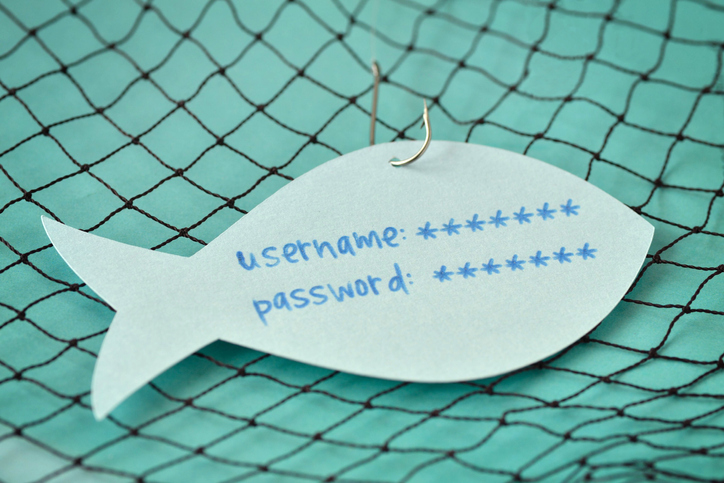
Phishing is one of the most commonly-used cyber attacks in Australia. Statistics from the Office of the Australian Information Commissioner show that phishing accounts for 39 percent of all breaches reported. Therefore, it’s important to be aware of how to protect yourself at home and at work from phishing.
How Does Phishing Work?
The victim receives an email that is simple in format and generally personalised and potentially from a known sender. It may look like an official email from a known organisation or company, and it invites the victim to click on an embedded link. Wording varies, but it may say, “click to learn more” or “click to see the image.” After clicking, the victim is redirected to a web page and asked to enter their user name and password or for other personal information. Once the personal information is filled in the attacker then sends emails to everyone in the victim’s address book and the cycle repeats.
What are the Dangers?
While having spam email issued from your own email account is annoying and a problem, the larger issue is that the victim has given the attacker their user name and password. With an email and password, the attacker can easily hack into anything the victim uses that email and password for. Most people repeat email and password data for multiple accounts. In the world of cloud storage, this can be several accounts including email, CRM, file storage, banking, and proprietary applications.

by Felicien | Aug 15, 2019 | Education
Protect Yourself From Ransomware In Windows 10
You may have been using Windows 10 for some time now, but it’s likely that you haven’t mastered all of its features just yet.
You’ve heard about ransomware, right?
It’s a type of malware that encrypts your data so you can’t access it and holds it for ransom. Usually, this malware makes its way into your systems by posing as a file or program you think you want. Even if you don’t end up having to pay the ransom, it’s a lot of trouble that you should try to avoid.
Did you know that you can enable Controlled Folder Access in Windows 10 to protect against ransomware?
Enabling Controlled Folder Access protects the default Windows data storage locations in your profile from access by unknown applications. When compared to identified and allowed programs, if the malware is determined to be unsafe, you’ll get a pop-up letting you know it was denied access to your storage.
by Felicien | Aug 15, 2019 | Education
Protect Yourself from Potential Attacks Via Chrome Extensions
Learn two simple ways to set the privacy and activity settings for each Google Chrome extension on your browser and steps the company is taking to protect users.
Google’s Chrome web browser is a popular choice for businesses the world over. Managing the extensions gives you more control and faster results when using Chrome to its best. Here’s a closer look at Chrome add-ons and how to use them effectively.
And with emerging cyberthreats targeting browsers, now is an important time to know your way around the extensions.
What Is the History of Google Chrome Extensions?
Google introduced Chrome in 2008. By 2010, there were more than 10,000 extensions available in the Chrome Web Store. Today, the company does not release the number available, but it’s estimated to be in the hundreds of thousands.
That growth brings with it an increasing vulnerability to attacks via vectors embedded in extensions. The company does work to keep malicious extensions out of its store but mistakes are possible. Other extensions can invade users’ privacy.
Should I Uninstall All Chrome Extensions?
Deleting all extensions is not necessary. Instead, use these two helpful tools to manage your extensions better and control permissions you provide to the add-in.
1. Use Extension Icons
To the right of the address bar, you’ll find icons representing the extensions you’ve installed. If you right-click on an icon, you’ll see an option titled “This can read and change site data” with three options:
When you click the extension
On [the site you’re on]
On all sites
The default is the first option, which limits the use of the extension to user-activated times. If an extension is “loud,” meaning it uses a lot of bandwidth, these settings can provide more control.
2. Use Extension Settings
If you click on the hamburger menu icon to the far right of your address bar, you can click on the option “More tools” and click on “Extensions.” This will bring up a screen with a box for each installed extension. Click on the Details button for any extension you want to modify. You’ll see the three options again, but also an option to add the URLs of specific sites on which you want the extension activated.
What Can Go Wrong with Browser Extensions?
There are several risks to installing browser extensions. Here are a few of the ways extensions can do harm:
Malicious intent. Malware can be installed unknowingly that uses your computer for other purposes. Kaspersky, for example, noted a recent example of extensions that made money for the hacker by clicking on pay-per-click ads.
Hijacking. If a hacker steals a designer’s credentials, an extension can be compromised by changing the functionality or inserting malware.
Purchases. Extensions are hard for designers to monetize. That’s why many are eager to sell their code if approached by a buyer. Users are usually unaware if extensions change hands, meaning a previously well-intentioned add-on can be repurposed.
Is Google Addressing Extension Security?
Google recently announced steps it’s taking to combat the security issues with extensions. Among its changes:
More granular user permission options
A requirement that extensions only request access to the minimum amount of user data needed to operate
Expanding privacy rules for extensions. Those that carry user communications and user content will join those that handle personal or sensitive user data and need to post privacy policies
Proactive steps combined with Google’s efforts are critical to keeping your browsing and data safe and secure.

by Felicien | Aug 14, 2019 | Education
What You Need to Know About Android Malware
Hackers are devising new ways to infect phones with malware. Learn about the latest attack on Android phones and how to minimize your risk of getting malware.
Since the first computer operating systems hit the market, malware has been a serious security concern. Today, malware can infect not only desktop and laptop computers, but devices that are connected to nearly everything we do: our phones. In July 2019, cybersecurity experts found that up to 25 million Android phones were infected with malware masquerading as trusted apps like WhatsApp. Here’s what you need to know.
Imposter Apps
The latest malware threat was able to breach Google’s Android OS and replace legitimate apps with “zombified” versions that bombard users with unwanted ads. The outbreak affected approximately 15 million phones in India, 300,000 in the U.S., and nearly 140,000 in the U.K., making it one of the most devastating cyberattacks of the decade.
The malware was traced back to 9apps.com, a third-party app store owned by Chinese company Alibaba. Hackers that plant malware on these sites usually target users in developing nations, though this particular attack hit a significant number of phones in the states and the U.K.
Research thus far into the imposter apps found no threat apart from malicious ads. However, hackers that employ this type of attack can potentially do much more evil such as stealing user data, tracking user locations, and even accessing private messages.
How Does the Malware Work?
The malware is programed into a variety of apps such as photo editors, games, and messaging apps and made available for download. Once downloaded, the app runs the malware, which is often disguised as a harmless app update. The malware then corrupts popular apps such as WhatsApp, turning them into zombie apps that launch unwanted ads. In this case, the hacker’s end goal appears to be to trick users into tapping the ads and generating revenue via a pay-per-click scheme. Fortunately, the malware does not appear to affect other data stored on the phone.
Who’s Behind the Malware?
Experts have linked the malware to a Guangzhou company involved in developing and marketing apps for Android phones. While most of the carrier apps were made available on third-party storefronts, the hackers may have considered sneaking the apps onto Google Play. Researchers at Check Point are working closely with Google to identify and take down potential malware installers.
How to Protect Your Android Phone from Malware
A good first step in minimizing your risk of malware is to update your phone to the latest version of Android OS. Be wary of downloading apps on third-party stores, which typically have fewer security measures in place than the official Google Play store. Even after taking these precautions, you should still be proactive in recognizing red flags. For example, if an app suddenly starts displaying ads or behaving differently than before, it’s likely infected. To fix this, navigate to your phone’s app info list and uninstall ones you don’t recognize.
No matter how many security updates Google releases, hackers will find and exploit loopholes. You can help stop hackers by being aware and reporting suspicious activity on your Android phone to Google.
