by Felicien | Nov 20, 2019 | Education
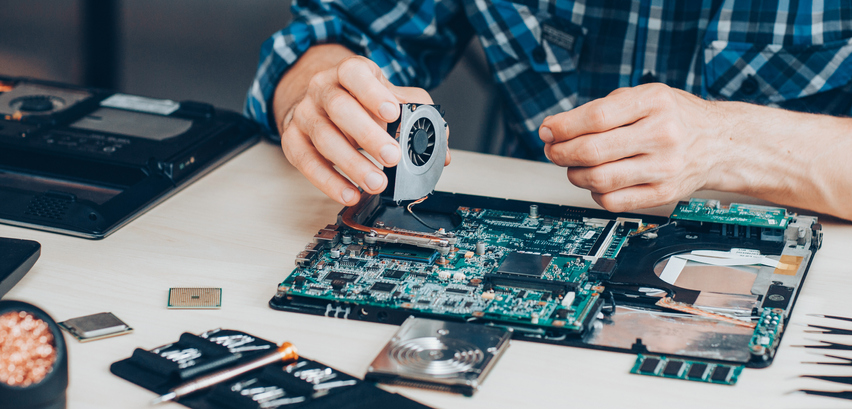
Need to Hire a Computer Repair Specialist? 5 Criteria to Consider
Are You Ready to Hire a Computer Repair Specialist? Read about the 5 Criteria You Need to Evaluate to Avoid Hiring the Wrong Person and Costly Mistakes
Computer use in the U.S. has grown exponentially in the last decade. Over 15 million computer devices were shipped out to users per year in 2003, according to industry data. That amount rose to an astonishing 65 million per quarter in 2015. With that many devices in consumers’ hands, computer repair specialists are a must for personal and enterprise users when something goes wrong. However, when it comes time to decide who to hire, knowing what criteria to look for can mean the difference between a mediocre and an excellent result.
Experience Levels
When deciding to hire a computer repair specialist or vendor, ask about the length and type of experience the specialist has. A specialist that has years of experience with the types of devices your organization has is ideal. If hiring a specialist from a local or national vendor, ask how employees or contractors are selected. Some vendors, for example, will only hire contractors that have successfully completed various industry certifications.
Education and Training
Hiring specialists that possess a formal degree in computer science or information systems can help improve the quality of service you receive. Industry certifications specific to general computer repair and troubleshooting, Apple, and Microsoft devices can also help. Specialists that keep up to date with industry trends and changes through continuing education courses is another good sign you will receive excellent service. Yet, industry certifications and degrees alone are not as important as years on the job and skills.
Device Types
Take a look at what types of devices your organization has and what devices require ongoing or periodic support. Some repair technicians will be highly specialized in certain types of devices, such as tablets or desktops. Repair specialists may only work on specific brands like Apple or Dell. Another important consideration is determining which repairs and devices can be supported internally versus externally. Simple repairs like replacing or upgrading RAM might be able to be completed by your internal IT department, depending upon the device brand and type. Other repairs like replacing a motherboard could be more complicated and require the device to be shipped into a vendor’s depot or replaced with a similar unit.
Cost
The cost of hiring a qualified computer repair specialist is usually at the top of most organizations’ criteria. Although it can be tempting to choose the vendor or specialist that offers the lowest price, this may not always be the best option. Consider whether there will be extra fees for issues that come up after the initial repair is completed. Also, check into whether completed repairs come with a warranty and how long the warranty lasts. Keep in mind that while the price of the service is not necessarily equated with quality, choosing smaller vendors or individual repair specialists will likely provide you with the best value.
Recommendations
Ask peers for recommendations on qualified computer repair providers. If the vendor or specialist is local, visit the location as a potential customer to see how the specialist responds. Assess whether you were treated courteously, whether the technician attempted to listen to your problem, and what repairs the technician recommended.

by Felicien | Nov 19, 2019 | Education
Why Google Chrome Users Should be Concerned About Security Patches
Does Your Organization Use Google Chrome? Find Out Why Recent Security Flaws Have Created an Urgent Need to Update Your Devices’ Browsers Immediately
If users in your organization use Google Chrome, there is a high chance that several of those systems are creating an opportunity for hackers to install malware. Google recently identified a major security flaw with its Chrome browser that impacts Windows, Mac, and Linux-based devices. Although Google has released a security patch to correct the security vulnerabilities, the patch fixes two separate problems.
Security Vulnerabilities
One of the security vulnerabilities Google identified is Chrome’s audio component. The other vulnerability is tied to the browser’s PDF library. Both allow unwanted modifications or corruptions to memory data. This allows hackers to elevate privileges on the device or within applications installed on the device. If someone is able to gain administrative access to a system or software on a system, the individual could make unwanted changes or wreak havoc on the device’s operating system. There is also a high chance that a hacker could install malware or execute malicious code on the device.
Version
The version of the browser that fixes the security issues is 78.03904.87. Although the Chrome browser may be configured to automatically update itself in the background upon launch, it is a good idea to manually check each device. The browser can be manually checked by selecting the Help menu and then “About Google Chrome.” If there is an update available, the browser will automatically search for it and find it. The browser’s version will also be displayed in the “About” section. If the listed version is 78.03904.87 or later, then the device has received the necessary security patch.
If there are problems with the browser updating, it may need to be removed from the system and reinstalled. Some organizations have an automatic process to uninstall and reinstall applications from the server once the devices connect to the organization’s network. Reports can be run to see which systems still have outdated versions and technicians should manually check those systems to diagnose why automatic updates are not going through.
Other Considerations
A system that is not receiving automatic updates from Google Chrome may have other issues. Technicians should check for the following:
Is the anti-malware program up to date and running correctly?
Is the OS receiving approved updates and are these updates installing?
When was the last time the system pinged the network?
Has the system been restarted recently?
If the system has been disconnected from the organization’s network, how long has it been offline?
Has a malware scan recently been run? Were any malicious items identified and removed?
Are there are any suspicious executables or unauthorized programs installed?
Sometimes wiping a system and completely reinstalling the OS are the best courses of action. Signs that a device may be too infected, corrupted, or outdated include the presence of unauthorized or suspicious applications, more than 100 pending OS updates or a previous update date that is more than a month old, and an anti-malware program that will not update or run a scan correctly. Before wiping a system and reinstalled the OS, a technician should check for and back up any user data that may be installed on the device’s hard drive. However, the data should be carefully scanned for any malware infections prior to transferring it back onto the system.

by Felicien | Nov 18, 2019 | Education
Learn from Marriott’s Example: Notification Responsibilities After a Data Breach
Most states, the District of Columbia, the Virgin Islands and Puerto Rico have passed legislation regarding notification of security breaches. Know the laws in your state.
To answer this question, let’s start with the example experienced by Marriot International recently when a breach exposed the social security numbers of the hotel chain’s associates. Then, we’ll look at the federal and state requirements for notifying those impacted by a breach that involved their data.
How Did Marriott International Employees Fall Victim to a Data Breach?
Marriott International told some of its employees that their social security numbers (SSNs) had been exposed to an unknown person. The risk came from a vendor that handled documents for the hotel chain.
On September 4, 2019, Marriott found out that someone access information recorded on those documents, which included subpoenas and court documents. The notification, which came two months after the incident, merely stated that someone may have accessed the records, which is all hotel representatives claim to know. The potential breach impacts over 1,500 Marriott employees. On October 30, the hotel started sending notifications via regular mail for anyone it hadn’t been able to find.
Those impacted will receive free credit monitoring as well as identity theft protection for one year at the company’s expense. Notification and credit monitoring services are part of recent data breach laws, but one must wonder what took Marriot so long to notify the victims.
Why Did Marriott Have a Difficult Time Finding Victims?
Marriott received a list of those impacted, but most had no address. This may be the most significant factor in the delay. And, it’s not an unusual one. Company records breached by hackers may be incomplete in the best of circumstances, and this information was sitting in several external systems.
The unnamed firm said all Marriott employee data was deleted from its system. One of the problems in cases like this is storing data in multiple systems, which increases the risk of theft and data breaches. Marriott no longer partners with the vendor.
What Are Your Company’s Responsibilities in Case of a Data Breach?
The FTC recommends following these steps, some of which are legally required.
Secure your Operations
Move quickly to take whatever steps are needed to secure your systems. Otherwise, your data breach can result in a series of breaches. Mobilize or form a breach response team to shore up your network against further loss.
Fix Vulnerabilities
As part of the fix, you need to anticipate questions that clients, associates and the authorities may have. Put together clear questions and answers to post on your website. Direct communication may ease frustration and concerns, especially if it takes some time to identify those impacted, as in the Marriott cases.
Work with forensic experts to track to determine what records were at risk.
Notification
Most states, the District of Columbia, the Virgin Islands and Puerto Rico have passed legislation regarding notification of security breaches. You must notify the affected parties when personal information is involved. Check the laws in your state as well as the federal laws and consult with your legal team regarding your responsibilities.

by Felicien | Nov 15, 2019 | Education
HIPAA is an everyday stressor in the healthcare industry. A computer-based recordkeeping system can help keep records secure and HIPAA compliant.
For many in the health care industry, compliance with the Health Insurance Portability and Accountability Act (HIPAA) is an everyday stressor that dictates the actions and availability of information. However, HIPAA is necessary to protect the patients’ information and medical records. A violation of HIPAA could lead to lawsuits and large fees, which could cause a business or practice to close their doors.
The Challenge of Human Error
Unfortunately, even the perfect system is prone to human error, especially if you do not have integrated checks and balances that are part of a computer document management software.
Many facilities that are larger in size have already integrated their records into a computer-based record-keeping system. This type of software is especially helpful for the large volume of records that they keep on a daily basis. However, smaller healthcare facilities may want to consider a customized computer-based record-keeping system to stay HIPAA compliant.
Typically, most HIPAA violations happen without employees’ knowledge, or they are due to simple inexperience. Some of the most common HIPAA violations include:
Accessing records for any reason other than to aid in treatment or payment
Not using a secure encryption method for protecting health records
Removing patient information from the facility, either physically or on an unauthorized device
Sharing patient information via a personal email
No control or lack of control of who accesses patient health information
Not removing access of former employees
Digital Solution for Record Keeping
Physical paper documents have a higher chance of being compromised because their very nature requires that you physically secure them. Within HIPAA, health facilities not only have to worry about who has access to patient information but for what reason.
While some electronic solutions can help healthcare facilities step away from paper options, such as a common or shared network drives, these do not provide the security needed to remain HIPAA compliant. HIPAA requires that digital solutions for handling patients’ personal information have almost cutting-edge security tools. Due to the private nature of patients’ information within the system, health facilities’ data is considered a prime target for hackers looking for targets with blackmail or ransomware.
Benefits of Moving to Digital Record-Keeping
Even for small health care facilities, there is a digital document management system that could fit the needs of the business while still being HIPAA compliant. Some of the benefits of digital record keeping are:
Tracking for Audit Purposes – A digital document management system can record everything that happens to a file. The record could include which user has accessed the file, when the file was accessed, if anything has changed since the last time it was accessed, and historical copies of the file.
Control Over File Permissions – The records system administrators can control who has permission to view a file and the features they are available to use once they have access.
Unique Security Options – Administrators can dictate which users have access to patient information. As an example, administrators can add a two-step authentication method to access sensitive patient information.
Privacy and HIPAA compliance can be challenging, but adding the right document management tools can help with the stress and pressure of protecting patients’ information.

by Felicien | Nov 12, 2019 | Education
4 Reasons Not to Hire Printer Companies
Thinking about saving money on your IT services with a printer company? Learn about the pitfalls and dangers of relying on support from companies without expertise.
Hiring a printer company to take care of your IT services can seem like a great solution. You won’t have to consult with multiple vendors or negotiate multiple contracts. A printer company might even offer to take care of all of your IT services for less than what you’re currently spending. However, there are several reasons why you should not trust a printer company as your single vendor for all of your organization’s IT needs. Although you may pay less, that lower price comes with a higher cost – substandard service and support.
The delivery of substandard service and support from printer companies occurs due to the following:
A lack of experience
An inability to understand the true nature and components of IT services
Inadequate resources directed towards developing IT and IT services
Unstable organizations due to conflicts between printing and IT services
Insufficient Experience
By design, printer companies are specialists in troubleshooting and maintaining two items – printers and copiers. While these companies are experts at providing service on these types of devices, branching out into the world of IT services is not something these companies have done in the past. Even though the staff may have basic troubleshooting, sales, and customer service experience under their belts, they may only have limited experience with the complexities of managing networks.
Lack of Understanding
Since printer companies do not have decades of experience with IT services, there is often a skill and knowledge gap. Without an understanding of and experience with more complex computing devices, troubleshooting skills may be limited. Computing devices, servers, and network equipment are more intricate than printers or copiers. In order to configure, deploy, maintain, troubleshoot, and fix this type of equipment, advanced and interdependent knowledge is necessary. It is far easier for printer companies to overlook the source of a problem with network dependent devices and the network itself simply due to a lack of skill.
Inadequate Resources
Since these companies specialize in printers and copiers, it is more difficult to devote internal resources to IT services. This means that there may be little put into research and development, training staff on the skills they need to support IT services, and a lack of support staff designated to managing IT services for clients. In other words, printer companies tend to overpromise and underdeliver when it comes to supporting services and devices outside of printers.
Instability
When printer companies try to branch out into IT services, it can cause internal conflict. Staff that is managing printers and copiers may not be able to keep the company afloat, due to the fact that the company is not reinvesting what it should into its printer expertise. Consequently, both sides of the business begin to suffer, and animosity develops. Leaders within the company may decide to cut out IT services altogether, leaving clients without support.
