
by Felicien | Aug 11, 2017 | Education
Taking business on vacation is bad news all around.
Here’s how to keep your phone, but leave work behind.
Vacation time leaves today’s professional with a tough problem—They want to get away from work, but they typically end up bringing it with them thanks to their work-related mobile devices. In today’s BYOD world, more people are taking their jobs with them on vacation, and that’s not good.
Vacations are necessary for both physical and mental health, however the good they do evaporates when the job comes along for the ride. Here’s how to make sure your mobile device doesn’t keep you tethered to the office.
Leave an Effective “Away Message.”
Email: Be thoughtful when setting up your email “away” message. You don’t want people to leave unnecessary information, or try to contact you some other way unless it’s an emergency. The typical email auto-reply will work: “I’ll be out of the office from [date] to [date], and will be reading my emails when I return.” Don’t say anything other than this. More information will only hurt your goals. For example, if you say that you’re going on vacation in your away message, many people will think their problem is more important than your rest.
Phone: When leaving away messages on your phone, style them after the email version. Speak the dates you’ll be away. You may want to mention that unless it’s very important, the caller shouldn’t leave a voice message and should state their needs via email or on your website.
This may not stop phone calls to your mobile device if your number is listed for business communications. If you use a service that routes business calls to your phone, ask about disabling it while you’re away so you don’t have to get the calls at all.
Have Someone Else Manage Your Emails
When possible, don’t open up your work email at all. If you may be getting important, must-answer emails, arrange to have someone else cover them for you. You should probably switch important client accounts over to someone else, and email messages should be a part of this process. Newer tools like Outlook’s Group emails make this easier, since emails can be seen and managed by multiple people.
Need to Check In? Talk to Someone Directly.
If you still need to get reports about business while on vacation, don’t review them yourself. Instead, give that job to someone else, and call them when you absolutely have to. Let them decide what’s important to tell you so you don’t have to.
Turn Off Notifications on Your Phone and Computer.
Chances are good that you have a few important apps on your phone and computer that provide alerts when something significant occurs. As part of your vacation prep, go to settings and move through your notifications to see how many you can turn off. Switch off as many as possible and you’ll rest easier. This may mean disabling Microsoft Office 365 during your away time as well.
Note: Platforms like iOS make this “a breeze” with the Notifications tab. It lists all app notifications in one place so they’re easy to find and change.
Turn Off Your Alarms
Do you use your phone to wake up? A lot of busy people do. However, you probably want to sleep in on vacation. So, don’t forget to turn off your alarms and try waking up the natural way.
Don’t Take Your Phone with You
Sure, you can take your phone on vacation. But don’t take it everywhere. If you’re going to lay by the pool or walk on the beach you shouldn’t need your phone. Leave it behind: You can always depend on someone else’s phone in an emergency.
Mute and Hide Your Devices.
This is an easy and effective tactic. When you’re back in your the hotel room or vacation rental you may want to turn off the sound on your phone and put it away in a drawer. A major part of stress associated with devices is due to their physical presence. Disabling the sound and hiding it away removes that stress. After the “itch” to take out your phone goes away, you can finally start enjoying your vacation.
Set Strict Goals for Time Spent on Devices.
If you’re more of a technical person, then check how much time you spend on your device each day. You can easily do this with applications like Moment Screen-Time Tracker. Set a goal for lowering the time you spend on your device as each day goes by. This gives you something to work on, while spending more time enjoying your vacation—So, both parts of your brain win.
Block Calls for Specific Times
Software like Timetrade allows you to set time-based blocks on your phone to stop calls and other activity. This is a great solution when you need to take your phone somewhere, but you don’t want to be disturbed.
Need more info on how to manage your business from afar, or your digital time in general? We can help. {company} provides IT services for businesses in {city}. Give us a call {phone} or send us an email {email}.
by Felicien | Aug 10, 2017 | Education
Device management is an age-old headache, and one that IT teams struggle with on a regular basis. However, using DaaS (Device as a Service) can solve this problem, and leverage organizational strengths while reducing overall costs.
Businesses of all sizes look for ways to leverage technology to create an edge over their competitors. However, this can be a challenge for small to mid-sized businesses (SMBs). The rapid pace of change, and the deeper pockets of larger organizations often leaves SMBs competing with aging software and hardware, and without the funds to replace them.
Fortunately, cloud-based software is now extending to devices. DaaS is growing in relevance and prominence in the SMB workplace. While procuring devices in a service model isn’t new, the term has been updated. Technology teams are adopting this concept and fully embracing the new opportunities offered by this aged-old model.
The Challenges with Device Management
IT managers are familiar with the difficulties surrounding device management. Plus, it can cause frustration all the way from the board room to individual workers, for a variety of reasons:
Cost: By the time IT managers get the funds needed for device upgrades, the technology is often outdated and needs to be researched again before a purchase can be made.
Lack of flexibility: Buying devices in bulk is usually the most cost-effective option. Purchasing a bulk quantity of the same type of computer simplifies everything from purchasing to deployment and support. However, this doesn’t take into consideration the varying needs of workers.
Slow upgrades: New employees coming online may have different requirements than those who received their computer only a few years ago. In this case, your IT team is left dealing with multiple releases and platforms.
Maintenance: It’s no surprise that older hardware and software require more maintenance to run efficiently and effectively. As you near the end of your device life cycle, this problem will rise to the forefront, and can be a huge productivity drain on your technology team.
Device disposal: What do you do with used devices after they’ve been replaced with newer models? Best case scenario, you’re can sell them—However, this still requires the wiping of hard drives, removing passwords, and other precautions.
Hardware inventory: Maintaining an accurate inventory of which devices are assigned to specific individuals can be a laborious task. Even the most organized of IT teams need to perform a bi-annual or annual inventory, and there are invariably surprises or missing devices that need to be tracked down. This problem is compounded if you provide your tablets, mobile phones, desktop and laptop computers for each employee.
With all of the challenges associated with device management, it’s no surprise that businesses are looking for other options.
The DaaS Model
Devices as a Service has been used in the past to lease high-end office equipment such as printers and copiers. However, it’s now expanding to other devices as IT departments are being overtaxed and understaffed.
Outsourcing devices allows technology teams to focus on ways to bring value to the organization, instead of spending time keeping things running. The hidden costs of poorly supported technology are numerous, and include everything from poor productivity due to slow operations, to lost customer data, and even reduced levels of revenue.
IT teams may not realize their prospects and customers are jumping off their website due to slow connection speeds from their server. And business leaders may not realize that the effectiveness of their customer service representatives is less than 50 percent due to slow computer connections.
Improved Security and Scalability
As cybercrime is on the rise, and ransomware is running rampant throughout the business world, ensuring your network is completely secure is a key. When your team has the latest hardware and software, you’re more likely to be compliant with accepted best practices for security, regulations, business continuity and disaster recovery plans.
Scalability is a critical piece to consider as well. DaaS provides you with an easy way to scale up or down, without incurring massive costs to add or depreciate equipment.
You’ll Receive Timely Updates
With DaaS, security patches, software updates and hardware upgrades are performed on a regular schedule by individuals whose sole responsibility is to ensure they’re up-to-date at all times.
Ease of Management
Working with a DaaS vendor provides you and your IT team peace of mind. Your vendor will constantly review the current device structure for your business, and handle device issues now and into the future.
Plus, your DaaS vendor can provide an analytics platform so you and your IT team can view employee performance and productivity throughout your organization.
When you research DaaS organizations, it’s important to keep in mind that service levels can differ, with a variety of price ranges depending on response times and update schedules.
Working with a DaaS vendor provides you and your team more time to focus on strategic initiatives that will promote your business success. They’ll manage your IT assets, device inventories, upgrade schedules and handle deployments—even the disposal of aging assets.
Want to learn more about DaaS for your organization in the {city}? Contact {company} at {phone} or {email}. Our professionals will work with you to find the best device management options for your business.

by Felicien | Aug 10, 2017 | Education
When news broke that Microsoft was planning to discontinue MS Paint in the wake of newer and more modern offerings like Paint 3D, the Internet did not take it well. The reaction to what many assumed was Microsoft’s plans to kill the beloved 32-year-old program was one of sadness with the hashtag #RIPMSPaint trending within hours, tacked on to the end of numerous tweets from users who were not happy to learn that they would have to say goodbye to this old favorite.
First launched all the way back in 1985 as part of the original Windows 1.0 program, MS Paint holds a deep nostalgia for computer users who have fond memories of the entertainment the program provided in the days when there wasn’t much other entertainment to be found on the home PC. For such a simple program, Paint proved to be a surprisingly versatile tool for Windows users. Whether you used it to doodle with your mouse, add your own artistic flair to a piece of clip art, or as a way to create screen grabs, MS Paint had something to offer everyone.
The barrage of tweets expressing gratitude for years of silly fun and sharing little Paint-created photos as a reaction to this disappointing bit of news did not go unnoticed by Microsoft. A day later, the PC giant released a blog post that addressed MS Paint being added to a list of “deprecated” features that would be included as part of their Windows 10 Fall Creators Update – meaning that while the program would be a part of this fall’s software package, it would no longer be subject to active development and could likely go away forever. Outlook Express and the Reader app were also on this list, but neither of those programs prompted the level of protest and outrage MS Paint’s inclusion did.
In their statement, Microsoft acknowledged the outpouring of support for this trusty old app from its large number of fans. As a result, they no longer plan to put MS Paint out to pasture. An app version will be made available in the Windows Store. In an email, a Microsoft spokesperson further clarified the company’s plans for the app, saying “MS Paint is not going away. In addition to the new 3D capabilities, many of the MS Paint features people know and love like photo editing and 2D creation are in Paint 3D–the new app for creativity, available for free with the Windows 10 Creators Update. In the future, we will offer MS Paint in the Windows Store also for free and continue to provide new updates and experiences to Paint 3D so people have the best creative tools all in one place.”
With that, MS Paint supporters can rest easy knowing that the much-loved program will be sticking around for a while longer. For those who spent many an hour playing around with Paint and making the most of its basic features, this feels like an important victory. Regardless of whether you view Paint as an integral bit of your childhood or as an easy and reliable means of creating simple graphics for a college or workplace project (or killing time in class or at the office – we’ve all been there), it’s nice to know that Paint isn’t going anywhere.
Technology is constantly evolving for the better, slowly but surely making even old standards unrecognizable. These kinds of changes are welcomed with open arms, especially by those who use them each and every day. Paint may be the one and the only program we’re all glad has barely changed since day one. Because while no one would argue that yesterday’s technology is superior to today’s, seeing that familiar little icon in the Start Menu is like seeing an old friend who is impossibly still the exact same as you remember them. In a digital world that would be completely baffling to computer users from the 80s, MS Paint is a touchstone to days gone by.
Want to find out more about the IT support solutions {company} has to offer? Contact us at {email} or {phone} today. We’re the IT professionals businesses in {city} trust.

by Felicien | Aug 10, 2017 | Education
With mobile devices and cloud access, today’s organizations provide more flexibility for their workers. However, your growing business still requires on-site hardware to store information on servers, or use powerful workstations with wired Internet connections for design or engineering.
When hardware needs expand, it can cause “Cable Confusion.” Wired connections are often difficult to maintain, and without proper organization they can turn into a confusing mess. This isn’t just annoying – it’s a serious problem that causes major setbacks if cables are damaged or disconnected. And, in the worst-case scenario, improperly installed cabling creates a fire hazard.
Structured Cabling is the Answer.
Structured cabling is the design and installation of cabling systems to support multiple hardware devices. Small companies with limited hardware typically don’t need structured cabling. However, as they grow, and require data banks and additional workstations, cable management is essential
Standards for Structured Cabling
The Standards for Structured Cabling are governed by three different organizations:
The Telecommunications Industry Association,
The Electronic Industries Association, and
The American National Standards Institute.
They oversee a set of standards for data and voice communications using various kinds of cable. These standards provide best practices that data specialists must use when setting up complex wired networks. With a properly installed system your requirements for both today and tomorrow will be met, so when you add hardware it will be supported.
The Benefits of Structured Cabling
You may be thinking, “This is all about keeping cables organized? We can do this on our own.” The truth is that most don’t know how to organize cables and wired connections, and because of this, they set themselves up for chaos. It’s best to let the experts install your structured cabling. Here’s why:
Hardware upgrades are easier: From a technical perspective, it’s far easier to switch to newer hardware or make upgrades with structured cabling. Technicians know where everything is, and can quickly hook up new products with minimal confusion and fuss.
When something goes wrong, it gets fixed fast: Without structured cabling, it can take a very long time to carefully check all the potential hardware problems when something goes wrong (and that’s often before moving onto check software, which is a whole other consideration). When following standards, troubleshooting becomes much easier, and as a result there’s less downtime.
Safety: We already mentioned fire hazards, which is of course an important danger to avoid. But structured cabling also helps prevent electrical shocks and old-fashioned tripping. Basically, your workplace will be a safer place.
Longevity: Cables tend to last longer than hardware in most cases. Structured cables are better protected and won’t need to be replaced as often.
Standard Specifics: The Four Key Sections
Structured cabling is divided into four different sections. Each section acts like a checklist when installing and organizing cables. They’re meant to work together during the setup process.
ANSI/TIA/EIA-568-B: This standard focuses on telecommunications wiring in commercial buildings for larger, widespread systems like local area networks, VoIP, video systems, and so on.
ANSI/TIA-569-C: This standard deals with design and construction when planning for telecommunication wiring, both inside buildings and between buildings.
ANSI/TIA/EIA-606-B: Here, the standards focus on what sort of controls and oversight administrators need to manage telecommunications infrastructure inside a business.
ANSI/TIA/EIA-607: This standard deals with commercial building grounding and bonding for telecommunications hardware.
Digging into these standards reveals a long list of obscure technology and installation terms that many small and mid-sized businesses are unfamiliar with. However, the goal is clear: Make sure cables are reliably set up in a safe, practical way.
Using Cable Standards in Your Business
Clearly, there are many situations where these standards can be used, and they may require different strategies depending on the situation. For example, a retrofit may need a very different approach to meet structured cable requirements than installing brand new software. Working on an older building that has been converted to an office may require innovative solutions, compared to a modern office building built with these codes in mind.
That’s not even touching on manufacturer warranties and how they relate to installation, or how scaling up in the future may change cable needs. The bottom line is that structured cabling can be more complex than it first appears. This is why it’s important to find vendors, service providers, and installation experts who understand structured cabling and utilize best practices.
If you need such an expert for your business in {city}, we can help. {company} specializes in providing the IT and structured cabling services support growing companies require. Contact us at {phone} or {email} for a complimentary assessment of your needs.
by Felicien | Aug 9, 2017 | Education
How much do you know about your company’s IT network?
What type of cabling system do you use?
When was the last time you upgraded your network cabling?
These are questions any business owner should have answers for. However, if you’re like most that consult for, your answers aren’t sufficient. Your IT network is the backbone of your organization. Without a strong network, your employees are wasting time and losing productivity every day.
Are you using old technology and running your business on an out-of-date network?
If so, it’s time for an update.
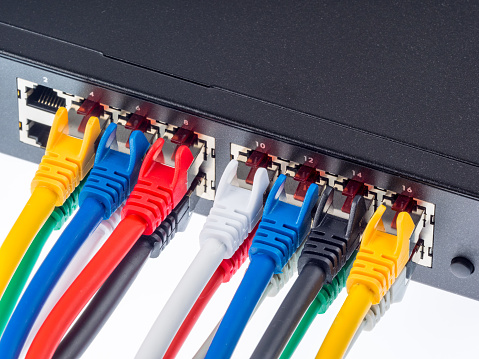
One of the most useful updates you can make to your network is to switch from that old point-to-point cabling system to a highly functioning structured cabling system.
Point-to-Point Cabling vs. Structured Cabling Systems
These are the only two methods for transporting data through network cables. Many continue to use the old point-to-point cable method for their data infrastructure. A point-to-point cabling system has a tendency to cause problems as your network needs expand is size and complexity. To understand why, you must know how a point-to-point cabling system works:
A point-to-point cabling is set up by connecting one component of a network, a server, switch or a device, directly to another component of the network using a fiber-optic cable. Twenty years ago, this type of wiring was an elegant solution for quickly and easily stringing together a network. At that time, most networks were small, and IT departments were smaller.
Today, as networks grow, and fast transfers of huge amounts of data are more essential, maintaining these older point-to-point cabling system, along with the thousands of cords necessary to operate them, places a big strain on a company’s IT resources.
To avoid dealing with this, many companies have switched to a structured cabling system. Instead of connecting each individual component of a network directly to another, a structured cabling system connects the servers and storage units directly to a communication backbone.
Local cabling panels are installed throughout the office and connected to the communication backbone with a single cable. A user can then connect his device to the entire network by simply plugging a short cable into the closest cabling panel.
The Benefits of Structured Cabling
You may be thinking, “Hey, isn’t adding a communication backbone and redoing all the cable systems in my office going to be expensive?” The answer is yes. Installing a structured cabling system can be costly, but it’s an investment in the future of your business.
Why is it such a good investment? There are many reasons. A structured cabling system:
Pays for itself. It’s true that changing from a point-to-point cabling system to a structured cabling system isn’t cheap. The cost of installing a structured cabling system can range from $100 to $500 for each connection. Companies in older buildings with less access to the ceiling and subfloor can expect to pay even more. But the investment will eventually pay for itself by both making your employees more effective and lowering IT costs.
Reduces the time necessary to make repairs. Since a structured cabling system is segregated into a group of devices connected to a single local cabling panel, it’s easy for your IT professional to identify problems and solve issues. An additional benefit is that users’ work won’t be disrupted if their devices aren’t connected to the cabling panel being serviced.
Helps you plan for the future. A cable has an average useful lifespan of 15 years. That’s two to three times longer than most devices. The cabling system you install today is going to be around for a long time, and will handle several generations of devices. No one knows how large your business will grow, or what future devices you may require. However, when you switch to a structured cabling system, you’re helping to future-proof your network.
Offers increased flexibility. Adding more devices to the network is much easier when using a structured cabling system. Instead of running a new cable from additional devices to a switch or server using a long cable, your IT professional can simply connect the device to the closest cabling panel. Removing devices is just as easy. Simply disconnect the device from the cabling panel and the job is done. No more orphaned cables to find and remove, like when using a point-to-point cabling system.
Isn’t it time for you to make the switch from point-to-point cabling? {company} can install a structured cabling system for your business in {city}. Contact us for a complimentary assessment of your cabling needs. {phone} {email}
