by Felicien | May 8, 2018 | Education
The European Union’s General Data Protection Regulation goes into effect on May 25, 2018. Many U.S. and Canadian businesses have been working hard to meet the new GDPR guidelines., but it’s not clear if others have the technology in place to notify individuals that their data was breached within the required 72-hour period. This is one of the primary components of the 2018 GDPR. No matter how you look at it, three days can go by very quickly when it comes to sending out data-breach notifications, especially if you haven’t planned in advance.
Watch Our Free GDPR Training Online
Many U.S. and Canadian businesses, even large enterprises, don’t always plan ahead and, instead, operate in a reactionary mode. Security professionals in the U.S. and Canada are concerned–The mandatory 72-hour GDPR breach-notification period has them worried because they don’t think most businesses are prepared. The U.S. doesn’t have a national data-breach notification requirement. However, most states do require notification within 30 to 45 days. If businesses don’t comply, they will be fined 4% of their global revenue up to $20 million. Plus, the consumers whose data is breached can file class-action suits against them for noncompliance.
Experts know that the GDPR is something to take very seriously.
They believe that the regulators in the European Union will impose the largest fines they can and that they’ll make an example of organizations that lack compliance–and will do so within the first 90 days of the breach. This is much like the U.S. Health, and Human Services/Office of Civil Rights does with their “Wall of Shame” and HIPAA breaches of personally identifiable information (PII).
The GDPR requirements apply to any organization that does business in Europe and collects personally identifiable information on European citizens. It doesn’t only apply to large multi-national corporations; it applies to any business that has 250 or more employees. Smaller companies are typically exempt, except in the case where a data breach results in a risk to the rights and freedom of individuals, isn’t an occasional occurrence, or where the processing of data includes special categories like those relating to criminal offenses or convictions.
The 2018 GDPR replaces the old Data Protection Directive of 1995. The most recent GDPR breach notification requirement was enacted in April 2016. It set a higher compliance standard for data inventory, and a defined risk management process and mandatory notification to data protection authorities.
Breach notification is a huge endeavor and requires involvement from everyone inside an organization. In-house tech support and outsourced Technology Service Providers should have acquired a good understanding of the consequences a data breach causes and the data breach notification requirements for their organization. They must be prepared in advance to respond to security incidents.
Is your technology ready for the GDPR?
Smart CIOs and CEOs in the U.S. and Canada have been preparing for the GDPR for the last year. And many larger enterprises, especially those that regularly do business in the European Union, have seen this on the horizon for a while and have taken advantage of the two-year implementation period to seriously prepare for GDPR. These organizations are ready and won’t need to worry that they can’t meet the 72-hour notification deadline. Many U.S. financial organizations and banks are already prepared as they are accustomed to notifying regulators and customers, and they have the IT infrastructure in place to respond quickly. Plus, banks in the U.S. have been functioning under more stringent regulations since the 2007-2008 financial crisis–They’re already well prepared.
The following are steps your organization should take to prepare your technology for the GDPR.
Perform a thorough inventory of your personally identifiable information, where it’s stored–in onsite storage or in the Cloud, and determine in which geographical locations it’s housed. Don’t forget about your databases. PII is often stored in databases.
Perform a Gap Analysis. This is a process where you compare your organization’s IT performance to the expected requirements. It helps you understand if your technology and other resources are operating effectively. By doing this, your Technology Solution Provider (TSP) can then create an action plan to fill in the gaps. The right TSP will understand the GDPR regulations and how your IT must support your compliance efforts.
Develop an Action Plan. Your TSP should document a detailed action plan for how to use technology to meet the GDPR if you experience a data breach. This should include individuals’ roles and responsibilities. Conduct tabletop exercises to practice how the plan will work with specific timelines and milestones.
Ensure data privacy. If you don’t have a Technology Solution Provider, then you need one for this. Data protection is key for organizations of any size. Consumers have the right to have their data erased if they want. This is called “the right to be forgotten.” This is a concept that has was put into practice in the European Union in 2006, and it’s a part of the GDPR. You won’t be able to do this if their data is stolen.
Be sure to document and monitor everything that you do that’s related to GDPR Compliance. This includes any changes or upgrades that your Managed Service Provider makes to your IT environment. You may need to demonstrate that you’ve done your due diligence when it comes to protecting citizens’ private information and that you practice “defense-in-depth” strategies where you use multiple layers of security controls when it comes to your technology.
If you have all these processes properly in place, you should be able to meet the GDPR breach notification 72-hour period. The organizations that have met most of the International Organization for Standardization information security requirements should also be ready for the new regulations.
Watch Our Free GDPR Training Online
Unfortunately, many organizations won’t do this, simply because they’re not educated about the new GDPR, or they’re so busy they don’t think they have the time to make it a priority. Some think that the GDPR doesn’t apply to them. And others who don’t undertake proactive technology methods, in general, simply “bury their heads in the sand.” These organizations have waited too long now to make the May 28th deadline. Hopefully, yours isn’t one of them.

by Felicien | May 7, 2018 | Education
We have seen firsthand the common errors and oversights that lead to infections and intrusions – and we want to help your business learn from those mistakes.
When it comes right down to it, cybersecurity best practices are not nearly as complicated or confusing as they seem on the surface. That’s not to say that security is simple, but rather that the best precautions have more to do with common sense and practicality than anything else. Yes, the software and safeguards you choose matter, but the best way to avoid something like malware damaging your business is to be smart about all aspects of your cybersecurity – not just the technological parts.
Here are the 10 main reasons businesses like yours are still at serious risk of suffering a malware attack.
1) You Still Think It Can’t Happen To You – Smaller businesses have a habit of assuming that just because they’re not a Fortune 500 company, a cybercriminal would have no interest in disrupting their operations or stealing their data. The reality is that couldn’t be further from the truth. It takes minimal effort on a hacker’s part to successfully target an SMB that has invested very little in their IT security, letting them use your business for practice or sport, and profit off of your stolen data. Most of the new malware variants are automated and target ANY business that lacks protection from a particular vulnerability.
2) Threats Evolve Faster Than You Realize – Like any other aspect of technology, malware and other cyber threats are constantly changing and evolving. Hackers are continually coming up with new ways to target businesses, and are creating more advanced threats. If you’re not up to date on the latest malware strains and zero-day exploits, you very likely have a gaping hole in your cyber defenses. This level of vigilance is all but impossible to achieve without full-time IT security staff at your disposal.
3) Your Staff Isn’t Up To Date With Security Best Practices – Your employees are both your best defense and your biggest weakness. Just about every cyber threat out there relies heavily — if not entirely — on the unwitting assistance of someone inside your organization to be effective. If your staff isn’t well-educated on security best practices and offered ongoing training and information to keep them up to date, any number of threats can target your business with ease.
4) Your Policies And Protocols Are Lacking – Your policies need to focus on more than just password control. At the minimum, you should have two-factor authentication and access controls in place to protect mission-critical data. By tightly regulating access to your files, folders, and systems, you can reduce the odds of an unauthorized users getting their hands on your data or finding a way inside your network.
5) You’ve Got Major Exposure To Multi-Vector Attacks – A standard firewall or antivirus will only protect your network against certain types of infections or attacks. If your security measures and protocols don’t take into account email, web browsing behaviors, file sharing, and network activity, your defenses won’t hold up under a multi-vector attack.
6) Your Technology Is Too Complex For Your Administrators To Manage Effectively – When you leave the responsibility for your business’ cybersecurity in the hands of a single in-house IT person or designate a staff member the administrator of these systems, you could be setting your business up to fail. A solid IT security system is far too complex for a single individual to manage on their own. Automating as much of your cybersecurity as possible can help to lighten the load, but these systems still need oversight to run effectively.
7) Your Systems And Software Are Out Of Date – An alarming number of malware infections — including the now-infamous WannaCry ransomware virus — use pre-existing system or software exploits to gain access to targeted systems. More often than not, security experts are aware these exploits exist, and release patches and updates designed to rectify the problem long before a hacker figures out how to make use of said exploit. However, if you’re not keeping on top of these patches and updates, you’re essentially propping a door open for a cybercriminal to waltz right through.
8) You’ve Got Zero Network Visibility – If you’ve got little to no idea about what’s going on inside of and around your network, it’s more than a little difficult to spot threats. Network monitoring tools can quickly detect both internal and external threats, and contain them before they can cause damage.
9) You’ve Got Lackluster Data Backup Practices – The most terrifying malware infection to date has been ransomware, and no other infection makes a better case for the importance of data backups. Without current and complete backups available for your business to restore from – specifically offsite backups that are insulated from threats that target your network and systems – it’s next to impossible to survive a ransomware attack. Businesses that don’t have reliable and up to date data backups to count on will typically close their doors within six months of a major data loss incident.
10) You’re Falling Short Of Compliance Requirements – Any compliance regulations your business is subject to – whether that be HIPAA, PCI, or any other industry-specific guidelines – will make strict recommendations for security. Simply by working to make sure you’re meeting these requirements, you can take a huge step towards better cybersecurity practices.
At the end of the day, great cybersecurity is not impossible to achieve. Often, it just comes down to having the right support in place. The true value of working with an MSP like {company} comes not from the specialized tools and support we can offer, but from the guidance and advice, you can only receive from experienced and knowledgeable technology professionals who understand your world, and the threats present in it.
Want to learn more about the industry-leading cybersecurity solutions and support we have to offer? Contact us at {phone} or {email}.

by Felicien | May 7, 2018 | Education
In the era of modern technology, effective database security is more important than ever. Your business stores a range of sensitive information (for clients and employees) all of which needs to be kept safe at all times. Should any of that data get exposed, either by malicious hackers or internal human error on your staff’s part, it could very quickly lead to severe consequences for your business. Loss of business, the trust of your clients, financial damages, lawsuits, compliance infractions, or worse. Don’t let it happen to you.
Why Should Database Security Be Enhanced?
Information stored on your business database is more than likely to be misused – either hackers who want to access, steal or corrupt it, or simply by employees who aren’t entirely sure of what they’re doing. Additionally, the database is at risk of malware infections that may lead to inappropriate effects, unauthorized access, or deletion of crucial data. Data breaches can cause an overload that would result in poor business performance and lower operational efficiency. Besides, if hackers access your private business data, it could lead to data corruption and inappropriate activity that would potentially damage your reputation. That’s why it’s so important for you to enhance database security by employing various strategies aimed at protecting the information from any unauthorized access. These strategies involve physical, administrative, and software controls. They include:
Enhancement of Physical Database Security
It may sound simple, but it’s a vitally important part of database security – make sure your servers are kept protected by physical security implementations. Locked closets, numbered keypads, video surveillance, etc. Similarly, you need to ensure that you allocate different machines from those running the web servers for your database. Given that such servers are publicly accessible, they are at a higher risk of hacking and may help in accessing the database irregularly.
Use of Database Firewalls
A firewall will help to enhance the security of the database by denying access to traffic from unidentified sources and reducing the initiation of unnecessary outbound connections. In this case, it identifies a few web servers of applications that are allowed to access the data. Web application firewalls can also be used to prevent malware such as SQL injection attacks that have a potential to delete database information.
Encryption of Data
Encryption should be a foundational aspect of your cybersecurity practices, but especially those concerning your database. In layman’s terms, encrypted data is formatted in a secret code that would be meaningless if intercepted. It is one of the most efficient ways to secure a database given that decryption can only occur through a key, which is essentially a “secret password”. In this case, there is a need for updated encryption software to ensure that private information is only accessible through the database program.
Use of Secure Passwords
Given that a password grants access to your database, it is imperative that you ensure it is complex enough that it can’t be easily guessed. In recent years, hackers have developed sophisticated tools and systems for identifying simple passwords. Therefore, combining letters, numbers, and symbols are simple ways to ensure your passwords are more difficult for hackers to crack using their standard methods.
Auditing and Monitoring Database Activity
Regular database auditing and monitoring help to detect any unusual activity or login attempts by an unauthorized individual. In addition, doing so can help you detect cases of account sharing or any other suspicious activity. The organization may need Database Activity Monitoring (DAM) software that is important in monitoring such activities automatically and independently. Additionally, auditing the database helps to identify accounts that are no longer in use, which could increase the risk of hacking.
Tight Management of the Database Access
It’s important to limit the number of people accessing the database in order to enhance monitoring. Besides, your administrators should only get the minimum privileges that are necessary for their jobs. In some instances, employees are caught colluding with external hackers to defraud an organization or steal crucial data. Therefore, it would be prudent for your business to consider acquiring access management software that provides temporary passwords to authorized users and more specific privileges when necessary. That way, any attempts to access the database with these credentials after they expire won’t work and will notify you of such attempts.
Segmentation of Database
A large, singular database is at a higher risk of exposing private information because it involves so much data. That’s why it can be useful to segment the data by creating various roles within the database. This help prevents all administrators from viewing all data whenever they like. Were you to segment your database, depending on the roles, your administrators may be classified with different privileges and access to different levels of database information.
The security of a database is undeniably important for businesses like yours. Be sure to follow strict cybersecurity practices in order to keep your database secure from malicious hackers and careless employees.
by Felicien | May 7, 2018 | Education
Don’t Be Like The City Of Atlanta That Paid Millions After A Ransomware Attack
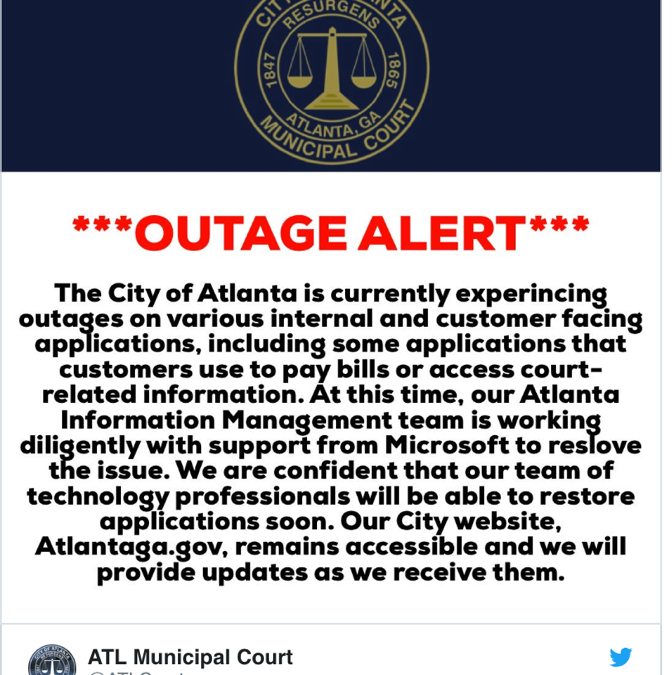
In March 2018, Atlanta’s city government was hit with a ransomware attack that paralyzed them. They couldn’t process payments, provide information or other citizen services because their IT system was locked down. The note attached to the SamSam ransomware demanded $51,000 in bitcoin to restore their systems. However, the City of Atlanta spent much more than this trying to recover their data; a whopping $2.7 million! Plus, some services still aren’t up and running.
We’re not sure if they paid the ransom, but it doesn’t look like it went through if they tried. The hackers took down their communications portal, which they would have needed to pay the ransom. Agencies like the FBI tell us not to pay ransoms because it only encourages these criminals to continue hacking us. Plus, paying doesn’t necessarily mean that the thieves will provide the decryption keys to unlock your data.
It would have been so much cheaper to have protected their network beforehand. The City of Atlanta paid $600,000 in emergency data recovery costs after the incident. They could have set up a more secure system throughout all their departments for 10 percent of this. If I were a taxpayer in Atlanta, I’d be pretty angry about this, wouldn’t you?
Unless your organization has $2.7 Million to spare, it’s time to up your IT security.
Government entities are advised to follow the standards mandated by the Federal Information Processing Standards (FIPS) through the Federal Information Security Management Act (FISMA).
FIPS are a set of standards for document processing, encryption algorithms and other information technology standards for use by non-military government agencies, government contractors and vendors who work with them.
The US government’s National Institute of Standards and Technology (NIST) disseminates these standards via their Framework for Improving Critical Infrastructure Cybersecurity, Version 1.1, recently published on April 16, 2018.
Had The City of Atlanta followed these standards, they may not have been hacked.
The voluntary Framework consists of standards, guidelines, and best practices to manage cybersecurity-related risk. It’s broken down into five segments:
Identify, Protect, Detect, Respond and Recover
1. Identify: Develop an organizational understanding to manage cybersecurity risk to systems, people, assets, data, and capabilities. The activities in the Identify Function are foundational for effective use of the Framework. Understanding the business context, the resources that support critical functions, and the related cybersecurity risks enables an organization to focus and prioritize its efforts, consistent with its risk management strategy and business needs. Examples of outcome Categories within this Function include Asset Management; Business Environment; Governance; Risk Assessment; and Risk Management Strategy.
2. Protect: Develop and implement appropriate safeguards to ensure delivery of critical services. The Protect Function supports the ability to limit or contain the impact of a potential cybersecurity event. Examples of outcome Categories within this Function include Identity Management and Access Control; Awareness and Training; Data Security; Information Protection Processes and Procedures; Maintenance; and Protective Technology.
3. Detect: Develop and implement appropriate activities to identify the occurrence of a cybersecurity event. The Detect Function enables timely discovery of cybersecurity events. Examples of outcome Categories within this Function include: Anomalies and Events; Security Continuous Monitoring; and Detection Processes.
4. Respond: Develop and implement appropriate activities to take action regarding a detected cybersecurity incident. The Respond Function supports the ability to contain the impact of a potential cybersecurity incident. Examples of outcome Categories within this Function include Response Planning; Communications; Analysis; Mitigation; and Improvements.
5. Recover: Develop and implement appropriate activities to maintain plans for resilience and to restore any capabilities or services that were impaired due to a cybersecurity incident. The Recover Function supports timely recovery to normal operations to reduce the impact of a cybersecurity incident. Examples of outcome Categories within this Function include Recovery Planning; Improvements; and Communications.
The NIST Framework is a good reference for guidance. {company} can do the rest. The days of using only in-house techs are gone. Your organization requires the up-to-date expertise of IT experts who can keep your data secure.
What Else Can You Do?
6 Steps To Take To Protect Your Organization
Step 1: Ignore Ransomware Threat Popups and Don’t Fall for Phishing Attacks
These threats look like they’re from an official entity like the IRS or FBI. If a screen pops up that says you’ll be fined if you don’t follow their instructions, don’t do what they ask. If you do, the criminal will encrypt all your data and prevent you and your employees from accessing it.
Beware of messages that:
Try to solicit your curiosity or trust.
Contain a link that you must “check out now”.
Contain a downloadable file like a photo, music, document or PDF file.
Don’t believe messages that contain an urgent call to action:
With an immediate need to address a problem that requires you to verify information.
Urgently asks for your help.
Asks you to donate to a charitable cause.
Indicates you are a “Winner” in a lottery or other contest, or that you’ve inherited money from a deceased relative.
Be on the lookout for messages that:
Respond to a question you never asked.
Create distrust.
Try to start a conflict.
Watch for flags like:
Misspellings
Typos
Step 2: Always Use Secure Passwords
Never use words found in the dictionary or your family names.
Never reuse passwords across your various accounts.
Never write down your passwords.
Consider using a Password Manager (e.g., LastPass or 1Password)
Use password complexity (e.g., P@ssword1).
Create a unique password for work.
Change passwords at least quarterly.
Use passwords with 9+ characters.
A criminal can crack a 5-character password in 16 minutes.
It takes 5 hours to crack a 6-character password.
Three days for a 7-character one.
Four months for eight characters.
26 years for nine characters.
Centuries for 10+ characters.
Turn on Two-Factor Authentication if it’s available.
Step 3: Keep Your Passwords Secure
Don’t write down passwords.
Don’t email them.
Don’t include a password in a non-encrypted stored document.
Don’t tell anyone your password.
Don’t speak your password over the phone.
Don’t hint at the format of your password.
Don’t use the “Remember Password” feature offered on programs like Internet Explorer, Portfolio Center or others.
Don’t use your corporate or network password on an account over the Internet that doesn’t have a secure login where the web browser address starts with “http://” instead of “https://”. If the web address begins with “https://”, then your computer is talking to the website in a secure code that no one can eavesdrop on. There should be a small lock next to the address. If not, don’t type in your password.
If you believe your password may have been breached, you can always change it.
Step 4: Back Up Your Data Onsite/Remotely and Securely
Maintain at least three copies of everything.
Store all data on at least two types of media.
Keep a copy of your data in an alternate location.
If you haven’t backed up your data and you get attacked, it’s gone forever.
Step 5: Secure Open Wi-Fi with a VPN
Don’t go to sites that require your personal information like your username or password.
Use a VPN whenever possible.
Limit your access to using sites that start with “https://”
Don’t connect if all the Wi-Fi networks you have ever accessed appear as “Available”.
Step 6: Hire a Reputable IT Company to Conduct Testing and Training
Conduct a social engineering test.
Share the results with your staff.
Debrief and train your users.
Test again each year!
Don’t run the risk of getting hit with SamSam or any other form of ransomware. Follow the FIPS and NIST Framework and ask the experts at {company} to help.

by Felicien | May 4, 2018 | Education
What DoD Contractors Need to Know About Controlled Unclassified Information (CUI) & Using a Technology Solutions Provider to Ensure Compliance with the DFARS and NIST.
Today, more than ever, the Department of Defense (DoD) relies on external contractors and suppliers to carry out a wide range of missions. Sensitive data is shared with these companies and must be protected. Inadequate safeguards for this sensitive data may threaten America’s National Security and put our military members at risk.
In response to this threat, the DoD has implemented a basic set of cybersecurity controls through DoD policies and the Defense Federal Acquisition Regulation Supplement (DFARS). The DFARS rules and clauses apply to the safeguarding of contractor/supplier information systems that process, store or transmit Controlled Unclassified Information (CUI). These security controls must be implemented at both the contractor and subcontractor levels based on information security guidelines developed by the National Institute of Standards and Technology (NIST) Special Publication 800-171 “Protecting Controlled Unclassified Information in Non-federal Information Systems and Organizations.”
As a U.S. DoD contractor who collects, stores, or transmits Covered Defense Information (CDI) or Controlled Unclassified Information (CUI) you must comply with NIST (The National Institute of Standards and Technology) regulations 800-171 and DFARS (Defense Federal Acquisition Regulation Supplement) 252.204-7012. Your subcontractors must comply as well and be able to maintain compliance. If you don’t, you can’t bid on DoD contracts, and you may lose the ones you have.
The Department of Defense enforces a specifically defined set of cybersecurity controls through the DFARS. The DFARS rules and clauses apply to the safeguarding of contractor/supplier information systems that process, store or transmit Controlled Unclassified Information (CUI). These security controls must be implemented by both you, the contractor, and your subcontractors according to levels based on information security guidance developed by the National Institute of Standards and Technology (NIST).
Finding everything you need to know about DFARS regulations and NIST cybersecurity guidance to ensure that your technology is compliant can be a daunting task. Using the services from a Technology Solutions Provider who has expertise in DFARS and NIST requirements is essential if you want to attain compliance and remain compliant.
Complying with DFARS and NIST requirements isn’t easy. You and your subcontractors must meet DFARS cybersecurity standards and NIST Guidelines, or you can’t apply for DoD contracts. To do this requires a complete scoping and readiness assessment to measure your compliance. You must then remediate any identified gaps in security.
To do this requires the support from a Technology Solutions Provider who specializes in providing compliance solutions. The right IT Provider will help you understand the risks of storing Controlled Unclassified Information in your IT system, and what you must do to comply. Your Provider should also be adept at conducting gap analyses services, vulnerability scans, and penetration testing to ensure your IT security.
Your Requirements as a DoD Contractor
Cyber attacks have reached epidemic proportions in the U.S. Even government agencies are at risk of breaches. This poses a real risk to National Security. It’s imperative that you, your personnel and your subcontractors safeguard classified information and Controlled Unclassified Information. The security of the U.S. Government depends upon the measures you take as a contractor, as well as those in your supply chain. Unfortunately, many businesses don’t have the right cybersecurity controls in places like firewalls, anti-virus and anti-malware, and identity-authentication processes. They also lack detection and response controls for IT exploits.
Until now, strict security processes, controls, and standards that applied to federal information systems weren’t required for CUI. The DFARS 225.204-7012 and NIST SP 800-171 regulations were developed to cover unclassified federal information for nonfederal organizations. You must implement the security controls outlined in the NIST SP 800-171 to be compliant with DFARS.
The U.S. Government provided a disciplined and structured process for contractors to follow. If you want to comply and be accepted for DoD projects, you must leverage the following IT solutions.
Security Information and Event Management
Intrusion Prevention System
Vulnerability and Threat Management
Database Security Controls
Log Management
File Integrity Checking
A Tested Incident Response Plan
The Right Technology Solutions Provider Will:
Identify Information Security Gaps in your system design, architecture policies, and planning exercises.
Utilize Advanced Security Engineering for remediation and enhancements so there are no interruptions in IT service.
Deploy Cyber Operations Support with proven methods to maximize your operational security.
Conduct Continuous Risk Management with a proactive rather than reactive approach.
Use Advanced Cyber Security Testing to identify vulnerabilities in your IT assets that are at risk for cyber attacks.
What Specifically is Covered by the DFARS/NIST Regulations?
The DFARS 252.204-7012 | NIST SP 800-171 requirement for CUI includes any information related to a DoD performance contract, as well as anything that supports the contract. This is a very broad requirement and could have a dramatic impact on the number of systems that must be covered.
These systems are broken down into four categories:
Controlled Technical Information: Any and all technical information as defined by DoD, including those with space or military applications.
Operations Security Information: Any intentions, capabilities or activities that an attacker could use to guarantee failure or unacceptable consequences.
Export-Controlled Information, like biochemical or nuclear data.
Any additional information specified in the contract.
The new rule also applies to your subcontractors. They must meet the same applicability definitions described above.
As a DoD Contractor, you must know what CUI you store, process, or transmit in the course of performing your duties. You and your subcontractors must be prepared to apply NIST SP 800-171 security controls to your information systems. You must create and sustain an environment for the proper storing, processing, or transmitting of CUI. This includes ensuring your employees or any individuals involved in the contract practice security and privacy when it comes to information systems.
As you can see, this broad scope of requirements demands the expertise of a Technology Solutions Provider who can develop, deploy and enhance a secure and compliant environment for your CUI processing needs. You need one who can engage with stakeholders to identify the key security objectives and critical requirements to develop a prioritized IT roadmap, information security architecture, security controls and operations that comply with the DFARS 225.204-7012 and NIST SP 800-171 Guidelines.
Minimum cybersecurity standards are described in NIST Special Publication 800-171 and broken down into fourteen areas:
Access Control– You must limit system access to authorized users.
Awareness & Training– You are required to promote awareness of the security risks associated with users’ activities, train them on applicable policies, standards and procedures, and ensure they are trained to carry out their duties.
Audit & Accountability- You must create, protect, retain and review all system logs.
Configuration Management– You are required to create baseline configurations and utilize change management processes.
Identification & Authentication-You must authenticate information systems, users, and devices.
Incident Response– You’re required to develop operations to prepare for, detect, analyze, contain, recover from, and respond to incidents.
Maintenance-You must perform timely maintenance on your information systems.
Media Protection– You must protect, sanitize and destroy media containing CUI.
Personnel Security– You’re required to screen individuals before authorizing their access to information systems, and ensure these systems remain secure upon the termination or transfer of individuals.
Physical Protection-You must limit physical access to and protect and monitor your physical facility and support infrastructure that houses your information systems.
Risk Assessment– You are required to assess the operational risk associated with processing, storage, and transmission of CUI.
Security Assessment– You must periodically assess, monitor and correct deficiencies and reduce or eliminate vulnerabilities in your organizational information systems.
System & Communications Protections– You must monitor, control and protect data at the boundaries of your system, employ architectural designs, software development techniques and system engineering principles that promote effective information security.
Protection System & Information Integrity– You’re required to identify, report and correct information and any flaws in your information in a timely manner. You must also protect your information systems from malicious code at appropriate locations, and monitor information security alerts and advisories so you can take appropriate actions.
Plus, there are specific security requirements comprising 110 individual controls that you and your subcontractors must implement in each of these areas.
Large enterprises probably have these security systems in place. Smaller businesses probably don’t–And this is a big undertaking. With the right experience in CUI requirements, your TSP can help by handling these responsibilities for you. They can:
Periodically assess the security controls in your company’s systems to determine if the controls are effective in their application.
Develop and implement plans of action designed to correct deficiencies and reduce or eliminate vulnerabilities in systems.
Monitor security controls on an ongoing basis to ensure the continued effectiveness of the controls.
Develop, document, and periodically update system security plans that describe system boundaries, system environments of operation, how security requirements are implemented, and the relationships with or connections to other systems.
As a DoD contractor, you and your authorized employees must fully understand what Covered Defense Information you store, process, or transmit in the course of doing business with the Department of Defense. You must also be ready to provide adequate security using controls outlined in the NIST SP 800-171, Security and Privacy Controls for Non-Federal Information Systems.
Your Technology Solutions Provider must be adept at integrating methodologies for incorporating security and privacy into business solutions. They should leverage the following services:
Compliance Services that include security awareness training, information technology security training, computer-based training classes, IT oversight, system registration and categorization, and continuous monitoring planning.
Risk Management Services via successful risk management programs and concise, actionable risk assessments.
A 24/7 Virtual Network and Security Operations Center (VNSOC) with a team of highly trained, certified and experienced network and security analysts that monitor your network and systems around the clock with log management.
Security Assessments that utilize the latest trends in data protection, technology advancements, and legislative changes, and that test the security posture of your information systems.
Security Controls that determine how to implement NIST SP 800-171 R1 security requirements.
Identity, Credential & Access Management (ICAM) to simplify the identification, credentialing and assessment of your IT infrastructures to ensure privacy, security, privacy, compliance, and efficiencies.
Cyber Incident Reporting to plan, develop and execute testing of a cyber-incident plan.
Response and Recovery Service if a cyber event is confirmed. Your TSP should support and advise you during the Incident Response lifecycle. Your TSP should immediately preserve and protect all evidence and capture as much information about the incident as possible. They should review your networks to identify compromised computers, services, data, and user accounts and identify specific covered defense information that may have been lost or compromised. You must always be helpful and transparent with the DoD and cooperate with them to respond to any security incidents.
Meeting the SP 800-171 is not a one-time fix–Rather it’s a continuous assessment, monitoring and improvement process. Your TSP should periodically assess the security controls in your company’s systems to determine if the controls are effective in their application. They should develop and implement plans of action designed to correct deficiencies and reduce or eliminate vulnerabilities in systems. They must monitor security controls on an ongoing basis to ensure the continued effectiveness of the controls that are in place. And, they should develop, document, and periodically update system security plans that describe system boundaries, system environments of operation, how security requirements are implemented, and the relationships with connections to other systems.
If the Department of Defense determines that other measures are required to provide adequate protections and security, you and your subcontractors may also be required to implement additional precautions. It’s essential that you stay up to date on these requirements if you want to keep your standing with the DoD or to bid on future contracts. Again, your Technology Solutions Provider is your best friend where this is concerned.
