
by Felicien | Aug 10, 2017 | Education
With mobile devices and cloud access, today’s organizations provide more flexibility for their workers. However, your growing business still requires on-site hardware to store information on servers, or use powerful workstations with wired Internet connections for design or engineering.
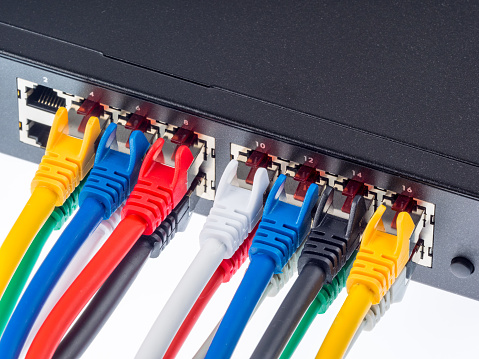
When hardware needs expand, it can cause “Cable Confusion.” Wired connections are often difficult to maintain, and without proper organization they can turn into a confusing mess. This isn’t just annoying – it’s a serious problem that causes major setbacks if cables are damaged or disconnected. And, in the worst-case scenario, improperly installed cabling creates a fire hazard.
Structured Cabling is the Answer.
Structured cabling is the design and installation of cabling systems to support multiple hardware devices. Small companies with limited hardware typically don’t need structured cabling. However, as they grow, and require data banks and additional workstations, cable management is essential
Standards for Structured Cabling
The Standards for Structured Cabling are governed by three different organizations:
The Telecommunications Industry Association,
The Electronic Industries Association, and
The American National Standards Institute.
They oversee a set of standards for data and voice communications using various kinds of cable. These standards provide best practices that data specialists must use when setting up complex wired networks. With a properly installed system your requirements for both today and tomorrow will be met, so when you add hardware it will be supported.
The Benefits of Structured Cabling
You may be thinking, “This is all about keeping cables organized? We can do this on our own.” The truth is that most don’t know how to organize cables and wired connections, and because of this, they set themselves up for chaos. It’s best to let the experts install your structured cabling. Here’s why:
Hardware upgrades are easier: From a technical perspective, it’s far easier to switch to newer hardware or make upgrades with structured cabling. Technicians know where everything is, and can quickly hook up new products with minimal confusion and fuss.
When something goes wrong, it gets fixed fast: Without structured cabling, it can take a very long time to carefully check all the potential hardware problems when something goes wrong (and that’s often before moving onto check software, which is a whole other consideration). When following standards, troubleshooting becomes much easier, and as a result there’s less downtime.
Safety: We already mentioned fire hazards, which is of course an important danger to avoid. But structured cabling also helps prevent electrical shocks and old-fashioned tripping. Basically, your workplace will be a safer place.
Longevity: Cables tend to last longer than hardware in most cases. Structured cables are better protected and won’t need to be replaced as often.
Standard Specifics: The Four Key Sections
Structured cabling is divided into four different sections. Each section acts like a checklist when installing and organizing cables. They’re meant to work together during the setup process.
ANSI/TIA/EIA-568-B: This standard focuses on telecommunications wiring in commercial buildings for larger, widespread systems like local area networks, VoIP, video systems, and so on.
ANSI/TIA-569-C: This standard deals with design and construction when planning for telecommunication wiring, both inside buildings and between buildings.
ANSI/TIA/EIA-606-B: Here, the standards focus on what sort of controls and oversight administrators need to manage telecommunications infrastructure inside a business.
ANSI/TIA/EIA-607: This standard deals with commercial building grounding and bonding for telecommunications hardware.
Digging into these standards reveals a long list of obscure technology and installation terms that many small and mid-sized businesses are unfamiliar with. However, the goal is clear: Make sure cables are reliably set up in a safe, practical way.
Using Cable Standards in Your Business
Clearly, there are many situations where these standards can be used, and they may require different strategies depending on the situation. For example, a retrofit may need a very different approach to meet structured cable requirements than installing brand new software. Working on an older building that has been converted to an office may require innovative solutions, compared to a modern office building built with these codes in mind.
That’s not even touching on manufacturer warranties and how they relate to installation, or how scaling up in the future may change cable needs. The bottom line is that structured cabling can be more complex than it first appears. This is why it’s important to find vendors, service providers, and installation experts who understand structured cabling and utilize best practices.
If you need such an expert for your business in {city}, we can help. {company} specializes in providing the IT and structured cabling services support growing companies require. Contact us at {phone} or {email} for a complimentary assessment of your needs.
by Felicien | Aug 9, 2017 | Education
How much do you know about your company’s IT network?
What type of cabling system do you use?
When was the last time you upgraded your network cabling?
These are questions any business owner should have answers for. However, if you’re like most that consult for, your answers aren’t sufficient. Your IT network is the backbone of your organization. Without a strong network, your employees are wasting time and losing productivity every day.
Are you using old technology and running your business on an out-of-date network?
If so, it’s time for an update.
One of the most useful updates you can make to your network is to switch from that old point-to-point cabling system to a highly functioning structured cabling system.
Point-to-Point Cabling vs. Structured Cabling Systems
These are the only two methods for transporting data through network cables. Many continue to use the old point-to-point cable method for their data infrastructure. A point-to-point cabling system has a tendency to cause problems as your network needs expand is size and complexity. To understand why, you must know how a point-to-point cabling system works:
A point-to-point cabling is set up by connecting one component of a network, a server, switch or a device, directly to another component of the network using a fiber-optic cable. Twenty years ago, this type of wiring was an elegant solution for quickly and easily stringing together a network. At that time, most networks were small, and IT departments were smaller.
Today, as networks grow, and fast transfers of huge amounts of data are more essential, maintaining these older point-to-point cabling system, along with the thousands of cords necessary to operate them, places a big strain on a company’s IT resources.
To avoid dealing with this, many companies have switched to a structured cabling system. Instead of connecting each individual component of a network directly to another, a structured cabling system connects the servers and storage units directly to a communication backbone.
Local cabling panels are installed throughout the office and connected to the communication backbone with a single cable. A user can then connect his device to the entire network by simply plugging a short cable into the closest cabling panel.
The Benefits of Structured Cabling
You may be thinking, “Hey, isn’t adding a communication backbone and redoing all the cable systems in my office going to be expensive?” The answer is yes. Installing a structured cabling system can be costly, but it’s an investment in the future of your business.
Why is it such a good investment? There are many reasons. A structured cabling system:
Pays for itself. It’s true that changing from a point-to-point cabling system to a structured cabling system isn’t cheap. The cost of installing a structured cabling system can range from $100 to $500 for each connection. Companies in older buildings with less access to the ceiling and subfloor can expect to pay even more. But the investment will eventually pay for itself by both making your employees more effective and lowering IT costs.
Reduces the time necessary to make repairs. Since a structured cabling system is segregated into a group of devices connected to a single local cabling panel, it’s easy for your IT professional to identify problems and solve issues. An additional benefit is that users’ work won’t be disrupted if their devices aren’t connected to the cabling panel being serviced.
Helps you plan for the future. A cable has an average useful lifespan of 15 years. That’s two to three times longer than most devices. The cabling system you install today is going to be around for a long time, and will handle several generations of devices. No one knows how large your business will grow, or what future devices you may require. However, when you switch to a structured cabling system, you’re helping to future-proof your network.
Offers increased flexibility. Adding more devices to the network is much easier when using a structured cabling system. Instead of running a new cable from additional devices to a switch or server using a long cable, your IT professional can simply connect the device to the closest cabling panel. Removing devices is just as easy. Simply disconnect the device from the cabling panel and the job is done. No more orphaned cables to find and remove, like when using a point-to-point cabling system.
Isn’t it time for you to make the switch from point-to-point cabling? {company} can install a structured cabling system for your business in {city}. Contact us for a complimentary assessment of your cabling needs. {phone} {email}

by Felicien | Aug 9, 2017 | Education
Predictive analytics may not tell your future, but using it can increase your company’s fortunes.
Each time you buy something online, you’re providing more than just your name, address and credit card number. Websites collect a vast treasure trove of valuable information about you, even if you never make a purchase.
The information a company can collect ranges from the search terms you use, to how long you spent looking at specific pages. However, this is still just the “tip of a very large and hidden iceberg.”
When I ask business owners about who their target customers are, most are only capable of responding with a short sentence, “Our customers are married men between the ages of 40 and 60.” This isn’t nearly enough information to make appropriate business decisions.
Some have a much clearer idea of their target audience, and can provide a more complete customer persona based on general trends. However, as of yet, no client has ever presented me with an extremely detailed report of their market’s actual online behaviors.
This is no way to run a business. The more you know about your customers, the better you can predict their needs and cater to them. Collecting and analyzing big data is the best way for you to learn as much as you can about your customers and their behaviors.
What’s Big Data and Why Is It Such a Big Deal?
Perhaps you’ve heard the term “big data” before, but you may not know exactly what it means. To put it simply, it describes a collection of information that’s so large and cumbersome that it’s next to impossible to analyze without using a computer. However, there’s much more to big data than this basic definition.
Back in the early 2000s, industry analyst Doug Laney developed the concept behind big data. He defined it with the Three V’s: Volume, Velocity and Variety.
Volume:Extremely large amounts of information.
Velocity:Rapid flow of data.
Variety:Data comes in many forms.
Companies around the world spend a lot of money on big data.
How Can Your Business Prosper from Big Data?
Although there’s a great deal of hidden potential in big data, it takes one more step to transfer information into knowledge. You can use this information to improve your business through the power of predictive analytics.
Predictive analytics deals with what’s likely to happen in the future using structured and unstructured big data.
Structured data includes things that are easily definable and objective, like a customer’s age, race, gender, educational level and income.
Unstructured data is information that must be parsed, and is subjective, such as customer reviews and social media.
Some areas where predictive analytics is most advantageous are with pricing strategies, inventory management and preventative maintenance.
Pricing strategies that incorporate predictive analytics can help you increase your ROI (Return on Investment). Your business can earn more revenue when understanding the actions of your prospective customers. You can use big data and predictive analytics to discover what drives a specific segment of customers to make a purchase. For instance, an online retailer can store data about which pages a customer visited before making a purchase. With predictive analytics, you can then use big data to predict how much certain customer groups are willing to spend on your product.
Inventory management is critical for businesses to master. Poor inventory management means a business is losing money by either not having enough stock to meet the level of demand, or by overbuying, which means products are sitting on their shelves. Traditionally, businesses stock products based on historical sales during a period of time. However, this approach doesn’t take into account changing preferences, nor does it provide data regarding new products. By using predictive analytics and big data together, businesses can get a better idea about demand for their products, and better plan for purchasing and stocking inventory.
Predictive maintenance helps to keep a business operational by avoiding sudden breakdowns. If you’re concerned about unexpected machinery issues, you can combine predictive analytics and big data to make an educated guess about when a machine will require maintenance. Predictive maintenance can save businesses a lot of time and money. It’s critical for companies working in the transportation industry (such as airlines, trains and bus fleets.)
While most small businesses don’t have as much big data as large corporations, every business can still benefit by applying the principals of predictive analytics to build a better understanding of its market.
The experts at {company} help. Contact us at {phone} or via email {email} to learn how we can help you use technology to analyze and predict your business needs.

by Felicien | Aug 9, 2017 | Education
As a business owner in Canada, the Internet is crucial to our operations, productivity and success.
How important is the Internet to you?
Would you go as far to say that it’s essential for a decent quality of life? Thankfully, the lawmakers in Canada believe it is.
Food, shelter, clothes, and a high-speed broadband Internet connection. Are these the new standards for basic human needs? I honestly think so. After all, it’s now the 21st Century, and the Internet has replaced many of the more traditional aspects of everyday life.
The power of the Internet has changed the very fabric of our country. Everything from the decline of cable TV viewership, to the decline of shopping on Main Street. Those who don’t have access to a high-speed Internet connection are missing out on more than just Facebook chats and cat memes, they’re rapidly becoming second-class citizens.
That’s why I was so interested in a news report about a decision made by the Canadian government. Canadian lawmakers declared that access to an inexpensive, dependable, and fast Internet connection is a basic right for all Canadian citizens no matter where they live. This announcement from the Canadian Radio-television and Telecommunications Commission (CRTC) came as welcomed news to the 18% of Canadians who live beyond the great technological divide in some of the most remote areas of the country.
Currently, residents in remote areas must pay outrageously high prices for slow and spotty Internet services with low data caps. Some people pay as much as $100 a month for 1 Mbps connections. Even for those who can afford to pay the cost, these restrictions prevent millions of Canadians from taking full advantage of all the benefits an Internet connection offers. Expensive and poor-quality Internet connections mean these residents don’t have access to critical educational and medical information, nor the ability to conduct business online.
To make matters worse, many of the people in areas without reliable Internet are members of the First Nations, who are living in small indigenous communities. Many of them are already facing extreme hardships such as poor food quality, lack of security, and high unemployment. These harsh realities cause widespread feelings of hopelessness, and a much higher than average rate of suicide, especially among young people. Canadian lawmakers hope that by providing accessible Internet to these isolated communities, residents will be able to gain hope and improve their lives.
The chair of the CRTC, Jean-Pierre Blais said, “The future of our economy, our prosperity and our society — indeed, the future of every citizen — requires us to set ambitious goals, and to get on with connecting all Canadians to the 21st Century. These goals are ambitious. They will not be easy to achieve, and they will cost money. But we have no choice.”
This goal is ambitious. The government plan calls for all Canadians to have access to unlimited data, with at least 50 Mbps for downloads and 10 Mbps for uploads. The government has already committed $750 million to the project, and predicts that 90% of all Canadians will have access by 2021.
The Internet in the USA
Right now, in the US, proposed Internet policies that seem intent on destroying net neutrality are working their way through Congress. If passed, these laws would put small businesses at a distinct disadvantage to large corporations that could literally buy up the majority of the bandwidth. This would prevent small online businesses from operating on the same playing field as large corporations.
Besides the possible elimination of net neutrality, US companies still have a long way to go when providing high-speed Internet to all US residents. Even using the FCC’s low-bar definition for broadband Internet, which is only 25 Mbps for uploads and 3 Mbps for downloads, millions of Americans don’t have access to broadband-speed Internet connections.
According to the 2016 Broadband Progress Report issued by the FCC, 10% of all Americans lack broadband access. This number increased to 39% for Americans living in rural areas. What’s even more troubling is that almost half of all American students attend schools that don’t have Internet connections with the recommended 100 Mbps per 1,000 students. We can, and we must do better.
This isn’t to say that there’s no good news when it comes to Internet speeds in the US. Based on a recent report for the first quarter of 2017, the average Internet speed in the US was 18.7 Mbps. That’s a 22% increase over the last year and welcomed news for Americans.
In terms of our government, it’s refreshing to see that Canadian officials understand the importance of technology to improve people’s lives.
Is your business getting the fastest Internet service possible? Contact {company} in {city}. We’ll be happy to perform a complimentary Internet-speed test to ensure you are. {phone} {email}

by Felicien | Aug 8, 2017 | Education
G-Suite is Google’s new cloud-based collection of business applications. Should you make the switch from Office 365 Business?
It’s no secret that I’m obsessed with Microsoft’s Office 365 Business. However, after hearing about the recent updates to Google’s G Suite, (formerly Google Apps for Work) I had to take a closer look. After all, I owe it to my clients to find out if there’s something better out there.
What is Office 365 Business?
Office 365 Business is a collection of cloud-based applications for easy for companies to easily create, collaborate and keep their business running smoothly. Office 365 Business comes in three different versions: Regular, Premium and Essentials. The annual subscription costs from $5 to $12.50 per user, per month.
Each version of Office 365 Business offers a selection of popular applications. For this comparison, I decided to look at the most complete version, the Office 365 Business Premium (which costs $12.50 monthly per user with a yearly commitment, or $15 per month without a contract).
What is G Suite?
G Suite is the rebranding of the Google Apps for Work suite of applications, and is very similar in concept to Office 365 Business. Most of the apps included are new versions of the company’s old favorites. Like Office 365 Business, there’s more than one version of G Suite you can choose from. G Suite comes in Basic and Business, which costs subscribers either $5 or $10 per month, per user, respectively. There’s also an Enterprise version, however, the price isn’t available on Google’s website.
Unlike Office 365 Business, all of G Suite’s plans offer access to every major application. The difference is that the Business version offers more storage and better search functions. For this comparison, I will use the G Suite Business plan which costs $10 per month per user, per month, and doesn’t include a discount for an annual plan.
Comparison Results
Apps for Creating
Office 365 Business Premium offers extremely well-known and popular web versions of their business application which many workers have experience using. This familiarity saves time for your employees to learn, and lets new hires be productive from the first day on the job. The package includes:
Word for documents.
Excel for spreadsheets.
PowerPoint for presentations.
OneNote for storing information.
Publisher (PC only) for layout design.
Access (PC only) for databases
Although G Suite provides subscribers popular apps that were previously available from Google, many employees have never used them before. This means more training time. The applications G Suite provides for creating include:
Docs for documents.
Sheets for spreadsheets.
Slides for presentations.
Keep for storing information.
Forms for creating interactive surveys and forms.
Sites for building simple websites
While both Office 365 Business Premium and G Suite offer apps to help users accomplish similar tasks, the Office 365 Business Premium apps feel much more established and better thought out. Word can handle longer and more complex documents than Docs, and Sheets doesn’t even come close to the robustness of Excel. PowerPoint makes it much easier than G Suite’s Slide to both create a presentation and present it. Keep feels like a light version of OneNote, however, some users may prefer its overall simplicity.
Each service also offers unique apps.
Office 365 Business Premium gives PC users Access and Publisher.
Access is a decent database creation and management tool. Publisher is a simplified desktop-publishing application that lacks the power of many other commercial desktop publishing programs. However, it’s acceptable for laying out in-house documents.
G Suite’s Forms allows you to create interactive forms and surveys and send them via email, or upload to a website. It also provides the tools required to analyze the results. While not as powerful as similar stand-alone software, it is a nice app. Sites is a website-creation tool that appears as an out-of-date afterthought.
Apps for Collaboration
Office 365 Business Premium is great for helping employees work better and faster with collaborative apps. A subscription includes:
Outlook for emails.
Skype For Business for text, voice, video chatting and meetings.
Microsoft Teams for group chats.
Yammer for helping groups work smarter.
G Suite has its own software solution for collaboration that includes:
Gmail for emails.
Hangout Meets for video, voice chatting and meetings.
Google+ for helping teams work smarter.
Jamboard an interactive whiteboard.
When it comes to email services, both G Suite and Outlook provide comprehensive solutions that are well matched.
Power users will appreciate G Suite’s unlimited email storage limit, but Outlook provides a more than adequate 50 GB of storage per account.
Skype For Business is vastly better than Hangout Meets since it allows 250 people to join a meeting. That’s ten times the number allowed in Hangout Meets. In addition, most users find the video and voice quality better with Skype.
Many people are confused about the differences between Yammer and Microsoft Teams. Both serve similar functions to facilitate collaboration, but they do so in different ways. Microsoft Teams is similar to Slack, while Yammer is more like a traditional BBS. No matter which you prefer, both are better than Google+.
Jamboard is basically an interactive whiteboard that some may find useful.
Apps for Keeping Things Organized
Microsoft’s OneDrive is a popular file-sharing and storage platform. Office 365 Business Premium offers 1 TB of data storage which should be enough for most. When a business purchases five or more licenses, all users gain unlimited storage.
G Suite offers their subscribers Drive, with the same deal that Office 365 Premium provides. It offers 1 TB of data for companies with fewer than five licenses. After five licenses, all users get unlimited data storage.
There’s not much difference between the two storage solutions.
All in all, Office 365 Business Premium still seems to be the better deal. The only drawback is that it’s slightly more expensive than G Suite. But, in my opinion, the price difference doesn’t seem like a good reason to switch.
For help determining what software packages best meet your business’ unique needs, contact the IT experts in {city} at {company}. We’ll be happy to provide a complimentary business-app assessment. {phone} {email}

by Felicien | Aug 8, 2017 | Education
The Prevalence of Cybercrime
Cybercrime is the fastest growing economic crime throughout the world, with countries such as the US and UK seeing double-digit growth every year. Preventing criminals from taking control of your digital assets is essential. This requires diligent risk assessments, robust compliance policies, and standardized procedures designed to limit the potential of an attack.
The government agrees: They state that cyber theft is up $3 trillion from 2016. The cost of malware and other cybercriminal activities is expected to hit $6 trillion a year by 2021. The rising cost of cybersecurity products and services continues to place a burden on organizations as they rush to gear-up to protect their digital assets.
All technology workers must stay abreast of cybersecurity threats. However, this can be challenging for the small to mid-size business where IT professionals are already overworked. The IoT (Internet of Things) and BYOD (Bring Your Own Device) models continue to create loopholes in what might otherwise be a relatively secure infrastructure.
Ransomware is particularly prevalent in today’s economy, as hackers know they can “lock down” an organization’s systems until a ransom has been paid. This can be used against healthcare organizations and others who rely on highly-sensitive patient or customer data.
The Security Challenges with Windows
While Windows is far from the security black hole that some Mac users believe, there are some significant security challenges. You hear about attacks on Windows systems more often due to the pervasiveness of the operating system. Security shortfalls such as poor backup procedures, too-easy access to root servers, and the ever-present risk of infiltration when employees open a link or email attachment that contains a virus can’t always be managed from a central location.
Additionally, it’s critical that IT departments maintain updated Windows patches. However, this requirement extends to supplemental software such as Firefox and Adobe Reader, two products that are ripe for cybercrime. Finally, maintaining strict workstation-security standards means everything from requiring passwords are robust and changed on a regular basis, to ensuring web browser configurations are standardized and non-supported applications can’t be installed on machines.
What is BitLocker?
With cybercrime on the rise, it’s important that business and technology professionals are informed about security. They should know that BitLocker provides high-level protection against vulnerabilities for Windows. Fortunately, most Windows users have access to BitLocker without spending a dime.
Understanding that there are significant challenges with cybercrime, the Windows development team created this disk-encryption feature. It’s available for systems from Windows Vista to current versions of Windows. It provides Windows users a built-in methodology to protect data using AES-encryption algorithms with either a 128-bit or 256-bit key. While BitLocker isn’t available on all versions of Windows, you’ll find it in Windows 8.1 Enterprise or Windows 10 Pro. Users who have deep concerns about security can use BitLocker to provide a good level of safety against firmware-level malware or other unauthorized system changes.
How BitLocker Works
In the beginning, BitLocker only worked on the drive where the Windows operating system was installed. However, more recent editions include all drives on a particular system. Implementing a compatible TPM (Trusted Platform Module) allows BitLocker to validate the integrity of critical system files, as well as boot files. If the special TPM chip has been infiltrated, then BitLocker will block access to your files to maintain their security, and will only boot in a restricted mode. This adds an additional layer of security for your files.
Using BitLocker
The first step is to ensure your particular Windows version includes the software. You can do this by typing “BitLocker” in the Start Menu, or by selecting BitLocker from the Control Panel. Opening BitLocker starts the encryption process that prompts you to enter a password, or insert a USB key. Selecting multiple options for backup and recovery is important, as it allows you to access the software even if you forgot your primary entry method. Once you select the backup and restore options, you’ll be presented with two choices:
Encrypt entire drives
Encrypt only disk space that’s been used
While encrypting the entire drive is preferable, it will take more time.
Need to learn more about cyber security and how to protect your business assets? Give the security professionals at {company} a call at {phone}, or contact us via email to {email}. We’ll work directly with you to implement BitLocker and other advanced security mechanisms on your workstations and network computers.
