
by Felicien | Apr 17, 2018 | Education
An efficient and secure running IT system is essential for any organization, and especially so for today’s law practices. Your work relies on secure and ready access to your data when you’re in the office, courtroom or when on the road. You need the ability to interface your Line of Business applications with other IT solutions you and your staff depend on each day. In order to remain competitive, you must use the most advanced legal technology solutions available and use them to your best advantage. And, any form of downtime is totally unacceptable because can cost you your clients. For all this, you need a Technology Solutions Provider who can build an IT infrastructure from the ground up to meet your high-security, high-availability, high-efficiency requirements.
The Seven IT Headaches All Lawyers Face Today (And Their Remedies)
Technology challenges can lead to significant IT headaches, especially for small and medium-sized firms that manage their own infrastructure. They often “tag” the one employee who knows the most about technology. But today, it’s impossible for a non-professional to provide the 24/7 IT support, expertise and defense-in-depth protection required today.
Even law firms with a professional IT employee struggle with their changing and increasing technology demands and the need for 24/7 IT remote management. IT headaches in the legal industry vary. But the common factor is that they are pervasive and never-ending unless they are prevented by qualified Legal IT experts.
Headache #1 – Cybersecurity
Client confidentiality is a priority for every law firm. And without the proper IT management, your data can be at great risk.
Many lawyers aren’t aware that their critical data is at risk. The chance that data is breached has increased as attorneys, and their employees use mobile devices and email outside the office. They don’t realize that at a moment’s notice their IT system could be hacked, and confidential information stolen.
Cybercriminals have discovered new, creative ways to steal data. Hackers are increasingly targeting law firms to steal clients’ confidential data. Additionally, unethical competitors engage in illegal eDiscovery to harm a competing law firm, or to win a lawsuit.
Many say, “This only happens to larger legal organizations, not small ones like mine, right? Wrong–Small and mid-sized law firms are a more attractive target for hackers because they typically don’t have the right security solutions in place, nor do they train their employees to recognize phishing and ransomware threats like their larger counterparts do.
Building a cybersecurity infrastructure today can be a daunting task with all the attack vectors in play. The most important challenge comes from the requirement to protect clients’ private information. Client confidentiality is at the top of every attorney’s mind, and without the right IT management, this confidentiality can be breached. Cybersecurity should be the primary concern for litigation attorneys who handle confidential electronically stored information.
“To maintain the required level of competence, a lawyer should develop and maintain a facility with technology relevant to the nature and area of the lawyer’s practice and responsibilities. A lawyer should understand the benefits and risks associated with relevant technology, recognizing the lawyer’s duty to protect confidential information.”
Law firms must prevent:
Unauthorized access to both their wired and wireless networks.
Malware from corrupting their network.
Their employees from clicking on malicious links or unknowingly revealing confidential information to a hacker.
The disclosure of electronically transmitted communications.
Data loss from both manmade attempts or natural disasters.
Law firms must ensure:
Data is encrypted and safeguarded.
Compliance with legal, regulatory and confidentiality requirements when using technology.
Files are properly backed up both onsite and offsite, and that they are easily recoverable.
A secure email-archiving and retention strategy for both data at rest and in transit.
Cybersecurity is confirmed with regular Vulnerability and Risk Assessments.
The situation demands a defense-in-depth security plan that employs multiple security measures to protect confidential data. Defense-in-depth security was originally conceived by the NSA to provide a comprehensive approach for cybersecurity.
By using multiple layers of automated and remote security solutions, where the outer layers provide a first line of defense, and deeper more concentrated layers stop anything that gets through, lawyers can stop worrying about cyber threats and concentrate on their work at hand. And, as each law firm is unique, this protection requires an IT professional with the knowledge and expertise to find the right combination of security techniques and solutions.
The Remedy: The answer is to rely on a Technology Solutions Provider who will avert security risks and compliance issues that can cost you in legal liabilities, regulatory penalties, and your good reputation.
Headache #2 – Downtime
Every hour lost to downtime means lost billable hours. Time is money when it comes to law practices. Downtime due to power failures, ransomware, natural disasters and more mean your firm is paralyzed and unable to operate.
The increasing digitization of information over the last 20 years has increased productivity for law firms. When IT runs as it should, it helps you save time, and work more efficiently. However, this also means that when it doesn’t, and you’re faced with downtime that your clients, who are used to your efficiency, don’t understand and become angered when their cases come to a standstill.
This causes headaches for you, your employees and your clients. It’s critical that you recover as quickly as possible. When your IT goes down, even for a few hours during a workday, you lose billable hours, lose the ability to send and receive emails, and risk damaging your firm’s reputation.
It doesn’t matter how long downtime persists. It’s unacceptable in any case because it’s preventable. You can mitigate the risk of downtime by having the right technology in place.
The Remedy: Preventive IT measures are key to protecting your confidential data. With the right enterprise cloud backup and recovery system, and the services and support from a Technology Solutions Provider, your firm will benefit from complete system monitoring, secured servers, safeguarded data and upwards of a 99% guaranteed uptime.
Headache #3 – Inefficient IT Performance
In today’s digital world, a slow-performing IT system is like a wound that can drain the life’s blood out of your law firm. You can’t afford to wait this out and hope that things will improve. Time is money, and inefficient IT solutions are not only frustrating, but they can also impede your ability to meet your clients’ demands.
Increased IT performance is one of the biggest benefits of outsourcing your IT service and support. Often, an in-house technical staff creates new problems by overcomplicating basic configurations, because they lack the skill and experience required.
The Remedy: A Technology Solutions Provider offers a higher level of expertise and establishes a highly performing IT system to keep your law firm up and running.
Plus:
You’ll save money. Unlike with in-house staff, you won’t have to provide benefits like healthcare coverage, sick and vacation days and workman’s compensation.
You’ll have 24/7 Live Help Desk Support, to ensure your issues are resolved quickly, and your IT systems stay up and running at all times.
You’ll save time with the resources to start new IT solutions quickly as opposed to waiting for in-house techs who will need to be trained.
Headache #4 – Poor Integration of Line of Business Solutions
You need your Line of Business (LOB) applications to complete your responsibilities each day for Practice Management, Document Management, Time & Billing, and Legal Document Generation.
Applications like:
PCLaw
Prolaw
Juris
Clio
Timeslips
Amicus
Abacus
Tabs3 / Practice Master
Timeslips
ProDocs
You also need these applications to integrate with popular software programs like Microsoft Office. And when they don’t run as expected, this can cause major headaches.
The Remedy: This requires assistance from a Technology Solution Provider with expertise in legal IT programs.
Headache # 5 How to Maintain Client Confidentiality While Using the Cloud.
Attorneys are using the Cloud in their law practices. However, this can present significant challenges when it comes to their ethical and legal obligations to maintain client confidentiality.
Your law firm can benefit immensely from cloud computing services. However, it’s important to fulfill all of your legal and ethical duties to your clients.
As an attorney, you are subject to ethical rules that make it difficult to use certain types of cloud services. But how do you know what ethical rules apply to your law firm when it comes to using the Cloud? Plus, these ethical rules vary from one jurisdiction to another. If you have firms in multiple locations, how do you manage this?
The more questions you have about cloud solutions, the greater the potential for more headaches:
Confidentiality & Integrity?
Does cloud computing threaten the confidentiality or integrity of your data? Most ethical rules contain a duty of confidentiality and competence.
Third Party Providers?
If you’re assigning responsibilities to the third-party cloud provider, you must make a reasonable effort to ensure that their conduct is compatible with your legal and ethical obligations. Most ethical rules maintain that you must supervise third parties.
Communicating with Clients about Cloud Services?
Must you ask each of your clients if you can store their data in a third party’s cloud? Most ethical rules contain a duty to seek consent for decisions regarding clients’ data.
Safeguarding of Data?
How do you know that your cloud provider can ensure the proper safeguarding of your clients’ files and documents? Are you liable if they don’t? After all, it’s your responsibility to safeguard your clients’ property.
But, cloud computing provides many benefits for the small law practice. You don’t want to miss out on these:
Low Cost
Most enterprise cloud-based services can be obtained at a very reasonable cost. Law firms typically find that it’s less expensive to use these services than running and maintaining their own servers. With cloud computing, you don’t have to pay for your additional servers and hardware.
Less Maintenance
Enterprise cloud services often include maintenance in their offerings. As an attorney, your workday is too busy to worry about updating programs and patching software. The right cloud provider will automatically install all updates for you.
Greater Accessibility
With cloud computing, you and your authorized employees can access your data from any computer, in any location where you have internet access. If you need to work long hours outside the office, you can still access the IT resources you need remotely.
More Flexibility
Cloud computing services are often sold on a subscription and month-to-month basis. They are based on the number of users who access the solution. If your workload increases, you can up the number of subscriptions. If it declines, you can reduce them. on demand.
Security
Most cloud providers employ sophisticated security measures, so you don’t need to worry about client confidentiality. Also, their staff is trained and experienced in the implementation of security measures that align with current security risks.
Cloud computing offers many benefits for your law firm. Don’t let the potential risks stop you from experiencing those benefits. But you must mitigate your risks.
Review the ethical rules that apply to your jurisdiction and determine what type of cloud services would be best for your law firm.
Make sure you’re clear about the particular service you’re planning to purchase.
Where are the servers located?
How will the servers be used to process your data?
Make sure the service is reliable and secure.
If you’re ready to purchase cloud computing services be sure to review the proposed contract carefully.
Pay attention to the disclaimers of liability, intellectual property, confidentiality, and security provisions. Also, does the service provider have a robust disaster recovery plan in place? It’s critical to ensure that the cloud service provides alternative access to data in the event of a service outage.
The top two important risks to consider include:
Security Breaches
Does the cloud provider protect your data from unauthorized access or modification? Make sure you’re informed about any security breaches that affect your data. Discuss compensation in case a security breach is caused by the cloud provider.
Data Ownership
Read the contract and look for clauses that might give the cloud provider ownership of data stored in the Cloud. Make sure the contract acknowledges that your data is owned by your law firm.
The Cloud provider may offer recommendations for security measures. Your staff must understand these security measures and sign a written agreement to comply with them, such as the prohibition of shared passwords.
The Remedy: Ask Technology Solutions Provider to address these concerns and help you choose the right cloud solutions for your law firm.
Law firms that want to compete in today’s technology-driven environment must depend on reliable, up-to-date hardware and software solutions. But, with the complexities and rapid changes in IT today, they’re realizing the need to also outsource IT services to experts like Technology Solution Providers, so they can focus on their core competencies, and benefit from increased security, innovation, cost savings, efficiency, and productivity.
Headache # 6– How to Keep Up with Ever-Changing Legal Technology Solutions
The digitization of legal documents and the use of use of electronic word processing, databases, and research software has gone mainstream today. Most law practices now manage case files by electronic means and rely on software programs to search, edit, track, archive and distribute documents.
From legal technology in the courtroom, in corporate environments, for paralegals, for electronic discovery, to BYOD solutions, and even for Artificial Intelligence, all of these enable you and your employees to do your job more efficiently.
But these technologies are ever-changing and evolving. How are you supposed to know which ones to use, which will provide the most benefits, and how to find the time to train your employees to use them properly and securely? How can you keep up?
The Remedy: Choose a Technology Solutions Provider who is adept at keeping up with today’s legal technology solutions and can help you select which are best for your unique requirements.
Technology helps today’s lawyer carry out essential tasks, exercise professional judgment, engage with and represent clients, provide advice and settle key commercial dealings. Those who view technology as an opportunity—rather than a threat—will prosper, and more easily reap the rewards from their efforts. Those who don’t will fall behind the competition.
Headache # 7– Lack of IT Talent
Even if you wanted to hire a full-time IT staff, the talent pool is quickly shrinking if you run a small practice. Even your larger competitors are having difficulty finding the IT talent they need to compete.
Most techs in the workplace lack the breadth and depth of knowledge and experience to stay up to date on today’s ever-changing technology resources. Plus, your law firm has very specific requirements when it comes to IT.
You need the expertise of an IT professional who understands your needs, work processes, regulations, the applications you use, and your unique technology challenges. One who knows the complexities you face and can help you improve the way you use technology by:
Automating routine legal transactions,
Assuring you can share and store documents securely,
Optimizing your work processes,
Deploying mobility solutions that keep data secure, and
Helping you capitalize on tools like electronic data discovery.
The Remedy: The only way to get this kind of IT talent is with a Service Level Agreement from a Technology Solutions Provider who specializes in Legal IT Services.
In Conclusion
Today’s law firms are moving to a Managed Services Model where their Technology Solutions Providers have the expertise and credentials to provide the proactive support they require to keep their IT systems secure and running at peak performance. When they do, they no longer suffer from the IT headaches that can put them at a competitive disadvantage.
Technology Solution Providers are helping law firms use technology efficiently and safely. The result? – Increased value from your technology assets, and no IT headaches for both you and your clients.

by Felicien | Apr 17, 2018 | Education
Orbitz has disclosed that a recent data breach could have exposed extensive information of up to 880,000 of their customers.
It’s so often these days that hacks hit big-name companies that consumers are becoming numb to it. The latest to get hacked? Orbitz.
The travel booking company recently announced that they may have been hacked, possibly compromising the personal information of approximately 880,000 users. The breach could have included their date of birth, gender, and credit card info, exposing those using the platform between January and June of 2016, and October and December of 2017.
“We determined on March 1, 2018, that there was evidence suggesting that an attacker may have accessed personal information stored on this consumer and business partner platform,” said Orbitz in a statement. “We took immediate steps to investigate the incident and enhance security and monitoring of the affected platform. To date, we do not have direct evidence that this personal information was actually taken from the platform. We deeply regret the incident, and we are committed to doing everything we can to maintain the trust of our customers and partners.”
Whereas Orbitz is big enough to handle the damage control for an incident like this, what about you and your business? Cybercriminals are often just as likely to target small organizations as they are large ones, particularly because of the lack of cybersecurity measures.
Are you prepared to defend your business? If you’re not sure, keep these tips in mind:
Stay informed about phishing and spoofing techniques. Regular security awareness training should be a top priority for your organization.
Stop and think before you click a link. Don’t click on links from random emails or text messages. Hover your mouse arrow over a link to see who sent it. Most phishing emails begin with “Dear Customer”, so watch out for these. Verify the website’s phone number before placing any calls. Remember, a secure website always starts with “https”.
Never divulge personal information requested by email. Phishing attempts try to send you to a webpage to enter your financial or personal information. If you suspect this, give the company a call. Never send sensitive information in an email to anyone.
Be skeptical of messages that contain an urgent call to action:
With an immediate need to address a problem that requires you to verify information.
That urgently asks for your help.
Asking you to donate to a charitable cause.
Indicating you are a “Winner” in a lottery or other contest, or that you’ve inherited money from a deceased relative.
Consider installing an anti-phishing toolbar and security tools. Some Internet browsers offer free, anti-phishing toolbars that can run quick checks on the sites you visit. If a malicious site shows up, the toolbar will alert you.
Never download files from suspicious emails or websites. Double check the website URL for legitimacy by typing the actual address into your Web browser. Check the site’s security certificate. Also, beware of pop-ups as they may be phishing attempts.
Block pop-ups via your browser settings. You can allow them on a case-by-case basis if you decide to.
Most importantly? Be sure you’re working with a trusted, reliable cybersecurity service provider. We have the industry experience and expertise needed to keep you and your business secure against today’s cyber threats.

by Felicien | Apr 16, 2018 | Education
Many cities and countries around the world are having problems with distracted driving accidents. During 2016, Great Britain recorded 1,445 fatal crashes where one or more people were killed. One study completed in the town of St. Albans found that one in six drivers were engaged in some type of activity that took their focus away from driving.
In the United States, approximately nine people are killed on average each day due to distracted drivers. Another 1,000 people are injured with millions of dollars in property damage. In Toronto, there were about 7,500 distracted driving accidents during 2016. Of those, there were eight fatalities and 2,642 injuries with thousands of dollars in property damage.
In spite of public awareness campaigns, drivers continue to ignore these statistics. People tend to think that bad things only happen to others, so they go ahead and text or talk while driving. This has become such a problem that cities around the world have changed their distracted driving laws, increasing penalties and fines. Ontario is one those areas that have recently increased the penalties and fines for those caught.
What is Considered Distracted Driving?
Many people connect distracted driving with texting while driving. In fact, distracted driving covers any activity that causes the driver to divert their attention away from the roads and traffic. Studies have found that younger drivers are more likely to ignore laws and put everyone on the road at risk. Distracted driving includes:
Eating while driving
Changing the radio
Watching any type of media
Talking or texting while driving
Reading
Looking at a map
Smoking
Any activity that diverts the driver’s attention
Most cities are seeing a big rise in the number of tickets issued for distracted driving each year. Lawmakers feel that these penalties and fines will eventually cause drivers to realize that times have changed. Drivers must give their full attention to the road and avoid losing focus. Lives are at stake.
A Major Factor
One of the major factors that make distracted driving so deadly is speed. A car traveling at 60mph moves at 88 feet per second. Using simple math, we can see that if you turn your attention away from the road for only three seconds, your car will have traveled 264 feet. A football field measures 360 feet so you will have traveled approximately three-fourths the length of a football field, just to put things in perspective. That’s a great distance when you consider that there are autos moving at similar speeds all around you and on both sides of the road. If each driver looked away from their driving for three seconds, there would be dozens of crashes with multiple fatalities.
The truth is that each driver feels that they’re probably the only one on the road who is looking away for a few seconds. Surely with all the other drivers paying attention, there’s no need to worry – they’ll see you and take action in time to avoid an accident. This can be a deadly assumption.
An average vehicle weighs around 3,500 pounds, making it a very dangerous weapon in the wrong hands. Though more experienced drivers are less likely to be guilty of distracted driving, the truth is that everyone occasionally feels that a text message or phone call is important enough to take the risk.
This type of thinking has become an epidemic in Ontario, England, America and many other countries. For these reasons, legislatures and lawmakers have been forced to increase the penalties for these crimes.
Changes in Ontario’s Laws
New laws have recently taken effect in Ontario that increases the fines and penalties for failing to give your undivided attention to the road. Fines for a first offense can be as much as $490 with three demerit points on your license. If you decide to fight the ticket and lose, you could pay up to $1,000 in fines. If you’re a new driver with very little driving experience, you could lose your license for 30 days. With each conviction, novice drivers will have their license suspended for longer periods of time, up to 90 days. After that, a novice driver’s license could be revoked completely.
When is it Safe to Use the Phone?
Many drivers have had questions about these new laws. In Ontario, it’s not uncommon to see drivers pull off to the shoulder in order to take an important phone call. But is this legal? Or it is dangerous as well? Each city has its own unique laws when it comes to these types of issues. In Ontario, the law states that a driver may pull off the road to a safe location and take a phone call.
In some cases, moving to the shoulder of the road is not deemed safe. There may be workers there making road repairs. The shoulder of the road often has gravel, which can fly up and crack a windshield. Since each case is a bit different, it’s up to the driver to ensure that they are pulling off and re-entering the highway in a safe fashion. If a traffic officer feels that a driver has not pulled off the road in a safe manner, the driver may receive a traffic citation for this. At the end of the day, the traffic officer’s job is to make sure that all drivers are protected. Everyone wants to get home safely to their family each day and it simply is not worth it to put anyone in danger over a text message or phone call.
Tips for Avoiding Fines
We all want to get to our destination safely so what is the standard these days for using a phone while driving? According to the new laws in Ontario, drivers can use hands-free devices (Bluetooth) to talk on the phone while driving. However, you cannot pause to dial a number or answer a call unless you can do so using voice commands.
Most experts recommend turning your phone off while driving. That way, you will not be tempted to answer a call or text message. If you are leaving on a long trip, then email all your friends and tell them that you will be driving and will not be able to return calls until you stop for service or food.
Safe Driving Tips
Always be mindful if on the road with cyclists, emergency vehicles or buses. Pay special attention to the road, your driving and other drivers. Remember that although you may not be breaking the law, there are others on the road who are. There may be a teenager who wants to talk to his girlfriend while driving to school. These drivers present a special danger due to their limited experience behind the wheel.
There may be drivers who are under the influence of drugs or alcohol. This condition has been shown to slow a driver’s reflexes. Sometimes drivers are worried about being late, so they try to speed, take shortcuts or make erratic movements. When you put all these different drivers on the road at the same time, it can be dangerous. It’s a good idea to bear these things in mind before getting behind the wheel.

by Felicien | Apr 13, 2018 | Education
Here’s Some Up-to-Date Info That Should Be of “Interest”!
Accounting software is much-needed tool today. Gone are the days of manually writing down copious amounts of figures in heavy, dusty logbooks, or using calculators to add up debits and credits. Our computers do this for us now. Accounting software makes the process of bookkeeping more efficient and accurate.
What else is different than in years past? Today’s newest accounting solutions are now cloud-based, and they provide many advantages.
No more shelling out a large amount of cash to purchase expensive business accounting software. Instead, you can pay for a web-based accounting service via a convenient subscription.
Online accounting services are used via the Internet rather than being installed on your organization’s computers. They allow you to access the information you need through an Internet browser like Internet Explorer, Firefox, Chrome or Safari. You can access the service from anywhere you have an internet connection, and it will always look like the same wherever you use it.
Plus, you won’t have to worry about technology requirements, if you have the right operating system, backing up your accounting data, installing updates or dealing with maintenance issues. You get all this and more handled for you–And all for a convenient monthly or annual fee.
Just like any accounting software, cloud-based accounting services allow you to perform all the accounting tasks your business needs, and they include features you’re familiar with like an online general ledger, invoicing and accounts receivable capabilities, purchase histories, business inventories and much more.
And, because upgrades and data backup are managed by the accounting service vendor, cloud-based accounting services are an attractive option for small businesses.
Although these new solutions are cloud-based, you can still buy desktop accounting software if you wish. But due to their popularity, most small businesses are now using online accounting services. Because of their anywhere availability via the Internet, crunching numbers is now much easier than ever before.
What Do Online the Different Accounting Services Have in Common?
Each solution is different, but they all have the following features in common.
They are available via a subscription. Accounting software has always been expensive and needs to be updated every year. With the online version, you pay for only as many users as you need, and you can pay on a monthly or annual basis. Many offer a free trial that converts when you sign up for a service. They cost anywhere from $5 to $70 a month depending on what you require. You won’t be locked into a contract, and all the upgrades are provided. Another plus is that your data will automatically be backed up to a secure cloud.
They’re easy to navigate. Online accounting services try to make your job less taxing with intuitive, easy-to-navigate platforms where you can easily find the features you want. Toolbars, drop-down lists, fill-in-the-blank fields, buttons and icons, all help you enter the numbers for whatever calculations and financial forms you require.
They use language that you’re familiar with. Although we still refer to terms like credits, debits, and chart of accounts, online accounting solutions only use arcane financial language when absolutely needed. The developers are trying to use every-day language whenever possible. However, although centuries old, double-entry accounting is a process we all need to use, and it’s here to stay, the developers let the “wizards” handle the complex processes behind the scenes.
They provide mobile versions. If you’re on the road, traveling for business meetings, or even need to do a little work when you’re on vacation, you can access your web-based accounting services securely from your mobile devices.
You have the choice of different levels of service. Some of the best cloud-based accounting solutions provide more than one level of service at different prices. This way you can purchase just what you need and nothing more. If you need to switch to a different level, most allow you to do this easily.
You can integrate them with other solutions. As your business grows, you may find that you need to use a variety of cloud-based financial management solutions. In this case, many of the best cloud-based accounting solutions allow you to connect to other services that you may already be using.
Dashboards. Interactive home pages or dashboards will help you keep track of your finances by flagging tasks that need attention and providing visuals like graphs and charts to give you a high-level view of where you stand. They summarize data like income, expenses and cash flow in easy-to-read images, so you and your team can more easily comprehend data and can make decisions about what to do.
Which Solution is the Best for Your Business?
So, how do you decide which online accounting solution is best for your small business? You might not be able to find a perfect match, but because they are flexible and provided on a monthly basis, you can find the best one for you and tweak it along the way.
As mentioned, many offer a free trial, so you can “road test” them. Give them a try and consider the following questions when you do:
Can you import your existing data?
Are the tasks you perform most often supported? (recordkeeping, billing, purchasing, etc.)
Do you like the interface? Is it easy to navigate?
Will it support the number of users you need?
Are there any restrictions on actions you’ll need to take?
Is it customizable?
Is it scalable?
What is the quality of the mobile application?
Are add-ons supported?
Do they provide a help desk or support solutions?
Is the subscription fee something that your budget will allow?
While you’re at it, we did some homework for you. Below are some of the top online accounting services for small businesses.
Consider these and take advantage of the free trials they offer. Don’t worry if these might not work for you five years from now. Assess them based on your needs for the upcoming year.
Remember, you aren’t purchasing the product. Instead, you’re signing up for a subscription that you can change or upgrade/downgrade as you need. In other words, you aren’t stuck with these like you are with regular accounting software programs.
Freshbooks
Zoho
Intuit
Xero
GoDaddy
Wave
QuickBooks
Oneup
Kashoo
Sage
MYOB
Alignbooks
Kashflow
CloudbusinessLLC
Panhandle
No matter which online accounting solution you choose, you’ll have peace of mind because you won’t have to worry about security. Online accounting services have stringent security requirements to ensure that your data is safely protected from hackers and any kind of loss. Even if your physical office is destroyed, or an employee accidentally deletes information, your online accounting service will be able to retrieve your data for you.

by Felicien | Apr 13, 2018 | Education
In this age of information, it’s challenging to maintain compliance with so much data stored on many different devices. Most companies these days have remote workers, employees in various departments, third-party vendors, management, employees working in other countries, and more. These people have laptops at home and at work, smartphones, and tablet computers. All this information must be structured in a way that it can be stored or accessed successfully whenever needed. This is a massive task that seems impossible, yet with enterprise content management programs, it’s suddenly doable.
Information Overload
Americans are now overwhelmed with the massive amounts of data that exist in their world. But it’s not enough to have a world full of information available; you must know how to use it to achieve your business goals while adhering to compliance regulations. Though there are many ways to handle these tasks, the key is creating a system that’s user-friendly but safe from hackers. Compliance is all about protecting everyone’s data from the world’s cyber thieves.
Losing Control of Compliance
With so many different methods of storing and maintaining data, it’s easy to lose control of compliance issues. This is a problem for every business owner, large and small. Enterprise organizations are easily the most vulnerable simply for the sheer volume of data they must maintain. Our age of information can loom out of control with the simple act of one employee losing a computer. Suddenly, hundreds of records are at risk and the company is struggling to find out what information has been lost. These types of events occur much more often than most CEOs want to admit.
How ECMs Help
Enterprise content management systems can create a safe method of handling and control all this important data. A few of the solutions include:
Optimizing workflows using multifunction devices to reduce the number of machines and interfaces
Improving the security of all documentation
Ensuring ongoing compliance with industry requirements
Ensuring the best performance of hardware and software
Minimizing downtime to cut overall costs
Implementing green strategies with rules-based printing and cartridge recycling
The latest ECMs utilize additional resources to better manage conference rooms, mail rooms, help desks, procurement and many other areas where productivity can be radically affected. There’s much more to managing content than meets the eye.
Controlling the Data Flow
If you’re running a large business with hundreds or even thousands of employees, these types of issues can be extremely hard to control. Every company needs to achieve an optimal level of productivity. However, a healthy level of compliance has become an important factor in this mix. There’s just too much at stake these days if the personal information of millions of consumers is compromised.
In addition to your company’s internal rules and requirements, you may be forced to observe regulations from:
The Health Insurance Portability and Accountability Act (HIPAA)
The Affordable Care Act (ACA)
The Sarbanes-Oxley Act (SOX)
The Occupational Safety and Health Act (OSHA)
Audits Can Be Stressful and Expensive
Imagine the IRS showing up at your door and demanding your documentation to prove compliance in some or all of these areas. Where do you even begin? Your employees might have to sort through several data systems, search file cabinets, and reign in multiple records from dozens of computers and other devices. This scenario can be a nightmare that no one wants to endure. Missing paperwork and costly errors are just the beginning.
That’s why so many large companies are moving over to enterprise content management systems. These systems provide an efficient method of storing, tracking and managing large volumes of data. Everything is located in a single repository. This makes it far easier to locate important documents that prove compliance. Plus, important documents are protected from intrusion.
Easing the burden of complying with today’s wide range of regulations can give your company leaders peace of mind. It’s a real confidence boost for the stockholders as well. Using advanced robust technology, your organization can move forward more efficiently with a higher level of security.
Easy Search & Collaboration
The best enterprise content management systems are cost-effective, secure and easy for everyone to use. They support all common platforms and databases. Information should be easy to search with programs that seamlessly send a document to the scanner or printer. Most teams need to be able to collaborate in real and virtual meeting rooms. It can be very helpful to be able to find a document, then edit it live together with other teams. This helps everyone stay informed and up-to-date. Transparency in document editing is also important, especially in the event of an audit.
Maintenance & Certification
Another important element, various filters can determine when regular maintenance on the equipment or data is necessary. Alerts are sent out to the correct employees when they need new certifications. These seemingly small tasks keep things flowing and people on track. Once new certifications are obtained, copies are stored with their expiration dates. These documents are fairly easy for auditors to check and this makes everyone’s life a little simpler.
Greater Security
In the past few years, everyone has been shaken by the enormous number of identities stolen in various data breaches. Security is paramount on everyone’s mind. Rules-based settings can be employed to allow access only to those with proper authorization. When you’re dealing with financial data and health records, you simply can’t be too careful. This data should be available whenever needed but safe from hackers. Many enterprise customers are moving to ECMs simply to improve their security. This has rapidly become an important part of doing business.
Proper Archival Procedures
The government requires certain tax forms to be on file for specific lengths of time. However, most documents will eventually need to be archived. The Department of Labor and IRS have many such requirements. Employees can become confused about the requirements resulting in significant fines. A good enterprise content management system eliminates these worries with automatic purge and archive features. Settings can be altered to meet any specific or preferred criteria.
Growing for the Future
With all these things in mind, search for an enterprise content management system that will grow with your company. In the future, compliance may become even more critical. Companies will certainly continue to expand all over the globe, making compliance even more difficult. If your company incorporates a good ECM from the beginning, these issues can be dealt with as you go along, avoiding any abrupt changes to your daily operations.
by Felicien | Apr 13, 2018 | Education
Microsoft Outlook is a professional email and calendar program that’s been used by businesses for over 15 years. It’s had many iterations over the years, but with 2016, and its integration with Office 365, Microsoft has taken Outlook to the next level. Today, small and medium-sized businesses that couldn’t afford the enterprise-level application can now benefit from Outlook 2016.
The following are 3 ways to help you use Outlook 2016 more efficiently.
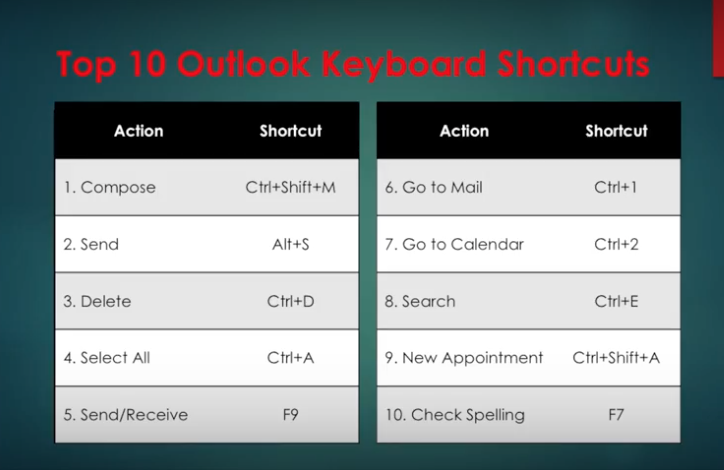
1. Keyboard Shortcuts
Using keyboard shortcuts in Outlook on Windows will help you work more efficiently. It’s also handy for those who have mobility or vision disabilities because using keyboard shortcuts can often be easier than using a touchscreen or mouse. Here are some popular keyboard shortcuts you should try.
And there are more. Here are popular keyboard shortcuts for NAVIGATION:
When searching, try these handy keyboard shortcuts:
To create an item or a file keep these shortcuts in mind.
Shortcuts in Mail.
To see more Outlook 2016 Shortcuts go here.
2. Use Quick Steps
Right-click any email, choose Quick Steps and choose from the list.
We’re going to choose Team Email. The first time we use this, Outlook asks you to name your team and enter their email addresses.
Then create a Keyboard Shortcut for this. So, the next time you hit Control Shift 1, an email to your entire team can be composed.
You can also create new Quick Step. Simply choose Create New Quick Step.
Here are some other Quick Steps to try: 1
Move to Folder: This is essentially the same as Move To.
Categorize & Move: This moves the selected message to a specific folder, marks the message as read, and assigns a category color and name to the message.
Flag & Move: This moves the selected message to a specific folder, marks the message as read, and assigns a flag to the message.
New Email To: This opens a New Message form with the To field already filled out with a particular recipient.
Forward To: This is essentially the same as To Manager.
New Meeting: If you often send meeting invites to the same group of people, use this Quick Step to open a New Meeting form with the To field already filled in with the invitees.
Custom: This opens the Edit Quick Step dialog box so that you can create your own custom Quick Step.
3. Use Conditional Formatting
This is used to change the look of a particular email. You do this in the View Menu.
Here, we just click on Conditional Formatting and create an email called Microsoft.
Next, we choose a condition, where the word Microsoft appears anywhere in an email.
Then, we ask it to appear in a bold red font.
Now, any new email we receive with the word Microsoft in it will show up in red. This is a great way for us to recognize the importance of an email. You may want to do this for any email with your boss’s name in it!
And, there are more ways you can get the most from Outlook 2016. Here are a few ideas:
EMAIL
Change the color and contrast of Outlook: You can also use a picture or color as the background, add a text watermark to your emails.
Customize emails with the fonts you prefer: Change the default font for various email messages you send, or a particular font for messages that you forward or reply to.
Create signatures for your different email accounts: Create personalized signatures for your email messages: include text, images, your electronic business card, a logo, or even an image of your handwritten signature. Signatures can be added automatically to all outgoing messages, or you can choose which messages should use a particular signature.
Setup sound alerts when new emails come in: A sound can play when a new email message arrives. The default sound is a short .wav audio file, but you can change it to any .wav file of your choice.
Establish tracking options with delivery receipts: A delivery receipt confirms delivery of your email message to the recipient’s mailbox.
Use Outlook’s templates for your messages or create your own: Use email templates to send messages that include information that rarely changes from message to message. You can also insert icons, photos, and tables into your messages.
Embed voting buttons in your email to survey your recipients about a particular topic (such as, “When’s the best date and time for a meeting?”): Voting buttons are an excellent way to poll people, especially when communicating with large groups.
Use Quickparts to insert a standard set of words you often use: Use the Quick Parts Gallery to create, store, and locate content, including AutoText, document properties such as title and author, and fields.
Clutter: This is where you can place low priority emails you want to read later. Clutter helps you filter these low-priority emails saving time for your most important messages. Office 2016 remembers “Clutter” emails if you want. If Clutter isn’t for you, you can TURN IT OFF.
Create folders and subfolders: You can base these on topics, senders, organizations, projects, etc.—Whatever works for you and organize your emails under the subjects you choose. Use folders in Outlook to move email messages, add a folder to your Favorites, and set a rule to move specific emails out of your inbox.
CALENDAR
Outlook 2016 calendars have all the tools and functionality you’ve relied on in the past, with improved features to help you manage your time.
Set up multiple calendars (e.g., personal, business, health, etc.).
Create appointments quickly and share them with your contacts.
Scheduling assistant lets you access others’ calendars that you’re authorized to view (and vice versa).
Set reminders, reoccurring appointments/meetings, alerts, and more.
View your calendar by day, week, month, and year.
CONTACTS
You can also import contacts to Outlook from other email providers using the Outlook Import/Export wizard. Import a CSV file, Excel spreadsheet, or vCard.
Your contacts are linked to your email accounts, so you can simply key a name in the “To” field, and your contact’s email address will appear.
Set permission for a particular contact (delegate) to view your emails while you’re on vacation. Plus, you can give this person access to your calendar, tasks, and so on, as appropriate. One delegate can take care of your email, another your tasks, etc.
TOOLS
Always know how much space is left in your account.
Notify those emailing you that you aren’t available during a particular period with Out of Office. You set up a special message you want others to see.
Even set up different messages for people inside or outside your organization. (Outlook will remind you that the “Out of Office” message is turned on, so you don’t forget when you return.)
As mentioned above, similar to having an assistant help you manage your incoming paper mail, you can use Microsoft Outlook to allow a delegate, to receive and respond to e-mail messages and meeting requests and responses on your behalf.
You can also grant additional permissions that allow your delegate to read, create, or have more control over items in your Microsoft Exchange Server mailbox—And, set more than one delegate and permissions for various tasks.
TASKS
Outlook 2016’s task management helps you accomplish to-dos faster and easier.
Categorize your tasks with color codes.
Ping reminders for tasks.
Check-off tasks when complete.
Create tasks for others as well. Outlook integrates tasks with your emails so that you can assign a task to a recipient. The task will show up on their task list.
To learn more about how you can get the most from Outlook 2016 contact us.
