
by Felicien | May 28, 2018 | Education
It’s the same old story time and time again… your Dallas IT support provider tells you what to buy, then leaves you holding the bag. NCT Net, on the other hand, is here to help you – every step of the way.
Don’t be embarrassed, it’s happened to everyone.
There was a new client I worked with just last year. They came to me with a problem I’ve encountered over and over.
They said, “My last IT company said I needed to buy this, but they never really helped me set it up or get it working right. It’s just been a waste of money”.
It doesn’t really matter what the technology is. Sometimes it’s a new firewall, sometimes it’s a Wi-Fi router. That’s not what’s important.
How Other Tech Companies Keep Failing You
Dallas IT companies like the one this client had to deal with making two huge mistakes when they do something like this:
They assume that the right technology is all that’s needed.
It’s a hallmark of bad IT support. You go to your Dallas IT support provider with a problem, they take a cursory, Tier-1 glance at it, and decide that the solution is just to throw money at it. Your money, not theirs.
There are a few things wrong with this scenario:
You have to go to them. The right partner in IT doesn’t wait for you to come to them with problems – they assess your business, identify your obstacles, monitor your systems, and do everything they can be proactive about support. They notice issues before you do, and eliminate them before it affects your work.
The solution is more money. While it may eventually be the solution, more often than not, a bad Dallas IT support provider is just going to tell you to spend money. New hardware, software, or something else.
It’s like when you call tech support for your cable box at home. An engaged and capable technician will try a few options before deciding to roll a truck and incur further costs to you or the company they represent. Lazy technicians go right to rolling a truck and getting you off the line.
We’re not like lazy phone support technicians or other Dallas tech companies for that matter – NCT Net is proud to offer Proactive Managed IT Services that follow a proven process that identifies our many clients’ needs, matches them to effective solutions, and keeps their costs as low as possible.
They don’t help you set up the technology.
It seems like a no-brainer, but let me tell you, it’s extremely common for clients to be left fending for themselves when it comes to installation, configuration, and deployment of their new tech.
The reality – setting up your technology isn’t your job. It’d be like hiring someone to furnish your home, but instead, you’re left trying to interpret the IKEA instruction manuals for hours.
In the case where an investment in some kind of new technology really is necessary, we don’t ask you to front the bill and then leave you to figure it out on your own. Our team of expert engineers is available to help in person or over the phone as need be to ensure your new technology is properly installed, configured and deployed.
That way, you get the best possible ROI on your investment – both in our services and the new technology.
Dallas IT Consulting With Your Needs In Mind
With each step your Dallas business takes in becoming a more developed and profitable operation, you need to be sure that your IT systems can support its growth. Arranging one-off consultations with other Dallas IT companies is inconvenient and expensive, but without the right knowledge, your technology may fail to meet the requirements of the next stage of your business.
NCT Net is available to consult on every big decision that involves technology. Proper planning not only helps you to avoid technological missteps that can often result in IT issues, but it also adds further value to your company as it develops effectively.
With your specifics in mind, our team helps you to develop long-term IT plans that take into account important factors like your budget, projections, customer and employee needs and business goals. Ongoing assessments of your IT infrastructure will help to identify any risks or opportunities that should be accounted for as your company expands.
In a nutshell? Our Dallas IT Consulting services offer business and technology expertise that helps your company plan effectively for the future.
Just because you run a business that needs IT, that doesn’t mean you have to be an IT expert. Let NCT Net take the stress out of business technology by providing invaluable IT advice on each and every business decision you deal with.
For more information about our Proactive Managed Services and IT Consulting Services in Dallas, get in touch with NCT Net at (214) 544-3982 or support@nctnet.net.

by Felicien | May 28, 2018 | Education
In this age where cybercrime is on the rise, it has become increasingly important to ensure the protection of data. Much of the company data today contains critical and sometimes very personal information. The release of such information would expose the person responsible for liability for breach of confidentiality. Identity theft is on the rise. Sometimes it seems that no one’s private information is safe from intruders. These crimes have undesirable effects on the affected organization, the individual, and the economy. It is imperative that appropriate measures be taken to ensure data protection.
Measures in place
There are various measures that have been put in place to ensure data protection. Persons and organizations dealing in data are usually required to adhere to these measures. An example is the Data Protection Law. This Act mandates protection of all data and puts in place mechanisms to ensure the achievement of this objective. Secondly, this Act creates bodies which are authorized to confirm that these new laws are carried out correctly. It also punishes non-adherence, thus providing the right incentives for persons dealing with data to ensure that they comply with its requirements.
Apart from the Data Protection Law, various regulations have been passed that have a responsibility to protect data by providing guidelines for handling another entity’s information. Regulations are important drivers of laws. Basically, while laws provide the framework that needs to be adopted and followed, regulations provide enforcement and implementation mechanisms.
Without proper regulations, laws cannot be well understood and implemented. The regulations that govern data protection are clear as to the measures and standards that need to be employed for compliance with the Data Protection Law. Compliance with these regulations not only benefits the person whose data is at risk of exposure, it also protects the person holding the data. In the long run, compliance saves the organization and the country a lot in monetary losses. The cost of one data breach is about $1.3 million.
Compliance with regulations
Various measures have been adopted by data users and processers to comply with the rules and regulations. Data processors generally attempt to find the easiest and most cost friendly way of data protection. This may include the use of software specifically designed to make it hard for hackers to break into a computer system. While there are a variety of software programs for this type of data protection, the time-tested Microsoft Office 365 package provides a broad range of services.
Compliance with regulations has the following benefits:
Provides uniform benchmarks since the regulations and standards define the minimum bar for protecting data in the cloud.
It acts as a proof of security as organizations are motivated to design better security controls to build trust with the customers.
It is a proactive innovation since the regulatory bodies encourage and work with cloud service providers to create better technology.
Office 365 offers an inclusive set of certifications and proofs for any cloud service provider. They help organizations comply with national, regional, and industry-specific requirements governing the collection and usage of an individual’s personal information.
Shared responsibility
Unlike most software providing data protection services, the Microsoft Office Package allows for shared responsibility through the cloud. This responsibility is mutual between the data processor, known as the client and the cloud service provider. The client is required to manage the risks that are associated with inadequate data protection or data leakage for his or her end. This ensures responsibility and removes all risks of negligence by the client. At this point, data classification and data accountability is done. This shared responsibility model reduces the customer’s burden.
Shared responsibility may not be as easy as it sounds. The client has to know exactly what is required of him or her and how to meet these requirements. Since these are mostly technological and the client already has his or her hands full with the data processing, it may be difficult to find time to learn and implement shared responsibility.
While Microsoft is well equipped to maintain its end of the bargain, they understand the difficulty that clients face in maintaining their end of it. As such, Microsoft takes it upon themselves to equip their clients with the tools and knowledge required to ensure accountability on their part. An example of how this works is seen in Office 365. This software uses lockboxes to restrict access to data. Clients are given access thus making them a part of the chain-of-command required before access to the data is gained.
This business model helps to reduce the customer’s burden. Microsoft handles the larger part of accountability, which is 78% while the organization is responsible for 22% of the burden.
Wrap up
Microsoft Office 365 contains over 1,100 controls that coordinate with different regulatory requirements. This helps to counter any threat that can be imposed from anywhere across the globe. In addition, it assists individuals and businesses in staying up to date with the ever-evolving industry standards in data protection.

by Felicien | May 28, 2018 | Education
When we think of Memorial Day, we have visions of parades, going to the beach, enjoying a picnic in the park, or gathering with family and friends for a barbeque. But, as most of us know, this is a special day to honor military members who made the ultimate sacrifice for our country. Many of us will be visiting the gravesites and memorials of the men and women who served and died performing military service for our country.
The History Of Memorial Day
This year, Memorial Day is on Monday, May 28th. Memorial Day was first known as Decoration Day. It originally honored only those who lost their lives while fighting in the Civil War. In the spring of 1865 at the end of the Civil War, people throughout the U.S. held tributes to fallen soldiers by decorating their graves with flowers on Decoration Day.
General John A. Logan of the Grand Army of the Republic, proclaimed that the first Decoration Day be observed each year on May 30th. On the first Decoration Day, General James Garfield made a speech at Arlington National Cemetery where 5,000 attendees decorated the graves of the more than 20,000 soldiers from both the Union and Confederacy. It was during this time that the federal government established the first national cemeteries.
Americans in the northern states followed suit with their own commemorative events, and by 1890 each recognized Decoration Day an official state holiday. Southern states honored their dead on separate days.
After World War I, the holiday evolved to commemorate American military members who died in all wars. In 1966, the federal government declared Waterloo, New York as the official birthplace of Memorial Day. They chose this city because, on May 5, 1866, Waterloo closed businesses so residents had a day where they could decorate the graves of soldiers.
However, a number of other cities claim to be the birthplace of Memorial Day. These include:
Columbus, Mississippi
Richmond, Virginia
Macon, Georgia
Carbondale, Illinois
Boalsburg, Pennsylvania
In 1968, the U.S. Congress passed the Uniform Monday Holiday Act, which established Memorial Day as the last Monday in May. It went into effect in 1971 and Memorial Day has been designated a federal holiday ever since.
In the year 2000, President Clinton signed the “National Moment of Remembrance Act,” which designates 3:00 p.m. local time on each Memorial Day as the National Moment of Remembrance.
Today, cities and towns across America hold Memorial Day parades each year along with military personnel and members of veterans’ organizations. Some of the largest parades take place in Washington, D.C., New York, and Chicago.
What Will You Be Doing On Memorial Day?
When Congress made Memorial Day into a mandatory three-day weekend with the National Holiday Act of 1971, it, unfortunately, caused some to think of it as a vacation weekend and to be distracted from the spirit and meaning of the day.
Some people confuse Memorial Day with Veterans Day. Veterans Day is a commemoration of all the individuals who have served or are currently serving in the nation’s armed forces.
Memorial Day was specifically enacted to honor those who died while serving the country. Because we also think of it as a “beginning of summer” celebration, this can tend to minimize the true meaning of Memorial Day.
Because of this, Hawaii Senator Daniel Inouye, a World War II veteran, introduced a Congressional measure to return Memorial Day to May 30 in 1987. He continued to do so every year until his death in 2012. In 1999, he wrote:
“Mr. President, in our effort to accommodate many Americans by making the last Monday in May, Memorial Day, we have lost sight of the significance of this day to our nation. Instead of using Memorial Day as a time to honor and reflect on the sacrifices made by Americans in combat, many Americans use the day as a celebration of the beginning of summer.” 3
Honoring Our Fallen Military Members
Without the sacrifice of the men and women in our Armed Forces, we wouldn’t enjoy the freedoms we have today. Even if you’re having fun celebrating this Memorial Day holiday, we should all take a moment to remember them.
Civil War – Approximately 620,000 Americans died. The Union lost almost 365,000 troops and the Confederacy about 260,000. More than half of these deaths were caused by disease.
World War I – 116,516 Americans died, more than half from disease.
World War II – 405,399 Americans died.
Korean War – 36,574 Americans died.
Vietnam Conflict – 58,220 Americans died.
Operation Desert Shield/Desert Storm – 383 service members died.
Operation Iraqi Freedom – 4,411 service members died.
Operation New Dawn – 73 service members died.
Operation Enduring Freedom – 2,346 service members died.
Operation Freedom’s Sentinel – 48 service members have died as of May 2018.
Operation Inherent Resolve – 61 service members have died as of May 2018. 1
A national moment of remembrance occurs at 3:00 p.m. local time on Memorial Day. Please join us in taking the time to remember and thank all of our fallen military members.
https://www.cnn.com/2013/05/23/us/memorial-day-fast-facts/index.html
https://www.history.com/topics/holidays/memorial-day-history
http://people.com/celebrity/why-happy-memorial-day-is-inappropriate/

by Felicien | May 27, 2018 | Education
Microsoft has released the fifth major update to its Windows 10 operating system, complete with a whole bevy of exciting changes and helpful features. This latest iteration is designed to improve performance and productivity while focusing more on security.
The Windows 10 April 2018 Update has been codenamed, Redstone 4 and is now available worldwide for updates to any device running a Windows operating system. It includes a better array of media creation tools in order to meet the growing demands of users who enjoy posting to Instagram and Pinterest.
There are quite a few solid features with this new release that should make life a little easier for those who use their smartphone for just about everything. However, there were major additions to desktop and laptop computers as well. Microsoft is focused on improving its browser, MS Edge, but Chrome is still the preferred choice for most users. Other improvements to Windows Subsystem for Linux and Windows Defender should increase the product’s flexibility and security.
Cortana carries the day on the desktop experience
There are substantial changes to the Cortana assistant. The new Windows version has experienced a complete overhaul of the Cortana Notebook. It now features tabs and card-based items making it more responsive and easier to use. Lists and reminders are now on the organizer tab and the options to change most of the Cortana settings are now on the Manage Skills tab.
The default skill in the Notebook on Cortana now features a set of tips for questions that you can ask Cortana to get you started. To use this feature, you can either type the question, tap the suggestion, or simply talk to Cortana and the information you want will pop up.
Cortana’s Notebook is now available in more countries and in more languages, with quite a few performance improvements. Not to mention that you’ll now see your account picture in the left rail going forward.
There is something else that’s new with the Lists experience on Windows 10: Cortana Collections. This is an addition that allows Cortana to notice and remember things like restaurants, recipes, movies, books, TV shows, and more for you without you necessarily having to do anything.
What’s new on the desktop
Right-clicking the Windows Defender Security Center icon on the desktop now brings new options including:
A quick scan
Update definitions
Change notifications
Launch the Windows Defender app
OneDrive in File Explorer now shows a cloud status icon that tells you the sync state of files on the various folders.
Windows 10 has introduced a new Game bar with a fresh design, settings that are easier to use, and an updated clock. You’ll also see new buttons to turn on the microphone and camera and capture and edit your Mixer stream title.
The Start menu now includes Reveal highlights, an interactive visualization feature that helps you navigate and interact with apps. This feature will be noticeable while hovering over items in Live Tiles and the “All apps” list. Furthermore, right-clicking the Microsoft Store app and selecting the More option now brings a menu with a Settings option included. Clicking this takes you straight to the settings page for that app.
Action Center on the new Windows now supports a two-finger touch gesture to dismiss all notifications. It also automatically saves as drafts any notification responses dismissed by accident. The “a” / “p” format for indicating the 12-hour clock timestamp has changed to “am” / “pm”.
Nearby Sharing. This is a new feature on the updated Windows 10 that allows for sharing of web links and files wirelessly to nearby devices via Wi-Fi or Bluetooth connectivity.
Changes and additions to settings experience
The Windows Settings app has received a major facelift. It now features an innovative homepage with smaller icons and their titles to the right.
Microsoft has introduced a house icon for the home button, acrylic material effects on the left side of sections, and a lot of other improvements and tweaks to various categories of settings. This includes three new automatic rules under Focus Assist (formerly Quiet hours), an option for changing the font that the system uses (under Pen & Windows Ink). You can now select your own security questions as an option for recovering your account in case of forgotten sign-in information.
Major change on input
Microsoft has updated its Emoji panel data so that it will show emojis as you type related words using the touch keyboard.
Microsoft system additions
Microsoft is phasing out the HomeGroup service in favor of the more contemporary sharing tools like Share, OneDrive, and Nearby Sharing.
Many users will love the introduction of Windows Defender Application Guard to their default antivirus program, Windows Defender. This addition is a security feature that isolates pages you are viewing on Microsoft Edge from Windows and from one another as a way to provide an additional layer of security from malware and zero-day attacks.
Finally, it is now possible for Windows Subsystem for Linux (WSL) on Windows 10 to run mixed instances of Linux. The process can also now run in the background even after closing the console.
As you can see, Microsoft has been working hard to make its Windows 10 software the best it can be. We hope that you find this guide informative and as useful as the Windows update itself.
by Felicien | May 27, 2018 | Education
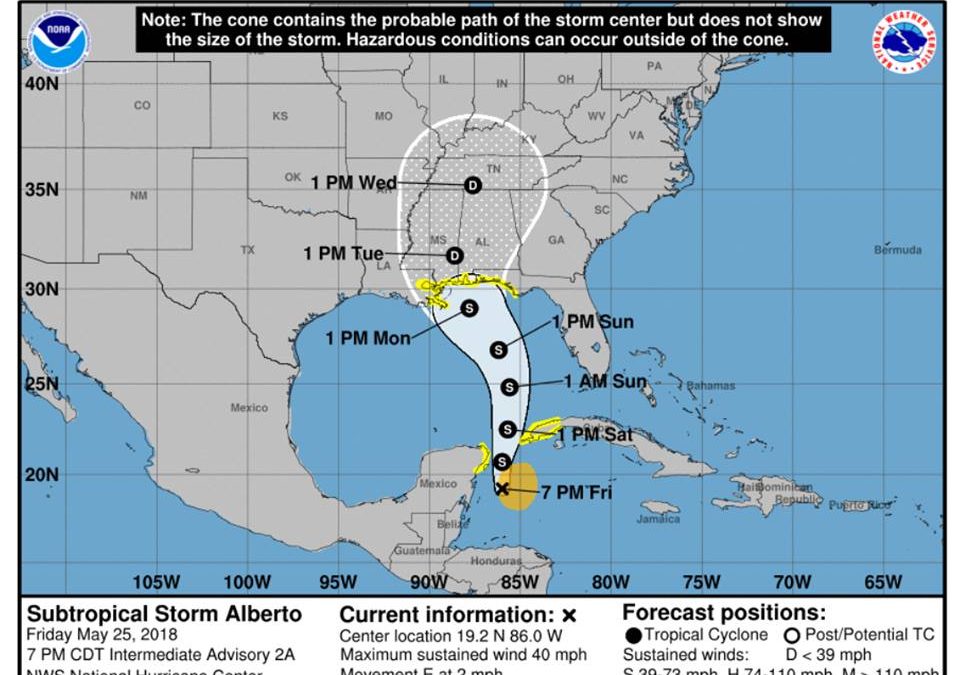
The Hurricane and Tropical Storm Season officially starts on June 1st. But we heard just now that Louisiana sent out storm and flood warnings for Alberto.
Alberto is a strong tropical storm that’s been gathering strength in the Gulf of Mexico for a few days. It’s not too late to prepare, especially if you live in New Orleans, Baton Rouge, anywhere in Louisiana or along the Gulf Coast.
It only takes one storm to change your life, your business, and your community.
Hurricanes are among nature’s most powerful and devastating storms. But, tropical storms can sometimes be just as bad. If you live or work in an area prone to hurricanes, or even areas well away from coastlines that can be hit with dangerous flooding, destructive winds, and tornadoes, you need to get ready now.
What should you do?
Follow these basic steps to protect your business:
Establish a business-continuity/disaster-recovery plan for your technology. Back up your data to a secure offsite location. If a hurricane or tropical storm strikes your area, and you lose power, or your place of business is damaged, a properly implemented plan ensures you can retrieve your critical data and services.
Consider cloud services. Data centers have systems in place to protect them from the most violent storms. Almost everything can be stored in the cloud today, from email servers, desktop systems, telephone services and much more. Storing your business data and services in the cloud ensures that if your office is out of commission, your business isn’t.
Install power-protection systems and backup power. A generator is a great investment to provide alternate power if a hurricane shuts down your electricity. Generators can run for days, providing power to critical systems and battery-backup systems. It allows for all systems to be properly shut down and protected from surges when power is cut and comes back on.
There are many more Hurricane and Storm Readiness strategies that your business should establish.
We’re here to help. If you need confirmation that your computer systems, backups, and telephones can survive the next big storm, we can check this out for you.

by Felicien | May 25, 2018 | Education
Changes in technology come with a variety of challenges. First, there is the need to change and adapt to the new advancements. There are always financial costs associated with this process. The effects of technology are often widespread. Some people are concerned that new products and programs will put them out of work. The new developments in robotics are a good example. Many workers are concerned that their jobs will be taken over by robots in the future.
If the past is any indication, this will not happen. What usually occurs is that the human workers do see a shift in the type of work they do, but they rarely are put out of work completely. Often, technological changes are a good thing. They make everyone’s job easier and remove all those boring, redundant tasks that no one wanted to do in the first place.
Technology in the accounting sector
The world of accounting has attracted numerous technological discoveries. These new programs reduce the error margin which leads to a more reliable outcome. Accounting programs can perform most tasks much easier than human beings and with more accuracy. This saves time and money for both the accountant and their customer. In the past, errors in financial reports or tax returns could cause quite a bit of trouble for everyone involved. With a good accounting program and someone to input the correct data, these errors are greatly reduced.
Stiff competition
Technology has increased the competition for accounting firms. Before the adoption of technology, accounting firms depended mostly on the skills of the employees of the firms. This meant, therefore, that competition was shaped by the accuracy and expertise of the workers in a firm. The credentials of an accounting firm’s employees went a long way in attracting a clientele.
In the world today, however, competition among accounting firms is shaped by technology. The first question that today’s client wants to know is which accounting software do you use. Everyone has a favorite accounting software and some people have a distinct dislike of certain programs. The one thing that software developers have learned over the years is to make all software as user friendly as possible. Accounting programs that require a genius to figure out don’t last very long. Everyone is searching for something they can learn quickly.
Increases in accounting fees
Modern accounting firms have raised their fees over the years, but so have all the other professions. Just try finding a lawyer who will work for $100 per hour. This was once a huge amount of money but today’s attorney’s charge an average of $300 per hour. Technology hasn’t made their fees any cheaper but it does make the job of billing clients much simpler.
The increase in accounting fees is attributable to a wide range of factors. The software purchase, maintenance, and renewal of licenses can be a big initial expense. Of course, with each new program that is released, that expensive software you just purchased may become obsolete overnight. For this reason, many accounting professionals choose monthly subscriptions. This concept allows an accounting firm to get the most advanced software on the market. The monthly subscription fee includes regular updates. This means that your software will never be obsolete. Usually, regular maintenance and support is included in your monthly charge as well. Many websites include training for your employees.
Most accountants will say that they enjoy and appreciate this type of convenience. They can focus on working with their customers. They don’t even have to think about whether their software is working okay and contains the latest changes in tax law. Everything works like it’s supposed to and if you have a problem, simply call the vendor and they will fix things straightaway.
Accounting programs do everything from reconciling bank statements to sending invoices to customers. Though these programs will never replace humans, they make their work much easier. They give the accountant time to find ways to help their clients save money.
Filing taxes
This task has always been stressful for individuals and business owners alike. There’s just no getting around paying your taxes though. Benjamin Franklin said that nothing in this life is certain except for death and taxes. Whether you own a small business or work for an employer, doing your taxes on time and correctly each year is imperative. If accounting software didn’t do anything except our taxes, it would be well worth it.
A good accounting program can help you keep track of your expenses throughout the year. You no longer need a shoebox for all those receipts. When it’s time to file your taxes, you can import all that data into the tax filing software and save yourself lots of time. Many people are still not comfortable doing their own taxes and since IRS penalties are often severe, it may be best to hire a good accountant to do them for you. Tax time is the busiest time of year for accountants.
Final thoughts
For accountants, technology has overall been very positive. The role of accountants has changed because of reliable software programs like Xero. Your accountant has the time to talk to you about saving money on your tax return, investing in new property, and ways to save on supplies. The role of the accountant has changed some due to technological advancements, but the changes have all been good.
