by Felicien | Aug 10, 2018 | Education
Using Rules To Organize Your Outlook 2016 Inbox
The purpose of Rules in Microsoft Outlook is to help you organize your email and receive updates if items are changed. Rules can save you time, keep on top of high priority tasks, and reduce the clutter of your Outlook inbox – if you know how to use the Rules Wizard correctly.
Basics of Outlook Email Rules
To set up a Rule, you first select the condition(s) that the email must meet (e.g., certain words in the subject line or from a particular sender), then indicate what you want to have happen when an email meets those conditions (e.g., place in a certain folder or provide an alert). It helps if you think about how you process your email. For example, you get various emails about a certain project, so you place those in a folder for that project. The condition would be that the subject line contains that project name in it, and the action would be moving it to a certain folder.
Creating a Simple Rule
Let’s create a simple rule that takes all emails with a subject line that contains the word “Proposal” and moves them to a folder in the “Smith Account.” Begin by right-clicking on a message in your Inbox. In the list that appears, select Rules>Create Rules. This will open up the Create Rules dialog box.
The Create Rules dialog box is fairly straightforward to use. The first section of the dialog box deals with the rule conditions. Check the Box beside Under Subject Contains, then type Proposal in the text box next to it. That indicates the rule is to apply to all emails whose subject contains the word Proposal. Then, moving down further in the dialog box, check the box next to Move the Item to Folder. A list of available folders pops up. Select the Smith Account folder (note you can create a new folder if needed by clicking on the New button), and click Ok. Smith Account will now appear next to the words Move Item to Folder. Next, click on OK to create this rule.
Another dialog box pops up to let you know the rule has been created. Notice there is a checkbox that says Run this rule now on messages already in the current folder. If you check that box and click OK, this allows the rule to immediately be put to use on existing emails. Otherwise, it will wait until new email messages come in.
For email rules, conditions can include sender, text that appears in the subject line, or who the email was sent to. When an email meets the conditions, then you can choose what happens next.
Available options for what happens in a simple email rule like the one we just created include the following:
Display in the New Item Alert Window
Play a Selected Sound
Move the Item to a Folder
Using Rule Templates
You can access templates for Rules by going to File>Manage Rules and Alerts>New Rule. Here the Rules Wizard gives you access to templates organized under three categories: Stay Organized, Stay Up to Date, and Start from a blank rule.
Under Stay Organized, there are templates for the following:
Move messages from someone to a folder
Move messages with specific words in the subject to a folder
Move messages sent to a public group to a folder
Flag messages from someone for follow-up
Move items from a specific RSS Feed to a folder
Under Stay Up to Date, here are your options:
Display mail from someone in the New Items Alert Window
Play a sound when I get messages from someone
Send an alert to my mobile device when I get messages from someone
Let’s run through a quick example using a Rules template. We will create a rule that flags messages from a certain person for follow-up. Note that this can be applied to an email from people or from public groups. Begin by going to File>Manage Rules and Alerts>New Rule. This will start the Rules Wizard. Under Step 1, go to Stay Organized, select Flag messages from someone for follow-up.
At the bottom of the Rules Wizard, you will see Step 2. Here, you will edit the rule description to meet your needs. Anything underlined in blue can be edited. In the case of a move messages rule, you should see something like this under Step 2:
Apply this rule after the message arrives
from people or public groups and
flag message for follow up at this time
If you click on people or public groups, then you will be provided with a list of people or public groups to choose from. Clicking on follow up at this time will open up flagging options. These include what type of flag to apply (e.g., Follow Up, For You Information, Forward, etc.) and when it needs to be completed (e.g, Today, Tomorrow, This Week, Next Week, No Date, Complete). Once you’ve edited the rule description to meet your needs, click on Next.
This takes you to some additional options for refining the rule, such as requiring that certain words be in the subject or that the email comes through a specific account. Clicking on Next allows you to add exceptions to the rules, such as making an exception for emails sent from a public group or that you have been CC’ed on.
Clicking Next again allows you to name your rule and choose from a few more rule options that are presented next to checkboxes. These rule options are as follows:
Run this rule now on messages already in Inbox
Turn on this rule
Create this rule on all accounts (this only appears if you have multiple accounts)
Once you’ve made the modifications you need, click on Finish. Outlook will provide you with a message to let you know if the rule is only run when Outlook is open. Click on OK, and everything will be set up.
Conclusion
Taking the time to think through how you process email helps you gain control of your Outlook 2016 inbox. Remember that the rules can be as simple or complex as you want them to be. If you don’t know where to start, then use one of the Rule Templates. Templates simplify the Outlook Rules Wizard process so you can get familiar with how it works.

by Felicien | Aug 10, 2018 | Education
In a recent Forbes article, former VP of Strategic Communications at SAP, former Chief Communications Officer at Oracle, and current founder and president of Evans Strategic Communications LLC, Bob Evans, weighed in on the cloud wars between Amazon and Microsoft.
Evans broke down the 10 key elements of Microsoft’s progress and strategy in the words of Microsoft CEO Satya Nadella and CFO Amy Hood taken from their comments during Microsoft’s July 19 earnings call for its fiscal 2018 Q4.
According to Evans: Why Can’t Amazon Match Microsoft In The Cloud?
Azure’s Ability to Scale Correctly on Demand is Added to its Plate
According to CFO Amy Hood, Microsoft doubled the number of $10-million-plus Azure agreements and closed a larger-than-expected amount of multimillion-dollar commercial cloud agreements.
Beating the company’s expectations, Hood also reported that commercial unearned revenue was $29 billion, up 23%.
Fiscal fourth-quarter commercial-cloud revenue rose 53% to $6.9 billion and Azure revenue grew 89%.
Azure’s Potential to Be the Go-to Computer
Microsoft CEO, Nadella reports that his prediction of Microsoft’s ability to interweave the cloud and the edge is allowing Microsoft to offer them, “ideal platform for customers’ digital transformations.”
In an effort to force Amazon, IBM, and others to catch-up with Microsoft’s advancements, Nadella said they are, “the only hyper-scale cloud that extends to the edge across identity, data, application platform, security, and management.” He added, “We are investing aggressively to build Azure as the world’s computer.”
Azure’s Capacity to Handle Mission-Critical Workloads
Nadella reported a continued growth of Microsoft handling Tier 1 workloads for many companies.
Citing Microsoft’s IaaS growth, Nadella believes they are going to continue to see businesses using both Azure and Azure stack as they move their workloads to the cloud. He believes businesses will concurrently discover that this is the perfect time to transform their legacy apps and move toward more advanced technology.
Microsoft’s Friendly Path to the Cloud
Hood touted Microsoft’s commitment of continuing to focus on creating customer value as a reason why they are still seeing a growth in their on-premises server business.
Hood said they persist at making the Microsoft platform a friendly way that their customers can move from on-premise to the cloud.
Microsoft’s Friendly Path to the Cloud Through Microsoft 365
Microsoft 365 gives business customers the freedom to take their existing familiarity with Microsoft Office and begin moving into higher-level cloud services.
Since Microsoft 365 is a multibillion-dollar business, it has the reach to give their customers a path to the cloud that otherwise might cause them to be apprehensive about approaching it.
Microsoft’s Competitive Advantage
Microsoft states that their vision for both centralized cloud computing and edge computing is to keep them together as much as possible. They don’t want to have two separate camps; one for edge computing and another for cloud computing.
Nadella said: “…our real competitive advantage and differentiation is, we have one programming model, one identity model, security, management, etc, so those modern developers, as well as IT, can use the computer available from Azure Sphere to Azure.”
Microsoft’s Best-Kept Secret
Azure Hybrid Benefit, a licensing model which gives businesses the ability to transfer money already committed to on-premises versions of Windows Server Standard and Datacenter Editions to the Azure cloud is what Nadella calls Microsoft’s “best keep secret.”
Nadella said Microsoft has not been good at promoting the Azure Hybrid Benefit, and he anticipates substantial progress to take place with this program in the future.
Microsoft’s Dynamics 365 Aggressive Position
Microsoft’s suite of Dynamics 365 SaaS applications has a price advantage and the value advantage for customers in what Microsoft considers to be a profoundly patchy market.
Microsoft envisions fully exploiting its place as an enterprise-cloud provider for both large and midsized businesses that can lead its customers through the digital-transformation journey.
Microsoft’s S&P Leverage
Microsoft admits that cloud revenue is growing more than CapEx is growing, but CFO Amy Hood said she believes that the rate of CapEx growth will moderate. According to Hood, they are adding regions and seeing a lot of global demand and improving margins.
As Microsoft’s margins increase, their ability to continue investing many billions of dollars across their extensive range of enterprise-cloud services will expand as well.
Microsoft’s LinkedIn Acquisition
Microsoft’s surprising $26-billion acquisition of LinkedIn has been remarkably successful. With a revenue growth of 37% in the last quarter, that is their “fifth consecutive quarter of revenue acceleration,” said Nadella.
Improving LinkedIn’s quality of video feed, messaging, and growth in mobile usage, made LinkedIn the go-to platform to connect business professionals worldwide.
Although Microsoft is not unbeatable, their ability to provide just one source that gives IT cloud providers the capability of designing the best-imagined cloud experience for their customers gives them a leg-up on Amazon and all other competition. The fact that businesses can use the full suite of well-known Microsoft products in the cloud and combine their own cloud products and services under only one billing arrangement gives them the decisive advantage.

by Felicien | Aug 10, 2018 | Education
Third-Party Vendor Breach and Subsequent Delays in Reporting Now Result in Major Problems for an Orlando Healthcare Provider
A recent breach left the protected health information (PHI) of more than 19,000 patients in Orlando, Florida completely exposed online for two months before it was detected. What is more concerning, however, is why it took the group of clinics involved five months to report the breach to the Department of Health and Human Services, and six months to alert the affected patients.
How the Breach Happened
The Orlando Orthopaedic Center in Florida hired a 3rd party vendor to handle their transcriptions, as do many clinics and health centers. When the vendor was updating their software during December 2017, they made a serious mistake that misconfigured access to one of their databases. That configuration issue left their server open to the public and accessible over the internet. Anyone who desired could access the patient data stored on that server, and they could do so without any authorization needed. It was two months before the mistake was discovered.
Impact of the Breach
This breach left 19,101 patient records seriously exposed, which was not only a major HIPAA violation but a situation that could easily result in identity theft. Once the breach was recognized, investigators discovered that a great deal of information had inadvertently been made publicly available. This included names, insurance details, dates of birth, medical treatments, employers, and, in a limited number of cases, social security numbers. Fortunately, no financial information (debit card numbers, credit card numbers, bank account numbers, or other financial records) were exposed during the breach.
All patients that received treatment from any Orlando Orthopaedic clinic prior to January 2018 would have been affected by the breach. Investigators were not able to determine if anyone had gained access to what should have been PHI, and none of the affected individuals have, as of yet, reported identity theft or misuse of their PHI. However, the investigators were still unable to rule out the possibility of information theft or unauthorized access to patient information.
The aftermath of the Breach
Orlando Orthopaedic did not find out about the breach until February 2018, two months after it occurred. However, it would be almost six months before the affected patients were notified by mail. The clinics involved have yet to provide a reason for the delay in notification.
As a result of the security breach, Orlando Orthopaedic Center employees are receiving cybersecurity training even though they were not directly responsible for the problem. In addition, the affected clinics are taking additional security measures to ensure that PHI stored both on their own servers, as well as accessible through endpoints, are all secured.
The transcription vendor responsible for the breach has offered all the affected patients one year of free credit monitoring and identity theft protection and restoration services. The vendor has also made changes to their security to ensure that information on their servers remains protected from prying eyes.
In addition, all patients involved have been advised to closely monitor their insurance Explanation of Benefits statements, as well as their other accounts for any signs that their PHI is being used fraudulently. In the event that a patient sees unusual activity, they should notify their insurance provider immediately.
Who Is Responsible?
Even if a 3rd party vendor or business partner is responsible for causing the breach, the healthcare provider is still held responsible. In this case, Orlando Orthopaedic is the responsible party even though it was the security of the vendor that was lax, a situation over which they had no direct control. This reinforces the fact that healthcare providers must be thorough in vetting potential vendors.
Concerns about Delays
As already mentioned, it took Orlando Orthopaedic six months to notify their patients of the PHI breach and five months to notify the Department of Health and Human Services Office of Civil Rights (OCR). The OCR should have been notified 60 days after discovery of the breach, according to HIPAA guidelines, not five months. The same deadline applies to notifying patients.
No doubt a fine is to be expected. Presence Health delayed reporting a breach to the affected patients and OCR 40 days past the 60-day deadline. Their fine amounted to $475,000 and was the first case of a HIPAA breach fine for the untimely reporting of a breach of unsecured PHI
Conclusion
Even if the breach of PHI is caused by the carelessness of a business partner (including 3rd party vendors), the healthcare clinic is still the entity held responsible. There is a 60-day deadline for notifying OCR and the affected patients, and failure to meet this deadline will most likely result in a punitive fine. Failure to notify the patients right away can damage the reputation of the healthcare provider. Even offers of credit monitoring and iidentitytheft restoration cannot undo the negative effects of the breach.
by Felicien | Aug 10, 2018 | Education
The Newest Forms Of Ransomware & How To Protect Your Business From Them
The Situation
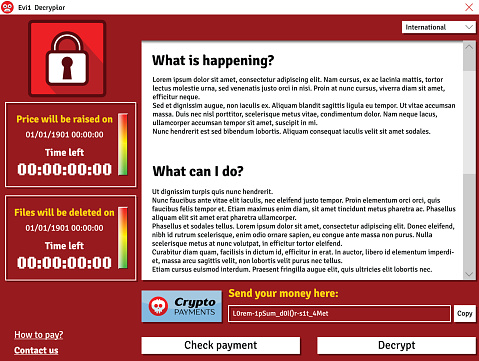
Ransomware is now one of the top security concerns for businesses and organizations of all sizes. The City of Atlanta was hit with a ransomware attack called SamSam in March, crippling some important departments like their court system, sewer infrastructure requests, and water billing department.
The attackers who deploy SamSam are known for clever, high-yield approaches. This, combined with the City’s lack of preparedness, explains why the infection was so debilitating.
Experts are telling us that SamSam will strike again. Unlike many forms of ransomware that spread via phishing attacks where individuals inadvertently invite the attack, SamSam exploits IT system vulnerabilities and cracks weak passwords. These ransomware attackers have made $1 million in less than six months.
Keeping all your systems patched, storing data in enterprise-based cloud backups, and having a ransomware preparedness plan can offer real protections against SamSam and other ransomware infections.
Unfortunately, ransomware attacks are on the rise, and as hackers use more sophisticated encryption technology, the threat is constantly evolving. According to malware security firm Barkly, a company is hit with a ransomware attack every 40 seconds. They also identified ransomware as the most prevalent form of malware, with “4.3x new ransomware variants in Q1 2017 than in Q1 2016.”
This eBook details how dangerous ransomware is, how it could harm your business, and what you should do to protect your data.
Part 1
What is Ransomware?
Ransomware is a type of malicious software (malware) that blocks access to a computer that infects, locks or takes control of a system and demands a ransom to unlock it. It’s also referred to as a crypto-virus, crypto-Trojan or crypto-worm. It then threatens that your data will be gone forever if you don’t pay using a form of anonymous online currency such as Bitcoin.
Most forms of ransomware are spread via spam using unsolicited phishing email or an attachment. Phishing attacks use emails disguised to look like they’re from someone you know and are more likely to trust.
Some ransomware-based applications disguise themselves as police or a government agency, claiming that your system is being locked down for security reasons and that a fine or fee is required to reactivate it. Then it typically asks you to click on a link or attachment to perform a routine task such as updating records or account details. If you do this, a worm or malware is downloaded, infects your system and locks it by encrypting your files.
Ransomware, like SamSam, can also infect your IT system using vulnerabilities in your computer’s browser. It does this when you click on a malicious code hidden in online ads or free software.
Ransomware targets small to medium-sized businesses because they are particularly vulnerable due to limited IT resources. They are also more likely to pay the ransom in the hopes that they’ll get access to their data, although the FBI warns that this isn’t necessarily so.
“Paying a ransom doesn’t guarantee an organization that it will get its data back—we’ve seen cases where organizations never got a decryption key after having paid the ransom. Paying a ransom not only emboldens current cybercriminals to target more organizations, but it also offers an incentive for other criminals to get involved in this type of illegal activity. And finally, by paying a ransom, an organization might inadvertently be funding other illicit activity associated with criminals.”
Paying the ransom only guarantees that the malicious actors receive your money, and possibly even banking information. Also, decrypting files does not mean the malware infection itself has been removed.
No one is immune.
Temporary or permanent loss of sensitive or proprietary information,
Disruption to regular operations,
Financial losses to restore systems and files, and
Potential harm to your organization’s reputation.
The lack of awareness and cybersecurity training is a leading cause of ransomware.
Part 2
Ransomware Comes in Many Forms.
Ransomware comes in many different forms, but essentially, it’s a type of malware that denies access to your computer devices unless you pay a ransom. The ransomware malware encrypts your data. Once it does this, it can travel throughout your network and encrypt other mapped and unmapped network drives. Because of this, it can bring your organization to a halt.
The ever-evolving nature of these threats makes ransomware very difficult to keep track of. Ransomware-as-a-Service (RaaS) makes it easy for cybercriminals to set up a lucrative hacking scheme. It is provided as a vendor platform on the Dark Web. Unlawful vendors offer hackers and criminals a tool to use to lock down computer files, information or systems and hold them hostage.
Ransom32 is a type of “Ransomware-as-a-Service” that provides any cybercriminal, even those without technical knowledge, the ability to create their own form of ransomware. What makes Ransom32 so dangerous is that it uses JavaScript, and can be used on computers that run Windows, Mac OS X, and Linux.
Over 2,900 types of ransomware have been reported, and they’re growing. Here are just a few:
Bad Rabbit
Bad Rabbit has infected organizations in Russia and Eastern Europe and is spreading throughout the world. It does this via a fake Adobe Flash update on compromised websites. When the ransomware infects a machine, users are directed to a payment page demanding .05 bitcoin (about $285).
Cerber
This ransomware encrypts your files using AES encryption and demands a ransom of 1.24 bitcoins (worth $500). It communicates via a text-to-speech voice message, a recording, a web page, or a plain text document. There’s no way to decrypt files that are encrypted by Cerber unless you pay the ransom.
Cryptolocker
CryptoLocker infects computers that run Microsoft Windows. Like other forms of ransomware, you must pay the hackers to decrypt and recover your files. CryptoLocker spreads via fake emails (phishing) designed to mimic legitimate businesses.
CryptoWall
This form of ransomware has been around since 2014, but new variants are still circulating, including CryptoBit, CryptoDefense, CryptoWall 2.0, and CryptoWall 3.0. Like CryptoLocker, CryptoWall is distributed by spam or exploit kits.
CryptXXX
CryptXXX used additional capabilities including network-share encryption. This means that even if you can decrypt your files, it can still cause significant downtime by encrypting files on your network shares.
FakeBsod
FakeBsod uses a malicious piece of JavaScript code to lock your web browser. It displays a fake warning message and tells you to go to a particular webpage (that contains the ransomware). The message says to “contact Microsoft technicians” about an “Error 333 Registry Failure of the operating system – Host: Blue screen Error 0x0000000CE.” When you call the phone number, you’ll be asked to pay a fee to fix the problem.
Lockscreen
This form of ransomware isn’t new and has been in use for quite a while. It attacks Android devices. However, now there’s a new version that is more powerful and much more resilient. It used to lock your screen using a hardcoded passcode, but with the right code, you could unlock your device. Today the new version is impossible to reverse-engineer the passcode since it uses pseudorandom passcodes. Because of this, you can’t unlock your device and must pay the ransom.
Locky
If your computers are infected by Locky, it will rename all of your important files and prevent you from opening them. It does this through encryption and using the file extension–locky. Now, only the cybercriminals have the decryption key, and you must purchase it from them to retrieve your files. To do this, you have to go to the Dark Web and pay $400+ in Bitcoin.
NotPetya
This is a strain of Petya and was first seen in 2016. Today, experts believe NotPetya’s sole purpose is to destroy data instead of obtaining a ransom.
Petya
Petya is especially dangerous because it encrypts entire computer systems, and overwrites the master boot record, so you can’t reboot your operating system.
Spider
Spreads via spam emails. It’s hidden in Microsoft Word documents and installs the ransomware on a computer when it’s downloaded. The Word document (typically disguised as a debt-collection notice) executes macros that encrypt your data.
TeslaCrypta
This uses an AES algorithm to encrypt files and is specifically designed to attack Adobe software vulnerabilities. TeslaCrypta installs itself in the Microsoft temp folder.
TorrentLocker
TorrentLocker spreads via spam email campaigns and targets specific geographic regions. It also uses the AES algorithm to encrypt files. It collects email addresses from your address book to spread malware to your business contacts, friends and family members.
WannaCry
WannaCry has hit over 125,000 organizations in over 150 countries. It currently affects Windows machines through a Microsoft exploit known as EternalBlue.
WannaCrypt
This computer attack began locking down data on May 12, 2017. It affects Microsoft Windows Operating systems. WannaCrypt encrypts all the data in on your computer and holds it hostage.
ZCryptor
This form of ransomware uses a worm-like tactic to self-propagate and encrypt files and external drives so that it can attack other computers.
Part 3
How Ransomware Infects Your Computers
Ransomware attacks are increasing, and so are the ransoms to recover your data.
You’ll know when ransomware infects your computer because the hackers display a message telling you how much to pay to unlock your files. These ransoms typically run in the $300-$500 range. But, some businesses are having to pay upwards of $1,000 per computer. If you have 25 computers that are infected, that’s $25,000.
Hackers primarily use the following attack vectors to infect computers:
Phishing Emails
This is the most common scenario. A realistic-looking email is sent to you with a link or attachment that contains the ransomware. Hackers will often send a number of these links or attachments to hide the one with the malware. Once it’s clicked the malicious software loads itself and the ransomware infection spreads throughout your files, locking them until you pay the ransom.
Drive-by-Downloads
If you unknowingly visit a realistic-looking website containing ransomware, it can load itself onto your computer. If you use an old browser, out-of-date software, or third-party applications, you’ll be most vulnerable. A hacker can detect a vulnerability and exploit it. When a software vendor discovers this, they’ll release a patch to repair the issue, but by this time the criminal has already done their dirty work. Examples include unpatched versions of Adobe Flash, a bug in Java or an old web browser, or an unpatched operating system.
Free Software
A lot of us download free versions of software. Some are legitimate, but others contain ransomware. They are especially prominent in broken versions of expensive games, free games, porn content, screensavers or bogus software. By convincing the user that they should download the software, they can get past firewalls and email filters. You might not even know that you’ve done this until the ransomware activates weeks later.
Unpatched Software
According to the U.S. Computer Readiness Team (CERT) using unpatched and unsupported software may increase the risk of proliferation of cybersecurity threats, such as ransomware. Microsoft provides a guide to help you keep your software up to date. They recommend that you use feed update functionality to stay informed about new ransomware variants and what you should do to protect your data.
Part 4
What to Do If Your Files Get Encrypted.
Tell your employees to let you know if they experience the following:
They can’t open their files, or they get error messages saying a file is corrupted or contains the wrong extension.
A window pops up with a ransomware program that they can’t close. This window may contain a message about paying a ransom to unlock files.
A message says that a countdown has started for a ransom to decrypt files and that it will increase over time.
They see files in all directories with names like “How to decrypt files.txt or decreypt_instructions.html.”
Ransomware isn’t easy to find while it’s at work encrypting your files. So, you might not know that it’s happening until the hacker sends you a message. By this time, the infection has completed its job. The best thing you can do at this point is to contain the virus from spreading throughout your network.
Unplug the infected computer from your network. You may also need to turn off all network access for all your computers until you know the virus is contained. Set your Basic Input Output System (BIOS) time back if the ransomware has started a countdown. This will hopefully give you more time to recover your critical files and try to eliminate the malware. You can access your BIOS time through the BIOS Setup Utility on the computer.
Restore your files from your last backup. This is why it’s important to regularly backup your files to a safe, offsite cloud location. Just make sure your most recent backup wasn’t infected as well. If you use a Disaster Recovery as a Service (DRaaS) solution, you should be able to do this and quickly “spin up” the DR image on your computer. By spinning up the image in a self-contained virtual machine (VM), you can inspect the DR image without exposing it to your entire network.
Alert the FBI. Don’t pay the ransom. This is a mistake because you still may not get your files back and the criminal will continue to extort you for money.
Unfortunately, recovery from ransomware can be difficult as cybercriminals fine-tune their tactics and become more sophisticated.
Part 5
How to Protect Your Data From Ransomware
ood news is that there are best practices you can adopt to protect your business. The Small Business Administration has these 14 recommendations. Your Technology Solutions Provider can help you with these.
Implement an awareness and training program. Because end users are targets, employees should be aware of the threat of ransomware and how it is delivered.
Enable strong spam filters to prevent phishing emails (an attempt to obtain sensitive information electronically) from reaching employees and authenticate inbound email using technologies like Sender Policy Framework (SPF), Domain Message Authentication Reporting and Conformance (DMARC), and DomainKeys Identified Mail (DKIM) to prevent email spoofing.
Scan all incoming and outgoing emails to detect threats and filter executable files (used to perform computer functions) from reaching employees.
Configure firewalls to block access to known malicious IP addresses.
Patch operating systems, software, and firmware on devices. Consider using a centralized patch management system.
Set anti-virus and anti-malware programs to conduct regular scans automatically.
Manage the use of privileged accounts based on the principle of least privilege: no employees should be assigned administrative access unless absolutely needed and those with a need for administrator accounts should only use them when necessary.
Configure access controls—including file, directory, and network share permissions— with least privilege in mind. If an employee only needs to read specific files, the employee should not have write access to those files, directories, or shares.
Disable macro scripts (toolbar buttons and keyboard shortcut) from office files transmitted via email. Consider using Office Viewer software to open Microsoft Office files transmitted via email instead of full office suite applications.
Implement Software Restriction Policies (SRP)s or other controls to prevent programs from executing from common ransomware locations, such as temporary folders supporting popular Internet browsers or compression/decompression programs including the AppData/LocalAppData folder.
Consider disabling Remote Desktop Protocol (RDP) if it is not being used.
Use application whitelisting, which only allows systems to execute programs known and permitted by security policies.
Execute operating system environments or specific programs in a virtualized environment.
Categorize data based on organizational value and implement physical and logical separation of networks and data for different organizational units.
In Conclusion
The increased incidence and rapid evolution of ransomware have raised concerns and stakes for both small and large businesses. Of everything we’ve discussed here, the two most important things to do to protect your business is to use a solid enterprise-grade cloud backup solution and to provide professional Cybersecurity Awareness Training for your employees. In both cases, your Technology Solutions Provider is your best friend. They’ll help you fight and prevent ransomware and cybercrime of all kinds. Don’t wait. Contact them today.

by Felicien | Aug 9, 2018 | Education
This video made by Cisco does an incredible job of showing how the Internet of Things (IoT) based attacks are already a reality in the business environment. The Internet of Things is changing our culture. For us to see innovations in medical care, manufacturing, and utility services, we have to adjust to this new way of operating a business and ensure our networks remain safe from attacks. A new Gartner (the world’s leading research and advisory company) survey reveals that almost 20 percent of organizations have experienced one or more IoT-based attacks in just the last three years. Also, they are predicting that global spending on IoT security will reach $1.5 billion in 2018, a 28 percent increase from 2017.
Who Needs to Defend Themselves from an IoT Attack?
Finance Industry
The rapid-paced world of finance has encompassed the digital revolution. Banks, investors, and financial institutions of all kinds track current market conditions and command precise, up to the minute data. Through IoT, the financial industry will link and grasp the buying performance of clients. IoT technologies will provide the financial market with real-time analytics to push a more significant revenue stream.
The Risk
Since the end goal for cyber-attacks is money, the finance industry is the apparent leading target for cyber villains. Financial institutions are a top target for ransomware attacks. Smart devices offer tremendous potential for finance with instant access to customer data, but IoT devices are a blind spot that exposes financial companies to easy unlawful access.
Financial organizations are stringently regulated, and they have to meet an assortment of regulatory and compliance standards. For a company to provide satisfactory protection of IoT devices, businesses need full asset discovery for all their devices on all of their networks. They also need an ability to keep track of the behavior and monitor the connections made by those IoT devices.
The Solution
It’s crucial for financial institutions to have a service that gives them instant protection of IoT. Their devices must connect safely to the network, and they need a system that monitors the activity and exchanges of these devices. Being able to automatically identify erratic behavior or suspicious connections will ensure that the companies remain secure and compliant.
Healthcare
Gartner Research states that 25% of healthcare attacks will initiate from IoT devices by 2020. And over 70% of hospitals now report that security risks around connected medical devices are their biggest concern.
The Risk
With the arrival of the Internet of Things age, the healthcare industry has a new task: The Internet of Medical Things. MRI machines, x-ray machines, and heart monitors, just to name a few, are devices that can now be infiltrated threatening the vital care of a patient.
The Solution
Most of the current IoMT devices were not intended to have a high security-first position. They cannot support an agent to ensure their security. Healthcare organizations need an agentless resolution that can recognize the devices, their performance, and the networks to determine if a medical device has been compromised. They also need to be able to quickly disconnect the device from the network if it has been compromised.
Manufacturing
IoT has made the manufacturing world more efficient by providing access to vital data in real time. IoT sensors provide companies with the ability to monitor the temperature in food manufacturing, the performance of the production line, and track quantities of their product up to the minute. IoT improves the manufacturer’s production efficiency to cut costs and provide better quality.
The Risk
Manufacturing is a multifaceted progression that relies on numerous moving parts to keep running smoothly. When this progression slows or stops production, it will have a disastrous impact on profit and may cause long-lasting damage to the reputation of the product or brand. IoT streamlines manufacturing, however, since it is connected, it is also vulnerable to attack. Invaders can influence IoT devices to send bad data that affects quality or productivity, halt systems altogether, and stop productivity. Compromised IoT devices in the manufacturing sector allow hackers to gain access to the network and steal whatever data they want.
The Solution
What occurs in manufacturing settings is the reality that these smart devices and sensors were not originally designed with security in mind. Most of these devices are totally unmanaged when it comes to security. With no way to protect the IoT device directly, companies need a new approach to IoT security. Being able to monitor device behavior to detect when it is connecting to a hacker’s network is critical. Also, interacting with inappropriate devices or systems in order to identify suspicious or anomalous behavior will save the manufacturer from peril. Companies need a smart security solution that can see any IoT or unmanaged device, and respond automatically to ensure there are no interruptions of productivity.
Summary
The number of IoT attacks, and the damage that they have done, have both been gradually growing. IoT security requires businesses to be able to keep track of their device’s state, performance, vulnerability, history, and reputation. Visibility and monitoring can help companies detect potential attacks, but in order to prevent an attack, their security system must be able to control all wired and wireless connections in order to spontaneously block traffic or disconnect compromised devices. This IoT security solution must also be able to assimilate seamlessly with the company’s existing network hardware and software.
As companies realize the very real dangers of an IoT attack, they must work together to design and create security solutions that protect their bottom line.

by Felicien | Aug 9, 2018 | Education
Everything You Need To Know About Facebook Events!
Facebook allows you to post events for pages and groups, and from your personal page as well. Many of the options are going to be the same for all three of these, but not all options – and some options, once set, you cannot change. It’s a good idea to have an overall idea of what you can do and what information you need as you create an event on Facebook.
Creating Events for a Page
You can create public events for a Facebook page. You’ll start by navigating to the Home page for the particular Facebook page involved with the event. Once there, click on Create Event. From there, you can add a picture for the event, and then specify information such as the name of the event, its location, date and time, and any co-hosts (which can involve individuals or other Facebook pages).
If tickets need to be purchased to attend the event, there is a spot to add a URL to take individuals where they need to go to buy a ticket. Next, you can describe your event, select a category, and add tags to make your event easier for people to discover. There is also an option you can check to make sure that only the host and co-hosts can post on the event wall.
Sometimes you may want someone else to take a look at an event before you publish it. If you notice, there is a drop-down arrow beside the word Publish. One of the options is Save as a Draft. You (or someone else) can come back to it later and publish it. Sometimes you may want to schedule the event to be posted at a later time, and for that, you can use the Schedule option.
Once you’ve created your event, don’t forget to invite people, share it with others, or publish it on the Facebook page behind the event. This will help to get the word out about the event. You can also promote an event for a page.
Creating Events for a Group
You can create events directly from a Group page as well. There is a Create Event option that directs you to enter information such as name, location, date, time, and details. The final option controls whether or not posts and stories related to the event must be approved by the admin.
Who will be able to see the event depends on the privacy settings for the group. If it’s a Public group, then anyone on or off Facebook can view it. If the group is Closed, only members can see posts and events. If someone tries to access the event page, they will not be able to see any of its contents. The same is true for Secret groups.
Creating Events from Your Personal Page
For events related to a personal page, you’ll want to navigate to your Facebook homepage, and the easiest way to do that is to click “Home” on the upper right-hand side of your screen. Once there, you’ll notice a list of Favorites in the column of the left-hand side. In that list, click on Events.
That takes you to information about events that are going on. You want to create a new event, so click on Create Event.
Event Privacy Settings
Now, this part is essential: the drop box beneath Create Event gives you the one and only opportunity to decide if your event is going to be public or private. If you want it to be a public event, then click on Create Public Event. If this is going to be a private event, then click on Create Private Event. Public events are visible to anyone, even people not logged in to Facebook. Private events, on the other hand, are only visible to the people that you invite. If they aren’t invited through Facebook, they’ll never even know the event exists.
Private Events
Once you’ve chosen private events, it’s time to set the attributes for your event. You can start by selecting an image to upload for the event, as well as an option to choose a theme to use. Next, you’ll add the name of the event and the location. Next comes the date and time information. All of this can be edited later on if you wish.
Now, there is a caveat with private events. One of the options you can choose will allow people invited to invite their friends. Do not check that box if you want to retain full control over who can see the event and who is invited via Facebook. This is the last option under private events. Once you’ve entered the information, click on Create. The next task is to encourage your Facebook friends!
If you’d like to add co-hosts, click on Edit Event. This not only allows you to select someone as a co-host, but it will enable you to invite additional friends and change other event details such as time or description.
Public Events
Setting up public events is similar to what we just described for private events. First, however, you’ll need to specify who the host is going to be. You can then add a picture of the event, then the usual event name, location, time, and description. Added to public events, however, are descriptive tags you can use to describe your event and make it easier for interested parties to find out about it. Once you’ve filled in all the information, you can Edit Event and make changes or add a co-host.
Conclusion
Facebook is a great way to get information out about your event. This popular app gives you quite a bit of control over who views it and who can be invited. Knowing what the options are as you go along can help you get it right the first time. Though most details can be edited, some cannot, so it may be a good idea to write down all the details of your event before ever going into the Facebook app to create your next event. Brainstorm with friends. Write down specifics. Locate good photos that will make the event shine. These are just a few ways to ensure that your next Facebook Event is a huge success.
