
by Felicien | Oct 2, 2018 | Education
Apple’s newest software update has arrived, and it’s already making an impact in how effectively users manage their smartphones. iOS 12, which comes preinstalled in the iPhone XS and iPhone XS Max, is equipped with a number of shiny, new features sure to delight iPhone and iPad users, old and new models alike. From stronger battery performance to significant upgrades to maps, notifications and passwords, iOS 12 is robust in its delivery. Here, we’ll explore some of iOS12’s most anticipated new features, and how they can help you achieve more with your iPhone or iPad.
Battery Performance And Battery Life
Mobile phones are designed to help users achieve everyday tasks with ease. However, with this great power comes a need for great battery life. Luckily, iOS12 delivers on this front. The new update offers significant upgrades in both battery life and performance, helping you operate your device for longer and with more speed than ever before. What’s more, owners of older model iPhones are reaping the biggest benefits. In terms of the newest update, the older your iPhone model, the better. According to Apple, older models can expect to see speed boosts of up to 70% faster.
Earlier versions of iOS allowed users to see how much battery their favorite apps were using, and for how long. In efforts to help users further understand the extent of their usage, iOS 12 offers users charts that display battery use in great detail. The charts are broken down by Screen On usage and Screen Off Usage. Also, now users are able to see how fast their battery was depleted, as well as how these levels were during any part of the previous 24 hours. There is also a long-term overview to help users evaluate their usage over time.
Instant Tuning
An onslaught of notifications can be annoying and distracting. The new software update seeks to remedy the inconvenience of too many notifications. Now, ioS offers instant tuning, which means users can now edit notification settings on the notification itself. They can even set specific apps to deliver notifications silently, meaning they’ll show up on the display, but without vibrations or sound alerts.
Some other changes to notifications? The Do Not Disturb feature on your phone just got a whole lot more effective, allowing you to further manage the time frames in which you do not want disruptions. You can set your phone on Do Not Disturb for a certain time frame, for a certain location, or pretty much whatever time you choose.
Grouped Notifications
A common complaint among iPhone users is the barrage of notifications they receive on their screen after they’ve been inactive. Instead of receiving one notification for text messages, they were forced to scroll through endless notifications, which made it hard to easily locate priority alerts. Now, with grouped notifications, users will instead see one notification for each app, leaving more room for prioritizing tasks.
Redesigned Maps App
The modern day smartphone user relies heavily on map apps to help them reach their destinations. Glitches in the map apps are highly inconvenient for users, and the new iOS update helps to alleviate this. Other improvements include more detail like foliage, buildings, pools, pedestrian pathways and the ability to see into buildings. Currently, this feature is only available in certain areas, such as the city of San Francisco. The upgrades are expected to be available in a growing number of cities over the next year. You’ll also find improvements to traffic, construction notifications, and real-time road conditions — all intended to make your driving experience more safe and efficient.
Improved Password Management
Given the outstanding popularity of smartphones and their capabilities to manage so many aspects of everyday life, security is always a concern. While Apple devices have typically operated with their own password systems, now users are able to access their own much more easily. The latest iOS update offers an AutoFill setting that allows your chosen password manager to be available everywhere. This means password managers like OnePass and Dashlane are fair game.
Improved QR Code Reader
QR codes haven’t quite caught on for iPhone and iPad users. This may be because of several reasons. One reason may be that, prior to iOS12, scanning QR codes required a special app, making it sometimes difficult to quickly capture QR codes in passing. The newest software update comes equipped with a QR scanning shortcut that can be accessed through iPhone’s lock screen. You can do this by adding a new widget to your device’s Control Center.
Smartphones, in their bid to deliver everything users hope for in a device and more, require sporadic updates to run at their optimal performance. iOS12 is just the latest to bring a new range of benefits to iPhone and iPad users everywhere. No telling what the future holds.

by Felicien | Oct 2, 2018 | Education
Four hospitals – Boston Medical Center, Brigham and Women’s Hospital, Massachusetts General (both teaching hospitals affiliated with the Harvard Medical School), and New York Presbyterian – have been fined by HHS’ Office of Civil Rights (OCR) for breaches of patient privacy. The takeaway here is that under HIPAA, protected health information extends to photos and films of patients, and permission has to be sought to obtain and make use of either of them.
What, Exactly, Was The Violation?
The violation in each case was allowing film crews from TV shows to film patients and their treatment without first obtaining permission. The total of fines for the four hospitals was $3, 199,000, an average of $799,750 per incident. That’s a chunk of change for even a major teaching hospital.
The first three hospitals listed above said that allowing the filming was not a violation of protected health information (PHI) and that patient consent had been obtained and that they were not liable for any fine. The OCR disagreed and decided that films and photos of patient treatment were, in fact, PHI and that the same HIPAA laws and regulations that cover data breaches applied here. This establishes a precedent that OCR can follow in the future.
Of course, healthcare organizations are proud of the services they provide, and the knee-jerk response of the public relations department will, of course, be to invite the media in when there is something to celebrate. Photos of treatment, films of procedures, and interviews with patients naturally follow. The lesson from the OCR decisions in the cases of these four hospitals is that it’s perfectly okay to do this, provided appropriate patient consent is obtained first.
OCR does not provide a standard form for permission to film or photograph. That will have to be developed by the hospital’s legal department, which should craft the consent, not only with HIPAA in mind but also any applicable state laws covering health care or privacy.
What About Digital Media?
The situation gets more complex if the films or photos are taken or stored using digital media, and that will very often be the case. Once this is done, all of the regulations and laws covering PHI in digital form apply. This gives OCR an opening to expand the fines to cover a double violation, even if the violation(s) stems from the same single incident.
It is worth noting that three of the four hospitals involved made the defense that they had, in fact, obtained patient consent. OCR apparently found that whatever form was used did not meet the HIPAA standards for consent. It should also be noted that under HIPAA, there is a difference between “authorization” and “consent.”
What Is Consent? What’s Authorization?
Authorization is more formal and must involve a signed document. The advice from the legal department is likely to be that there are ambiguities surrounding consent that are not present in the definition of authorization, and that obtaining authorization is always the safer course.
Just as providers have the motto that “if it’s not in the chart, it didn’t happen,” the posture of health care organizations should be “if we don’t have a signed form, consent was not given.” In particular, mere verbal consent is never a sufficient defense—it’s not worth the paper it isn’t printed on. The Privacy Rights Clearinghouse provides a good summary of consent versus authorization at How Can Covered Entities Use and Disclose PHI. Remember, in three of the cases discussed above, whatever the hospitals thought was consent was a violation in the eyes of the OCR.
“Health care operations” are generally, but not exclusively, exempt from HIPAA. “Health care operations” is somewhat ambiguous. Generally, the term refers to the activities that healthcare providers regularly engage in to keep the organization in operation – credentialing, billing, accounting, data operations (except handling of PHI) are generally HIPAA exempt.
But there are no necessary parallels between HIPAA and state laws, and “healthcare operations” that are perfectly exempt from HIPAA. Plus, these may be covered by privacy rights under state laws. Again, your legal department is the best authority on this, and if state laws differ from HIPAA, it makes sense for one form to cover both the required federal and state consents. A complete list of the activities covered by the term may be found at 45 Code of Federal Regulations 164.50.
What’s The Takeaway?
The chief takeaway from these four incidents is that common sense, or what appears to be common sense, does not govern here; the law and regulations do. Having good legal advice in any case where there is ambiguity is a good idea. If you are uncertain about what “covered activity” means, then consult your lawyers. You’re paying good money for legal counsel so make use of them.

by Felicien | Oct 2, 2018 | Education
Are You REALLY Secure? Follow This Checklist To Know For Sure
When everything is going well, the last thing you want to do is think about what will happen when something goes wrong.
It can be easy to think that just because you’ve recently bought some new hardware, or updated your security software, or simply the fact that it’s been a while since you had to deal with a major issue.
Don’t let that give you false confidence.
We don’t have to dwell on the potential for disaster though – you and I know that it’s a possibility, so let’s just leave it at that. What’s important about this is that you know to cover your bases. No need to assume the worst – just plan for it, so you know you’re covered.
What Are The Main 3 Areas Of Cybersecurity That You Need To Verify?
As important as cybersecurity is, it doesn’t have to be complicated. Follow this checklist to ensure you have all your bases covered:
Do you have the necessary range of cybersecurity solutions?
This is easy – do you have a firewall? Do you have antivirus software? Do you have a spam filter for your email?By investing in these solutions, you can eliminate a vast majority of common cybersecurity threats.
Does your staff follow cybersecurity best practices?
The next step is to make sure your staff is contributing to your cybersecurity, not hurting it. Especially when it comes to their email practices.
Cybercriminals often use email as a way to transmit viruses, ransomware, and other malicious software. Give your staff the following list and have them walk through it when they’re unsure about an email:
Do I know the sender of this email?
Does it make sense that it was sent to me?
Can I verify that the attached link or PDF is safe?
Does the email threaten to close my accounts or cancel my cards if I don’t provide information?
Is this email really from someone I trust or does it just look like someone I trust? What can I do to verify?
Does anything seem “off” about this email, its contents or sender?
Do you have an effective backup plan in place?
While these other two points are preventative, in this case, you’re ensuring you have a viable response to when something breaks through your cybersecurity.
In the event that your data is stolen, compromised or encrypted and held at ransom, a recent and regular backup will keep you protected.
And that’s it! Does that sound like a bit too much to handle? The good news is that you don’t have to deal with IT security on your own.
As vital as each one of those tasks is for your security, there is still the problem of making sure they are all done on a regular basis. That’s where a trusted partner in IT support can be so helpful.
By having an expert team of IT security professionals assess your network and manage its many aspects, you can ensure that your technology is secure, without having to see to it yourself.
Be sure to partner with a reliable IT support provider like {company} to make sure all your bases are covered when it comes to your cybersecurity.
by Felicien | Oct 1, 2018 | Education
There’s a new Gift Card scam going around that has already cost consumers lots of money, frustration, and headaches. Here’s how it works.
You’ll get an email from a friend or relative asking you to go buy them a gift card. The email will say that your friend or relative has been busy or sick and unable to get to the store. Once you get the card for them, they’ll ask you to take a quick photo of the gift card code on the back and send it to them. Once you do this, they can cash out the gift card and you lose your money. It happens just that quickly.
Can You Help Out a Friend?
This scam has been working well for several reasons. Usually, the email comes from someone you know, maybe a sibling, parent, or aunt. Of course, you want to help them out, right? But one thing many consumers don’t realize is just how simple it is to hijack an email account. This is easy work for any hacker worth his salt.
For some reason, people just believe that the email is legit and never take that extra step of calling their friend or relative and just asking them, “Hey, did you send me an email about buying you a gift card?” That’s all it would take to avoid being a victim here.
Instead, most people will run down to Walmart or Target, buy the gift card, take the photo of the code on the back and think they’re doing a great favor for someone.
After you send the pic of the code back to the hacker, they will move very quickly to cash out the gift card and you’ll lose all your money. Later, of course, you’ll learn that your friend did not make such a request and now you feel silly for not double checking. After all, we should we savvier than that as consumers, right?
New Apps Make Scamming Much Easier
Unfortunately, these types of scams have been working well for many years. Plus, new apps like Raise make it easy to turn unused gift card balances into money.
Though victims do sometimes reach out to local police for help, this is actually not a crime. I know that most people are stunned by that news, but it’s true. Because you were a willing participant and you initiated the action with intent, no fraud was committed. So now you’re out the cost of the gift card and there’s really nothing you can do about it.
Just In Time For the Holidays
Authorities are warning consumers that this scam will be prolific all throughout the holidays. That’s why it’s so important to spread the word. Let your friends and family know that if they get a request like this from you or anyone, be sure to stop and call the person. Ask them if they really sent the email asking for a gift card. It only takes a couple of minutes to do this and it can save you $50 or $100 bucks.
Other Scams to Watch Out for During the Holidays
Hackers infamously took over the Rio Summer Olympics a few years back using social engineering to exploit the event. Though some were shocked, social engineering has been around awhile and is used every day to trick business owners. This scam costs Americans millions of dollars each year and hackers find new ways to make their tricks even more effective.
Phishing Scams
Used more frequently than any other, phishing scams have become so widespread that it’s difficult to get accurate results of the losses incurred.
PhishMe is reporting that these scams are growing by at least 65% per year.
Kaspersky Labs claims that during the first quarter of 2018, its anti-phishing system prevented more than 107 million attempts to connect users to malicious websites.
A Barkly reports shows that 85% of companies have fallen victim to this scheme.
How It Works
Phishing scams work relatively easily. It’s not rocket science, as they say. You get a legitimate sounding email that seems to be from your bank or credit card company. These emails often use fear and urgency to make victims take action before double checking the legitimacy of the email.
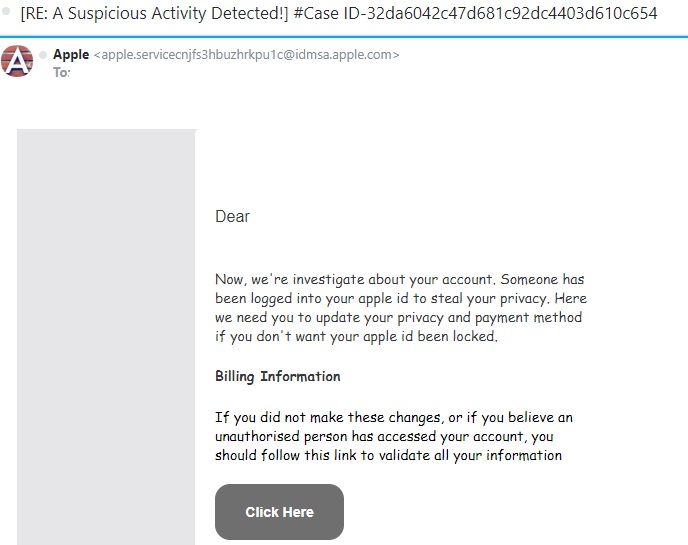
Below is an example. This scammer claims to be contacting you from Apple. If you check out the “From” address, you can quickly see that it’s not a legitimate Apple email account.
Another big clue is that words are misspelled and the grammar is very poor. You can tell that this email was written by someone (probably from Eastern Europe) who has very bad English skills.
NEVER click the link in a suspicious email like this one. Once you do, the cyber thieves can download malware or ransomware to your computer. They may also redirect you to a site where they steal your banking and credit card information. At the very least, they will steal your log-in information for your Apple account and then hijack it.
Final Tips
In order for consumers to avoid being a victim during the holidays, it’s important to watch out for these types of fraudulent activities. Never click a link in a suspicious email. Instead, open a new browser page and navigate to the website the way you ordinarily would. If there’s something wrong with your Apple account, a bank account or a credit card account, you’ll have a letter in your Inbox explaining what happened and what you need to do.
By using a little common sense and double checking when something feels suspicious to you, we can all avoid being victims this holiday season.

by Felicien | Oct 1, 2018 | Education
The Internet Crime Complaint Center (IC3) released a public service announcement at the end of September 2018, alerting companies about the risks of allowing RDP endpoints to be exposed online. The IC3, a division of The US Federal Bureau of Investigations (FBI), is sending out the alarm to U.S. businesses about their concerns that millions of RDP endpoints are visible online and susceptible to manipulation.
What is RDP?
RDP (Remote Desktop Protocol) is a Microsoft registered technology created in the 90s that permits a user to log into a remote computer and interact with its OS through a visual interface that gives the remote user access to its mouse and keyboard input. The remote desktop was designed for a computer technician to be able to help a customer who had limited or remote access.
RDP access is hardly ever enabled on home computers, but sometimes it is turned on for workplaces in enterprise networks or for computers situated in distant locations. RDP conveniently allows system administrators to access the computer, without physically having the computer in front of them.
Why is IC3 Concerned?
In its September press release, the FBI states that the number of computers with an RDP connection left open on the Internet has gone up dramatically since 2016. IC3 is observing numbers and trends by cyber-security firms in the past few years that are alarming.
ZDNet reported that Rapid7, a multi-product analytics and automation company, has seen nine million devices with port 3389 (RDP) opened on the Internet in early 2016, and then suddenly rose to over 11 million by the end of 2017.
Also, IC3 is seeing a steady stream of incident reports where hackers have acquired initial traction into victims’ networks through the computers with an open RDP connection.
The Rise of Ransomware Attacks
Over the past three years, a cluster of ransomware families were particularly designed to access a network by hackers who jumped in through an open RDP server.
Ransomware particularly designed to be infiltrated via RDP involves strains such as LockCrypt, Horsuke, CryptON, SynAck, Scarabey, Bit Paymer, Xpan, RSAUtil , Crysis, Samas (SamSam), Globe, DMA Locker, Apocalypse, LowLevel, Bucbi, Aura/BandarChor, Smrss32 and ACCDFISA.
How Do Companies Secure Themselves Before It’s Too Late?
IC3 has collaborated with the Department of Homeland Security (DHS) and published a report for companies to use to ensure RDP security.
Six Ways to Improve the Security of Network Infrastructure Devices
The National Cybersecurity and Communications Integration Center (NCCIC) has published six security measures for companies to ensure safety for their network.
Segment and Segregate Networks and Functions
Security engineers should study the overall layout of their framework, which includes both segregation and segmentation. A successful security tool for accurate network segmentation is to stop a hacker from spreading abuses or the ability to laterally move through an internal network. If the network is inadequately segmented, intruders can easily spread their control of analytical devices as well as obtain entrance into sensitive data. A securely segregated network can restrict malicious incidences and reduce the effect that intruders can have if they gain a foothold inside the network.
Limit Unnecessary Lateral Communications
Permitting unprotected communications between colleagues involving a workstation-to-workstation situation sets up grave weaknesses. This can permit a network hacker easy access to spread their attack to multiple systems. Once penetrated, the attacker can create backdoor manipulation throughout the network. When a hacker has backdoor access, they have an easier time of maintaining their presence inside the network and keeping users from removing the intruder.
Harden Network Devices
A basic way to boost a company’s network infrastructure security is to protect networking devices with secure designs. The best practice for a company is to implement the recommendations that government agencies, organizations, and vendors resource. Their guidance allows a business to be safe and stay within site security policies, and industry practices.
Secure Access to Infrastructure Devices
A company can give administrative freedom to allow specific users access to data and resources that are not broadly obtainable by the general public or all employees. Limiting these administrative privileges for infrastructure tools is vital for security because hackers will infiltrate administrative privileges that are inadequately approved.
Ways to secure access for infrastructure devices include having a multi-factor authentication process to confirm a user’s identity and closely monitor and manage the user’s access.
Perform Out-of-Band Management
Out-of-Band (OoB) management incorporates different contact paths that remotely manage your network infrastructure devices. These devoted communication paths can differ in configuration to involve areas such as physical separation and virtual tunneling. In applying for OoB access, it will strengthen your security by restricting access and dividing user traffic from the network management traffic.
Validate The Integrity of Hardware and Software
Products purchased and downloaded through unauthorized channels are more than likely a reproduction or inferior in their use. Several media outlets have reported the use of grey market hardware and software in the workplace. Unlawful hardware and software cause the users’ information to be at risk. Because they have not been carefully tested to meet superior standards, grey market products can present risks to the network. These risks can lead to breaches in the supply chain and allow opportunities for malicious software and hardware to be installed unbeknownst to the user. Compromised hardware and software can affect the network and give away the confidential and valuable information. Companies should regularly check the integrity of software.

by Felicien | Oct 1, 2018 | Education
As technology continues to become more widely used in the legal sector, it is apparent that even the most traditional offices should adapt. Technological advances, however, are occurring quickly. Not all attorneys and legal support staff are equally prepared to manage these new systems themselves. They do not, necessarily, require an entire IT department. This is where the right managed services provider (MSP) can be instrumental.
Managed service providers are companies that manage their clients’ IT infrastructure remotely. These are generally set up as a subscription per-device, per-user, or all-inclusive plan. Since providers have access to sensitive information, it is vital that the decision regarding which to choose is made carefully. Consider the following before searching for the right provider.
Why Would a Law Office Benefit from Having a Managed Services Provider?
Outsourcing IT management would reduce the stress and effort of maintaining the devices and network required to run a law office. Along with streamlining the day to day operations, a managed service provider will increase efficiency. For example, it would provide the following:
Adaptability to technological innovations
Access to advice, knowledge, and skills
Better business continuity and service
Better operations
Improved regulatory compliance
Increased efficiency
Increased IT security infrastructure
Reduced costly, technology-related risks
Streamlined operations
Although initially, it will add to the operating expenses, with the increase in efficiency it will reduce expenses over time.
Why Should Law Offices Choose an MSP with Industry Experience?
As with any service or product, the number of years it has existed indicates how well it can be expected to perform. Therefore, a more experienced provider is likely to have been tried and tested. Mistakes have already been made and solutions discovered. They have become seasoned professionals. Seeking a managed services company that has been around for a while reduces the chances that they are still figuring things out.
Be choosy. A qualified managed services provider may be capable of handling a new business with expertise. An industry-specific provider will handle it better. The legal profession is a highly-specialized vocation. It has a precise nomenclature and failure to use the correct word or phrase could result in big trouble.
An IT with legal experience is better suited to managing the services of a law office than an IT with a more general history. Choosing a provider with legal experience ensures they are able to anticipate potential issues, as well as understand the practice’s operational needs.
Why Should You Select a Provider with an In-House Network Operations Center?
Many managed service providers decrease the cost of their overhead by outsourcing their Network Operations Center (NOC). Although this may be fine for many companies, it could present problems for a heavily-regulated business like a law office. With the strict regulatory mandates, it is necessary to ensure that not only does the service provider adhere to them, but that their third-party NOC does, as well.
What Is Meant by Quality of Service When Comparing Managed Service Providers?
Determine whether potential providers outsource or handle service aspects in-house. If they handle in-house, inquire into their staffing levels. Do they have established procedures for various tasks? Do they have enough personnel to troubleshoot problems for clients?
A high-quality managed services company should also be able to have reasonable response times. They should offer accurate estimates for how long it takes for them to fix various problems that may arise in the future.
What Is the Importance of Innovation and Scalability?
Choosing a provider that adopts the most recent technology and offers the newest services ensures the office remains contemporary. An innovative IT managed services provider is able to use the latest strategies to address daily operations, as well as any potential problems that arise. This provides an edge over other, less modern law practices.
Additionally, when comparing MSPs, it is a good idea to address scalability. Like any company, a law practice is liable to grow and change. The right service provider should be able to accommodate this expansion. They should have enough experience that they can answer how they would handle these issues based on how they have in the past.
In Conclusion
Whether it’s a new practice or a well-established partnership, most law offices could benefit from hiring a managed service provider for their Information Technology. By following these suggestions, savvy lawyers can select the right provider for their needs. Along with the many other perks, it helps ensure attorneys and office support staff have more time to focus on other, more important aspects of their jobs.
