by Felicien | May 22, 2017 | Education
WannaCry may be beaten, but here’s why the ransomware can still be dangerous.
WannaCry is an infamous example of how dangerous ransomware can be in the modern world. Almost overnight, this cyber attack hit computers around the world and managed to infect 300,000 computers in more than 150 countries before going back to the benches for a break.
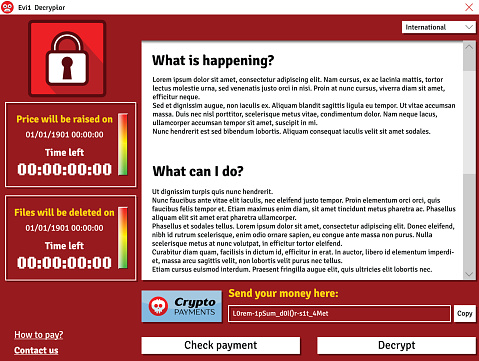
Ransomware is particularly dangerous because, unlike many types of malware, it has a particular purpose: It tries to extort money from victims by holding data hostage. In this case, WannaCry spread its way through unprotected Windows computers, locking away valuable files and changed desktop backgrounds into a set of commands to submit money to the hacker via bitcoins. Here’s how it played out.
How WannaCry was Born
WannaCry is an interesting version of ransomware because of the way that it spreads. Most ransomware starts with a relatively simple phishing email that encourages victims to click on the link and so download the malware. WannaCry, short for Wanna Decryptor, spreads itself through the Server Message Block protocol, which is used by Windows computers to share files. That makes it very easy for the malware to jump between different computers that are on the same Windows network (the actual mechanics of making that jump are still somewhat unclear). This makes the ransomware particularly dangerous for business and school computers that are regularly connected on large networks. It even managed to infect high-level government organizations in countries like the UK.
When inside a vulnerable computer, WannaCry chooses specific files types – files types generally known for their valuable data content – and creates an encrypted copy of them using AES and RSA encryption techniques, which makes it very difficult for anyone but the hacker to decrypt the files. The encrypted versions replace the old files, and the ransomware displays the extortion message.
How Security Experts Tackled the Ransomware
Actually, it was one security expert in particular that cracked the code to shut down WannaCry before it did, even more, damage: A 22-year old anonymous malware researcher who digs into these problems for a living took a close look at WannaCry and found a significant vulnerability.
Most ransomware has a simple test that it runs when it firsts attacks a computer. This involves sending out a request to a website that doesn’t exist in the real world. This request is designed to fail. Ransomware is often tested in secured simulated environments by security experts looking for a weakness, so it is usually programmed to avoid infected computers in such a simulated network. A simulation wouldn’t route this website request to the real Internet, so the check would pass, and the ransomware would know it was a trap.
The UK white hat hacker came up with a simple solution based on this reaction: He simply bought a real domain for about $10 with the exact same name as the nonsense website that the WannaCry ransomware was programmed to check for. Suddenly, whenever WannaCry checked for the site on any connected computer, it came up positive. The ransomware immediately started thinking that everything was a trap, and it shut down instantly.
Why WannaCry is Still a Problem
Despite the clever solution, WannaCry remains a problem. That’s because hackers can’t resist a successful piece of ransomware, and copycat versions of the attack have already begun. At least two versions have come up with workarounds to the kill switch, including choosing a different target website for the test.
These versions of WannaCry remain less dangerous than the first because 1)we know about them and 2)they were sloppy copies from amateurs, but this doesn’t mean a bigger, badder WannaCry 2.0 isn’t on its way.
The Lessons We Can Learn
Don’t stick with older operating systems! WannaCry was a big problem for two reasons. First, while Microsoft released a patch that would have prevented the issue back in March, far too few people – including organizations that should have known better – downloaded it. That’s why it’s usually a good idea to have automated update schedule enabled, or at least clear instructions after an important patch is released.
Second, don’t get stuck in the dark ages. It took Microsoft a lot longer to create updates for outdated systems like Windows XP, which proved the most vulnerable platform by far for WannaCry. Guess who still uses Windows XP? If you answered, “Governments and lazy businesses,” then you are absolutely right, and they were also the most common victims of WannaCry. It’s all right to wait for compatibility and stability checks, but upgrading to new versions of the OS is important as soon as it is possible.
For more ways to protect your {city} business, contat {company}. Feel free to ask us any specific questions by contacting us at {email} or {phone}.

by Felicien | May 22, 2017 | Education
While it remains unclear exactly how many have been affected by the latest ransomware, aptly called “WannaCry,’ the estimate has already reached more than 75,000 computers in over 150 counties worldwide.
Hospitals, government offices, and high profile organizations are still reeling today after what cyber experts are calling one of the largest cyber attacks ever. This virus, identified as ransomware, seizes control of the user’s computer until a ransom has been paid. The user is given six hours to pay the $300 ransom, with the price increasing every three hours after that.
While it remains unclear exactly how many have been affected, the estimate has already reached more than 75,000 computers in over 150 countries worldwide. A vast majority of these ransomware attacks targeted Russia, but the effects were felt as far as the United States, Taiwan, and Ukraine. A major telecommunications enterprise in Spain reported a freeze on their entire network, as their ransom climbed to almost $550,000.
Who’s at Risk?
The latest in a recent string of cyber attacks was first discovered May 12 and has been linked to vulnerabilities in Windows. Aptly named ‘WannaCry,’ the ransomware targeted Windows XP, Windows 8, and Windows Server 2003 customers who had not yet installed the security update released by Microsoft in March. The National Security Agency (NSA) has received much criticism over the last week, with many blaming their handling of the ‘cyber weapon’ theft last month for the attack. In April, the group called ‘Shadow Brokers’ claimed responsibility for the piracy, but many feel the threat wasn’t taken seriously by the NSA.
While the attack was initially revealed on the 12th, analysts indicate the ransomware software was likely spreading for several weeks, laying dormant, waiting for the kill switch to be pulled. This exceptionally well-written code makes it virtually impossible to unlock encrypted files once they’ve been infected.
In the United Kingdom, outpatient appointments for sixteen National Health Service facilities were canceled and patients were advised to steer clear of emergency rooms if at all possible. China reported PetroChina gas stations were also experiencing difficulties, forcing consumers to pay cash for goods and services. Both countries have reported no evidence of personal information being compromised.
With Russia at the center of a large portion of the attacks, cyber experts indicate that the attack may have originated in Russia. Evidence points to the hacking of an extensive Russian email database as the likely source.
What’s Next?
The ransomware was discovered by a British security researcher, who goes by the name MalwareTech. It was configured to continually contact an unregistered domain that was built into its coding. During his analysis of the attack, MalwareTech registered the domain, which, unbeknownst to him, was what was necessary to halt the ransomware attack from spreading any further.
While Microsoft customers were the target of this attack, all software users are urged to update their operating systems immediately. Windows users who haven’t installed the update Microsoft released in March can prevent an attack on their system by doing so now. Unfortunately, the update won’t help those who have already been targeted in this recent attack. Laptop users should use extreme caution when utilizing public WiFi connections, as the ransomware is equipped with a ‘hunter module,’ which helps spread the virus to anyone on the shared network.
Recent studies reveal that cyber attacks are on the rise, showing no signs of slowing down in the near future. A published FBI report indicates an average of 4,000 ransomware attacks occurred each day in 2016, with an attack on U.S. enterprises occurring once every forty seconds. Businesses and individual users are urged to keep their firewalls up-to-date and configure them to block any malicious IP addresses. Anti-virus and anti-malware programs should also be configured to automatically perform regular scans.

by Felicien | May 22, 2017 | Education
Facebook Ads Manager is child’s play once you get accustomed to the interface. Spend a lot of time trying out each tool to make the most of your Facebook marketing campaigns.
Facebook Ads and Excel easily sound like a match made in heaven. What could be easier than tracking your ads via a convenient Excel spreadsheet? Using this tool along with other resources within your Facebook Ad Manager interface can make charting your ads progress seamlessly. Here are a few basics to get you started with Facebook Ads Manger and tips on using the latest tools.
Grab a Seat and Stay Awhile
Getting comfortable with Facebook Ads Manager is a must. You’ll do everything here: create ads, edit ads, and chart campaign progress. There are four main headings within Facebook Ads Manager: Account Overview, Campaigns, Ad Sets, and Ads. Account Overview is a summary of financials like how much you’ve spent over the past week on ads. While Campaigns, Ad Sets, and Ads are used to create/edit ads and retrieve reporting information. Since there is often a lot of information to process within Facebook Ads Manager, take advantage of the filters available. Options include filtering by date range or by specific keywords. Custom filters can be created and saved to help you find the data you need quickly at a later time.
Creating Ads on Facebook
The rules are pretty straightforward on Facebook for advertising: no adult content, no foul language, no copyright infringement, no misleading content, and no illegal products or services. Poor image quality and poorly worded copy are also common reasons for ad rejections. Take the time to create a polished ad with optimized images before heading over to Facebook Ads Manager.
To start, you’ll want to launch a new campaign. This allows you to tie a new ad set or ad to an existing campaign. Facebook walks you through the campaign creation process so there isn’t a steep learning curve. A campaign is set with an objective in mind before you move onto ad sets. The ad sets you choose will take some research. Select the demographics and placement most relevant to your brand. Ad sets are savable for later use. Design options will be chosen once you enter the Ads screen. This involves choosing your ad’s format and media type. Text and images are uploaded in this section before the campaign goes to Facebook for approval.
Facebook Reporting Tips
Analyzing your campaign’s performance is an essential part of Facebook Ads Manager. If your campaign is stalling, you’ll want to edit the campaign to get better results. You can view results directly from Facebook or use Facebook Ads Manager for Excel or FAME. The benefit of FAME is the ability to import multiple Facebook accounts into your reports. Moreover, you don’t have to mitigate your ad data manually each time you want to view results. With Excel’s refresh function, reports have automatic updating. The reports have plenty of useful data such as ad clicks, page likes, and conversions. Reports also contain the number of impressions for each placement and click through rate. The reports are used to manage your advertising budget since you’ll see total spent and cost per click.
Getting started on Facebook Ads Manager is easy and worthwhile. Promotions on Facebook has a proven track record of being lucrative and you don’t want to miss out on this opportunity.

by Felicien | May 19, 2017 | Education
When someone thinks of spam they typically think of unsolicited bulk commercial email they receive in their inbox. However, the concept of spam started a little earlier than you might think. How far back? How does 1864 sound? Spam in 1864 you say? Yes, in the form of a telegraph, advertising a local dentistry actually. The Telegraph was so much news that the local paper even reprinted the telegraph that was sent to many households, further propagating the message.
More recently, people consider the first spam email coming out of Digital Equipment in 1978 which went to a total of 393 people promoting their latest computer model. You can thank a Monty Python sketch based on a cafe that only served the canned spiced ham SPAM for the origin of the name. Another early spammer was the lawyers Canter and Siegel posting their “Green Card Lottery” message to USENET, a shared messaging system.
What does all this have to do with today? You don’t want to be known as a spammer. There are three ways to attack the spam problem. First off, you don’t want your marketing emails to be classified as spam. Secondly, you don’t want your mail server to be abused where someone sends spam through your hardware. While this wasn’t sent to you directly, your hardware could be blacklisted, thus affecting your own emails. Lastly, you don’t want your employees to respond to spam. There are ways to filter this at the mail server to prevent them from seeing the messages, or at least classify messages as fishy before their opened. Our company {company} can help you to protect your business from being labeled a bad apple in the email business.
Starting with the most important avenue, ensuring your marketing messages get through, there are some best practices to know about. For starters, don’t just send emails directly to your clients. Putting everyone’s email in the “To:” field of a message is bound to cause problems when someone does a reply-all. If you absolutely have to send a message to LOTS of people, it is better to use the BCC (for blind carbon copy) field of a message. Better yet, rely on a mailing list management package like that offered by Constant Contact. Typically, you don’t want to add people to the mailing list yourself. Instead, people should opt-in. More importantly, with each message you send, there should be unsubscribed instructions.
Protecting your mail server is not an easy task. There are some simple steps you can do like requiring that users are authenticated before sending a message, but someone can just spoof the email headers to make it appear messages came through your server. To best protect your server, in 2012 DMARC, or Domain-based Message Authentication, Reporting, and Conformance was introduced. Combined with the earlier introduced SPF, Sender Policy Framework, this makes sure that any messages appearing to come from your mail server actually came from your mail server. {company} can help you keep up with the latest ways to protect your email servers and thus getting your marketing messages through.
Lastly, it is important to look at the inbound side of spam. With all the talk of Russians hacking servers and the release of inappropriate celebrity photos, most of these attempts are triggered by phishing attacks of targets. You still need to worry about viruses being sent through email, but phishing involves fraudsters sending what look like real emails in the attempt to reveal personal information like passwords and bank account info. You don’t want your employees giving away the farm so that others can then get into your company network or your employees worried about identity theft. {company} can help protect your mail servers from letting these unsolicited emails through.
Contact us at {email} or {phone} to learn more about how we can help you.
by Felicien | May 19, 2017 | Education
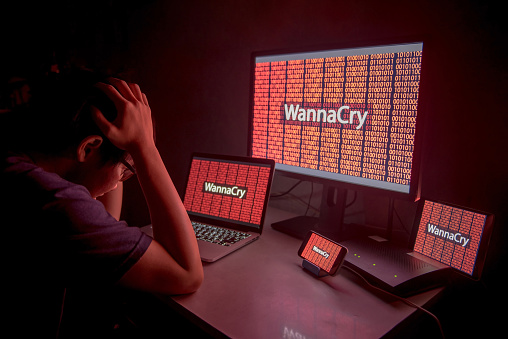
Unless you have been totally disconnected from the world the last few days, you have heard about the WannaCry ransomware attack that has been spreading around the world. This attack is being dubbed by some as the precursor to a larger, more focused attack once the extent of the vulnerability is revealed.
Those primarily affected are running unsupported systems like Windows XP, pirated or illegal copies of Windows, and those not staying current on operating system patches.
What is the right response to WannaCry? What should your IT team be doing?
In the wake of the news of the WannaCry ransomware attack, the cyber-security professionals of {company} went immediately to work.
While we believed that the workstations and servers we support had been patched appropriately to protect against the WannaCry attack, we still took the time to review all of the workstations and servers we support to determine if there are any that may have been missing the patches needed.
Beyond this immediate response, we also proactively surveyed the security of our internal network to protect the resources we depend on in delivering IT services to you.
Here’s a checklist that your IT support provider SHOULD be doing.
Actively monitoring all security fixes and patches for Microsoft, Adobe, and other major software packages commonly used and applying them as soon as possible.
This can be frustrating to end users when their workstations interrupt their work by restarting or operating slowly, but it is a critical part of staying safe in today’s technology-infused world.
Eliminating unsupported operating systems and software wherever possible.
The cost of continually upgrading and replacing workstations and servers can feel like an unnecessary drain on company resources. WannaCry – and similar attacks – are the reason why {company} IT consultants talk regularly with our clients about replacing unsupported hardware.
The Windows 10 operating system was not affected at all by this attack. Staying current on operating systems and other software is a critical part of staying safe in today’s world.
Segregating your private network from your guest network.
Over the last year, the {company} team has been more forcefully recommending the creation of separate networks for guest workstations and employee-owned equipment. This has felt inconvenient to many, and in some ways, it is. Again, attacks like WannaCry are the reason why we recommend this change.
{company} works actively to keep our client’s equipment patched and up-to-date. But we cannot do the same for equipment we do not support. By providing a separate network for non-company owned equipment, we can provide the Internet connection needed without endangering the company’s valuable assets.
These are just some of the proactive steps we take to help secure the networks we support. But cyber security is a team effort. We cannot do this on our own.
What can you do to help in the process of securing your company against cyber crime?
{company} IT consultants recommend that the primary contact for your company meet regularly with your IT support team to discuss and plan the technology for the company. This will give you the clearest picture of what is being done with the company’s technology.
Armed with a high-level picture of your company’s IT strategy, you will be able to:
Be an advocate for proactive technology practices in your company.
Ask questions. Of your IT support team – so you feel comfortable with the direction of your business technology. Of your coworkers, so you know what’s happening with the technology in the rest of your company.
Share information from the Strategic Business Reviews with others, and encouraging them to be involved in the process.
Encourage technology training and awareness for all members of your staff. WannaCry and similar attacks begin by someone clicking on something they should not. Education and awareness can often be just as important as up-to-date systems.
Whether you like it or not, technology has become an integral part of our daily lives. Properly cared for, it can be a valuable asset. But when ignored, it can be an ugly beast that can lay waste to the business.
{company} is proactively working to secure and maintain the networks of our clients, and we encourage our clients to take an active role in their own IT and to implement common sense cyber-security policies.
How has YOUR current IT support team responded to the WannaCry threat? Have they been efficient, informative, and communicative? Maybe it’s time for a change.
We’re here to help! Contact us now at {phone} or {email}
Bonus Info! – Here are some articles that we looked at as we researched this latest WannaCry threat. Take a look!
ESET: https://www.welivesecurity.com/2017/05/13/wanna-cryptor-ransomware-outbreak/
Symantec: https://www.symantec.com/connect/blogs/what-you-need-know-about-wannacry-ransomware
Microsoft: https://blogs.technet.microsoft.com/msrc/2017/05/12/customer-guidance-for-wannacrypt-attacks/
Times Now: http://www.timesnow.tv/technology-science/article/india-windows-piracy-wannacry-ransomware-rbi-atm/61104
CNN: http://money.cnn.com/2017/05/14/technology/global-cyberattack-explanation/
CNET: https://www.cnet.com/news/wannacry-wannacrypt-uiwix-ransomware-everything-you-need-to-know/
