by Felicien | Jan 30, 2018 | Education
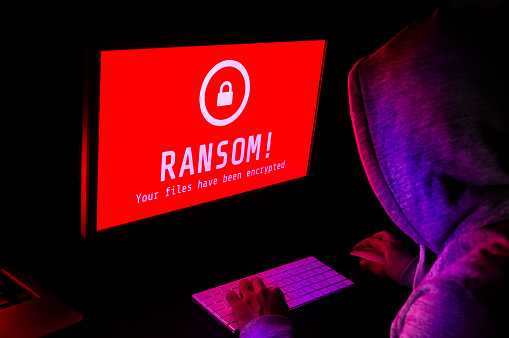
Once again a hospital has been hit with ransomware, causing staff to rely on pens and paper to keep records and maintain patient care.
On January 11th, Indiana’s Hancock Regional Hospital was infected with ransomware by an “unknown party” that has requested an unspecified monetary amount in bitcoins in exchange for the key to unlocking the systems. The ransomware has compromised the hospital’s email system, electronic health records, and more.
So far, hospital staff maintains that no patient records were stolen and that quality of patient care has not been affected by the attack. Once they had realized what was going on, they shut down their systems to prevent the ransomware from spreading, then informed the FBI and contacted their IT support provider. According to Hancock Health Hospital CEO Steve Long, the financial demand has not yet been met.
“We, like other hospitals, do disaster drills all the time, so this aligns perfectly well with drills that we’ve had throughout the years on how to continue to deliver world-class care when you have system failures or system breaches,” said hospital strategy officer Rob Matt to The Indianapolis Star.
The Ransomware Epidemic
It’s been a little more than eight months since the WannaCry ransomware strain struck on the evening of May 11th, encrypting the data of thousands of businesses in the UK (including the entirety of the National Health Service) and holding them to ransom. By the end of the weekend, WannaCry had infected thousands of networks in over 150 countries around the world.
Despite the extent of that attack, the world still doesn’t seem prepared to defend itself against ransomware – so what can you do about it?
Be sure to follow these tips to keep dangerous ransomware out of your systems:
Ensure that you have a good backup, a respected antivirus, and up to date security patches in place.
These are the fundamentals of a strong cybersecurity defense. Without them, your IT will be vulnerable to a range of threats – it’ll only be a matter of time before you’re hit by ransomware or worse.
Both industry leaders and cybercrime law enforcement members agree that the best defense against ransomware, other types of malware and similar cybersecurity threats is a robust data backup contingency. Have you invested in one for your firm?
When developing your ransomware defense, keep these recommendations in mind:
Make a considerable investment in a comprehensive backup data recovery solution so that you can restore your data at a moment’s notice when necessary.
Test your backup and cybersecurity measures thoroughly and regularly; create dummy files and then delete them to see how fast they can be restored, or schedule a day to literally unplug your critical systems to find out how long it takes to get online again.
Be sure to make the most of the available resources (both provided online and through expert IT consultants) to ensure that you’re not overlooking vulnerabilities in your IT security methodology.
Understand How Ransomware Works
Beyond simple security updates, it’s worth noting that ransomware often penetrates many systems through conventional phishing schemes, in which a fraudulent email requests that the recipient downloads an attachment, or clicks a link.
Ensure Your Staff Is Aware
Send out a company-wide memo. Make sure it comes from someone who won’t/can’t be ignored. It should say something like…
Attention All:
This ransomware is dangerous to your job and our company… (talk about ransomware’s impact).
It is imperative that you follow these guidelines on ALL work computers and ANY personal devices used for work.
If you get emails with suspicious attachments; even if it is from people you know do not click on the attachment.
No harm in opening the email for reading. Forward any suspicious emails to IT department.
Be very cautious of what you click on while browsing. Do not click on random pop-ups!
If you accidentally click on a suspicious email or web link, immediately unplug the computer from the network and turn off the WIFI – even before calling IT support.
Work With A Cybersecurity Expert
If you’re not sure how to ensure your protection against ransomware and other cybercrime threats, don’t try to “fake it ’till you make it”. Be sure to consult an expert if you’re unsure as to the state of your business’ cybersecurity defenses.
After all, isn’t this a lot to consider? Yes. Do you have to handle it all on your own? No! If you have any concerns about your cybersecurity whatsoever, be sure to get in touch with an expert support provider like {company} right away. Always be careful, and ensure your systems are up to date.
For more information about protecting your business from ransomware like the type that hit Hancock Regional Hospital, get in touch with {company} at {phone} or {email} right away.
by Felicien | Jan 30, 2018 | Education
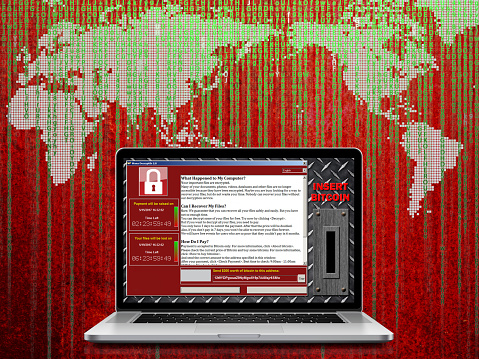
We recently came across some chilling news. A white hat hacker developed a working “Ransomcloud” strain, that encrypts cloud e-mail accounts like those in Office 365, and it does this in real time. This strain uses a smart social engineering tactic to trick you into giving the bad guys access to your cloud e-mail account. This means that if you open your e-mail in a browser, it can encrypt the whole lot right in front of your eyes. Thankfully, Ransomcloud hasn’t hit the wild yet. With that said, there’s no reason why it wouldn’t, especially because it’s not all that hard to do.
Ransomware is a term that you should be aware of. There are 3 types of ransomware: File- Scareware, Screen Locker, and File-Encrypting Ransomware.
Scareware is malware that works for both security software and tech support. It can be recognized by its notification telling you that your computer is plagued with a specific bug or virus. In order to remove it, you need to pay a fee to the hacker.
Screen Locker uses an official-looking seal from government programs such as the FBI or Department of Defense. It locks your computer screen and requests that you pay a fine to unlock it and retrieve your data.
File-Encrypting Ransomware is a type of malware that tricks you into clicking on a suspicious link or opening a phishing e-mail. Ransomcloud is the newest variant of file-encrypting ransomware and is incredibly dangerous. In the Ransomcloud Demo Video, Kevin Mitnick, KnowBe4’s Chief Hacking Officer, shows us the dangers of this new variant and what it means for our cloud-based emails. Once the Ransomcloud is initiated, either by clicking on the link or opening the e-mail, it immediately begins encrypting or scrambling e-mails. This is especially dangerous if you are connected to a corporate network that shares access to files, such as a shared cloud. Any files you have access to can be encrypted.
Often the malware is represented as something else. For example, the e-mail can come through as an update or program that is beneficial to you. For example in the demo video, the e-mail looks like it was from Microsoft. The e-mail may appear to come from a large company such as Microsoft–even using authentic logos–It’s important to look for anything suspicious before opening it or clicking on it. If you see that the e-mail says that Microsoft is launching a new anti-spam pro product, without taking a deeper look, you could easily shrug it off as authentic. (Keep in mind, that while this specific example uses the ruse of a “new Microsoft anti-spam service” it could be anything from any company as long as it helps the hacker reach their goal.) Since the e-mail stated that this new program will keep spam from your Outlook 365 inbox it wouldn’t be suspicious if it asked you to stay logged in and provide access to your data.
As soon as you accept these terms, the fatal mistake is made. You are essentially providing an “OAuth token,” which gives the hacker complete control. Once that OAuth Token is given up, all of your e-mails and attachments are encrypted real-time! The horrifying thought is that a Ransomcloud attack will work for any cloud e-mail provider that allows an application to give control through e-mail. It will also work for Google. After the link is clicked, and you go back to your e-mail, at first, it looks perfectly fine; then you’ll see changes moving swiftly throughout each and every e-mail in your inbox. All of your e-mails are quickly encrypted, leaving only the header readable.
Ransomware earns its name for what it does next.
Next, you’ll be notified that to decrypt your data you must pay a ransom. The hacker will explain how to do this.
The ransom is typically requested in the form of bitcoins. Bitcoins were created in 2009, as a new form of currency. When using this currency, there’s no need for banks or other middlemen, to intervene. The transaction is just between you, your bitcoins and your supplier. So why would bitcoins be a common currency for ransomware attacks? Because Bitcoins can be used without the name and paper trails (which can be limiting to criminals). Additionally, Bitcoins don’t use credit reports, or fees, and can work internationally without the regulations that other currencies are subjected to.
Using bitcoins gives this crime another shade of elusiveness. In the KnowBe4 Ransomcloud Demo video the hacker’s ransom e-mail states that the cloud e-mails have been encrypted and if the user wants the decryption code, they must pay a fee of $300 bitcoins to be sent to a specific bitcoin address. The video ends with the user paying the hypothetical $300 bitcoins and receiving the decryption code. Just as quickly as it started, it’s over, and the e-mails all return to their readable status.
The dangers of this are especially pertinent if you and your employees are working in a cloud-based environment. This is why it’s especially important to train your employees to be vigilant to secure your business data. They should carefully look at each e-mail prior to opening it or clicking on links. One small click of the mouse can turn into a world of trouble for your business.
The Take-Home Message
Simple training can help secure your company and your data. Training staff to spend a little more time when sorting through e-mails could save your business from a ransomware attack. This is where the importance of the training comes in. Employees should be trained to recognize ransomware emails and constantly look for ones that are suspicious, such as those containing simple grammatical mistakes or excessive punctuation. You should have a policy in place that tells them how to flag suspicious e-mail. Additionally, employees should all be trained on the importance of not opening or clicking on suspicious e-mails or links.

by Felicien | Jan 30, 2018 | Education
The problem with email
Email has been around for decades, and yet it hasn’t changed much. We must sort through dozens of messages to find the ones that matter. Only a small percentage of the emails we receive are important to view; the rests are advertisements and junk mail.
This outdated system may work for you as long as you have plenty of time to sort through the “junk,” or if you don’t receive many emails. But what if you get hundreds of emails every day? And what if one pertained to a multi-million-dollar lawsuit, or contained the confession of a client accused of murder? It would be a shame if they accidentally got sent to SPAM and you never saw them. One email could potentially make or break a case you’re working on.
Another troubling issue with email is that there’s no system for prioritization. An email about a new night cream arrives with the same level of importance as one from a client. These are a few of the many issues you must deal with when it comes to email.
Advancing technology
Email lags behind when other forms of technology are moving forward at a rapid pace. Why is it that we now have self-driving cars but the only way to find important emails is to manually sift through them? It’s a problem that countless professionals, not just attorneys, must deal with. Though other areas of technology have made great strides in the last few years, email architecture still can’t support the unique needs of attorneys.
But this is finally changing. You can now use Artificial Intelligence (AI) to interpret and classify the emails in your inbox, assign importance to your priority emails, and differentiate between an advertisement and an important email from a client.
Have you ever sent an email to the wrong person? This can be embarrassing, but in the legal world, it can result in expensive repercussions. The new AI system notifies you if you’re about to erroneously send a confidential email. It gives you a moment to double check and make sure you’re sending it to the right party. And, as with any AI solution, the email program learns and improves. The more you use it, the more useful it will be.
Email and DMS
The new email systems for law firms provide a secure connection to your document management system (DMS). This is especially important in the legal world due to the massive number of documents that are generated. From research to trial notes, law firms generate thousands of pages of documents each year. Imagine having an email program that can readily access any piece of information you need.
Document management systems are the perfect solution for sorting through and organizing emails. As the technology improves, these programs will also have the ability to connect emails with the right documents. AI will recognize specific words in an email and find the documents that pertain to it.
Increase your billable hours
Managing hundreds of emails each day is challenging for anyone, but for attorneys, it means lost revenue. Until now, all the time spent using your smartphone to handle emails wasn’t billable. With AI, you can now charge for this because your smartphone can recognize what case you’re working on and create a timesheet for it.
When you use a DMS system on your mobile device, the intelligent email system can identify a client’s email and find the correct folder for it. This prevents you from accidentally deleting or losing important emails. As an attorney, you’re expected to generate revenue, and with the new AI email programs, you can. This is good for your firm and frees you up to spend time on more important tasks.
Automated replies
Other industries are also benefitting from this technology. Employees spend a great deal of time on their mobile devices to conduct business. Software developers are working to create automatic responses based on the type of email received and sent. Google is a frontrunner in this technology with its new service called “Smart Reply.” Users can choose from three different responses based on the contents in an email. So far, this is widely accepted, and people say that it saves them time. No more typing repetitive responses like, “Thanks” or “Will talk to you soon.” Just choose from the list, select a response and within a few moments, you’ve dealt with it.
Other industries using AI with Email
Who knows? Someday Artificial Intelligence (AI) may be able to read and answer all of our emails. A new communication platform for Air Traffic Controllers uses learning algorithms to speed up computer, mobile, and SMS communications. Big companies like Facebook, Google, and LinkedIn are experimenting with ways to decipher the contents of an email and reply with an appropriate response.
Inboxes that utilize machine learning are able to recognize what the email is about and generate natural-language responses. Because of the special nature of legal work, these responses will be more complex–this has been a major challenge. Crafting an intelligent response that in no way offends the client or breaks the law is a huge concern. However, it’s important to realize that machine learning adapts and evolves. It learns from its mistakes. This means we can expect a future where most lawyers can handle emails on their mobile devices with just a few clicks.
Moving forward with AI and Email
Some companies have experienced firsthand how employees waste too much time each day on redundant email tasks. This time represents millions of dollars each year in lost revenue. For attorneys and law firms who charge hundreds of dollars per hour, this figure escalates to the billions of dollars.
The challenge for software developers is to build Artificial Intelligence for apps that accurately replicate human behavior. Since AI is all about the machine learning as it evolves, developers believe this is entirely possible.
by Felicien | Jan 30, 2018 | Education
Not only are healthcare organizations at risk due to cybercrime, so are their patients. Imagine having to turn away patients because your computers are shut down due to a ransomware attack. Or, having to “blindly” treat your patients because you can’t access their medical records unless you pay criminals a ransom. A ransomware attack can halt your workflow, data processing and jeopardize your ability to properly treat your patients.
Patient data is now a popular target for cybercriminals. It can easily be monetized, making healthcare organizations and practices increasingly vulnerable. Believe it or not, ransomware poses even larger risks to patients than failure to properly disinfect medical devices. According to the ECRI Institute:
“This is the first year ransomware has been included in the ECRI Institute’s Top 10 Health Technology Hazards list,” says Juuso Leinonen, senior project engineer at the health devices group. “Cybersecurity topics have been covered in the past, but this is the first year a cybersecurity topic has been ranked No. 1 on the list.”
A New Ransomware Threat–”Defray”
Cybersecurity experts discovered a new ransomware threat that targets healthcare organizations. Defray uses Microsoft Word attachments in emails to infect a network. In one instance it attacked a hospital in the U.K. using an attachment entitled “Patient Report.”
The email looked legitimate because it included the hospital’s logo and the name of the director of information management. Once the attachment was opened, the victim’s files were encrypted.
Defray includes a note asking for $5,000 in bitcoins to return the encrypted files. It also suggests a victim contact them via three email addresses if they have any questions, doubts or want to negotiate. The email addresses contained domains from Russia, Germany, and Switzerland.
There are no tools available to restore files encrypted by Defray. The only thing you can do is restore your files from a recent backup. Unfortunately, some healthcare providers aren’t doing all they can to prevent ransomware attacks, or even backup their data properly in the event their patient information is held ransom.
Medical Devices Are Also Under Attack.
According to a May 2017 article in Forbes, medical devices were hit by ransomware for the first time In U.S. hospitals:
“When the NSA cyber weapon-powered WannaCry ransomware spread across the world this past weekend, it infected as many as 200,000 Windows systems, including those at 48 hospital trusts in the U.K. and so-far unnamed medical facilities in the U.S. too. It wasn’t just administrative PCs that were hacked, though. Medical devices themselves were affected too.”
The Food and Drug Administration is especially concerned about the safety of medical devices. Suzanne Schwartz, M.D., associate director for science and strategic partnerships at the FDA’s Center for Devices and Radiological Health, writes:
“A computer virus or hack resulting in the loss of or unauthorized use of data is one thing. A breach that potentially impacts the safety and effectiveness of a medical device can threaten the health and safety of an individual or patients using the device.”
Manufacturers, hospitals, and other facilities must work to prevent these pervasive cybersecurity threats. With the development of innovative technologies, protecting patients’ safety from malware attacks must be a priority. However, this is difficult when hospitals and healthcare centers use many different types of medical devices from a multitude of vendors.
The Solution? – A Defense-in-Depth Strategy
Mitigating the risk of data breaches and malware infections requires professional IT service and support from experts who are up to date on the latest cybersecurity threats and who utilize defense-in-depth strategies.
Originally coined in a military context, the term refers to an even more comprehensive security strategy approach than layered security. If one layer of protection is breached, the attack can be defended with one or more of the other layers. Layered security is only one part of a defense-in-depth strategy.
Defense in depth addresses a broad range of tactics to mitigate ransomware and other threats to data security. It comprises:
Monitoring, alerting, and emergency response,
Accounting of authorized personnel activity,
Disaster recovery,
Reporting of criminal activity, and
Forensic analysis.
Defense-in-depth security means recognizing that no one security solution is ever enough for healthcare organizations. The best cyber security experts find the right combination of new and tried-and-true techniques and tools that address the organization’s unique security and privacy requirements.
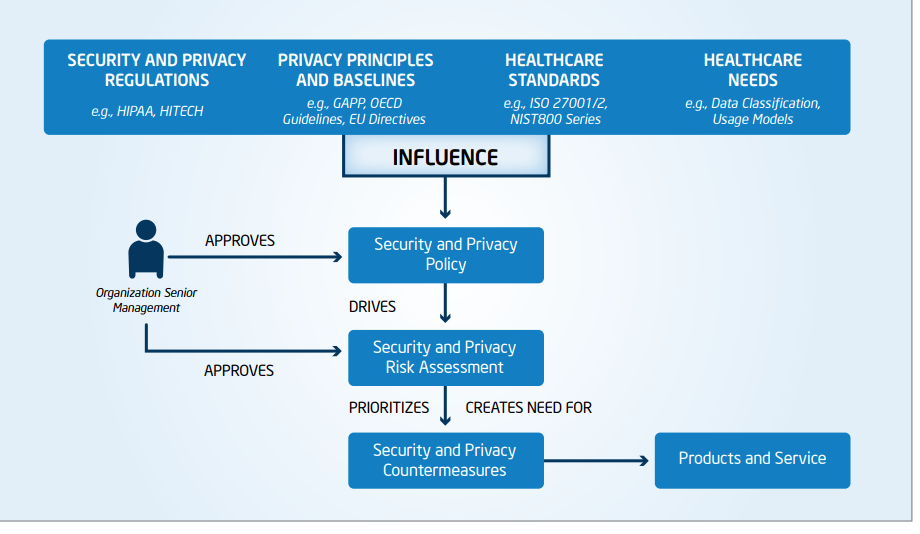
The diagram below depicts the guidelines suggested by the International Standards Organization’s ISO 27001 and ISO 27002 for Information Systems Management Security and Security Techniques, and principles such as the American Institute of CPA’s Generally Accepted Privacy Principles (GAPP) to determine security and privacy requirements.1
Only with a multi-layered, defense-in-depth strategy can healthcare organizations guard against patient safety infractions and best address the ever-increasing and evolving forms of ransomware.
Hopefully, this won’t happen, but if your hospital or healthcare facility is ever victimized by ransomware, be sure to contact the HHS for guidance.
For more information about Ransomware and Defense-in-Depth protection for your organization, contact {company} at {email} or {phone}.
1. Intel: “Health Information at Risk: Successful Strategies for Healthcare Security and Privacy”
http://www.ehealthnews.eu/images/stories/pdf/successful_strategies_for_healthcare_security_privacy.pdf

by Felicien | Jan 29, 2018 | Education
More than 20 years ago, retail began to shift from the shopping mall to online shopping. Amazon.com, the brainchild of Jeff Bezos, had been around for a few years. It was born as an online bookstore in 1995. A brilliant premise, Amazon offered a digital “storefront” that ran from the garage of Bezos’ home. Amazon’s virtual catalog represented nearly a million titles sold at prices lower than competitors’ due to wholesale agreements with major publishers.
After only two months, Amazon.com was bringing in US$20,000 weekly in sales. Its first sale was a copy of Douglas Hofstadter’s Fluid Concepts and Creative Analogies: Computer Models of the Fundamental Mechanisms of Thought. Just two years later, Amazon launched an IPO at US$18.00 per share.
Did you know that today Amazon trades at over US$1,300 per share on the New York Stock Exchange?
Mere days before its IPO, Amazon was sued by Barnes & Noble—They alleged that Amazon was operating under the pretense of being the world’s largest bookstore. They claimed that Amazon didn’t have inventory, rather they resold on behalf of publishers. Plus, Amazon’s habit of hiring former Walmart executives led to accusations of stealing trade secrets. As a result, Amazon soon restructured internally. What it didn’t change was its business plan, famously modeled after an “expansion- at-all-costs” motto.
This modus operandi stuck and has proven immensely profitable for Amazon. Close to its 20-year anniversary in 2005, Amazon launched its Amazon Prime membership model. With fast shipping guaranteed, members signed up in droves and enjoyed a smorgasbord of benefits, including the ability to share their membership with family members to cut the cost.
Today, Amazon Prime members number roughly 75 million globally and considering that each member pays a flat annual fee of US$99/year, this alone is a revenue stream of over US$7 billion a year. Contracts with freight companies like UPS keep shipping costs low so as not to chip away at this revenue. In fact, with only one membership price increase in over a decade, Amazon Prime members are fiercely loyal – and often comparison shop while they physically shop at “big box” stores before making purchasing decisions.
Amazon is well aware of this and takes full advantage. Does Amazon want to be the one-and-only shopping destination for consumers? In a perfect world, this could be the case. Recently, the company began test-marketing AmazonFresh, a grocery delivery service. They even “stretched their legs” into the meal kit market, competing with the likes of Blue Apron and HelloFresh. In Q3 2017, Amazon jumped into the grocery channel when it announced a merger with Whole Foods. With this came a promise to lower the cost of high-quality organic food and make it more readily available to the average American household–directly competing with stores like Trader Joe’s.
Standard brick-and-mortar grocery stores like Kroger and subsidiary Harris Teeter have been competing with stores like Trader Joe’s for years. Trader Joe’s only sells house brands, so store chains offered digital coupons to remain competitive, including for their house brands. Not to be outdone, in 2016 Kroger brands rolled out digital shopping services to meet the needs of their customers’ busy lifestyles. They now provide online ordering with pick-up and delivery options and incentives for customers who are willing to pick up during less-busy times like the middle of the day on non-holiday weekdays.
Not to be outdone, Amazon launched Amazon Go, testing a single store in Seattle where customers come to shop for prepared foods, meal kits, and other limited food and beverage items. The entire experience invokes innovative technologies, where much of the shopping process is automated and revolutionary. Customers download an app linked to their Amazon account on their smartphone and shop at their leisure. Using ceiling cameras and shelf sensors, selected items are detected and added to or removed from a virtual shopping cart. Then the automated checkout and payment process charges the customer’s account when they leave the store.
Unfortunately, the store’s opening was delayed for an entire year due to malfunctioning sensors that improperly detected purchases and even misidentified shoppers with similar body types. For an organization like Amazon where innovation is a mundane daily process, this was unexpected.
Amazon has mastered inventory management and streamlined the supply chain to the point where they are on par with Walmart – even ahead of Walmart in many regards. Walmart, however, beat Amazon to market with the “smartphone app” technology. Yes, Walmart’s “Scan & Go” product beat Amazon, the multibillion-dollar global organization behind the Kindle, Echo, Alexa, and on-demand cloud computing. Announcing “Scan & Go” in 2017, Walmart launched a test in 50 stores in select markets, where customers would – again, use a smartphone – download a proprietary app, store their payment information, scan items as they shopped, bag them, and are charged as they exited the store.
Kroger responded to Walmart with an announcement of its new initiative, “Scan, Bag, Go,” which takes its ClickList a step further. But as technological innovation isn’t a grocer’s forte, for now, customers must still visit self-checkout registers to finalize their shopping.
This exciting concept, along with the expansion of stores like ALDI and LIDL into more U.S. markets, and the price wars begin! With the goal of delivering fresh, healthy, and more economical food options, more adoption of this advanced technology isn’t far behind.
Amazon’s announcement for Q1 2017 made Walmart leap into action. Walmart went live with their program in Q3 2017 in 12 stores in the United States, with a store in Texas being the first. Walmart’s value proposition is that their customers aren’t limited to grocery items with “Scan & Go,” intensifying the competition.
Are you ready for the juiciest detail yet? Walmart launched this program in 2014, three full years before Amazon’s target launch date. The public version of the reason why the program was pulled from stores was that shoppers didn’t take to the app, but it was more likely that the app needed to be more user-friendly. We’re curious why it took three years for the “fix,” but the logical speculation is that it wasn’t deemed a priority for the organization that was seemingly ahead of its time.
With Amazon, the chief innovator of the tech industry going gangbusters with its version, Walmart could simply tweak their app and hop on board for some free publicity. This was made even better by beating the tech giant to market.
With Amazon Go incorporating Prime customers’ accounts into the experience, the simplification of the process wins. Amazon is known to take on retailers like Walmart head-to-head in price competition, with its “bots” crawling the web every nanosecond to compare prices just like “real people.” it’s no wonder they want their newest concept to be an ironclad success.
We expect nothing less from the e-commerce giant that holds a Federal Maritime Commission license as a non-vessel-owning common carrier to manage its international shipments coming into the U.S–and is building a logistics and air freight fleet, potentially rendering its agreement with UPS obsolete.
Given that Amazon is also now producing original programming and distributes through Amazon Video and that its Fire tablets are meant to compete directly with the Apple iPad, but at a much lower price point, it seems that breaking through barriers and challenging competitors is what Amazon does – and does quite well.
What will Amazon think of next?
