
by Felicien | Feb 2, 2018 | Education
Cybercrime is a common part of business these days. Even if you haven’t encountered a hacking or malware incident at your business in recent years, the fact is that cybercriminals are coming up with new methods of stealing and compromising sensitive business data every single day. At best, modern cybersecurity measures are 99.9% effective; cybersecurity experts around the world agree that hacks and data breaches are an inevitable part of a business.
A majority of cybersecurity services offered today include the best in vital technologies, from firewalls to anti-malware to data encryption and more. However, as important as this technology is, on its own, it simply isn’t enough. The key to truly comprehensive cybersecurity is simple, yet often overlooked: the user.
Your employees are the weak link. Of course, it is important to have a well-managed and maintained IT infrastructure, but in today’s business world social engineering is the number one security threat to any organization. The alarming growth and sophistication of cyber attacks only make this problem worse, as cybercriminals go for the low hanging fruit – that is, your employees.
Cybersecurity gimmicks — such as “set it and forget it” firewalls and antivirus software — fail to account for how important the user is. Even the most effective digital security measures can be negated by simple human error, which is why conventional solutions are simply not enough to ensure your business’ safety.
Much of cybersecurity is dependent on the user, and as such it’s vital that you properly educate your employees in safe conduct. The more your workforce knows about the security measures you have in place, the more confidently they can use the technology is a secure manner.
That’s why extensive security training is so important for you and your staff. By walking your employees through the most common cybercrime methods — phishing, ransomware, email spoofing and more — you can ensure they’re prepared to bolster your business’s security, rather than compromise it.
The best part? It may even eventually pay for itself! If you’re currently paying for cybersecurity insurance — and if you’re not, you should be — then you may be entitled to a discount on your premium by investing in security training for your staff. Call your carrier or agent today and find out if you can save some money by training your staff.
This is equally important because some forms of cybercrime that rely on the participation of an employee won’t be covered by the insurance. It may fall under human error, for which the wrong carrier or policy won’t pay out. So, not only will training help you save money on your premium, it will also help you avoid situations where you won’t be covered!
In 2016, 80% of U.S. companies suffered a cyber attack, and 47% of these were due to ransomware. The lack of employees’ cybersecurity awareness is the leading cause of successful ransomware attacks. This is the easiest way for cybercriminals to obtain access to your private data. Share these tips with your employees to start boosting your cyber defense today:
Phishing: This is the most popular tactic used by today’s ransomware hackers. They deliver malware in the form of an email, chat, web ad or website, and design it to impersonate a real employee. They send a message with a sense of urgency and importance, from a government agency or a major corporation to trick your employees.
Baiting: This is similar to phishing, and typically involves offering something enticing to an employee in exchange for private data. The “bait” could come as a digital file, such as a music or movie download; or a fake link in an email saying “check out our new employee policies.” Once they go for the bait, the malware is free to infect the computer and the network.
Make sure your employees are aware of emails containing attachments that they aren’t expecting. Before clicking on anything, they should confirm who the sender is via a phone call, text message, or by sending a separate email.
Malicious websites and malvertisements: These are designed to look like a legitimate website. Cybercriminals can make them look incredibly real by display branding and logos from actual organizations (such as banks). The hackers then insert a code into a legitimate site which redirects unsuspecting users to their malicious site.
Teach your employees how to check URLs by hovering their mouse over the link to reveal the complete URL in the status bar at the bottom of the browser.
As technology continues to become more sophisticated and complex than ever before, your employees may be operating on outdated knowledge, which can quickly put your business at risk for a data breach!
Train your employees to keep them safe AND save money on insurance. For more information, get in touch with {company} right away at {phone} or {email}.

by Felicien | Feb 2, 2018 | Education
We are addicted to our phones. These little boxes of life give us the capabilities to seamlessly stream Netflix or Hulu, update spreadsheets and respond to emails for work, all from wherever we are at the moment–whether we’re on a train commuting to and from work or waiting in line at the grocery store. But what if you aren’t getting the most out of your phone? Often, we view the specs of the phone and the wireless carrier as two separate mechanisms, when in reality this isn’t the case.
Did you know that your wireless carrier could have an impact on which features you can use on your phone?
Which carrier is best? Typically, we choose our carrier based on price, internet speed, and signal strength. While these are important, they aren’t the only differences between carriers. The biggest wireless carriers in the US are AT&T, Sprint, Verizon, and T-Mobile. Verizon and AT&T dominate the wireless carrier market at 34% and 33% respectively. While Sprint and T-Mobile try to maintain their portions of the market at 15% and 18% respectively.
AT&T, Verizon, and T-Mobile all offer the following 8 features for their iPhone users.
FaceTime over cellular data,
LTE,
Unlocking,
Visual Voicemail,
VoLTE,
Personal Hotspot,
Wi-Fi Calling and
Wi-Fi Calling on supported cloud-connected devices.
Sprint offers all but one—They don’t provide VoLTE.
What are these features? When shopping for a carrier, you should ask yourself a few questions specifically about these features and how they will affect your use of your phone. Ask, “Which ones do I need, and which ones can I live without?”
FaceTime is Apple’s video calling technology. It allows you to place a video call between compatible devices such as the iPhone, iPod, iPad, and Apple computers. Usually, this feature is only provided through the use of Wi-Fi, although certain carriers will allow you to use FaceTime over cellular data.
LTE stands for Long-Term Evolution. While a network might be the old version of 3G and the newest version of 4G, LTE allows the phone to work on the 4G. In a sense, LTE provides your phone the opportunity to keep up with the technology, even if it wasn’t available when the phone first came out.
Unlocking is the feature that allows you to free yourself from one wireless carrier. A carrier locks your phone to force you to remain with them. If you were to switch carriers, you wouldn’t be able to use that phone on the new plan, unless the phone was unlocked. Unlocking your phone is fairly easy but comes at a cost. If your carrier doesn’t support unlocking your phone, then you will be stuck with that carrier for the life of your phone. If your carrier does allow unlocking feature, then you must fill out a form using information such as the account holder’s name and address, as well as the serial and IMEI number for your phone. After the form is processed, you’ll receive a code that allows your phone to be unlocked. Both AT&T and T-Mobile permit you to start this process online. Sprint allows customers to unlock their devices via an online chat or by phone, but they don’t allow their iPhones to be unlocked. Verizon seems to be ahead of its competitors as their phones don’t need a code to work on another carrier.
Visual Voicemail is a new feature that allows you to view your voicemails in any order on your device. This essentially converts your voicemail into an inbox similar to your email. You can scroll through your messages to select which one you want to listen to, or which ones you want to erase.
VoLTE stands for Voice Over Long-Term Evolution. It allows you to make voice and video calls over the LTE network. While LTE provides the phone with higher processing speeds for uploads and downloads, VoLTE provides a seamless experience during calls.
Personal hotspots are one of the most popular features of cell phones. Personal Hotspots allow you to use your cell phone to create a Wi-Fi network. This is beneficial if you’re in a crunch to complete a work project, but you’re in a location that doesn’t offer a Wi-Fi network. You only need to enable the Wi-Fi hotspot on your phone, then connect your computer or device to that network. Once connected you can then browse the web, respond to emails, or complete your report, all through the use of the cellular data from your phone.
Wi-Fi Calling allows you to make domestic calls and receive calls without any additional charge. This is great because there’s no impact on your voice call airtime usage since it uses the Wi-Fi network instead of cellular data. Additionally, you can also use this feature to send and receive text messages, but you will be charged according to your cellular plan.
Wi-Fi Calling on supported iCloud connected devices means that you can complete these same tasks on your other iCloud devices such as tablets and computers.
The Take-Home Message
It’s a good idea to be aware of what features each carrier supports. If you don’t need all of these features, this helps you narrow down your search and save money in the long run. If you do need these features, it is important to do your research. The worst thing would be to get locked into a carrier that doesn’t support all the features that you require. The next time you need to pick a carrier for your wireless services, know that your choice not only affects your cell tower coverage but also what features you’ll be able to use on your phone.
by Felicien | Feb 2, 2018 | Education
In a world that seems to be growing more technologically savvy every day, we must be prepared for anything, from phishing scams to ransomware attacks. But, what if the threat to your business and data isn’t from technological warfare? What if something incredibly simple could cause your business to lose data?
The National Lightning Safety Institute reports that “Computer damage and data loss from lightning strikes cost the United States nearly $2 billion in an annual economic loss.” When lightning strikes, it causes a power surge. This change in current can have enormous repercussions for your computer’s systems and data.
It may not be from mother nature but rather human error. A technician in 2011, made a mistake when switching out major equipment. This one mistake caused 12 hours without power for over 2.7 million American industries, businesses, and residences.
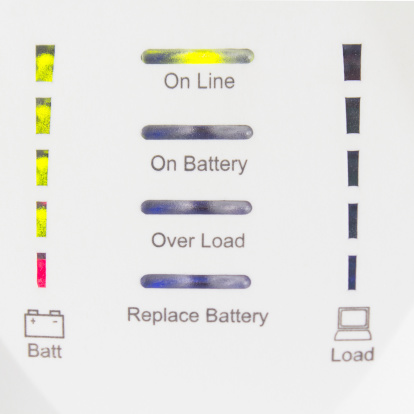
Power interruptions can be catastrophic. But the good news is that it doesn’t have to be. Something as simple as a UPS (Uninterruptable Power Supply) could save your business.
A UPS (Uninterruptable Power Supply) protects against certain power problems. Mainly it protects against blackouts, brownouts, noise, spikes, and power surges. Each of these provides a different challenge to your computer systems, and, if left unrestricted, they could have a devastating effect. So, how does a UPS protect your computers?
Blackouts are one of the more commonly known terms in relation to power problems. Blackouts occur when the system experiences a total crash of the power grid due to an imbalance between a generation and its consumption. Sometimes this could be a total blackout, while other times a controlled shutdown is applied to a specific area to avoid a complete blackout.
Brownouts aren’t as well-known but are just as destructive. While a blackout is a total loss of voltage, a brownout is a drop in voltage. This means that you will still have power just less of it. This can last anywhere from a few minutes to a few hours. While this sounds innocent enough, a brownout is capable of ruining your electronic devices within a few minutes.
Noise is caused by interference between lightning and generators. While this sounds minor, it can cause malfunctions throughout your computer operating systems. This lesser-known power problem has also been known to corrupt files.
Spikes are sudden increases in voltage. Usually, these are short-lived flare-ups in electric current caused by lightning. Another cause for spikes is when power is restored after a blackout. When power is restored it takes some time for the current to normalize. If electronics are plugged in when a spike occurs, they could suffer negative effects.
A Power Surge is the equal and opposite of brownouts. While brownouts are a decrease in power, power surges are an increase in power. Like brownouts, these are short-lived, however, they still cause significant damage, especially to large appliances like refrigerators or air conditioners.
How often do power problems like these occur?
The Department of Energy compiled a report showing the cost of power outages in the past 15 years. It also includes the number of customers affected. For example, in 2014 severe thunderstorms in Illinois caused a power outage for two days. Within these two days, over 420,000 customers were affected. And, in less than a day, severe weather (snow and ice) in Pennsylvania caused power problems that affected 715,000 customers. Anyone of these affected customers could be your business. If so, would you have the tools to protect your computers and data?
So, how does a UPS (Uninterruptable Power Supply) protect your computer and data? It detects changes in the electrical current and stabilizes it, so your computers aren’t harmed. When shopping for a UPS for your business, you should first do some research to determine what best fits your company’s needs.
There are two main types of Uninterruptable Power Supply solutions: Standby UPS and Line Interactive UPS.
A Standby UPS protects against outages and power surges. It constantly monitors the voltage-current to detect inconsistencies. If it recognizes a surge or outage, it immediately switches to battery power. This allows your systems to continue running without power interruption. A Standby UPS is best suited for a business with one computer hub because it can’t support numerous computer hubs at once. These typically cost between $200-$500.
A Line Interactive UPS works best to protect your computers and data against long-term issues. Line Interactive UPS works to constantly stabilize the voltage-current that supplies power to your business. It does this via a regulator that automatically boosts or reduces the incoming line voltage, and without switching to battery power, which can prolong the life of the battery in the long run. These typically cost between $500-$1,200.
The Take-Home Message
A UPS costs anywhere between $200-$1,200—This seems a fair price for the peace of mind that it can offer. It’s a simple yet effective tool to protect your IT investments. Not only would you risk losing your computer, but you could also lose the data it holds. The National Weather Service states that on average, each year 22 million cloud-to-ground lightning flashes hit the United States and surrounding coastal waters. Anyone of these 22 million could cause you to lose your computers and your data. Since you never know when lightning could strike, you should be prepared for it.

by Felicien | Feb 1, 2018 | Education
Do you want your Mac to work like a Windows machine? There are many reasons that small to mid-size businesses like yours want this kind of functionality, but the most common reasons are:
I don’t like Macs.
My employees don’t know how to use Mac OS.
I want to make use of what’s on a remote computer – at home or another office.
The applications I want to use aren’t available for or don’t work well on Macs.
If any of these reasons sound familiar to you, you’re in the right place! Let’s talk about VMware Fusion 10 and Parallels Desktop 13. To run a cloned or virtual Windows machine on your Mac, these are the two big players on the market.
What are the advantages of using Parallels Desktop 13 or VMWare Fusion 10?
You can:
Run Windows on a Mac.
Utilize a virtual Windows machine.
Save time.
Save money.
Save space.
If you want a seamless Windows experience on your Mac, either one of these software packages will do the job for you. They were each developed by leaders in the field, and their developers stand behind these products. Depending on the package you buy, you may have to spend more money if you want ongoing support.
So, with Parallels Desktop 13 and VMware Fusion 10 both on the market, how do you choose which is right for your internal workflow and broader network configuration?
It’s certainly possible to pick up one of these options, install it, and hope for the best. But that’s exactly what you would be doing–hoping for the best.
The truth is, this is a level of technology that isn’t as simple as plug-and-play. For Parallels Desktop 13 or VMware Fusion 10 to work as they should require an IT professional to set up and maintain it. Without the correct configuration and ongoing support, either of these applications could be a drain on your time rather than a boost to your business.
What’s the difference between VMware Fusion 10 and Parallels Desktop 13?
As we dive into the nuts and bolts of these two impressive software packages, we learn that despite their identical purpose, they are, in fact, very different. Yes, both will allow you to use a cloned or virtual Windows machine on your Mac computer, but that’s pretty much where the similarities end. It seems that each developer decided to emphasize different features within the user experience. This makes for two unique offerings that essentially accomplish the same purpose.
Because these two products are so similar, deciding which to use for your small to mid-size business may come down to the finer features included in the recent–almost simultaneous–releases of VMware Fusion 10 and Parallels Desktop 13.
While the developers would point out dozens, if not hundreds of tiny differences between the two, here are the ones that most people are interested in.
Parallels Desktop 13
Cortana Integration
Folder Sharing – Between OSX and Windows
Maintenance Mode for the Virtual Machine
Virtual Machine Icon in Mac Dock
Compatible with macOS High Sierra
One Click Windows 10 Install
Supports Retina Display
Presentation Mode
Customize Touch Bar for Windows applications
Drag and Drop to Open a Document in Windows
Search Feature for Virtual Machine Configuration
Virtual Machine Starts Automatically – Windows Always in Background
Coherence Mode – Windows Apps Made to Act Like Mac Apps
Wizard to Free Up Disk Space in Virtual Machine
Safari Plugin for “Open in Explorer” Function
VMware Fusion 10
New, Easier, User Interface
Touch Bar Integration
Run Mac and Windows Applications Side-by-Side
Share Virtual Machines with other VMware Fusion users
Utilizes the Latest Releases of Windows 10 without trouble
18 Months of E-mail Support
Eligible for Upgrade Pricing – For Next Release
Unity View – Uses Windows Apps Like You Use Mac Apps
Supports Retina Display
Supports Mac Metal – for Better Graphics and Battery Life
Import Virtual Machines from Parallels Desktop
Migration Assistant
MacOS 10.13 Host and Guest Support
Virtualization-Based Security – for Compliance Standards.
Virtual Trusted Platform Module
SSD Based Storage
What hardware do you need to run VMware Fusion 10 or Parallels Desktop 13?
Here are the hardware and software requirement specs for each software package (taken directly from each developer’s page). It’s essential that you take the time to ensure your Mac fits within the given criteria.
Parallels Desktop 13
Hardware:
A Mac computer with an Intel Core 2 Duo, Core i3, Core i5, Core i7, Intel Core M or Xeon processor
4 GB of memory (8 GB recommended)
850 MB of disk space on the boot volume (Macintosh HD) for Parallels Desktop installation
Additional disk space for virtual machines (varies by operating system installed)
SSD drive is recommended for better performance
Internet connection for product activation and select features
Software:
macOS High Sierra 12.13 or later
macOS Sierra 10.12.5 or later
OS X El Capitan 10.11.6 or later
OS X Yosemite 10.10.5 or later
VMware Fusion 10
Apple Mac launched in 2011 or later*
Also supports the 2010 Mac Pro “Six Core,” “Eight Core” and “Twelve Core” models.*
Minimum 4GB of RAM
750MB free disk space for VMware Fusion and at least 5GB for each virtual machine
Mac OS X 10.11.0 or later
Operating system installation media (disk or disk image) for virtual machines.
Microsoft Windows is not included with VMware Fusion.
Recommended graphics hardware for Windows DirectX 10 or OpenGL 3.3 support:
NVIDIA 8600M or better
ATI 2600 or better
Minimum requirements for Metal support:
See Apple’s documentation regarding Metal supported Macs: https://support.apple.com/en-us/HT205073
*Support excludes the 2012 Mac Pro “Quad Core” using the Intel® Xeon® W3565 Processor due to CPU architecture incompatibility.
Need some help deciding between Parallels Desktop 13 and VMware Fusion 10? We can help! The team of friendly IT professionals at {company} are standing by to answer your Mac and Windows questions. We would be happy to advise you on the right product for your requirements plus implement and maintain it to give you the best user experience for your investment. {phone} or {email}
by Felicien | Feb 1, 2018 | Education
In the fight to avoid security breaches, one area has proven over and over to be the weakest link. It’s the human factor. A survey done by CompTIA shows that human errors are responsible for 52 percent of all security breaches. Each day employees open emails; it’s part of their job. Often there are links in these emails, and most of them are legitimate. But then there’s that one link that downloads a virus into the computer system, and suddenly thieves have access to all company files.
A growing number of cybersecurity breaches come as a result of malicious email links. Educating employees about the various types of viruses has become a full-time job for many companies. In spite of regular meetings, webinars, and conferences, careless employees still open suspicious emails and click on links that open the door for cyberthieves. A recent report from Experian says that most employee training seminars are insufficient to alter employee behavior.
One study from MeriTalk reports that employees sometimes bypass security measures on purpose, then download a malicious virus without realizing it. That same report reveals that many employees view security measures as restrictive. They say it takes longer to get their work done each day. Employees can sometimes view security measures as cumbersome and annoying.
In spite of continuing education about data breaches, employees simply forget. They get busy working on something, then absent-mindedly open an email and click on a link that downloads spyware, ransomware and other malicious programs. Employee training about security threats has ramped up considerably over the past decade. And yet one study shows that 57 percent of company employees aren’t even aware of the current security protocols where they work.
Lack of communication
Another issue that was recently exposed is the lack of communication between the IT department and CEO. Some CEOs simply don’t want to spend the money to update their cybersecurity. They fail to equate a cyber breach with a monetary loss. Human beings seem to function under the fallacy that bad things only happen to other people. Cross-departmental communication is critical for everyone to understand what’s at risk.
With so many companies now employing remote workers, this lack of communication can quickly escalate. Remote workers should not be given access to any areas of the company’s network that aren’t necessary. A remote worker could accidentally leave their laptop in a restaurant or hotel. The IT department must be more vigilant about these matters. With greater control over who has access to what data, a company can better manage their risks.
Lessons learned
In just the last few years, massive data breaches at well-known stores like Target have everyone rethinking their data security. The federal government isn’t immune either. In 2015, the Office of Personnel Management (OPM) publicly disclosed that a data breach had occurred exposing the personnel records of over four million federal employees. Before this investigation was completed, the public learned that there were two separate breaches and that over 21 million records had been stolen. Most of these records included names, dates, social security numbers and even fingerprints.
This breach should have been a wake-up call for everyone. If the government can’t protect its data, then what chance do small business owners have? As unsettling as these types of breaches are, they have not resulted in dramatic changes to data security. Though businesses are taking the threat more seriously, most are not willing to spend the time and money to protect their data from intrusion.
Malicious employees
Another factor that isn’t spoken of much is the growing number of angry employees who expose a company’s network on purpose. These may be people currently working for the company or those who have recently been fired. When an employee is about to be fired, the IT department should make sure all their credentials are canceled before the employee leaves the building. Management can step in and try to mitigate the situation if they feel an employee may try to retaliate against the company. For everyone’s sake, it’s best to try to mend fences before allowing an angry employee to leave for the last time.
The ongoing cost of data breaches
For those who have already experienced a data breach, the lessons learned came at a high cost. Many of them are still dealing with the repercussions. A certain number of shoppers may never visit a Target store again. It sometimes takes years before consumers forget. The average cost of a data breach in monetary terms is $154 per record. If a company loses six million records, this is a significant amount of money. The cost is rising rapidly.
Also, a company’s reputation can suffer serious damage. Retail stores may not see customers returning to shop with them for months or even years after a cyber intrusion. Data breaches cause embarrassment for the business as well. Customers may not feel like they can trust a business anymore with their personal information. Customer trust is difficult to rebuild.
Conclusion
It’s time for companies of every size to take data breaches more seriously. Every company’s sensitive data deserves the best protection available. Employees should participate in regular monthly security awareness training. The IT department must have a solid system of checks and balances. The CEO should make it a priority to regularly communicate with the IT department.
Every business should strive to install the very best security programs they can afford. They must examine their weaknesses at every level and ensure IT professionals conduct annual vulnerability assessments. System-wide encryption, password management, and multi-factor authentication are strong measures that can help. When each enterprise, corporation, and company does its best to stop data breaches, we may see a decline in security gaps. Until then, a greater degree of diligence on everyone’s part can stem the tide of the growing number of data security leaks.
