
by Felicien | Feb 28, 2018 | Education
Outsourcing your IT services can lower your expenses and give you access to today’s most advanced technology. These are common reasons why businesses large and small choose outsourced IT providers. However, there are pros and cons of outsourcing. For instance, while you can definitely lower your costs, you also lose control of one area of business that can significantly affect your daily operations.
A recent study conducted by the Everest Group revealed that 48 percent of all business owners are unhappy with their current IT service provider.
In spite of the drawbacks, many of today’s small business owners see the value in outsourcing their IT infrastructure. However, the most discriminating business owners do quite a bit of research before selecting an IT service provider. This practice is highly recommended. It helps you avoid companies that don’t provide value-added services and are only in it for the money. Business owners need to know some very important things about their IT provider before ever signing a contract.
In spite of extensive research, business owners and managers still find themselves in relationships with IT service providers who simply aren’t doing their jobs. This can be a troubling area that fuels a great deal of frustration among business members.
Why Stay in a Bad Relationship?
Given that choosing a new provider is such a big deal, small business owners have been known to drag their feet when it comes to searching for a better IT provider. We all do that. We tend to think that a business relationship will improve if we just give it time. But eventually, that gnawing feeling in your stomach gets the best of you and you begin to ask your colleagues how they like their IT service provider.
After they spend ten minutes raving about their optimized infrastructure, you have to finally admit that it may be time to break up with your current IT service provider and look for greener pastures. It happens to all business owners and often it results in your company getting much stronger managed IT services for about the same money. Instead of dreading the process, why not dive in? What have you got to lose? Just be sure it’s time to take that leap.
Below, we go over seven effective ways you can tell whether you need to hire a new IT service provider:
One: Are They Proactive?
If your service provider only comes out when there’s a problem, then you may need to find a new provider. An IT company that stays on the ball and ahead on any disruptions to service is crucial in today’s business climate. With all the new software, firmware, apps and programs, there’s a constant need to stay on top of things. As the business owner, you shouldn’t have to worry about these things. If you’re paying good money to outsource your IT services, it’s their job to keep the system purring like a kitten.
It’s also their job to make sure you have all the recent necessary patches. Your data should have the highest level of protection from cyber thieves. Your programs, IT tools and services should be top-notch. You shouldn’t have to ask about this or worry constantly that you’re not getting the most timely updates.
Two: Industry Certifications
With everyone trying to cut their expenses and raise their profits, an IT service provider might be tempted to hire poorly trained technicians. As everyone knows, employees who are well-trained and certified in the pertinent fields are going to expect larger salaries. However true that may be, no business owner wants to see a technician working on the computers that he saw working at a fast-food joint just last week. Don’t be bashful about asking questions.
You have a right to expect that those who come out to update or repair your computers are properly trained and certified in the latest programs. A few of the most common certifications are:
CompTIA Mobility+
CompTIA Network+ CE
CompTIA A+ CE
CompTIA Server+ CE
MCP Windows 7
MTA Networking & Operating Systems
MTA Mobility & Security
Three: Strategic Partnerships
Every vendor and third-party supplier you work with should be on board with the plan to help your company succeed. After all, your success is their success. This is something all IT service providers should understand. Do you honestly feel that your IT company is working hard to make sure you can compete well in today’s diverse business culture? This is an important issue that has become more and more essential.
Too often, business owners are unfamiliar with their IT service people. They don’t have a key contact person they can speak to about upgrades, problems or new services. It can almost feel like your IT services are outsourced to some guy somewhere, but you really don’t know much about whoever it is. If this describes your current relationship with an IT service agency, then it may be time to change the game plan. You need a go-to person that is familiar with your company and knows your equipment; someone who can speak intelligently about any concerns you may be having.
Four: Updating to the Best Technology
With the world of computers, networking and the Cloud moving so fast, innovative products and services are arriving at ever-increasing speeds. However, your main concern must be all about running your business. The whole reason you outsource your IT services is so that you don’t have to run out and take college courses in topics like the Internet of Things (loT), private cloud enablement, and SaaS implementation.
IT service providers can be found in every city, and they all claim that they will give your company the best products and services. However, computer technology is rapidly changing. New advancements come along each year. It’s critical to modernizing your legacy infrastructures in order to drive better digital services across your enterprise. However, you need to know that this is being done whether you keep close tabs on it or not. Your IT service provider should be talking to you regularly about ways to improve your services and cut your costs.
Five: Protection Against Cyber-Theft
2015 saw a huge increase in the number of cyber-thefts, and because of this, businesses, organizations and the government greatly increased their network protection. In spite of these efforts, 2016 was even worse. During that year, the U.S. Department of Justice lost the personal information of 20,000 FBI employees. This represents not only a monetary loss but a substantial security breach for the FBI. Even the IRS was hacked, losing all the personal information for 100,000 taxpayers. FACC, an Austrian aerospace manufacturer, was hacked as well. This time, the cyber thieves stole over $54 million in cash right out of their bank accounts.
These large companies should have the best protection against cyber-theft, so how were their databases penetrated? This is a troubling question with no clear answer. Many small business owners feel that their business will not become a target of thieves because there are so many other Big Fish to fry. This simply isn’t true. Small businesses are equally at risk from cyber-thieves. It’s your IT service provider’s job to ensure that you have the latest and best protection against intrusion. One cyber breach could cost you millions of dollars and ruin your business’s reputation.
Six: Written Documentation
It’s one thing to speak to your IT service provider, but written documentation is essential. It’s part of their job to provide you with the best equipment and services, but you should have this in writing. Each time the IT service professionals work on your equipment, you can expect a full written report of what was done to your equipment. Any new updates should be fully outlined and documented.
Don’t accept a hand-written note from your service guy as proof of recent equipment updates. A well-established, professional IT provider understands the importance of proper documentation. This will prove to be invaluable in case you ever suffer a cyber-breach. Though cyber breaches have become common, those impacted often file civil lawsuits against the company that lost their personal information. One of your best safeguards against being found guilty of not properly protecting customer data is a sound paper trail.
Seven: Fast Response Times
We’ve all sat at home all day and waited for the cable guy to show up, but this is simply unacceptable for a professional IT services provider. Look for companies that offer guaranteed response times. Make sure your service provider has a 24/7 hotline you can call when there’s trouble. When your computers or network is down, you lose money, so insist on quick service. Good service means that a repairman shows up on time and gets the problem fixed promptly. If the repairman takes three days to get to your service call, then sits around for hours trying to figure out what’s going on, you’re not getting the service you deserve.
As with everything in life, we can all get complacent. However, when complacency leaves your employees sitting around discussing their weekend plans, it’s time to find a new IT service provider. Get your money’s worth and don’t accept flimsy excuses. Your company needs the best IT service provider to compete in this fast-paced world.

by Felicien | Feb 28, 2018 | Education
The General Data Protection Regulation (GDPR) applies to organizations that conduct business in Europe to ensure the protection of confidential data for citizens in the European Union (EU). This is true for companies no matter where they operate. If you do business with EU citizens, you must comply with the GDPR, which means that almost every major corporation and media group in the world is affected.
The mission of the GDPR is to protect EU citizens from data breaches as a result of transactions that occur within EU member states. The enforcement date for the new GDPR is May 25, 2018, and non-compliance could have major repercussions for your business.
Organizations that don’t comply with the new GDPR can be fined up to 4% of their annual global turnover or €20 Million ($24,959,600.00), whichever is greater.
The 28 EU member countries include: Austria, Belgium, Bulgaria, Croatia, Cyprus, Czech Republic, Denmark, Estonia, Finland, France, Germany, Greece, Hungary, Ireland, Italy, Latvia, Lithuania, Luxembourg, Malta, Netherlands, Poland, Portugal, Romania, Slovakia, Slovenia, Spain, Sweden, and the United Kingdom.
Why You Should Be Concerned
Many business owners and managers in the U.S., Canada and elsewhere aren’t prepared for GDPR enforcement. They don’t realize that even though they aren’t located in the EU, they’re still liable. Any company that processes the personal data of EU citizens or residents must comply with the GDPR or face hefty fines.
Plus, many companies have concerns with the new GDPR because it mandates that consumers’ data must be “reasonably protected” – yet it doesn’t specify what this means.
Compliance is worrisome for many because:
The GDPR takes a wide view of what personal identification information is, and it’s not always clear what needs to be protected.
They must provide the same high-level protection for people’s IP addresses, and cookie data for names, addresses and government identification information like National Insurance Numbers. (Cookie data is a text file that a Web browser stores on a user’s computer.)
Regulations apply to the processing of personal data by controllers and processors, regardless of whether it takes place in the EU or not.
The GDPR also applies irrespective of whether payment is required or the monitoring of behavior that takes place within the EU.
Rules apply to both controllers and processors. This means that cloud solutions aren’t exempt from GDPR enforcement.
The conditions for consent are now more stringent. Companies can no longer use long terms and conditions in legalese. Consent must be provided in an easy-to-understand format, and in plain language.
Non-EU businesses processing the data of EU citizens must appoint a representative in the EU.
Businesses can only process personal data that’s absolutely necessary and must limit access to only those who require it for the completion of their duties.
If a breach does occur, breach notification must be completed within 72 hours of first having become aware of it. Businesses must notify their customers, controllers, and authorities without delay.
How to Prepare for the New GDPR.
Be sure that you fully understand how the requirements affect your business. Is your company a data controller or a data processor?
A data controller is a person or entity that determines how to use data and for what. As a controller, you are responsible for any problems that involve personal data.
A data processor is responsible for obtaining, recording, adapting, or holding people’s personal information. As a processor you work on behalf of the controller, so your liability isn’t as great as theirs. However, processors share controllers’ responsibility when it comes to how the data is processed.
If a person’s personal data is exposed, the data processor is liable if the manner the data was processed isn’t in compliance with the GDPR. Furthermore, the data controller is liable for the data leakage or fraud because they delegated the transfer of data to the processor who is non-compliant. In other words, both can be fined.
Implement GDPR Now Before the New Regulations Take Effect.
The size of your organization and the complexity of your IT systems and operations will influence the extent and cost of your GDPR implementation. If you use an IT Managed Services Provider who already has this expertise, you’re in luck. They can take care of the implementation for you. If you don’t, you may need to hire additional, qualified IT staff.
GDPR inspections are conducted by the European Commission. If you don’t implement GDPR processes, and you handle personal information for people in the EU that’s compromised, you can face penalties that not only result in fines but legal ramifications as well. Once the public finds about any infractions, the credibility of your business is at risk.
You must assign a DPO before May 28, 2018.
One thing you must do is designate a Data Protection Officer (DPO) for your business. Your DPO is responsible for overseeing your data protection strategy and implementation to ensure compliance. The problem is that the GDPR hasn’t provided a list of DPO credentials. They only state that the DPO must have “expert knowledge of data protection law and practices”.
Your Data Protection Officer must be able to:
Educate and advise your employees about their obligations to comply with data protection laws and the GDPR.
Monitor compliance with GDPR and data protection laws, manage data protection activities, provide advice on compliance assessments, and conduct internal audits.
Act as the point of contact for supervisory authorities and for anyone whose data is processed by your organization
Your DPO can be a staff member as long as they can manage data controlling and processing activities and be readily available for contact whenever required. However, you must ensure that the duties of your DPO don’t result in a conflict of interest. If so, this could result in fines of up to EUR 10 million ($12,437,357.29), or up to 2 percent of your global annual turnover (whichever is greater).
Most businesses prefer to hire an external Data Protection Officer to avoid any conflict of interest. Consult with your IT Managed Service Provider to see if one of their IT professionals can act as your DPO.
Take Action Now.
It seems that everything we do today involves using and processing data. The good news is that the GDPR will give EU citizens the peace of mind that their personal data will be processed, stored and transferred securely.
Don’t wait until May 25, 2018 – failing to meet the GDPR could have a disastrous effect on your business. Take the time to be informed, review the legislation and ensure that your business remains compliant.

by Felicien | Feb 27, 2018 | Education
Microsoft Office 365 users are constantly surprised at the many innovative tools included within this suite of programs. FindTime is its newest meeting scheduler. With its integration into Outlook, users can quickly schedule meetings.
The FindTime app solves a very real problem that frustrates workers everywhere. Its ease of use is the number one advantage that people love about it. Because it is integrated into Outlook, it can save time in more ways than one. What is really remarkable is that a colleague does not need to have the app installed in order to respond.
How It Works
To get started, simply download this free Outlook add-on. An icon is added at the end of the Outlook ribbon – just click on it to get started. FindTime utilizes Outlook’s free/busy availability information to make scheduling a meeting much easier so you’ll spend less time on this exasperating chore. First, you send out an email and propose a potential meeting time or times. Attendees can reply by accepting or declining the suggested meeting time.
They can also suggest alternative meeting times and everyone has an opportunity to vote on whether the proposed time works for them. When all recipients have responded, the most popular time and date are chosen. The online poll allows you see how everyone else voted. You can also view their favorite time.
Once everyone in the group has responded to the poll, the meeting is scheduled using the most popular date and time. Now that a consensus has been reached, invites are automatically sent out by the FindTime app using Outlook. Though the app exists within Outlook, anyone can use it. People using other email programs or even those working at different organizations can be included.
Perks of FindTime
One of the perks of this app is that it encrypts all your personal information. Even the subject and body of the email can be encrypted to protect everyone’s personal identity. This is really important for those working on secret projects that they do not want made public yet.
If it has a drawback, FindTime’s weakness is the fact that it is currently only available for Outlook 2013, Outlook 2016, and Outlook Web Access. Though the program works best for Office 365 users, Microsoft will no doubt continue to tweak the app so that it works with a broader range of programs in the future.
FindTime was developed in the Microsoft Garage. Though the Garage program only began 2014, it has become wildly popular because it allows almost anyone at Microsoft to form a team and work on a project of their choosing. This type of collaborative creation has worked well in the past. Open Source projects like Linus and Azure have been so successful that they’ve influenced business and industry across the globe.
Despite the numerous time scheduling applications on the market today — NeedToMeet, Timebridge, Doodle, etc. — FindTime is by and large the best app for those already using Outlook. So much of the app’s functionality connects perfectly with Outlook’s resources. For instance, using email templates in Outlook can streamline sending out a quick email concerning the meeting’s topic. A calendar event is automatically created as well. Microsoft developers went to great lengths to add additional functionalities that users really wanted.
FindTime Has Found Its Niche in the Marketplace
With millions of people already using Outlook, FindTime is the perfect meeting scheduler. It handles all aspects of setting up a meeting, including sending out invitations, emailing reminders, emailing general information about the meeting’s content, and many others. Some users have claimed that they’ve saved two hours a day by using FindTime over standard meeting scheduling software.
A wide number of users have suggested fun, unique and helpful additions to the program and some of these may be added in the future. For instance, a future version of FindTime may be able to set appointments for you and manage the online registration process for workshops and classes.
FindTime’s Features in a Nutshell:
Find employees you want to attend in the Outlook database
Send emails to selected employees
Propose your selected times to attendees and allow them to vote and come to a consensus
Easy for recipients to decline, accept or suggest new times
FindTime looks for the best times and days that work according to each individual’s Outlook Calendar
Recipients can see whether the suggested date and time is open on their Outlook Calendar
All attendees vote
FindTime sends out the meeting invites on your behalf
Recipients only need internet access and an email address in order to be included
Send out test invites by adding a second personal email address to the To: or Cc: line
Recipients don’t need to have FindTime installed in order to participate
Using Azure, FindTime encrypts personal information, email topic, email body, and attendee names
No more playing email tag for days to try and set up a meeting
How to Install FindTime
Begin by logging into Office 365. Once you’re logged in, navigate to the Store. The Store link should show up in the middle of your screen, but it can also be found by clicking on the app launcher in the upper left-hand corner. Once inside the Store, search for FindTime by typing that in the search box. Next, press install. The program will install rather quickly and you will get a confirmation that it has been installed. Click Okay and you’re all set.
If you’d like to check to make sure the program was installed, or you need to see whether you already have FindTime installed, it’s easy to do so. Go to Settings > Manage Add-Ons and you’ll get a list of all add-ons. Checkboxes beside each add-on indicate whether the add-on is turned off or on. It’s a good idea to check there first, as you may already have the add-on installed and it simply needs to be turned on. Simply check the box to start using FindTime.
by Felicien | Feb 27, 2018 | Education
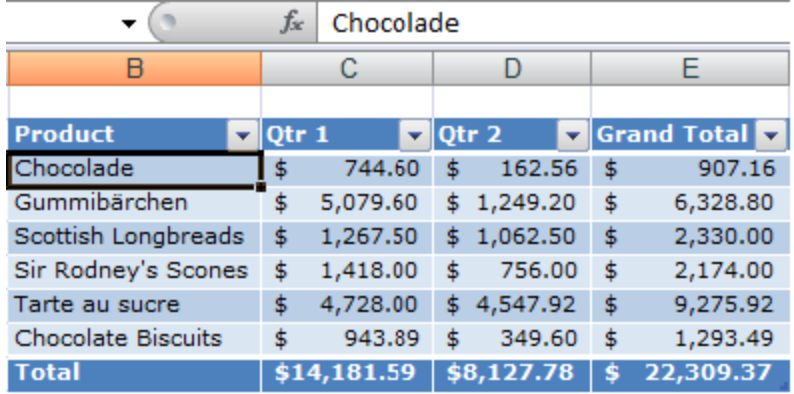
Excel is an invaluable tool in the world of modern business. Whether keeping track of data, budgeting or tracking trends, companies that use Excel Tables are at a considerable advantage over those that use knock-off alternatives.
The professional benefits of Excel Tables extend beyond the technical level. Businesses that frequently use Excel Tables are more likely to make decisions that are more advantageous to their enterprise as a whole. This is because information in a table format allows for more clarity and accurate evaluations. Numbers are laid out, patterns are easier to observe, and the people responsible for making important decisions will have a more informed perspective, one that they might lack without using Excel Tables.
Companies that frequently use Excel Tables can not only track day-to-day operations but also find areas in need of improvement. For instance, if employees clock in and clock out, management can easily track weekly hours and determine whether an increase, decrease, or continuation of employee numbers is required. Furthermore, if staffers fail to complete necessary tasks while working on company time, the problem is much easier to recognize and compare with similar statistics using data in a table.
You can create a Table in Excel by using a current range of data, or by creating a new Table and populating it with data later.
Use a current range of data.
Highlight the data you want to include in the Table and use the shortcut Ctrl + T. Excel will ask you to confirm the range of data for the Table (you can always change this later if you want). Note: If your data range includes headers, make sure you tick the checkbox that says “My table has headers.”.
Create a blank Excel Table.
Select the cells that you want in your Table, and press Ctrl + T. Then, check the respective box for whether your data has headers or not. If you don’t, an extra row will be automatically added to your Table. Hit OK. Excel will create column headings for your table. It will use ‘Column1’, ‘Column2’ etc., for any blank headings.
One of the best business features of Excel Tables comes in the form of waterfall charts.
Waterfall charts are commonly used to track finances, such as gross sales and net income. Although these charts were officially incorporated into the Excel program in 2016, many people still have trouble understanding how to use them.
Colors play an important role when using waterfall charts. While entering the correct data and numbers is imperative, the use of various colors makes it easy for you to track financial growth, loss, or stagnation. Furthermore, you can easily notice patterns and variables which may be impacting the state of your financial transactions.
Here’s how to create a Waterfall Chart (in Windows).
Select your data.
Click Insert > Insert Waterfall or Stock chart > Waterfall.
Another way to create a waterfall chart in Excel is to use the All Charts tab in Recommended Charts.
Excel Tables’ waterfall charts come with many advantages (and certain restrictions) of which you should be aware. For instance, while the charts above are easy to create, the global color scheme is the sole method of controlling the various types of data. Moreover, waterfall charts are only applicable to Excel 2016. Nevertheless, the use of waterfall charts has proven helpful to many businesses, both big and small.
Keyboard Shortcuts are also an incredibly helpful asset in Excel Tables.
(Note: If you want to work efficiently within Excel Tables, you should take the time to learn the keyboard shortcuts.)
These shortcuts not only save time and boost your productivity, but they also help you quickly observe patterns and learn how to enter information into the database. The essential Excel Table keyboard shortcuts to remember are “undo and redo”, “find and replace”, “cut, copy, paste”, and “select/select all”.
The “undo and redo” shortcut lets you backtrack if you make an error. This can easily happen when entering data into Excel.
“Find and replace” allows you to make certain connections, while “cut, copy, paste” is used to either remove, replicate, or post information into the spreadsheet.
“Select/select all” is a heightened version of “cut, copy, paste”. While “cut, copy, paste” may be used for a certain segment of data, “select/select all” highlights all of the information in the given spreadsheet. “Select/select all” is very helpful when you’re looking to share multiple tables of data with employees, colleagues, or clients.
Although the preceding shortcuts are the most commonly used, they aren’t the only ones that can save you time and increase productivity when using Excel Tables. Use Fill Color to add or change the background color or pattern in various cells. To use Fill Color, select Alt+H, H. You can access Data and View tabs by pressing Alt+A and Alt+W.
If you want to use a custom color, click More Colors. Then in the Colors dialog box, select the color you want.
Here are some other things you can do with Excel Tables:
Calculate table data totals. Create a “totals row” at the end of the table and select the functions that are provided in the drop-down lists for each of the totals row cells.
Insert and delete table rows and columns. Add a blank row at the end of the table or insert table rows and table columns anywhere that you want. You can also delete rows and columns if you wish.
Sort and filter data. You can find Filter drop-down lists in the header row of your table. Sort tables in ascending or descending order, by color, or create your own custom sort. You can also filter tables to show only the data that you need. Select the data, then click in the column header. Then click either Text Filters or Number Filters.
Format table data. You can apply a predefined or custom table style, or you can choose the Table Styles options. You can choose a table with or without a header or a totals row. Apply row or column bandings to make your table easier to read.
Export your table to SharePoint. Export your table to a SharePoint list so others you select can view, edit, and update the table data.
The benefits that you can obtain from Excel Tables are limitless. With Excel Tables, your data will be displayed in a unified, consistent format that you can easily interpret or update as needed. When you employ this tool, you’ll notice an overall improvement in multiple areas of your business. Waterfall charts, keyboard shortcuts, and other Excel Table options will enhance your decision-making capabilities which are critical for efficiency and productivity. The ability to track finances, create budgets, or monitor day-to-day operations are advantages that your business can benefit from that will help you gain an edge over your competition.

by Felicien | Feb 27, 2018 | Education
Instagram is taking on Pinterest, Snapchat, and Facebook to compete for a larger chunk of the social content sharing market with a new branding innovation.
Who is the current king of Social Media? That depends on who you ask. With the variety of social platforms — Facebook, Instagram, Twitter, Snapchat, the list goes on — the king of Social Media title might depend on the user count, the volume of activity, or advertising revenue. Facebook is the dominator in each category, with roughly 2 billion and rising, which is more than Instagram and Twitter combined. However, there’s competition, and the most surprising factor may be that Facebook is the biggest cheerleader and mentor!
Platforms carefully — and artfully — construct branding to stand out from their competition. As recently as 30 years ago, branding efforts were generally limited to a logo and a tagline. With the explosion of the Internet, having a company website meant a more complex brand identity.
For example, a “post” on social media platforms is the communication of content in the form of a thought or an image, but Twitter’s branding calls these posts “tweets”. The terminology of each platform is just as important to its brand identity as its logo. Can you keep up with social slang?
How is a social media king crowned? In this particular battle, user count is important, but the main competition comes down to the power of the brand’s marketing. Facebook offers a number of ways to expand the reach of your content and a coveted algorithm for reaching your target audience, but Instagram may have just unveiled a tool to crush at least some of the other players.
Instagram has released a new feature, the “regram”, which gives users the choice to share content — for the first time ever — by adding public content from other users to their own Instagram Stories. Yes, this is similar to what Twitter and Facebook users have been able to do for several years, but Instagram is the preferred platform for hundreds of millions of people, including an entire generation of Millennials – otherwise known as the most active group on social platforms.
The “regram” is likely copied directly from Facebook’s Share feature since Instagram was acquired by Facebook in 2012. Social users today aren’t as interested in reading lengthy content posts, and Instagram has captivated users with its visual storytelling concept. Instagram users can swiftly scroll and absorb content, experiencing a story and taking a quick journey while being exposed to subtle brand-discovery tactics.
Instagram was the perfect complement to the Facebook brand since it was a social platform but not a direct competitor due to the differing communication styles. Instagram is taking a direct swipe at Snapchat, though, and is eyeing Pinterest with keen regard. The design of social platforms is to share content, and this nature has attracted countless brands to vie for a position in the brand discovery war taking place in the social market. A “repin” on Pinterest has proven successful for brands, and it was only a matter of time before these ideas — sharing content (Facebook) and “repinned” Pinterest posts — made their way onto other platforms, especially if there are revenue opportunities!
Instagram eyes Pinterest and its unique position as a search engine for content in visual presentation, especially since brands can successfully optimize content to capture their audience through this platform. The inherent value in visual content is exponentially amplified with its embedded message, and the possibilities are endless. Was the inability to share content on Instagram hindering the platform before its acquisition? Not likely, being that it’s the fastest-growing social network, and this sustaining user base growth being the primary attraction that caused Facebook to bid for purchase.
The viral value of the “regram” no longer limits the shelf life of content and boosts the power of the brand and platform influencers. Similar to how YouTube launched the careers of Michelle Phan, whose company is today valued at over $80 million, and Sweden’s PewDiePie, a favorite in gamer fandom whose net worth now hovers near $10 million. Instagram is opening doors with the “regram”. When current and new influencers begin sharing content with their followers on Instagram and gain new revenue channels, and content partners gain new means of distribution through branded Instagram Stories, Instagram’s popularity is about to explode – yet again.
With the “regram”, Instagram is proving it’s prepared to take on the industry giants shortly. Tackling the fleeting lifespan of visual content, a “regram” is meant to function like a well-understood Facebook Share and be close enough to a Pinterest “repin” to convert users into quick-adopters and become an established daily practice, in hopes of extending content shelf life.
Social media is sticking around, and Instagram knows this. A few things to keep in mind when using Instagram to promote brand content:
Show authenticity and originality.
Originality gives a brand credibility and establishes a sense of trust and loyalty with your audience.
Use your bio to “wow” your audience.
Invoke a sense of individuality and creativity. This is your chance to shine and stand out from all other users and brands.
Hashtags are only effective when used intelligently.
Too many hashtags are annoying and alienate your audience. The most successful trending topical hashtags are simple, concise, but still fun.
It’s worth repeating: Engage. Engage. Engage.
Engaging with your audience instead of talking to them will always yield a more positive relationship.
Show some love: Featuring fans builds solid relationships – and loyalty.
When a brand features a customer’s name or words, it deepens the bond and strengthens the sense of loyalty to the brand.
Instagram has always held potential for brands, but its updated vision includes the use of the platform as a solid revenue channel. Now brands have the opportunity to gain more traction with content and expand their brand reach to the audiences of their followers – potential new customers.
Instagram should be part of a brand’s digital marketing mix, given the enormous potential this feature offers, and this is likely just a glimmer of the features Instagram has in store for users this year. The dissemination of content is the ultimate goal of a brand using a social platform, and an effective media strategy dances around the intricacies and algorithms involved.
Instagram is far more than the jester at the royal court, playing back-up to others’ rule over the social sharing world – Facebook is right there with it, helping every step of the way with the expertise to solidify their status.
